
自定义DialogAlert消息框
效果:
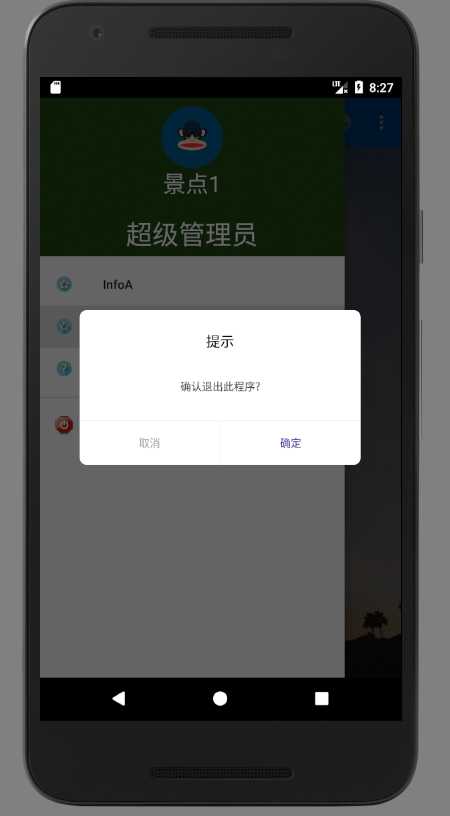
一、新建类CommomDialog 继承Dialog
public class CommomDialog extends Dialog implements View.OnClickListener{

    private TextView contentTxt;

    private TextView titleTxt;

    private TextView submitTxt;

    private TextView cancelTxt;

    private Context mContext;

    private String content;

    private OnCloseListener listener;

    private String positiveName;

    private String negativeName;

    private String title;

    public CommomDialog(Context context) {

        super(context);

        this.mContext = context;

    }

    public CommomDialog(Context context, String content) {

        super(context, R.style.dialog);

        this.mContext = context;

        this.content = content;

    }

    public CommomDialog(Context context, int themeResId, String content) {

        super(context, themeResId);

        this.mContext = context;

        this.content = content;

    }

    public CommomDialog(Context context, int themeResId, String content, OnCloseListener listener) {

        super(context, themeResId);

        this.mContext = context;

        this.content = content;

        this.listener = listener;

    }

    protected CommomDialog(Context context, boolean cancelable, OnCancelListener cancelListener) {

        super(context, cancelable, cancelListener);

        this.mContext = context;

    }

    public CommomDialog setTitle(String title){

        this.title = title;

        return this;

    }

    public CommomDialog setPositiveButton(String name){

        this.positiveName = name;

        return this;

    }

    public CommomDialog setNegativeButton(String name){

        this.negativeName = name;

        return this;

    }

    @Override

    protected void onCreate(Bundle savedInstanceState) {

        super.onCreate(savedInstanceState);

        setContentView(R.layout.dialog_commom);

        setCanceledOnTouchOutside(false);

        initView();

    }

    private void initView(){

        contentTxt = (TextView)findViewById(R.id.content);

        titleTxt = (TextView)findViewById(R.id.title);

        submitTxt = (TextView)findViewById(R.id.submit);

        submitTxt.setOnClickListener(this);

        cancelTxt = (TextView)findViewById(R.id.cancel);

        cancelTxt.setOnClickListener(this);

        contentTxt.setText(content);

        if(!TextUtils.isEmpty(positiveName)){

            submitTxt.setText(positiveName);

        }

        if(!TextUtils.isEmpty(negativeName)){

            cancelTxt.setText(negativeName);

        }

        if(!TextUtils.isEmpty(title)){

            titleTxt.setText(title);

        }

    }

    @Override

    public void onClick(View v) {

        switch (v.getId()){

            case R.id.cancel:

                if(listener != null){

                    listener.onClick(this, false);

                }

                this.dismiss();

                break;

            case R.id.submit:

                if(listener != null){

                    listener.onClick(this, true);

                }

                break;

        }

    }

    public interface OnCloseListener{

        void onClick(Dialog dialog, boolean confirm);

    }

}
二、新建dialog_commom.xml布局
<?xml version="1.0" encoding="utf-8"?>

<LinearLayout xmlns:android="http://schemas.android.com/apk/res/android"

    android:layout_width="match_parent"

    android:layout_height="match_parent"

    android:background="@drawable/bg_round_white"

    android:orientation="vertical" >

        <TextView

            android:id="@+id/title"

            android:layout_width="match_parent"

            android:layout_height="wrap_content"

            android:gravity="center_horizontal"

            android:padding="12dp"

            android:layout_marginTop="12dp"

            android:text="提示"

            android:textSize="16sp"

            android:textColor="@color/black"/>

    <TextView

        android:id="@+id/content"

        android:layout_width="match_parent"

        android:layout_height="wrap_content"

        android:gravity="center"

        android:layout_gravity="center_horizontal"

        android:lineSpacingExtra="3dp"

        android:layout_marginLeft="40dp"

        android:layout_marginTop="20dp"

        android:layout_marginRight="40dp"

        android:layout_marginBottom="30dp"

        android:text="签到成功,获得200积分"

        android:textSize="12sp"

        android:textColor="@color/font_common_1"/>

    <View

        android:layout_width="match_parent"

        android:layout_height="1dp"

        android:background="@color/commom_background"/>

    <LinearLayout

        android:layout_width="match_parent"

        android:layout_height="50dp"

        android:orientation="horizontal">

        <TextView

            android:id="@+id/cancel"

            android:layout_width="match_parent"

            android:layout_height="match_parent"

            android:background="@drawable/bg_dialog_left_white"

            android:layout_weight="1.0"

            android:gravity="center"

            android:text="取消"

            android:textSize="12sp"

            android:textColor="@color/font_common_2"/>

        <View

            android:layout_width="1dp"

            android:layout_height="match_parent"

            android:background="@color/commom_background"/>

        <TextView

            android:id="@+id/submit"

            android:layout_width="match_parent"

            android:layout_height="match_parent"

            android:background="@drawable/bg_dialog_right_white"

            android:gravity="center"

            android:layout_weight="1.0"

            android:text="确定"

            android:textSize="12sp"

            android:textColor="@color/font_blue"/>

    </LinearLayout>

</LinearLayout>
三、在drawable下新建三个xml
bg_dialog_left_white.xml
<?xml version="1.0" encoding="utf-8"?>

<shape xmlns:android="http://schemas.android.com/apk/res/android" android:shape="rectangle">

    <solid android:color="@color/white" />

    <corners android:bottomLeftRadius="8dp" />

</shape>
bg_dialog_right_white.xml
<?xml version="1.0" encoding="utf-8"?>

<shape xmlns:android="http://schemas.android.com/apk/res/android" android:shape="rectangle">

    <solid android:color="@color/white" />

    <corners android:bottomRightRadius="8dp" />

</shape>
bg_round_white.xml
<?xml version="1.0" encoding="utf-8"?>

<shape xmlns:android="http://schemas.android.com/apk/res/android" android:shape="rectangle">

    <solid android:color="@color/white" />

    <corners android:radius="8dp" />

</shape>
四、在styles.xml添加
<style name="dialog" parent="@android:style/Theme.Dialog">

        <item name="android:windowFrame">@null</item>

        <!--边框-->

        <item name="android:windowIsFloating">true</item>

        <!--是否浮现在activity之上-->

        <item name="android:windowIsTranslucent">false</item>

        <!--半透明-->

        <item name="android:windowNoTitle">true</item>

        <!--无标题-->

        <item name="android:windowBackground">@android:color/transparent</item>

        <!--背景透明-->

        <item name="android:backgroundDimEnabled">true</item>

        <!--模糊-->

    </style>
五、在colors.xml中添加
 <color name="mainColor">#573567</color>

    <color name="white">#FFFFFF</color>

    <color name="black">#000000</color>

    <color name="font_gray_b">#d4d4d3</color>

    <color name="font_tab_1">#42369a</color>

    <color name="font_tab_0">#b1b1b1</color>

    <color name="font_common_1">#424242</color>

    <color name="font_common_2">#a1a1a1</color>

    <color name="font_blue">#42369a</color>

    <color name="font_green">#00cccc</color>

    <color name="commom_background">#f3f3f3</color>
六、触发
new CommomDialog(Home.this, R.style.dialog, "确认退出此程序?", new CommomDialog.OnCloseListener() {

                            @Override

                            public void onClick(Dialog dialog, boolean confirm) {

                                if (confirm) {

                                    ActivityCollector.FinishAll();

                                    dialog.dismiss();

                                }

                            }

                        }).setTitle("提示").show();
作者发布的源码:https://github.com/xiaoxiaoqingyi/mine-android-repository
自定义DialogAlert消息框的更多相关文章
- Vue 自定义全局消息框组件
消息弹框组件,默认3秒后自动关闭,可设置info/success/warning/error类型 效果图: 文件目录: Message.vue <template> <transit ...
- WPF自定义控件与样式(13)-自定义窗体Window & 自适应内容大小消息框MessageBox
一.前言 申明:WPF自定义控件与样式是一个系列文章,前后是有些关联的,但大多是按照由简到繁的顺序逐步发布的等,若有不明白的地方可以参考本系列前面的文章,文末附有部分文章链接. 本文主要内容: 自定义 ...
- 【转】WPF自定义控件与样式(13)-自定义窗体Window & 自适应内容大小消息框MessageBox
一.前言 申明:WPF自定义控件与样式是一个系列文章,前后是有些关联的,但大多是按照由简到繁的顺序逐步发布的等. 本文主要内容: 自定义Window窗体样式: 基于自定义窗体实现自定义MessageB ...
- 【C#】分享一个可携带附加消息的增强消息框MessageBoxEx
--------------201507160917更新--------------- 无意中发现标准消息框在Windows7是有声音的,只是在Windows server 2008(R2)无声,而我 ...
- AloneJs.msgbox() —— 弹出消息框
一.引用 <link href="https://cdn.suziyun.com/alonejs.min.css" rel="stylesheet" /& ...
- C#Winform使用扩展方法自定义富文本框(RichTextBox)字体颜色
在利用C#开发Winform应用程序的时候,我们有可能使用RichTextBox来实现实时显示应用程序日志的功能,日志又分为:一般消息,警告提示 和错误等类别.为了更好地区分不同类型的日志,我们需要使 ...
- EasyUI Messager 消息框
通过 $.messager.defaults 重写默认的 defaults. 消息框(messager)提供不同样式的消息框,包括警示(alert).确认(confirm).提示(prompt).进展 ...
- Delphi 7中的四种消息框
Delphi中平常使用的消息框有四种形式,有ShowMessage.MessageDlg.Application.MessageBox.MessageBox.下面来深入了解下这四种形式的实现和使用.1 ...
- 【Web】一个非常简单的移动web消息框
适用:h5+jquery,移动网页最佳 最近在写个简单的公众号页面,前端验证时有些信息要提示,很简单的需求实在不想找啥现成的轮子,又不至于用alert这么粗暴,遂写了个非常简单的消息框,效果如图: 特 ...
随机推荐
- 钉钉企业应用C#开发笔记之一(免登)
关于钉钉 钉钉是阿里推出的企业移动OA平台,本身提供了丰富的通用应用,同时其强大的后台API接入能力让企业接入自主开发的应用成为可能,可以让开发者实现几乎任何需要的功能. 近期因为工作需要研究了一下钉 ...
- Opencv探索之路(十九):读写xml和yml文件
有时候我们处理完图像后需要保存一下数据到文件上,以供下一步的处理.一个比较广泛的需求场景就是:我们对一幅图像进行特征提取之后,需要把特征点信息保存到文件上,以供后面的机器学习分类操作.那么如果遇到这样 ...
- 企业QQ客服的添加
商城项目需要用腾讯的企业QQ客服,但默认提供的是一个链接,点击后弹出一个新页面, 请确认 确认打开QQ与营销QQ4009928310对话? 点确认才弹出聊天窗口,并不是需求想要的效果,经过一番折腾联系 ...
- 最小生成树之Prim算法和Kruskal算法
最小生成树算法 一个连通图可能有多棵生成树,而最小生成树是一副连通加权无向图中一颗权值最小的生成树,它可以根据Prim算法和Kruskal算法得出,这两个算法分别从点和边的角度来解决. Prim算法 ...
- AddDigitsTotal - 把数字中单个数相加
给定一个int数字,把数字中的单个数相加起来:得到的结果如果不是个位数,继续相加 如给定 19,执行1+9 = 10 --> 1 + 0 = 1 返回1 给定22,返回4 思路很简单,把各个位 ...
- salesforce零基础学习(七十五)浅谈SOSL(Salesforce Object Search Language)
在工作中,我们更多操作的是一个表的对象,所以我们对SOQL的使用很多.但是有时候,我们需要对几个表进行查询操作,类似salesforce的全局搜索功能,这时,使用SOQL没法满足功能了,我们就需要使用 ...
- Nginx文档-初学者指南
原文档: http://nginx.org/en/docs/beginners_guide.html 译者:Oopsguy 本指南旨在介绍nginx基本内容和一些在Nginx上可以完成的简单任务.这里 ...
- ES6对象扩展
前面的话 随着JS应用复杂度的不断增加,开发者在程序中使用对象的数量也在持续增长,因此对象使用效率的提升就变得至关重要.ES6通过多种方式来加强对象的使用,通过简单的语法扩展,提供更多操作对象及与对象 ...
- 【javascript】ajax的参数
1. 常用参数 url type: contentType: dataType: data: success: error 2. 特殊参数 context: 这个对象用于设置Ajax相关回调函数的上下 ...
- ArrayList——源码探究
摘要 ArrayList 是Java中常用的一个集合类,其继承自AbstractList并实现了List 构造器 ArrayList 提供了三个构造器,分别是 含参构造器-1 // 含参构造器-1 / ...