
基于Microsoft.Extensions.VectorData实现语义搜索
大家好,我是Edison。
上周水了一篇 Microsoft.Extensions.AI 的介绍文章,很多读者反馈想要了解更多。很多时候,除了集成LLM实现聊天对话,还会有很多语义搜索和RAG的使用场景,那么今天就给大家介绍一下如何完成语义搜索。
Microsoft.Extensions.VectorData介绍
语义搜索正在改变应用程序查找和解释数据的方式,它专注于语义关联,而不仅仅是关键字匹配。
Microsoft.Extensions.VectorData 是一组 .NET代码库,旨在管理 .NET 应用程序中基于向量的数据。这些库为与向量存储交互提供了一个统一的 C# 抽象层,使开发人员能够有效地处理嵌入并执行向量相似性查询。
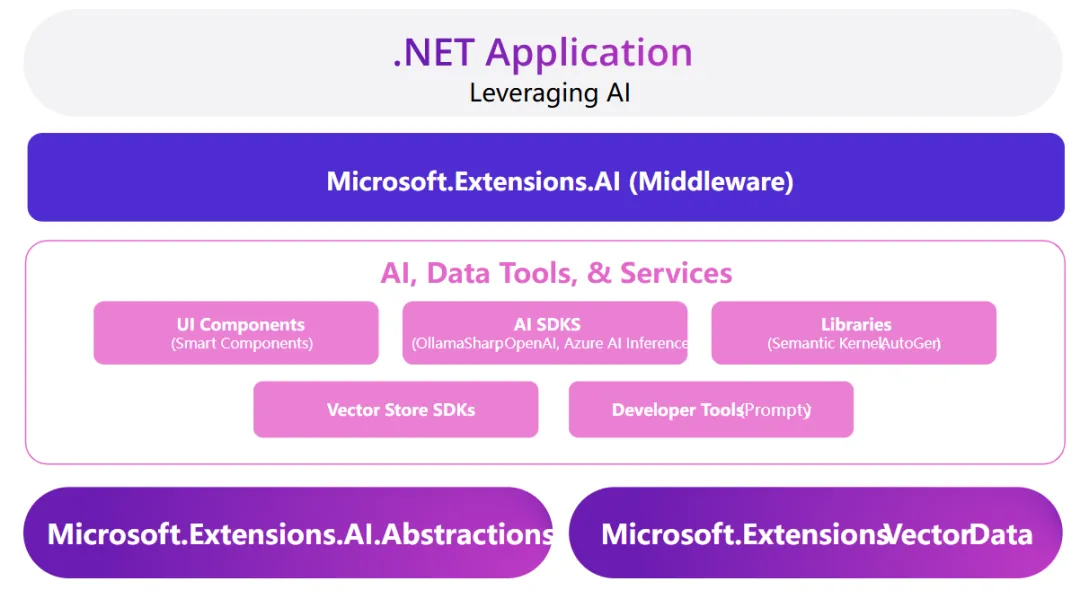
更多该代码库的内容请参考:Luis 《Introducting Microsoft.Extensions.VectorData》
在接下来的demo中,我们会使用以下工具:
(1) Qdrant 作为 VectorStore
(2) Ollama 运行 all-minilm 模型 作为 Emedding生成器
ollama pull all-minilm
Qdrant向量搜索引擎
Qdrant是一个向量相似性搜索引擎,它提供了一个生产就绪的服务,拥有便捷的 API来存储、搜索和管理带有额外负载的点(即向量)。它非常适合需要高效相似性搜索的应用程序。我们可以在 Docker 容器中运行 它,这也使它成为对开发人员友好的选择。
容器运行Qdrant:
docker run -p 6333:6333 -p 6334:6334 \

-v $(pwd)/qdrant_storage:/qdrant/storage \

qdrant/qdrant
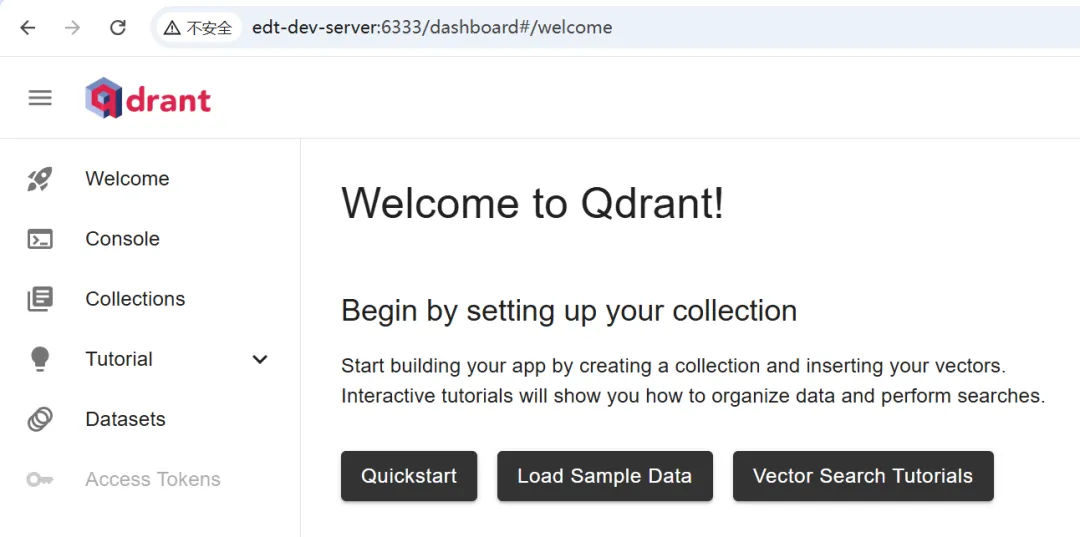
验证Qdrant运行:访问 server:6333/dashboard
开始DEMO案例
安装NuGet包:
Microsoft.Extensions.AI (preview)

Microsoft.Extensions.Ollama (preivew)

Microsoft.Extensions.AI.OpenAI (preivew)

Microsoft.Extensions.VectorData.Abstractions (preivew)

Microsoft.SemanticKernel.Connectors.Qdrant (preivew)
这里我们假设做一个CloudService的语义搜索,分下面一些步骤来实现它。
Step1. 配置文件appsettings.json:
{

  "Embedding": {

    "EndPoint": "http://localhost:11434",

    "Model": "all-minilm"

  },

  "Qdrant": {

    "Host": "edt-dev-server",

    "Port": 6334

  }

}
Step2. 加载配置:
var config = new ConfigurationBuilder()

    .AddJsonFile($"appsettings.json")

    .Build();
Step3. 初始化Embedding生成器:这里我们使用的是本地的Ollama运行all-minilm模型来做。
var generator =

    new OllamaEmbeddingGenerator(new Uri(config["Embedding:EndPoint"]), config["Embedding:Model"]);
此外,我们也可以使用OpenAI的Embedding服务:
var generator = new OpenAIClient(new ApiKeyCredential(config["OneAPI:ApiKey"]), new OpenAIClientOptions() { Endpoint = new Uri(config["OneAPI:EndPoint"]) })

    .AsEmbeddingGenerator(modelId: config["Embedding:ModelId"]);
Step4. 初始化Qdrant向量存储:
var vectorStore = new QdrantVectorStore(new QdrantClient(config["Qdrant:Host"], int.Parse(config["Qdrant:Port"])));

// Get the collection if it exist in qdrant

var cloudServicesStore = vectorStore.GetCollection<ulong, CloudService>("cloudServices");

// Create the collection if it doesn't exist yet.

await cloudServicesStore.CreateCollectionIfNotExistsAsync();
Step5. 插入测试数据:
// Define the test data

var cloudServices = new List<CloudService>()

{

    new CloudService

        {

            Key=1,

            Name="Azure App Service",

            Description="Host .NET, Java, Node.js, and Python web applications and APIs in a fully managed Azure service. You only need to deploy your code to Azure. Azure takes care of all the infrastructure management like high availability, load balancing, and autoscaling."

        },

    new CloudService

        {

            Key=2,

            Name="Azure Service Bus",

            Description="A fully managed enterprise message broker supporting both point to point and publish-subscribe integrations. It's ideal for building decoupled applications, queue-based load leveling, or facilitating communication between microservices."

        },

    new CloudService

        {

            Key=3,

            Name="Azure Blob Storage",

            Description="Azure Blob Storage allows your applications to store and retrieve files in the cloud. Azure Storage is highly scalable to store massive amounts of data and data is stored redundantly to ensure high availability."

        },

    new CloudService

        {

            Key=4,

            Name="Microsoft Entra ID",

            Description="Manage user identities and control access to your apps, data, and resources.."

        },

    new CloudService

        {

            Key=5,

            Name="Azure Key Vault",

            Description="Store and access application secrets like connection strings and API keys in an encrypted vault with restricted access to make sure your secrets and your application aren't compromised."

        },

    new CloudService

        {

            Key=6,

            Name="Azure AI Search",

            Description="Information retrieval at scale for traditional and conversational search applications, with security and options for AI enrichment and vectorization."

        }

};

// Insert test data into the collection in qdrant

foreach (var service in cloudServices)

{

    service.Vector = await generator.GenerateEmbeddingVectorAsync(service.Description);

    await cloudServicesStore.UpsertAsync(service);

}
其中,CloudService的定义如下:
public class CloudService

{

    [VectorStoreRecordKey]

    public ulong Key { get; set; }

    [VectorStoreRecordData]

    public string Name { get; set; }

    [VectorStoreRecordData]

    public string Description { get; set; }

    [VectorStoreRecordVector(384, DistanceFunction.CosineSimilarity)]

    public ReadOnlyMemory<float> Vector { get; set; }

}
Step6. 生成查询Emedding并从Qdrant中执行查询:
// Generate query embedding

var query = "Which Azure service should I use to store my Word documents?";

var queryEmbedding = await generator.GenerateEmbeddingVectorAsync(query);

// Query from vector data store

var searchOptions = new VectorSearchOptions()

{

    Top = 1, // Only return the Top 1 record from Qdrant

    VectorPropertyName = "Vector"

};

var results = await cloudServicesStore.VectorizedSearchAsync(queryEmbedding, searchOptions);

await foreach (var result in results.Results)

{

    Console.WriteLine($"Name: {result.Record.Name}");

    Console.WriteLine($"Description: {result.Record.Description}");

    Console.WriteLine($"Vector match score: {result.Score}");

    Console.WriteLine();

}
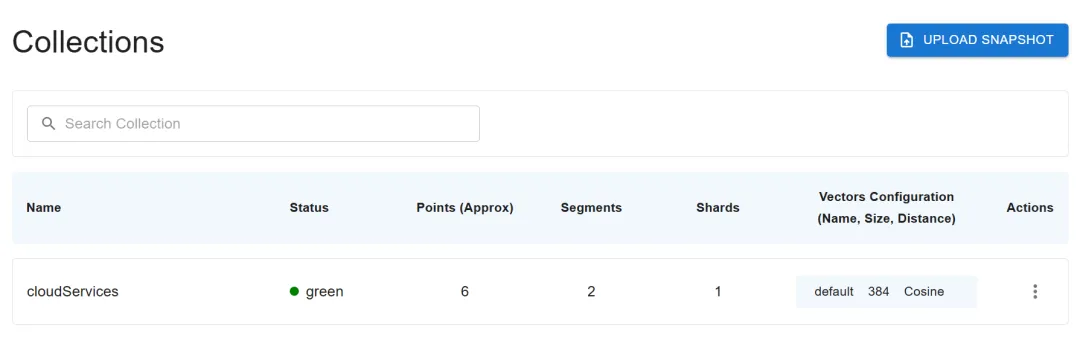
首先,验证下Qdrant中是否新增了数据:
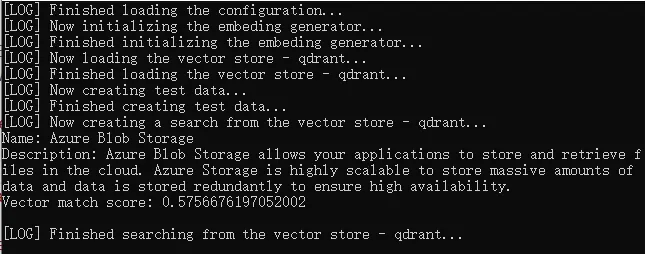
其次,查看运行结果显示:返回最匹配的一个数据返回,因为我们设置的Top1记录。
完整的代码示例请参考该示例代码的GitHub仓库。
小结
本文介绍了Microsoft.Extensions.Vector的基本概念 和 基本使用,结合Embedding Model(如all-minilm) 和 VectorStore(如Qdrant),我们可以快速实现语义搜索,而不仅仅是关键字匹配。
如果你也是.NET程序员希望参与AI应用的开发,那就快快了解和使用基于Microsoft.Extensioins.AI的生态组件库吧。
参考内容
Eddie Chen,《探索Microsoft.Extensions.VectorData与Qdrant和Azure AI搜索的使用》
Luis,《Introducting Microsoft.Extensions.VectorData》
路边石,《Microsoft.Extensions.AI.OpenAI官方代码示例》
推荐内容

基于Microsoft.Extensions.VectorData实现语义搜索的更多相关文章
- Asp.Net Core 2.0 项目实战(9) 日志记录,基于Nlog或Microsoft.Extensions.Logging的实现及调用实例
本文目录 1. Net下日志记录 2. NLog的使用 2.1 添加nuget引用NLog.Web.AspNetCore 2.2 配置文件设置 2.3 依赖配置及调用 ...
- Microsoft.Extensions.Options支持什么样的配置类?
在.Net core中,微软放弃了笨重基于XML的.Config配置文件(好吧,像我这种咸鱼早都忘了如何自己写一个Section了). 现在主推新的高度可扩展的配置文件(参见此处) 对于新的配置系统, ...
- 基于Microsoft Azure、ASP.NET Core和Docker的博客系统
欢迎阅读daxnet的新博客:一个基于Microsoft Azure.ASP.NET Core和Docker的博客系统 2008年11月,我在博客园开通了个人帐号,并在博客园发表了自己的第一篇博客 ...
- asp.net core 2.0 Microsoft.Extensions.Logging 文本文件日志扩展
asp.net core微软官方为日志提供了原生支持,有如下实现 Console Debug EventLog AzureAppServices TraceSource EventSource 并且在 ...
- DotNetCore跨平台~一起聊聊Microsoft.Extensions.DependencyInjection
写这篇文章的心情:激动 Microsoft.Extensions.DependencyInjection在github上同样是开源的,它在dotnetcore里被广泛的使用,比起之前的autofac, ...
- 将 WPF、UWP 以及其他各种类型的旧 csproj 迁移成基于 Microsoft.NET.Sdk 的新 csproj
原文 将 WPF.UWP 以及其他各种类型的旧 csproj 迁移成基于 Microsoft.NET.Sdk 的新 csproj 写过 .NET Standard 类库或者 .NET Core 程序的 ...
- Microsoft.Extensions.DependencyInjection 之三:展开测试
目录 前文回顾 IServiceCallSite CallSiteFactory ServiceProviderEngine CompiledServiceProviderEngine Dynamic ...
- Microsoft.Extensions.DependencyInjection 之三:反射可以一战(附源代码)
目录 前文回顾 IServiceCallSite CallSiteFactory ServiceProviderEngine CompiledServiceProviderEngine Dynamic ...
- 2018-12-6-Roslyn-如何基于-Microsoft.NET.Sdk-制作源代码包
title author date CreateTime categories Roslyn 如何基于 Microsoft.NET.Sdk 制作源代码包 lindexi 2018-12-06 16:2 ...
- paip.lucene 4.3 中文语义搜索最佳实践
paip.lucene 4.3 中文语义搜索最佳实践 首先一个问题是要不要使用lucene 自带的分词器...我觉得最好不使用哪自带的分词器.效果还凑火,就是不好控制... 先使用ik,ict,mms ...
随机推荐
- Member not found: ’packageRoot’ in Flutter
path/flutter/.pub-cache/hosted/pub.dartlang.org/platform-3.0.0/ lib/src/interface/local_platform.dar ...
- Http请求报文(请求行,请求头、请求体)
Http请求报文: http请求报文由3部分组成,请求行,请求头,请求体. 一.请求行: 请求方法.URL地址.协议版本 请求方法:POST.GET.DELETE.PUT.HEAD.OPTIONS.T ...
- 准备好"干翻世界"之前,不妨先听听我们的意见
期待大家的到来哦~
- baomidou的dynamic-datasource读写分离实现和加入AOP根据方法名选择库
文档 https://gitee.com/baomidou/dynamic-datasource-spring-boot-starter/wikis/pages maven <depende ...
- 网页转换成电脑exe软件简单办法
准备windows电脑,其他电脑步骤差不多 1.安装nodejs(nodejs自带npm),前往nodejs官网下载,选择Windows 安装包 (.msi) 64位,一直点击下一步安装即可 2.wi ...
- Qt编写RK3588视频播放器/支持RKMPP硬解/支持各种视音频文件和视频流/海康大华视频监控
一.前言 用ffmpeg做硬解码开发,参考自带的示例hw_decode.c即可,里面提供了通用的dxva2/d3d11va/vaapi这种系统层面封装的硬解码,也就是无需区分用的何种显卡,操作系统自动 ...
- Qt编写地图综合应用47-经纬度地址互相转换
一.前言 地址经纬度互换的功能只有在线地图有,因为需要去服务器查询对应的数据,拿到返回的数据,百度地图中需要用到BMap.Geocoder来实现这两个功能的互换,他内置了getPoint函数负责将地址 ...
- Transmission安装及更换官方UI
相关链接地址: Transmission镜像地址 Transmission 浏览器管理界面:Transmission Web Control UI. 创建容器 docker-compose.yaml ...
- IIS通过URL重写配置http跳转https,排除部分域名
<rewrite> <rules> <rule name="http to https" stopProcessing="true" ...
- C 简答题
1.从C语⾔执⾏效率⽅便,简述下C语⾔采取了哪些措施提⾼执⾏效率.(14分 or 20分)(年年考,⾮常重要) ①使⽤指针:有些程序⽤其他语⾔也可以实现,但C能够更有效地实现:有些程序⽆法⽤其它语⾔实 ...