
Android学习——LinearLayout布局实现居中、左对齐、右对齐
android:orientation="vertical"表示该布局下的元素垂直排列;
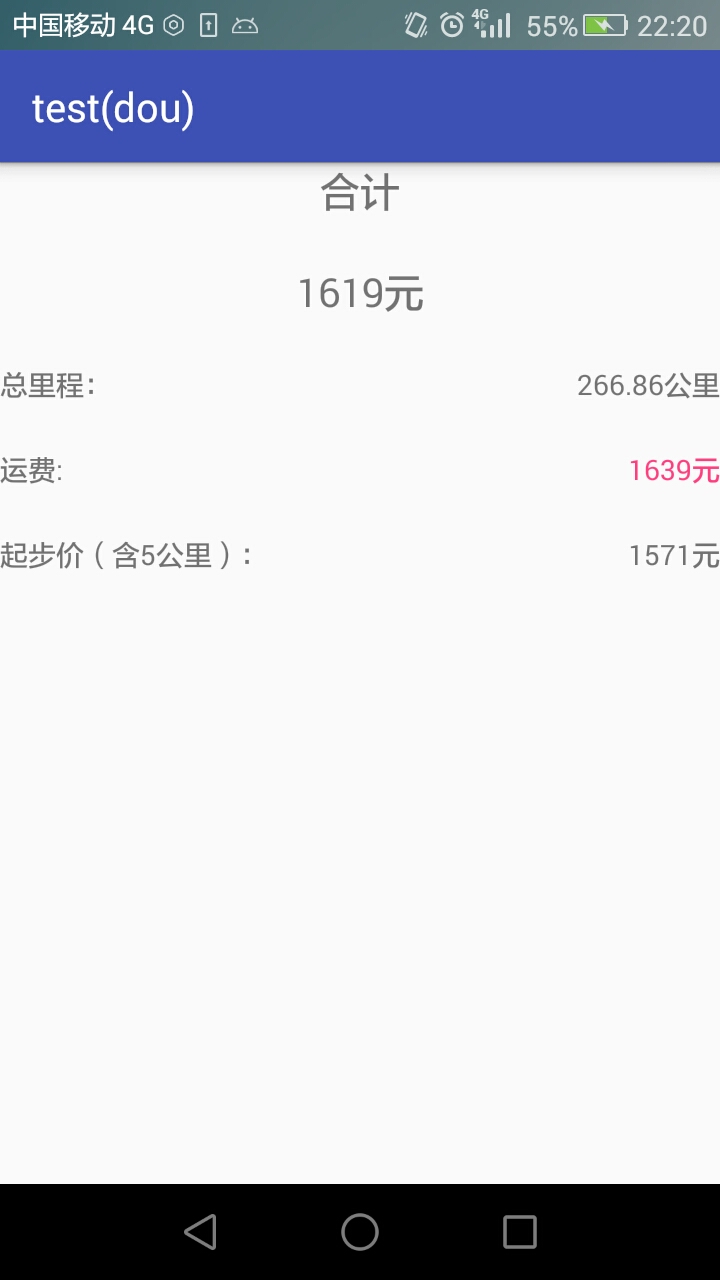
在整体垂直排列的基础上想要实现内部水平排列,则在整体LinearLayout布局下再创建一个LinearLayout布局。
 <?xml version="1.0" encoding="utf-8"?>

 <LinearLayout xmlns:android="http://schemas.android.com/apk/res/android"

     android:orientation="vertical"

     android:id="@+id/activity_main"

     android:layout_width="match_parent"

     android:layout_height="match_parent">

     <TextView

         android:id="@+id/textView"

         android:layout_width="match_parent"

         android:layout_height="wrap_content"

         android:text="合计"

         android:textSize="20sp"

         android:gravity="center"

         />

     <TextView

         android:id="@+id/textView2"

         android:layout_width="match_parent"

         android:layout_height="wrap_content"

         android:text="1619元"

         android:textSize="20sp"

         android:gravity="center"

         android:layout_marginTop="23dp"

         />

     <LinearLayout

         android:layout_width="fill_parent"        //在这个LinearLayout下,不指定orientation就默认horizontal

         android:layout_height="wrap_content"

         android:layout_marginTop="23dp"

         >

         <TextView

             android:layout_width="wrap_content"

             android:layout_height="wrap_content"

             android:text="总里程:"

             />

         <TextView

             android:layout_width="match_parent"

             android:layout_height="wrap_content"

             android:gravity="right"

             android:text="266.86公里"

             android:id="@+id/textView3"

             />

     </LinearLayout>

     <LinearLayout

         android:layout_width="fill_parent"

         android:layout_height="wrap_content"

         android:layout_marginTop="23dp">

         <TextView

             android:layout_width="wrap_content"

             android:layout_height="wrap_content"

             android:text="运费:"/>

         <TextView

             android:layout_width="match_parent"

             android:layout_height="wrap_content"

             android:gravity="right"

             android:textColor="@color/colorAccent"

             android:text="1639元"

             />

     </LinearLayout>

     <LinearLayout

         android:layout_width="fill_parent"

         android:layout_height="wrap_content"

         android:layout_marginTop="23dp">

         <TextView

             android:layout_width="wrap_content"

             android:layout_height="wrap_content"

             android:text="起步价(含5公里):"/>

         <TextView

             android:layout_width="match_parent"

             android:layout_height="wrap_content"

             android:gravity="right"

             android:text="1571元"

             />

     </LinearLayout>

 </LinearLayout>
实现效果如下:
Android学习——LinearLayout布局实现居中、左对齐、右对齐的更多相关文章
- Android学习----五大布局
1.LinearLayout 线性布局 android:orientation="horizontal" 制定线性布局的排列方式 水平 horizontal 垂直 vertical ...
- Python3基础 str ljust-rjust-center 左、右对齐 居中
Python : 3.7.3 OS : Ubuntu 18.04.2 LTS IDE : pycharm-community-2019.1.3 ...
- Android学习5—布局简介
Android界面的布局主要有四种,分别为RelativeLayout.LinearLayout.TableLayout.FrameLayout,接下来分别介绍这些布局如何使用(为了简单起见,接下来的 ...
- android 学习 之 布局(上)
学习安卓布局前,先了解三个属性值: 1.fill_parent: 设置一个构件的布局为fill_parent将强制性地使构件扩展,以填充布局单元内尽可能多的空间 2.match_parent: And ...
- Android:LinearLayout布局中Layout_weight的深刻理解
首先看一下LinearLayout布局中Layout_weight属性的作用:它是用来分配属于空间的一个属性,你可以设置他的权重.很多人不知道剩余空间是个什么概念,下面我先来说说剩余空间. 看下面代码 ...
- Word论文写作如何实现公式居中、编号右对齐
第一步:插入表格 在公式所在行居中插入一行三列的表格,具体操作为: a.设置行居中,快捷键Ctrl+E: b.插入->表格->3×1的表格: 2 第二步:修改表格属性 新插入的表格三列等宽 ...
- android 学习 之 布局(下)LinearLayout,RelativeLayout,TableLayout,FrameLayout
<LinearLayout xmlns:android="http://schemas.android.com/apk/res/android" xmlns:tools=&q ...
- 15.Android中LinearLayout布局一些小记录
在App中,我们经常看到布局中会有分割线,直接上代码: <?xml version="1.0" encoding="utf-8"?> <Lin ...
- android 学习Layout布局的使用
android 常用布局 LinearLayout(线性布局) 线性的 垂直的 水平的RelativeLaytout(相对布局) 最灵活的TableLayout(表格布局) 使用GridView代替A ...
随机推荐
- Git+VS2015修改提交代码以及解决冲突
第一步:前提我们已经讲代码从git上clone(可以看我的GIt篇)下来,创建自己的开发分支.我们在自己本地的分支上开发. 看到右下角有一个develop那是我自己建立的开发的分支,现在点击devel ...
- javascript中构造函数的说明
1.1 构造函数是一个模板 构造函数,是一种函数,主要用来在创建对象时对 对象 进行初始化(即为对象成员变量赋初始值),并且总是与new运算符一起使用. 1.2 new 运算符 new运算符创建一个新 ...
- 任何抛开业务谈大数据量的sql优化都是瞎扯
周三去某在线旅游公司面试.被问到了一个关于数据量大的优化问题.问题是:一个主外键关联表,主表有一百万数据,外键关联表有一千万的数据,要求做一个连接. 本人接触过单表数据量最大的就是将近两亿行历史数据( ...
- Android回炉系列之四大组件之首Activity
有段时间没有认认真真研习过android了,android毕竟是我进这个软件开发圈子接触的第一门技术,android已经成了口头禅之类的东西了.当初学习android的时候大都是草草了 ...
- Android 7.0 Gallery图库源码分析3 - 数据加载及显示流程
前面分析Gallery启动流程时,说了传给DataManager的data的key是AlbumSetPage.KEY_MEDIA_PATH,value值,是”/combo/{/local/all,/p ...
- 洛谷4623 [COCI2012-2013#6] BUREK
题目描述 给定N个三角形,和M条直线,直线要么平行于X轴,要么平行于Y轴,问这M条直线 分别经过多少个三角形内部 (注意是内部即分开的两个多边形的面积均大于零). 输入输出格式 输入格式: 第一行一个 ...
- HDU 2256 Problem of Precision( 矩阵快速幂 )
链接:传送门 题意:求式子的值,并向下取整 思路: 然后使用矩阵快速幂进行求解 balabala:这道题主要是怎么将目标公式进行化简,化简到一个可以使用现有知识进行解决的一个过程!菜的扣脚...... ...
- 使用xpath进行熟悉href属性
HTML文档 <html> <body> <a href="http://www.example.com">Example</a> ...
- Redis:基础知识及其常用数据类型和关键字
Redis: Redis是什么: REmote DIctionary Server(远程字典服务器) 是完全开源免费的,用C语言编写的,遵守BSD协议,是一个高性能的(Key-Value)分布式内存数 ...
- Vue轮播图插件---Vue-Awesome-Swiper
轮播图插件 Vue-Awesome-Swiper 地址:https://github.com/surmon-china/vue-awesome-swiper 安装:npm install vue-aw ...