
CentOS7 无法使用yum命令,无法更新解决方法
- 前言
- 设置网卡开机自动启动
- 设置国内dns服务器系统
- 修改CentOS-Base.repo中的地址
- 所参考的文章地址
前言
 One of the configured repositories failed (Unknown),

 and yum doesn't have enough cached data to continue. At this point the only

 safe thing yum can do is fail. There are a few ways to work "fix" this:

     1. Contact the upstream for the repository and get them to fix the problem.

     2. Reconfigure the baseurl/etc. for the repository, to point to a working

        upstream. This is most often useful if you are using a newer

        distribution release than is supported by the repository (and the

        packages for the previous distribution release still work).

     3. Disable the repository, so yum won't use it by default. Yum will then

        just ignore the repository until you permanently enable it again or use

        --enablerepo for temporary usage:

            yum-config-manager --disable <repoid>

     4. Configure the failing repository to be skipped, if it is unavailable.

        Note that yum will try to contact the repo. when it runs most commands,

        so will have to try and fail each time (and thus. yum will be be much

        slower). If it is a very temporary problem though, this is often a nice

        compromise:

yum-config-manager --save --setopt=<repoid>.skip_if_unavailable=trueOne of the configured repositories failed (Unknown),
and yum doesn't have enough cached data to continue. At this point the only
safe thing yum can do is fail. There are a few ways to work "fix" this:
1. Contact the upstream for the repository and get them to fix the problem.
2. Reconfigure the baseurl/etc. for the repository, to point to a working
upstream. This is most often useful if you are using a newer
distribution release than is supported by the repository (and the
packages for the previous distribution release still work).
3. Disable the repository, so yum won't use it by default. Yum will then
just ignore the repository until you permanently enable it again or use
--enablerepo for temporary usage:
yum-config-manager --disable <repoid>
4. Configure the failing repository to be skipped, if it is unavailable.
Note that yum will try to contact the repo. when it runs most commands,
so will have to try and fail each time (and thus. yum will be be much
slower). If it is a very temporary problem though, this is often a nice
compromise:
yum-config-manager --save --setopt=<repoid>.skip_if_unavailable=true
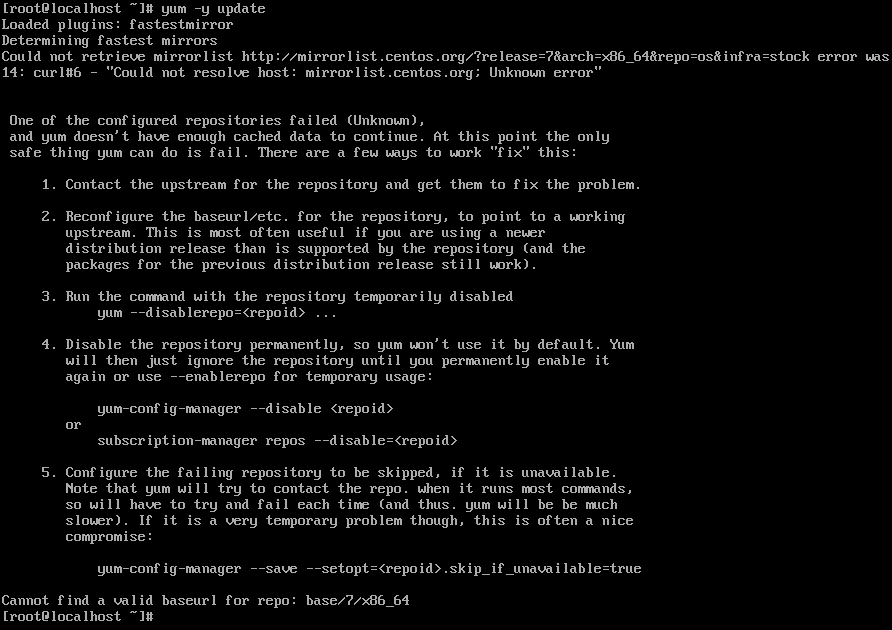
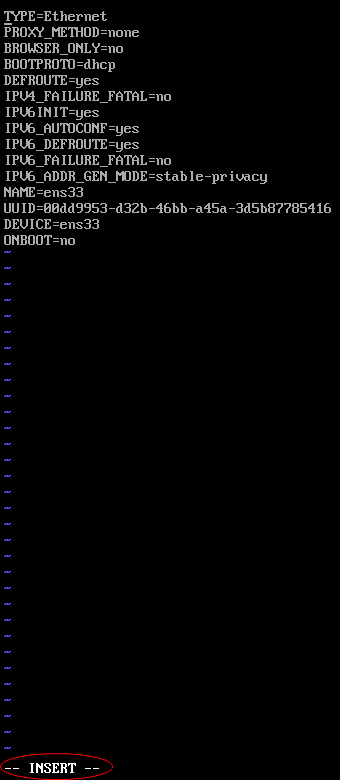
设置网卡开机自动启动

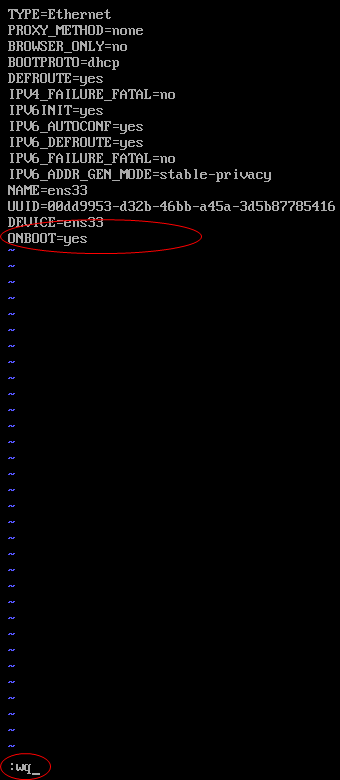
设置国内dns服务器
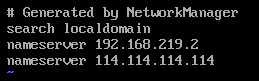
修改CentOS-Base.repo中的地址
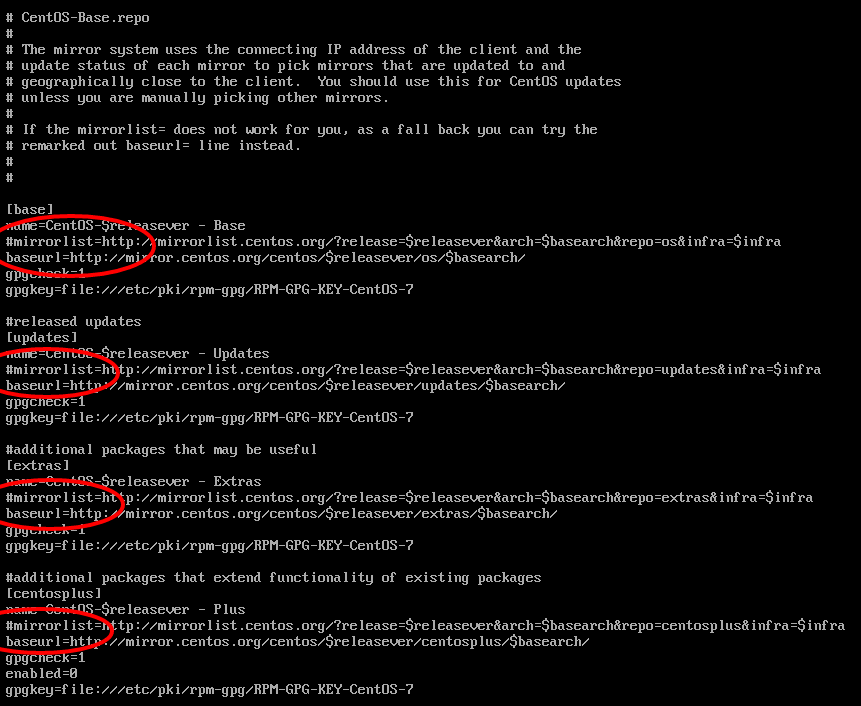
参考文章
CentOS7 无法使用yum命令,无法更新解决方法的更多相关文章
- Red Hat Linux 无法使用yum命令
一:首先提供部分Red Hat 镜像下载地址 1.rhel-server-6.8-i386-dvd.iso 链接: https://pan.baidu.com/s/18VqxRgBMuAJE7Ty0H ...
- CentOS忘记密码修改方案以及centos卡在开机登录界面,命令失效的解决方法
CentOS忘记密码修改方案 应用场景 linux管理员忘记root密码,需要进行找回操作. 注意事项:本文基于CentOS7.2环境进行操作的,由于CentOS的版本之间是有差异的,继续之前请先确定 ...
- CentOS7使用yum命令安装Java1.8
CentOS7使用yum命令安装Java1.8 首先更新已安装的包:#yum update查看系统当前的java版本:#java -version==================== CentOS ...
- Linux yum操作无效的解决方法
1.没网,试着:ping www.baidu.com 如果显示没有连接的话,就说明没网,也就无法使用yum 命令. 2.ping通了的话,还是是用不了yum命令,说明是yum镜像没有了,那么就得下载一 ...
- Oracle数据导入导出imp/exp sp2-0734:未知的命令开头'imp...解决方法
Oracle数据导入导出imp/exp sp2-0734:未知的命令开头'imp...解决方法 sp2-0734:未知的命令开头'imp 忽略了剩余行默认分类 www.2cto.com 应该 ...
- 02: 安装epel 解决centos7无法使用yum安装nginx
参考网址: http://www.mamicode.com/info-detail-1671603.html 1.yum命令安装 yum install epel-release -y 2.更新数据 ...
- 安装redis 执行make命令时报错解决方法
一.未安装GCC 解决方法:执行yum install gcc-c++命令安装GCC,完成后再次执行make命令 yum install gcc-c++ Linux无法连接网络 http://www. ...
- CentOS系统找不到setup命令工具的解决方法
如果你的CentOS系统中没有setup命令,很有可能是因为你安装CentOS系统时采用了最小化安装(minimal).这时,你执行setup命令时,就会报错: 错误信息: 1[root@localh ...
- NAT模式下VMware中CentOS7无法连接外网的解决方法
故障现象 ----------------------------------------------------------------------------------------------- ...
随机推荐
- C#连接Sqlserver代码
刚开始把数据库的密码搞错了,硬是连不上... //数据库连接类 SqlConnection conn = new SqlConnection("server=.;database=test; ...
- js声明json数据,打印json数据,遍历json数据,转换json数据为数组
1.js声明json数据: 2.打印json数据: 3.遍历json数据: 4.转换json数据为数组; //声明JSON var json = {}; json.a = 1; //第一种赋值方式(仿 ...
- A GUIDE TO UNDERSTANDINGDISCRETIONARY ACCESS CONTROL INTRUSTED SYSTEMS
1. INTRODUCTION The main goal of the National Computer Security Center is to encourage the widespr ...
- 一起学Python:列表介绍
列表介绍 想一想: 前面学习的字符串可以用来存储一串信息,那么想一想,怎样存储咱们班所有同学的名字呢? 定义100个变量,每个变量存放一个学生的姓名可行吗?有更好的办法吗? 答: 列表 <1&g ...
- 【22.73%】【codeforces 606D】Lazy Student
time limit per test2 seconds memory limit per test256 megabytes inputstandard input outputstandard o ...
- 商(quotient)—— 两数之比
1. IQ:Intelligence quotient IQ=MACA×100 MA:心智年龄(mental age) CA:实足年龄(chronological age)
- Asp.NetCore程序发布到CentOs(含安装部署netcore)--最佳实践
原文:Asp.NetCore程序发布到CentOs(含安装部署netcore)--最佳实践 环境 本地 win7 服务器:Virtual Box 上的Centos ssh工具: Xshell 文件传输 ...
- LaTeX —— 特殊符号与数学字体
1. 特殊符号 ℓ(\ell):用于和大小的 I 和 数字 1 相区分 R(\Re) ∇(\nabla):微分算子 2. 数学字体 mathbb:blackboard bold,黑板粗体 mathca ...
- 深入Qt 学习 -- 反射机制(比较简单清楚)
相对于Java天生的这一特性, C++并不具备;但进入到Qt领域,这一切都变得简单自如了. 从Qt的元对象系统可知,除了提供信号/槽机制的特性之外,它还提供了以下特性: ■ QObject::meta ...
- 机器学习:scikit-learn 做笑脸识别 (SVM, KNN, Logisitc regression)
scikit-learn 是 Python 非常强大的一个做机器学习的包,今天介绍scikit-learn 里几个常用的分类器 SVM, KNN 和 logistic regression,用来做笑脸 ...