
Python: scikit-image gamma and log 对比度调整
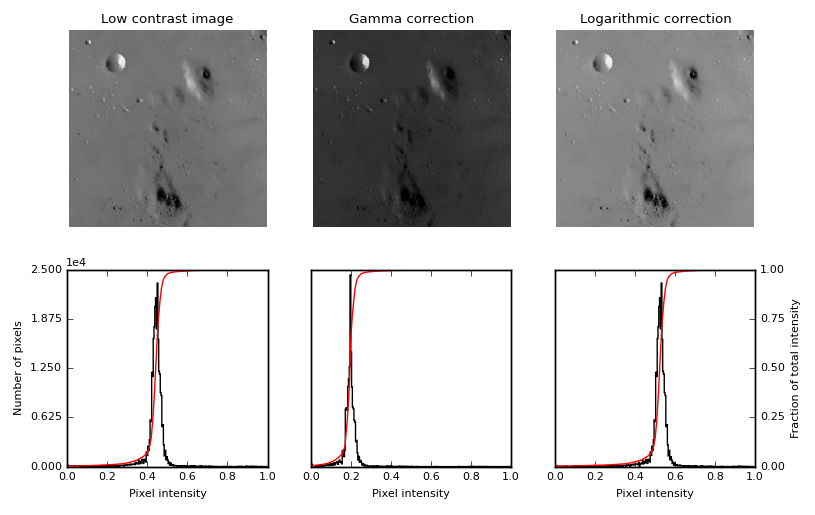
这个函数,主要用来做对比度调整,利用 gamma 曲线 或者 log 函数曲线,
gamma 函数的表达式:
y=xγ, 其中, x 是输入的像素值,取值范围为 [0−1], y 是输出的像素值,通过调整γ 值,改变图像的像素值的分布,进而改变图像的对比度。
log 函数的表达式:
y=alog(1+x), a 是一个放大系数,x 同样是输入的像素值,取值范围为 [0−1], y 是输出的像素值。
inverse log 的表达式:
y=a(2x−1), 这些变换都是从 [0−1] 变到 [0−1] 。
"""

=================================

Gamma and log contrast adjustment

=================================

This example adjusts image contrast by performing a Gamma and a Logarithmic

correction on the input image.

"""

import matplotlib

import matplotlib.pyplot as plt

import numpy as np

from skimage import data, img_as_float

from skimage import exposure

matplotlib.rcParams['font.size'] = 8

def plot_img_and_hist(img, axes, bins=256):

    """Plot an image along with its histogram and cumulative histogram.

    """

    img = img_as_float(img)

    ax_img, ax_hist = axes

    ax_cdf = ax_hist.twinx()

    # Display image

    ax_img.imshow(img, cmap=plt.cm.gray)

    ax_img.set_axis_off()

    # Display histogram

    ax_hist.hist(img.ravel(), bins=bins, histtype='step', color='black')

    ax_hist.ticklabel_format(axis='y', style='scientific', scilimits=(0, 0))

    ax_hist.set_xlabel('Pixel intensity')

    ax_hist.set_xlim(0, 1)

    ax_hist.set_yticks([])

    # Display cumulative distribution

    img_cdf, bins = exposure.cumulative_distribution(img, bins)

    ax_cdf.plot(bins, img_cdf, 'r')

    ax_cdf.set_yticks([])

    return ax_img, ax_hist, ax_cdf

# Load an example image

img = data.moon()

# Gamma

gamma_corrected = exposure.adjust_gamma(img, 2)

# Logarithmic

logarithmic_corrected = exposure.adjust_log(img, 1)

# Display results

fig = plt.figure(figsize=(8, 5))

axes = np.zeros((2, 3), dtype=np.object)

axes[0, 0] = plt.subplot(2, 3, 1, adjustable='box-forced')

axes[0, 1] = plt.subplot(2, 3, 2, sharex=axes[0, 0], sharey=axes[0, 0],

                         adjustable='box-forced')

axes[0, 2] = plt.subplot(2, 3, 3, sharex=axes[0, 0], sharey=axes[0, 0],

                         adjustable='box-forced')

axes[1, 0] = plt.subplot(2, 3, 4)

axes[1, 1] = plt.subplot(2, 3, 5)

axes[1, 2] = plt.subplot(2, 3, 6)

ax_img, ax_hist, ax_cdf = plot_img_and_hist(img, axes[:, 0])

ax_img.set_title('Low contrast image')

y_min, y_max = ax_hist.get_ylim()

ax_hist.set_ylabel('Number of pixels')

ax_hist.set_yticks(np.linspace(0, y_max, 5))

ax_img, ax_hist, ax_cdf = plot_img_and_hist(gamma_corrected, axes[:, 1])

ax_img.set_title('Gamma correction')

ax_img, ax_hist, ax_cdf = plot_img_and_hist(logarithmic_corrected, axes[:, 2])

ax_img.set_title('Logarithmic correction')

ax_cdf.set_ylabel('Fraction of total intensity')

ax_cdf.set_yticks(np.linspace(0, 1, 5))

# prevent overlap of y-axis labels

fig.tight_layout()

plt.show()
Python: scikit-image gamma and log 对比度调整的更多相关文章
- Python: PS 图像调整--对比度调整
本文用 Python 实现 PS 里的图像调整–对比度调整.具体的算法原理如下: (1).nRGB = RGB + (RGB - Threshold) * Contrast / 255 公式中,nRG ...
- GPUImage中对比度调整的实现——GPUImageContrastFilter
对比度指的是一幅图像中明暗区域最亮的白和最暗的黑之间不同亮度层级的测量,差异范围越大代表对比越大,图像越鲜亮,差异范围越小代表对比越小,图像越灰. GPUImage中实现了对比度调整的Filter,其 ...
- 图像对比度调整的simulink仿真总结
图像对比度调整可以由一个模块contrast adjustment 完成,参数有输入范围和输出范围,计算过程由以下公式决定 解释一下,当input<=low_in的时候输出的值是low_out+ ...
- 【opencv学习笔记七】访问图像中的像素与图像亮度对比度调整
今天我们来看一下如何访问图像的像素,以及如何改变图像的亮度与对比度. 在之前我们先来看一下图像矩阵数据的排列方式.我们以一个简单的矩阵来说明: 对单通道图像排列如下: 对于双通道图像排列如下: 那么对 ...
- Win8Metro(C#)数字图像处理--2.6图像对比度调整
原文:Win8Metro(C#)数字图像处理--2.6图像对比度调整 2.6图像对比度调整函数 [函数名称] 图像对比度调整函数ContrastAdjustProcess(WriteableBi ...
- C# vb .net实现对比度调整特效滤镜效果
在.net中,如何简单快捷地实现Photoshop滤镜组中的对比度效果呢?答案是调用SharpImage!专业图像特效滤镜和合成类库.下面开始演示关键代码,您也可以在文末下载全部源码: 设置授权 第一 ...
- [OpenCV] 图像亮度和对比度调整
对比度调整的原理参考这篇博客 以下是代码实现: #include <iostream> #include "opencv2/core.hpp" #include &qu ...
- 会务准备期间材料准备工作具体实施总结 ----(vim技巧应用, python信息提取与整合, microsoft word格式调整批量化)
会务准备期间材料准备工作具体实施总结(vim, python, microsoft word) span.kw { color: #007020; font-weight: bold; } code ...
- Python的logging,记录log的包
最近在做自动化测试时,想给他加上日志,所以用到logging的模块,以下是python增加log的几种方式 一.python代码配置方式(当然还有一种是可以多模块通用的一个python代码设置,这个网 ...
随机推荐
- 题解 P2504 【[HAOI2006]聪明的猴子】
这道题要坑死人啊... 第一次做40分,其他RE,改了一次之后就变成20分了... 究其原因,是有一个数组(dis)开的太小了,于是最后本蒟蒻就随手开了个五百万,然后,就AC了. 看到有一篇题解说求距 ...
- 137 - ZOJ Monthly, November 2014 - J Poker Face
Poker Face Time Limit: 2 Seconds Memory Limit: 65536 KB As is known to all, coders are lack of ...
- android音乐播放器开发 SweetMusicPlayer 载入歌曲列表
上一篇写了播放器的总体实现思路,http://blog.csdn.net/huweigoodboy/article/details/39855653,如今来总结下载入歌曲列表. 代码地址:https: ...
- 3.React Native在Android中自己定义Component和Module
React Native终于展示的UI全是Native的UI.将Native的信息封装成React方便的调用. 那么Native是怎样封装成React调用的?Native和React是怎样交互的? V ...
- 6个技巧加速你的gradle编译
近期我们都在讨论build系统,我们看了一些技巧能够让你的Maven build更快. 结论和反映都势不可挡.由于我们提供的技巧,很多其它的人都非常高兴能加快他们完毕自己的项目.如今,让我们看一下怎么 ...
- Pocket英语语法---一、形容词性物主代词和名词性物主代词
Pocket英语语法---一.形容词性物主代词和名词性物主代词 一.总结 一句话总结:名词性物主代词=形容词性物主代词+名词 Is that your umbrella? This is your c ...
- legend---四、菜鸟教程css3里面有教你炫酷的按钮怎么做
legend---四.菜鸟教程css3里面有教你炫酷的按钮怎么做 一.总结 一句话总结:想学,总是有很多资料的 1. 自动居中是 margin:100px 0px;么? 自动居中是margin:100 ...
- 概率编程语言(Probabilistic Programming Languages)库 —— edward
注意:tensorflow api 在 1.1.0 以后迎来重大变化,edward 的稳定版依赖于 tensorflow 1.1.0. edward是一个支持概率建模.推断的 Python 第三方库, ...
- Android手机使用WIFI及USB建立FTP服务器总结
想必大家经常在PC和Android之间传输文件,并不是每次都会插USB接口进行文件传输,就算是插上USB接口,还是有个问题,那就是Android打开大容量存储模式之后,经常很多软件就会被强制停止使用, ...
- Mysql学习总结(7)——MySql索引原理与使用大全
一.索引介绍 索引是对数据库表中一列或多列的值进行排序的一种结构.在关系数据库中,索引是一种与表有关的数据库结构,它可以使对应于表的SQL语句执行得更快.索引的作用相当于图书的目录,可以根据目录中的页 ...