
Python: scikit-image gamma and log 对比度调整
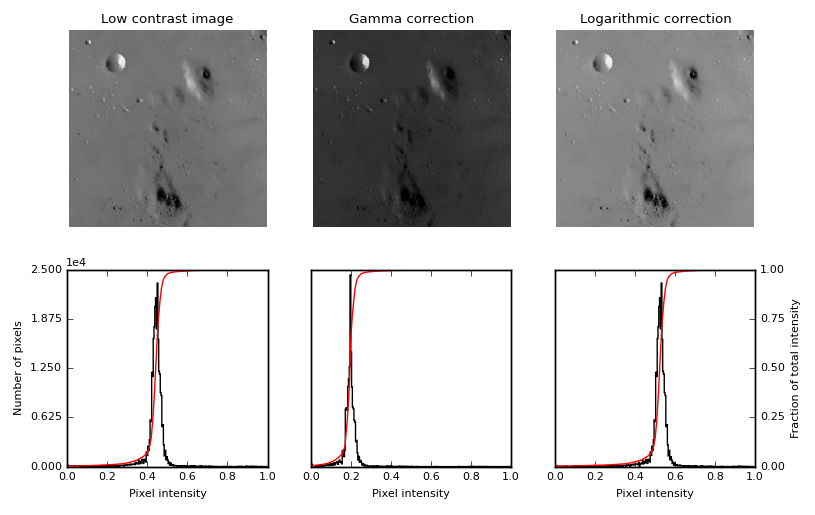
这个函数,主要用来做对比度调整,利用 gamma 曲线 或者 log 函数曲线,
gamma 函数的表达式:
y=xγ, 其中, x 是输入的像素值,取值范围为 [0−1], y 是输出的像素值,通过调整γ 值,改变图像的像素值的分布,进而改变图像的对比度。
log 函数的表达式:
y=alog(1+x), a 是一个放大系数,x 同样是输入的像素值,取值范围为 [0−1], y 是输出的像素值。
inverse log 的表达式:
y=a(2x−1), 这些变换都是从 [0−1] 变到 [0−1] 。
"""

=================================

Gamma and log contrast adjustment

=================================

This example adjusts image contrast by performing a Gamma and a Logarithmic

correction on the input image.

"""

import matplotlib

import matplotlib.pyplot as plt

import numpy as np

from skimage import data, img_as_float

from skimage import exposure

matplotlib.rcParams['font.size'] = 8

def plot_img_and_hist(img, axes, bins=256):

    """Plot an image along with its histogram and cumulative histogram.

    """

    img = img_as_float(img)

    ax_img, ax_hist = axes

    ax_cdf = ax_hist.twinx()

    # Display image

    ax_img.imshow(img, cmap=plt.cm.gray)

    ax_img.set_axis_off()

    # Display histogram

    ax_hist.hist(img.ravel(), bins=bins, histtype='step', color='black')

    ax_hist.ticklabel_format(axis='y', style='scientific', scilimits=(0, 0))

    ax_hist.set_xlabel('Pixel intensity')

    ax_hist.set_xlim(0, 1)

    ax_hist.set_yticks([])

    # Display cumulative distribution

    img_cdf, bins = exposure.cumulative_distribution(img, bins)

    ax_cdf.plot(bins, img_cdf, 'r')

    ax_cdf.set_yticks([])

    return ax_img, ax_hist, ax_cdf

# Load an example image

img = data.moon()

# Gamma

gamma_corrected = exposure.adjust_gamma(img, 2)

# Logarithmic

logarithmic_corrected = exposure.adjust_log(img, 1)

# Display results

fig = plt.figure(figsize=(8, 5))

axes = np.zeros((2, 3), dtype=np.object)

axes[0, 0] = plt.subplot(2, 3, 1, adjustable='box-forced')

axes[0, 1] = plt.subplot(2, 3, 2, sharex=axes[0, 0], sharey=axes[0, 0],

                         adjustable='box-forced')

axes[0, 2] = plt.subplot(2, 3, 3, sharex=axes[0, 0], sharey=axes[0, 0],

                         adjustable='box-forced')

axes[1, 0] = plt.subplot(2, 3, 4)

axes[1, 1] = plt.subplot(2, 3, 5)

axes[1, 2] = plt.subplot(2, 3, 6)

ax_img, ax_hist, ax_cdf = plot_img_and_hist(img, axes[:, 0])

ax_img.set_title('Low contrast image')

y_min, y_max = ax_hist.get_ylim()

ax_hist.set_ylabel('Number of pixels')

ax_hist.set_yticks(np.linspace(0, y_max, 5))

ax_img, ax_hist, ax_cdf = plot_img_and_hist(gamma_corrected, axes[:, 1])

ax_img.set_title('Gamma correction')

ax_img, ax_hist, ax_cdf = plot_img_and_hist(logarithmic_corrected, axes[:, 2])

ax_img.set_title('Logarithmic correction')

ax_cdf.set_ylabel('Fraction of total intensity')

ax_cdf.set_yticks(np.linspace(0, 1, 5))

# prevent overlap of y-axis labels

fig.tight_layout()

plt.show()
Python: scikit-image gamma and log 对比度调整的更多相关文章
- Python: PS 图像调整--对比度调整
本文用 Python 实现 PS 里的图像调整–对比度调整.具体的算法原理如下: (1).nRGB = RGB + (RGB - Threshold) * Contrast / 255 公式中,nRG ...
- GPUImage中对比度调整的实现——GPUImageContrastFilter
对比度指的是一幅图像中明暗区域最亮的白和最暗的黑之间不同亮度层级的测量,差异范围越大代表对比越大,图像越鲜亮,差异范围越小代表对比越小,图像越灰. GPUImage中实现了对比度调整的Filter,其 ...
- 图像对比度调整的simulink仿真总结
图像对比度调整可以由一个模块contrast adjustment 完成,参数有输入范围和输出范围,计算过程由以下公式决定 解释一下,当input<=low_in的时候输出的值是low_out+ ...
- 【opencv学习笔记七】访问图像中的像素与图像亮度对比度调整
今天我们来看一下如何访问图像的像素,以及如何改变图像的亮度与对比度. 在之前我们先来看一下图像矩阵数据的排列方式.我们以一个简单的矩阵来说明: 对单通道图像排列如下: 对于双通道图像排列如下: 那么对 ...
- Win8Metro(C#)数字图像处理--2.6图像对比度调整
原文:Win8Metro(C#)数字图像处理--2.6图像对比度调整 2.6图像对比度调整函数 [函数名称] 图像对比度调整函数ContrastAdjustProcess(WriteableBi ...
- C# vb .net实现对比度调整特效滤镜效果
在.net中,如何简单快捷地实现Photoshop滤镜组中的对比度效果呢?答案是调用SharpImage!专业图像特效滤镜和合成类库.下面开始演示关键代码,您也可以在文末下载全部源码: 设置授权 第一 ...
- [OpenCV] 图像亮度和对比度调整
对比度调整的原理参考这篇博客 以下是代码实现: #include <iostream> #include "opencv2/core.hpp" #include &qu ...
- 会务准备期间材料准备工作具体实施总结 ----(vim技巧应用, python信息提取与整合, microsoft word格式调整批量化)
会务准备期间材料准备工作具体实施总结(vim, python, microsoft word) span.kw { color: #007020; font-weight: bold; } code ...
- Python的logging,记录log的包
最近在做自动化测试时,想给他加上日志,所以用到logging的模块,以下是python增加log的几种方式 一.python代码配置方式(当然还有一种是可以多模块通用的一个python代码设置,这个网 ...
随机推荐
- 题解 P2872 【[USACO07DEC]道路建设Building Roads】
这道题真的是令人窒息,Kruskal调了贼久一直RE,最后发现数组大小稍微少了那么一点点.(也就10倍吧..) 言归正传,根据本人的分析(以及算法标签的提示),这是一道求最小生成树的题目,当然要注意已 ...
- LocalDateTime与mysql日期类型的交互(基于mybatis)
众所周知,在实体Entity里面,可以使用Java.sql.Date.java.sql.Timestamp.java.util.Date来映射到数据库的date.timestamp.datetime等 ...
- 洛谷 P1583 魔法照片
P1583 魔法照片 题目描述 一共有n(n≤20000)个人(以1--n编号)向佳佳要照片,而佳佳只能把照片给其中的k个人.佳佳按照与他们的关系好坏的程度给每个人赋予了一个初始权值W[i].然后将初 ...
- java反射机制剖析(二)— Class Loader
上一篇博客简要的提了一下java反射机制中涉及到的一些相关知识,那么ClassLoader就是当中之中的一个.本篇博客就具体的对ClassLoader做一个相对深入的了解. 作为了解须要知道的是.事实 ...
- vue2.0-elementUI
main.js import Vue from 'vue' import App from './App.vue' import ElementUI from 'element-ui' import ...
- vue24-webpack+vue-loader
手动配置自己: webpack+vue-loader webpack加载模块 ------------------------------------- 如何运行此项目? 1. npm install ...
- Mysql source导入.sql文件深坑!
刚刚接手一个项目,给老系统加功能.把数据库考出来一个.sql文件就170多M. 使用mysql命令行source 我的.sql文件. 导了一宿都没导完,然后发现里面的数据怎么是乱码呢.. 崩溃额,在排 ...
- VBA 字符串操作(基础篇)
转自:http://blog.csdn.net/jyh_jack/article/details/2315345 mid(字符串,从第几个开始,长度) 在[字符串]中[从第几个开始]取出[长度个字符串 ...
- javaScript 预编译过程浅尝
javaScript 预编译过程 1.创建AO对象(Activation Object) AO{ a: } 2.找形参和变量声明,将变量和形参作为AO属性名,值为undefined AO{ a:und ...
- oracle基础入门(二)
一:Oracle和plsql都安装成功 我们现在要链接自己本机Oracle 或者 远程服务器的Oracle 所有我们要找到tnsnames.ora 找到PLsql的 db_1我的地址F:oracle\ ...