
【WPF】右下角弹出自定义通知样式(Notification)——简单教程
原文:【WPF】右下角弹出自定义通知样式(Notification)——简单教程
1.先看效果
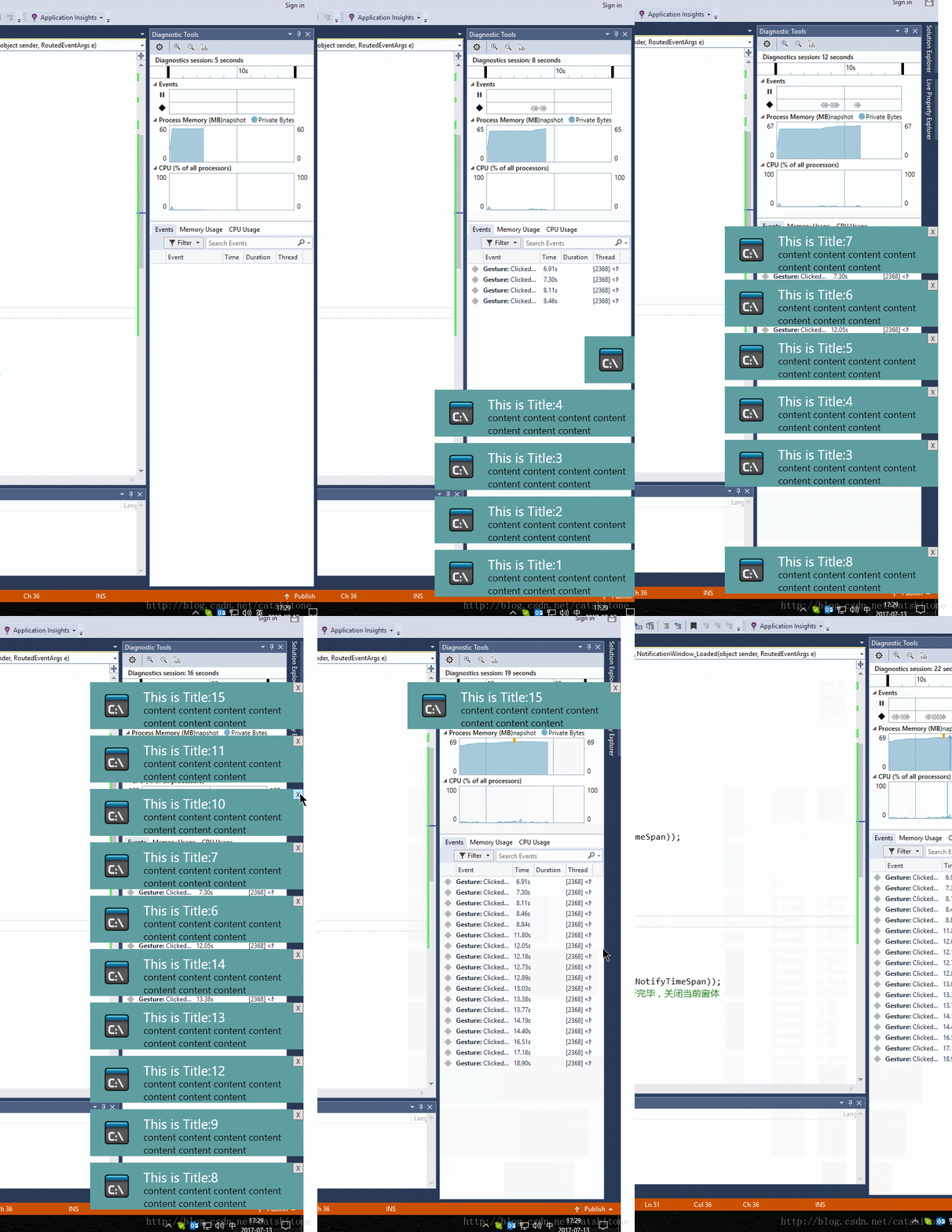
2.实现
1.主界面是MainWindow
上面就只摆放一个Button即可。在Button的点击事件中需要new一个弹出的NotificationWindow。代码如下:
 public static List<NotificationWindow> _dialogs = new List<NotificationWindow>();

 int i = 0;

 private void Button_Click(object sender, RoutedEventArgs e)

 {

            i++;

            NotifyData data = new WpfApplication1.NotifyData();

            data.Title = "This is Title:"+i;

            data.Content = "content content content content content content content ";

            NotificationWindow dialog = new NotificationWindow();//new 一个通知

            dialog.Closed += Dialog_Closed;

            dialog.TopFrom = GetTopFrom();

            _dialogs.Add(dialog);

            dialog.DataContext = data;//设置通知里要显示的数据

            dialog.Show();

  }

  private void Dialog_Closed(object sender, EventArgs e)

  {

            var closedDialog = sender as NotificationWindow;

            _dialogs.Remove(closedDialog);

}其中NotifyData类只有两个属性分别是Title和Content,给NotificationWindow提供所要展示的消息数据。
GetTopFrom方法用来获取弹出通知框的底部应该在WorkArea(工作区)的哪个位置:
 double GetTopFrom()

        {

            //屏幕的高度-底部TaskBar的高度。

            double topFrom = System.Windows.SystemParameters.WorkArea.Bottom - 10;

            bool isContinueFind = _dialogs.Any(o => o.TopFrom == topFrom);

            while (isContinueFind)

            {

                topFrom = topFrom - 100;//此处100是NotifyWindow的高

                isContinueFind = _dialogs.Any(o => o.TopFrom == topFrom);

            }

            if (topFrom <= 0)

                topFrom = System.Windows.SystemParameters.WorkArea.Bottom - 10;

            return topFrom;

}2.弹出的通知是一个NotificationWindow
这个Window就一个Image,一个Button,两个TextBlock。
就长这个样子:
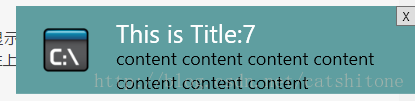
Image用来显示通知的图标,Button用来关闭当前window,两个TextBlock的Text属性分别banding到NotifyData类的Title和Content属性上,用来显示消息的标题和正文。
在NotificationWindow中添加如下代码:
public double TopFrom{get; set;}

private void NotificationWindow_Loaded(object sender, RoutedEventArgs e)

{

            NotificationWindow self = sender as NotificationWindow;

            if (self != null)

            {

                self.UpdateLayout();

                SystemSounds.Asterisk.Play();//播放提示声

                double right = System.Windows.SystemParameters.WorkArea.Right;//工作区最右边的值

                self.Top = self.TopFrom - self.ActualHeight;

                DoubleAnimation animation = new DoubleAnimation();

                animation.Duration = new Duration(TimeSpan.FromMilliseconds(NotifyTimeSpan));//NotifyTimeSpan是自己定义的一个int型变量,用来设置动画的持续时间

                animation.From = right;

                animation.To = right - self.ActualWidth;//设定通知从右往左弹出

                self.BeginAnimation(Window.LeftProperty, animation);//设定动画应用于窗体的Left属性

                Task.Factory.StartNew(delegate

                {

                    int seconds = 5;//通知持续5s后消失

                    System.Threading.Thread.Sleep(TimeSpan.FromSeconds(seconds));

                    //Invoke到主进程中去执行

                    Invoke(self, delegate

                    {

                        animation = new DoubleAnimation();

                        animation.Duration = new Duration(TimeSpan.FromMilliseconds(NotifyTimeSpan));

                        animation.Completed += (s, a) => { self.Close(); };//动画执行完毕,关闭当前窗体

                        animation.From = right - self.ActualWidth;

                        animation.To = right;//通知从左往右收回

                        self.BeginAnimation(Window.LeftProperty, animation);

                    });

                });

            }

}

static void Invoke(Window win, Action a)

{

     win.Dispatcher.Invoke(a);

}
上面这段代码注释已经很明白了,没什么好讲的。
- 当Button按钮点击后执行关闭窗体操作,这段代码其实跟上面的类似:
private void ButtonClose_Click(object sender, RoutedEventArgs e)

{

            double right = System.Windows.SystemParameters.WorkArea.Right;

            DoubleAnimation animation = new DoubleAnimation();

            animation.Duration = new Duration(TimeSpan.FromMilliseconds(NotifyTimeSpan));

            animation.Completed += (s, a) => { this.Close(); };

            animation.From = right - this.ActualWidth;

            animation.To = right;

            this.BeginAnimation(Window.LeftProperty, animation);

}
3.结束了,就这么简单
百度免费下载:链接: https://pan.baidu.com/s/1eSq5f8Y 密码: 5sna
【WPF】右下角弹出自定义通知样式(Notification)——简单教程的更多相关文章
- 实现android手机来电拦截系统页面弹出自定义页面特效
如何实现android手机来电拦截系统页面弹出自定义页面特效, 首先: 我们需要注册一个监听来电的广播PhoneStateReceiver 类:其次: 在onReceive里面我们获取an ...
- ArcGIS api fo silverlight学习三(利用ElementLayer实现鼠标悬浮弹出自定义窗体)
接着上一节继续学习,本节主要是利用ElementLayer实现鼠标悬浮弹出自定义窗体 参考博文:http://www.cnblogs.com/luxiaoxun/p/3322218.html 一.新建 ...
- android高德地图网络路径实现自定义marker并点击弹出自定义窗口
android中使用地图的地方随处可见,今天记录一下网络路径生成自定义marker,点击标记弹出自定义的窗口(在这里使用的是高德地图) 在这里我们使用Grilde去加载网络图片,因为这个简直太方便了! ...
- wpf之Popup弹出自定义输入"键盘"
在很多工厂的信息化MES系统中,车间的采集数据的机器是触摸屏电脑(工厂环境所限,用外接鼠标键盘反而不方便). 由于没有外接键盘,所以用户无法像坐在办公室一样,用鼠标键盘进行录入信息. 这时我们可以用w ...
- HTML中心在页面上弹出自定义表单层(实现可能拖累)
使用DIV窗体来动态显示内容的原理:首先採用CSS和HTML隐藏弹窗中的内容,然后利用JavaScript(本教程中是JQuery)来动态显示它们.这样的效果不仅可以充分利用有限的版面空间,并且可以提 ...
- wpf 右下角弹出窗
自己写的wpf 弹出框,欢迎拍砖,动画都写在了后台代码,前台代码不太重要,用了一下iconfont,具体样式我就不贴出来了,本次主要是后台代码的动画 需要有父级窗口才可以使用. 前台代码: <W ...
- Excel 去掉每次打开弹出自定义项安装的弹窗
弹窗: 解决方案: 一.打开“文件”——“选项”如图. 二.选择“加载项”,下面的“管理”,选择“COM加载项”,然后点击“转到”,弹出框: 三:在“可用加载项”下面你会发现有一项是“LoadTest ...
- HTML页面弹出自定义对话框带遮蔽罩(使用JavaScript)
转载:http://blog.sina.com.cn/s/blog_610f47c50100ohe4.html 原理其实很简单:首先绘制弹出的自定义对话框,将其使用display:none隐藏,因为设 ...
- Bootstrap Popover(弹出框)弹出自定义格式代码
HEAD 标签之间引入CSS:<link href="../../../public/css/bootstrap.min.css" rel="stylesheet& ...
随机推荐
- linux上电自启动应用程序具体解释
每当我学习一个新的东西得时候都是会 遇到一些错误.可是我会很努力的去解决它,今天这个自启动应用程序花了我两个小时的时间才攻克了.所以说遇到问题的时候要去思考.分析.以下我就来谈谈linux上电自启动应 ...
- Android 软键盘监听事件
Android软键盘的隐藏显示研究 Android是一个针对触摸屏专门设计的操作系统,当点击编辑框,系统自动为用户弹出软键盘,以便用户进行输入. 那么,弹出软键盘后必然会造成原有布局高度的减少 ...
- 微信测试号开发之九 微信网页授权:页面获取用户openid
原文链接:https://blog.csdn.net/qq_37936542/article/details/78981369 一:配置接口 注意:这里填写的是域名(是一个字符串),而不是URL,因此 ...
- 常用服务器ftp、ssh
1. Linux常用服务器构建-ftp服务器 ftp服务器 FTP 是File Transfer Protocol(文件传输协议)的英文简称,而中文简称为"文传协议". 用于Int ...
- AE控制图层中要素可见状态的几种方法
转自原文 AE控制图层中要素可见状态的几种方法 工作中常有这样的需求,一个作业图层由几个作业员来操作,我们要 控制每一个作业员只能看到他负责的区域.作业员的可见区域控制有时候是按空间区域划分,有时候是 ...
- Android开发:使用ViewDragHelper实现抽屉拉伸效果
事实上,有非常多方法能够实现一个Layout的抽屉拉伸效果,最常常的方法就是自己定义一个ViewGroup,然后控制点击事件.控制移动之类的,这样的方法的代码量多,并且实现起来复杂,后期维护添加其它效 ...
- Gini 系数与熵的关系
首先来看二者的基本定义: ⎧⎩⎨⎪⎪⎪⎪⎪⎪⎪⎪⎪⎪H(X)=−∑k=1KpklnpkGini(X)=∑k=1Kpk(1−pk) 将 f(x)=−lnx 在 x=1 处进行一阶泰勒展开(忽略高阶无穷小 ...
- 初始化NSDictionary:(工作经验)两种方法有时候效果不一样
方法1: NSMutableDictionary *dic = [[NSMutableDictionary alloc] init]; [dic setObject:[Hp_KeysArray obj ...
- svn服务配置
1关闭所有svn服务 nie-xiao-bo-mac-pro:svnproject mac$ killall -9 svnserve 2.开启某文件路径svn服务 nie-xiao-bo-mac-pr ...
- 进入Erlang的世界
http://erlang.group.iteye.com/group/wiki/1407-to-enter-the-world-of-erlang 进入Erlang的世界 作为程序员,我们曾经闻听很 ...