
【WPF】右下角弹出自定义通知样式(Notification)——简单教程
原文:【WPF】右下角弹出自定义通知样式(Notification)——简单教程
1.先看效果
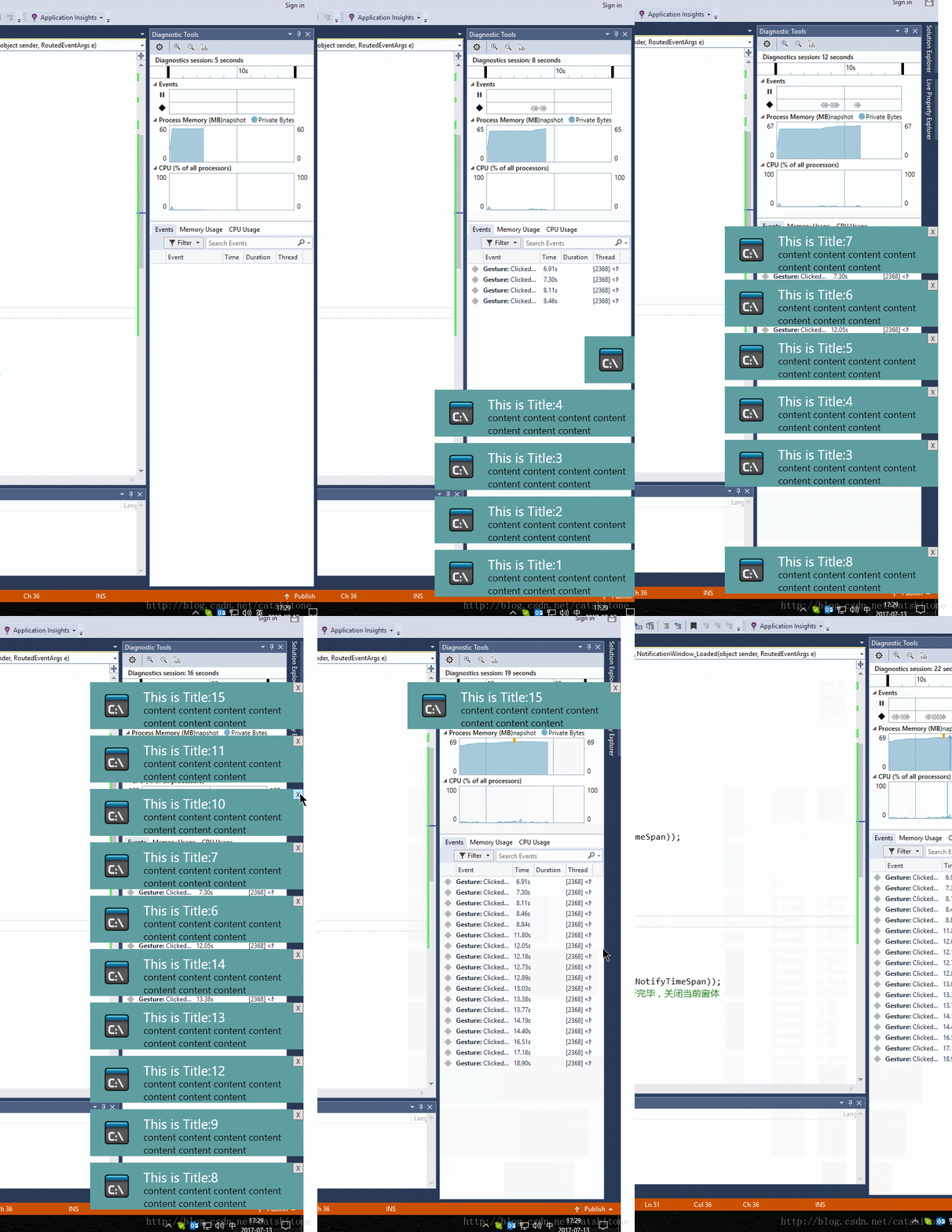
2.实现
1.主界面是MainWindow
上面就只摆放一个Button即可。在Button的点击事件中需要new一个弹出的NotificationWindow。代码如下:
 public static List<NotificationWindow> _dialogs = new List<NotificationWindow>();

 int i = 0;

 private void Button_Click(object sender, RoutedEventArgs e)

 {

            i++;

            NotifyData data = new WpfApplication1.NotifyData();

            data.Title = "This is Title:"+i;

            data.Content = "content content content content content content content ";

            NotificationWindow dialog = new NotificationWindow();//new 一个通知

            dialog.Closed += Dialog_Closed;

            dialog.TopFrom = GetTopFrom();

            _dialogs.Add(dialog);

            dialog.DataContext = data;//设置通知里要显示的数据

            dialog.Show();

  }

  private void Dialog_Closed(object sender, EventArgs e)

  {

            var closedDialog = sender as NotificationWindow;

            _dialogs.Remove(closedDialog);

}其中NotifyData类只有两个属性分别是Title和Content,给NotificationWindow提供所要展示的消息数据。
GetTopFrom方法用来获取弹出通知框的底部应该在WorkArea(工作区)的哪个位置:
 double GetTopFrom()

        {

            //屏幕的高度-底部TaskBar的高度。

            double topFrom = System.Windows.SystemParameters.WorkArea.Bottom - 10;

            bool isContinueFind = _dialogs.Any(o => o.TopFrom == topFrom);

            while (isContinueFind)

            {

                topFrom = topFrom - 100;//此处100是NotifyWindow的高

                isContinueFind = _dialogs.Any(o => o.TopFrom == topFrom);

            }

            if (topFrom <= 0)

                topFrom = System.Windows.SystemParameters.WorkArea.Bottom - 10;

            return topFrom;

}2.弹出的通知是一个NotificationWindow
这个Window就一个Image,一个Button,两个TextBlock。
就长这个样子:
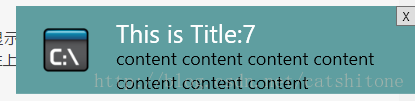
Image用来显示通知的图标,Button用来关闭当前window,两个TextBlock的Text属性分别banding到NotifyData类的Title和Content属性上,用来显示消息的标题和正文。
在NotificationWindow中添加如下代码:
public double TopFrom{get; set;}

private void NotificationWindow_Loaded(object sender, RoutedEventArgs e)

{

            NotificationWindow self = sender as NotificationWindow;

            if (self != null)

            {

                self.UpdateLayout();

                SystemSounds.Asterisk.Play();//播放提示声

                double right = System.Windows.SystemParameters.WorkArea.Right;//工作区最右边的值

                self.Top = self.TopFrom - self.ActualHeight;

                DoubleAnimation animation = new DoubleAnimation();

                animation.Duration = new Duration(TimeSpan.FromMilliseconds(NotifyTimeSpan));//NotifyTimeSpan是自己定义的一个int型变量,用来设置动画的持续时间

                animation.From = right;

                animation.To = right - self.ActualWidth;//设定通知从右往左弹出

                self.BeginAnimation(Window.LeftProperty, animation);//设定动画应用于窗体的Left属性

                Task.Factory.StartNew(delegate

                {

                    int seconds = 5;//通知持续5s后消失

                    System.Threading.Thread.Sleep(TimeSpan.FromSeconds(seconds));

                    //Invoke到主进程中去执行

                    Invoke(self, delegate

                    {

                        animation = new DoubleAnimation();

                        animation.Duration = new Duration(TimeSpan.FromMilliseconds(NotifyTimeSpan));

                        animation.Completed += (s, a) => { self.Close(); };//动画执行完毕,关闭当前窗体

                        animation.From = right - self.ActualWidth;

                        animation.To = right;//通知从左往右收回

                        self.BeginAnimation(Window.LeftProperty, animation);

                    });

                });

            }

}

static void Invoke(Window win, Action a)

{

     win.Dispatcher.Invoke(a);

}
上面这段代码注释已经很明白了,没什么好讲的。
- 当Button按钮点击后执行关闭窗体操作,这段代码其实跟上面的类似:
private void ButtonClose_Click(object sender, RoutedEventArgs e)

{

            double right = System.Windows.SystemParameters.WorkArea.Right;

            DoubleAnimation animation = new DoubleAnimation();

            animation.Duration = new Duration(TimeSpan.FromMilliseconds(NotifyTimeSpan));

            animation.Completed += (s, a) => { this.Close(); };

            animation.From = right - this.ActualWidth;

            animation.To = right;

            this.BeginAnimation(Window.LeftProperty, animation);

}
3.结束了,就这么简单
百度免费下载:链接: https://pan.baidu.com/s/1eSq5f8Y 密码: 5sna
【WPF】右下角弹出自定义通知样式(Notification)——简单教程的更多相关文章
- 实现android手机来电拦截系统页面弹出自定义页面特效
如何实现android手机来电拦截系统页面弹出自定义页面特效, 首先: 我们需要注册一个监听来电的广播PhoneStateReceiver 类:其次: 在onReceive里面我们获取an ...
- ArcGIS api fo silverlight学习三(利用ElementLayer实现鼠标悬浮弹出自定义窗体)
接着上一节继续学习,本节主要是利用ElementLayer实现鼠标悬浮弹出自定义窗体 参考博文:http://www.cnblogs.com/luxiaoxun/p/3322218.html 一.新建 ...
- android高德地图网络路径实现自定义marker并点击弹出自定义窗口
android中使用地图的地方随处可见,今天记录一下网络路径生成自定义marker,点击标记弹出自定义的窗口(在这里使用的是高德地图) 在这里我们使用Grilde去加载网络图片,因为这个简直太方便了! ...
- wpf之Popup弹出自定义输入"键盘"
在很多工厂的信息化MES系统中,车间的采集数据的机器是触摸屏电脑(工厂环境所限,用外接鼠标键盘反而不方便). 由于没有外接键盘,所以用户无法像坐在办公室一样,用鼠标键盘进行录入信息. 这时我们可以用w ...
- HTML中心在页面上弹出自定义表单层(实现可能拖累)
使用DIV窗体来动态显示内容的原理:首先採用CSS和HTML隐藏弹窗中的内容,然后利用JavaScript(本教程中是JQuery)来动态显示它们.这样的效果不仅可以充分利用有限的版面空间,并且可以提 ...
- wpf 右下角弹出窗
自己写的wpf 弹出框,欢迎拍砖,动画都写在了后台代码,前台代码不太重要,用了一下iconfont,具体样式我就不贴出来了,本次主要是后台代码的动画 需要有父级窗口才可以使用. 前台代码: <W ...
- Excel 去掉每次打开弹出自定义项安装的弹窗
弹窗: 解决方案: 一.打开“文件”——“选项”如图. 二.选择“加载项”,下面的“管理”,选择“COM加载项”,然后点击“转到”,弹出框: 三:在“可用加载项”下面你会发现有一项是“LoadTest ...
- HTML页面弹出自定义对话框带遮蔽罩(使用JavaScript)
转载:http://blog.sina.com.cn/s/blog_610f47c50100ohe4.html 原理其实很简单:首先绘制弹出的自定义对话框,将其使用display:none隐藏,因为设 ...
- Bootstrap Popover(弹出框)弹出自定义格式代码
HEAD 标签之间引入CSS:<link href="../../../public/css/bootstrap.min.css" rel="stylesheet& ...
随机推荐
- [RxJS] Split an RxJS observable with window
Mapping the values of an observable to many inner observables is not the only way to create a higher ...
- Uncaught SyntaxError: Unexpected end of input 解决办法
Unexpected end of input 的英文意思是"意外的终止输入" 他通常表示我们浏览器在读取我们的js代码时,碰到了不可预知的错误,导致浏览器 无语进行下面的读取 ...
- php实现求一个数的质数因子
php实现求一个数的质数因子 一.总结 一句话总结:这么简单的题目,还是把变量定义的位置和自增的位置写错. 1 <?php 2 $num=trim(fgets(STDIN)); 3 //如果$n ...
- PatentTips – CoAP Segment size determination
BACKGROUND OF THE INVENTION The subject matter disclosed herein relates to routing data through a ne ...
- 数组[0]和[firstobject]的区别
数组[0]和[firstobject]的区别 [0]:数组为空时回报错 [firstobject]:数组为空时回返回nil
- C#生成二维码,把二维码图片放入Excel中
/// <summary> /// 把图片保存到excel中 /// </summary> /// <param name="excelFilePath&quo ...
- Android实现手机拍照功能
一.布局文件main.xml <?xml version="1.0" encoding="utf-8"?> <FrameLayout xmln ...
- lucene 7.x 分词 TokenStream的使用及源码分析
一.使用步骤 //将一个字符串创建成token流,第一个参数---fiedName,是一种标志性参数,可以写空字符串,不建议用null,因为null对于IKAnalyzer会包错 TokenStrea ...
- Codeforces C. Pattern 412 解决问题的方法
这个问题是比较暴力的法律主体. 主要是检查每一个是否没有使用足够的?.假设优先使用其他的无论是什么字母,假设你一定不能使用?. 找一个有能力并给予所有的字符串匹配字符串,而且采用的最小?号码. 原标题 ...
- WPF 开发自动开机启动程序
原文:WPF 开发自动开机启动程序 本文告诉大家如何在 WPF 开发一个可以自动启动的程序 本文使用的自动开机启动方法是通过快捷方式放在启动文件夹的方式. 创建快捷方式 /// <summary ...