
easyUI在使用字符串拼接时样式不起作用,点击加号增加一行,点击减号删除一行效果。
拼接的按钮没有样式,需要使用
var str = $("<a href='javascript:void(0)' class='easyui-linkbutton' onclick='delDeviceInfo(this)' style='margin-top:2px;height:25px;width:25px;color:#fff;border:none;background:#63B8FF'>-</a>").appendTo($(".deviceView"))

$.parser.parse(str);
在JavaScript中一些dom元素是动态拼接的,由于页面实在加载完成后执行的js,页面已经渲染完成,所以没有加载到动态添加的组件的easui样式,所以需要手动执行渲染某个部件或者整个页面。
Parser(解析器)
解析器是easy ui很重要的基础组件,在easy ui中我们可以简单的通过class定义一个组件,通过parser进行解析,从而达到很好的交互效果。
parser会获取全部在指定内定为为easy ui组件的class定义,而且依据后缀定义把当前节点解析渲染成特定的组件。
$.parser.parse(); //解析EasyUI组件
附加:做如下的效果,点击加号增加一行,点击减号删除一行。
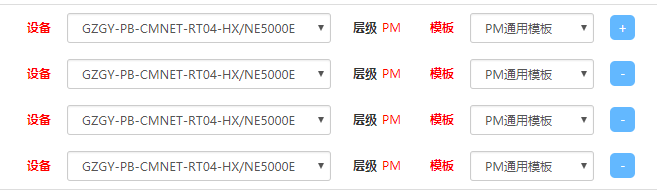
代码:
html:
<div>

	<table class='table' cellpadding="0" cellspacing="0" border="0" style='margin:0'>

		<tbody class='deviceView'>

			<tr class='firstChild'>

				<td width="114" class="labelName" style='color:red'>设备</td>

				<td width="280">

					<input type="hidden" id="" />

					<select id="" class="form-control input-sm">

						<option selected>GZGY-PB-CMNET-RT04-HX/NE5000E</option>

					</select>

				</td>

				<td  class="labelName" style='width:75px'>层级<span style='color:red;font-weight:normal;padding:0 5px;'>PM</span></td>

				<td class="labelName" style='color:red;min-width:25px!important;padding-left:0;'>模板</td>

				<td width="140">

					<select class="form-control input-sm">

						<option selected>PM通用模板</option>

						<option selected>PM通用模板</option>

						<option selected>PM通用模板</option>

					</select>

				</td>

				<td>

					<a href="javascript:void(0)" class="easyui-linkbutton " onclick="addDeviceInfo()" style="margin-top:2px;height:25px;width:25px;color:#fff;border:none;background:#63B8FF">+</a>

				</td>

			</tr>

		</tbody>

	</table>

</div>
JS:
//新增设备,通过tr长度赋值id

function addDeviceInfo(){

	var i = $(".deviceView tr").length+1;

	var str = $("<tr data-id='"+($(".deviceView tr").length+1)+"' id='deviceInfo"+($(".deviceView tr").length+1)+"'><td width='104' style='font-weight:900;text-align: right;line-height: 31px;'>设备</td><td width='280'><input type='hidden'/><select id='device"+($(".deviceView tr").length+1)+"' class='deviceAdd easyui-combobox' style='width:280px'></select>"+

	"</td><td  class='labelName' style='width:75px'>层级<span style='text-align: left;color:red;font-weight:normal;padding:0 5px;display:inline-block;width:30px;' id='lev"+($(".deviceView tr").length+1)+"'></span></td><td width='40' style='line-height: 32px;font-weight:900;text-align: right;padding-left:0;'>模板</td>"+

	"<td width='140'><select id='temp"+($(".deviceView tr").length+1)+"' class='easyui-combobox tempAdd' style='width:140px'></select></td>"+

	"<td><a href='javascript:void(0)' class='easyui-linkbutton' onclick='delDeviceInfo(this)' style='margin-top:2px;height:25px;width:25px;color:#fff;border:none;background:#63B8FF'>-</a></td></tr>").appendTo($(".deviceView"));

	$.parser.parse(str);

	initDeviceList("device"+i);

	initTemp("temp"+i);

}
//删除设备,找到按钮的父亲节点的父亲节点,及tr,然后删除

function delDeviceInfo(e){

	$(e).parent().parent().remove();

}
easyUI在使用字符串拼接时样式不起作用,点击加号增加一行,点击减号删除一行效果。的更多相关文章
- [转]easyui常用控件及样式API中文收藏
[转]easyui常用控件及样式收藏 2013-05-06 23:01 30612人阅读 评论(0) 收藏 举报 分类: java ee(5) 目录(?)[+] CSS类定义: div easyu ...
- C# 字符串拼接性能探索 c#中+、string.Concat、string.Format、StringBuilder.Append四种方式进行字符串拼接时的性能
本文通过ANTS Memory Profiler工具探索c#中+.string.Concat.string.Format.StringBuilder.Append四种方式进行字符串拼接时的性能. 本文 ...
- C++在字符串前加一个L作用:
在字符串前加一个L作用: 如 L"我的字符串" 表示将ANSI字符串转换成unicode的字符串,就是每个字符占用两个字节. strlen("asd" ...
- css样式实现字体删除线效果
<!DOCTYPE html> <html> <head> <meta http-equiv="Content-Type" content ...
- css样式表。作用是美化HTML网页.
样式表分为:(1)内联样式表 和HTML联合显示,控制精确,但是可重用性差,冗余多. 如:<p style="font-size:10px">内联样式表</p&g ...
- 在用easyui中做CRUD功能时,当删除一行或多行数据后再点击修改会提示你选中了多行,如何解决这个bug了?
在用easyui中做CRUD功能时,当删除一行或多行数据后再点击修改会提示你选中了多行,如何解决这个bug了? 在删除成功后,加上这句话就可以了:$("#dg").datagrid ...
- Angular中innerHTML标签的样式不起作用详解
1.背景 在最近angular的项目中,需要用到[innerHTML]标签来指定一个div的样式: //HTML部分 <div class="contents" [inner ...
- 微信小程序子组件样式不起作用的解决办法
今天我在编写微信小程序项目时,发现父组件引用子组件过后,子组件的样式不起作用,在上网查了很多解决办法后,成功解决了这一问题. 解决办法: 1.在全局样式文件app.wxss中引入子组件的样式,如 @i ...
- vue点击切换样式,点击切换地址栏,点击显示或者隐藏
1. vue点击显示切换 :class='{"span":index==0}' class原本是 类选择器 加上 :class就是绑定属性的意思 '{"span" ...
随机推荐
- 将JavaBean对象/List或Set或Map对象转成JSON方式
一.通过Struts2插件包(即使用Struts框架)自动生成JSON文本 二.使用第三方工具,将JavaBean对象/List或Set或Map对象转成JSON 准备导入第三方jar包: >c ...
- 【JavaScript框架封装】使用Prototype给Array,String,Function对象的方法扩充
/* * @Author: 我爱科技论坛* @Time: 20180705 * @Desc: 实现一个类似于JQuery功能的框架* V 1.0: 实现了基础框架.事件框架.CSS框架.属性框架.内容 ...
- ZOJ 3874 Permutation Graph (分治NTT优化DP)
题面:vjudge传送门 ZOJ传送门 题目大意:给你一个排列,如果两个数构成了逆序对,就在他们之间连一条无向边,这样很多数会构成一个联通块.现在给出联通块内点的编号,求所有可能的排列数 推来推去容易 ...
- 【LibreOJ 6277】数列分块入门 1 (分块)
emmm-学下分块~ 区间:数列中连续一段的元素 区间操作:将某个区间[a,b]的所有元素进行某种改动的操作 块:我们将数列划分成若干个不相交的区间,每个区间称为一个块 整块:在一个区间操作时,完整包 ...
- 00074_Array类
1.Array类的概述 此类包含用来操作数组(比如排序和搜索)的各种方法.需要注意,如果指定数组引用为 null,则访问此类中的方法都会抛出空指针异常NullPointerException. 2.常 ...
- Mysql 索引-1
索引的类型 根据数据库的功能,可以在数据库设计器中创建四种索引:唯一索引.非唯一索引.主键索引和聚集索引. 索引的不同应用场景 场景 1. 当数据多且字段值有相同的值得时候用普通索引. 2. 当字段多 ...
- C#--职业路线图
非常好的一个C#的职业技术路线图
- Ubuntu12.04 下 GTK3.xx 的安装、编译和測试
用此方法成功在UBUNTU 12.04下安装GTK 3.xxx. 一.安装 1.安装gcc/g++/gdb/make 等基本编程工具 $sudo apt-get install build-essen ...
- 【数字图像处理】六.MFC空间几何变换之图像平移、镜像、旋转、缩放具体解释
本文主要讲述基于VC++6.0 MFC图像处理的应用知识,主要结合自己大三所学课程<数字图像处理>及课件进行解说,主要通过MFC单文档视图实现显示BMP图片空间几何变换.包含图像平移.图形 ...
- hdu5386 Cover
Problem Description You have an n∗n matrix.Every grid has a color.Now there are two types of operati ...