
Jquery 多行拖拽图片排序 jq优化
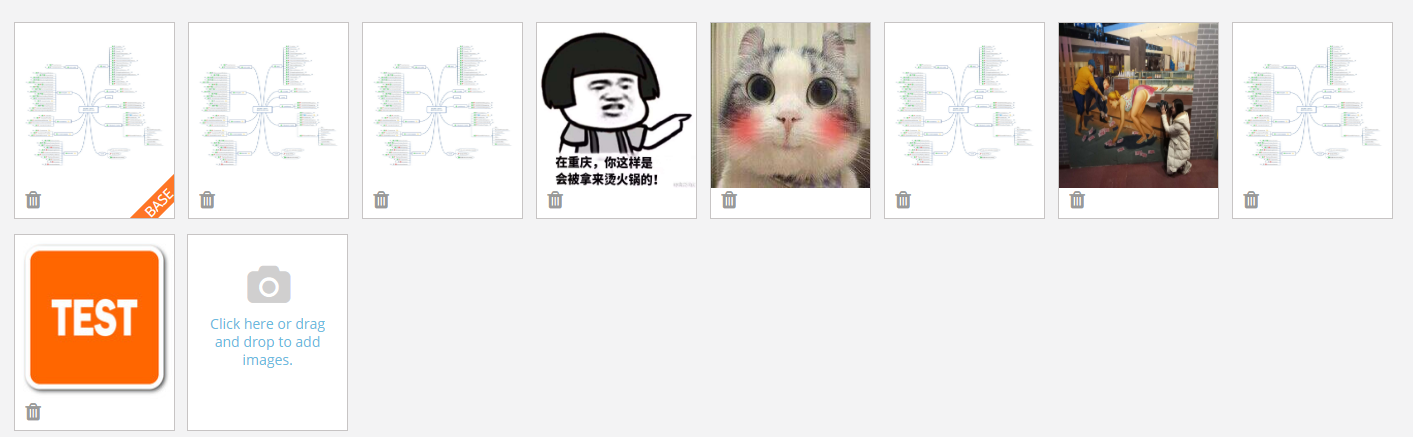
<!DOCTYPE html>

<html>

<head>

<meta charset="UTF-8">

<title>jQuery图片拖动排序代码</title>

<style type="text/css">

.item_container{position:relative;height:auto;overflow:hidden;}

.item_content ul{list-style:none;padding:0;margin:0;}

.item_content ul li{width:200px;height:160px;float:left;margin:10px }

.item_content{width:50%;height:auto;border:1px solid #ccc;float:left;}

.item_content .item{width:200px;height:120px;line-height:120px;text-align:center;cursor:pointer;background:#ccc;}

.item_content .item img{width:200px;height:120px;border-radius:6px;}

.close{display:block;width:20px;height:20px;top:0;right:0;z-index:9999;position:absolute;text-align:center;font-size:16px;cursor:pointer;color:aliceblue;}

</style>

</head>

<body>

<div class="item_container">

    <div class="item_content" id="imageChange">

        <ul>

            <li>

                <div class="item"> <img src="img/500x500-1.png" width="150" height="150">

                 </div>

            </li>

            <li>

                <div class="item"> <img src="img/500x500-2.png" width="150" height="150">

                 </div>

            </li>

            <li>

                <div class="item"> <img src="img/500x500-3.png" width="150" height="150">

                 </div>

            </li>

            <li>

                <div class="item"> <img src="img/500x500-4.png" width="150" height="150">

                 </div>

            </li>

            <li>

                <div class="item"> <img src="img/500x500-5.png" width="150" height="150">

                 </div>

            </li>

            <li>

                <div class="item"> <img src="img/500x500-6.png" width="150" height="150">

                 </div>

            </li>

            <li>

                <div class="item"> <img src="img/500x500-7.png" width="150" height="150">

                 </div>

            </li>

        </ul>

    </div>

</div>

<script src="js/jquery-1.8.3.min.js"></script>

<script>

$(function () {

    function Pointer(x, y) {

        this.x = x;

        this.y = y;

    }

    function Position(left, top) {

        this.left = left;

        this.top = top;

    }

    $(".item_container .item").each(function (i) {

        this.init = function () { // 初始化

            this.box = $(this).parent();

            $(this).attr("index", i).css({

                position: "absolute",

                left: this.box.position().left,

                top: this.box.position().top,

                cursor: "move"

            }).appendTo(".item_container");

            this.drag();

        },

            this.move = function (callback) {  // 移动

                $(this).stop(true).animate({

                    left: this.box.position().left,//相对父级的距离

                    top: this.box.position().top

                }, 500, function () {

                    if (callback) {

                        callback.call(this);

                    }

                });

            },

            this.collisionCheck = function () {

                var currentItem = this;

                var direction = null;

                $(this).siblings(".item").each(function () {

                    if (

                        currentItem.pointer.x > this.box.offset().left &&

                        currentItem.pointer.y > this.box.offset().top &&

                        (currentItem.pointer.x < this.box.offset().left + this.box.width()) &&

                        (currentItem.pointer.y < this.box.offset().top + this.box.height())

                    ) {

                        // 返回对象和方向

                        if (currentItem.box.position().top < this.box.position().top) {

                            direction = "down";

                        } else if (currentItem.box.position().top > this.box.position().top) {

                            direction = "up";

                        } else {

                            direction = "normal";

                        }

                        this.swap(currentItem, direction);

                    }

                });

            },

            this.swap = function (currentItem, direction) { // 交换位置

                if (this.moveing) return false;

                var directions = {

                    normal: function () {

                        var saveBox = this.box;

                        this.box = currentItem.box;

                        currentItem.box = saveBox;

                        this.move();

                        $(this).attr("index", this.box.index());

                        $(currentItem).attr("index", currentItem.box.index());

                    },

                    down: function () {

                        // 移到上方

                        var box = this.box;

                        var node = this;

                        var startIndex = currentItem.box.index();

                        var endIndex = node.box.index();;

                        for (var i = endIndex; i > startIndex; i--) {

                            var prevNode = $(".item_container .item[index=" + (i - 1) + "]")[0];

                            node.box = prevNode.box;

                            $(node).attr("index", node.box.index());

                            node.move();

                            node = prevNode;

                        }

                        currentItem.box = box;

                        $(currentItem).attr("index", box.index());

                    },

                    up: function () {

                        // 移到上方

                        var box = this.box;

                        var node = this;

                        var startIndex = node.box.index();

                        var endIndex = currentItem.box.index();;

                        for (var i = startIndex; i < endIndex; i++) {

                            var nextNode = $(".item_container .item[index=" + (i + 1) + "]")[0];

                            node.box = nextNode.box;

                            $(node).attr("index", node.box.index());

                            node.move();

                            node = nextNode;

                        }

                        currentItem.box = box;

                        $(currentItem).attr("index", box.index());

                    }

                }

                directions[direction].call(this);

            },

            this.drag = function () { // 拖拽

                var oldPosition = new Position();

                var oldPointer = new Pointer();

                var isDrag = false;

                var currentItem = null;

                $(this).mousedown(function (e) {

                    e.preventDefault();

                    oldPosition.left = $(this).position().left;

                    oldPosition.top = $(this).position().top;

                    oldPointer.x = e.clientX;

                    oldPointer.y = e.clientY;

                    isDrag = true;

                    currentItem = this;

                });

                $(document).mousemove(function (e) {

                    var currentPointer = new Pointer(e.clientX, e.clientY);

                    if (!isDrag) return false;

                    $(currentItem).css({

                        "opacity": "0.8",

                        "z-index": 999

                    });

                    var left = currentPointer.x - oldPointer.x + oldPosition.left;

                    var top = currentPointer.y - oldPointer.y + oldPosition.top;

                    $(currentItem).css({

                        left: left,

                        top: top

                    });

                    currentItem.pointer = currentPointer;

                    // 开始交换位置

                    currentItem.collisionCheck();

                });

                $(document).mouseup(function () {

                    if (!isDrag) return false;

                    isDrag = false;

                    currentItem.move(function () {

                        $(this).css({

                            "opacity": "1",

                            "z-index": 0

                        });

                    });

                });

            }

        this.init();

    });

});

</script>

</body>

</html>
Jquery 多行拖拽图片排序 jq优化的更多相关文章
- Jquery easyui treegrid实现树形表格的行拖拽
前几天修改了系统的一个功能——实现树形列列表的行拖拽,以达到排序的目的.现在基本上功能实现,现做一个简单的总结. 1.拿到这个直接网上搜,有好多,但是看了后都觉得不是太复杂就是些不是特别想看的例子,自 ...
- VUE +element el-table运用sortable 拖拽table排序,实现行排序,列排序
Sortable.js是一款轻量级的拖放排序列表的js插件(虽然体积小,但是功能很强大) 项目需求是要求能对element中 的table进行拖拽行排序 这里用到了sorttable Sortable ...
- JS组件系列——Bootstrap Table 表格行拖拽(二:多行拖拽)
前言:前天刚写了篇JS组件系列——Bootstrap Table 表格行拖拽,今天接到新的需要,需要在之前表格行拖拽的基础上能够同时拖拽选中的多行.博主用了半天时间研究了下,效果是出来了,但是感觉不尽 ...
- jqGrid之treeGrid及行拖拽
单纯的做个小记录 今天做功能用到了jqGrid里面的treeGrid,遇到几个问题,这里做下记录 treeGrid 树表格的应用在官网给出了很直白的例子: 1.http://blog.mn886.ne ...
- 在viewPager中双指缩放图片,双击缩放图片,单指拖拽图片
我们就把这个问题叫做图片查看器吧,它的主要功能有: (项目地址:https://github.com/TZHANHONG/ImageViewer/releases/tag/1.0,里面的MyImage ...
- 基于html5可拖拽图片循环滚动切换
分享一款基于html5可拖拽图片循环滚动切换.这是一款支持手机端拖拽切换的网站图片循环滚动特效.效果图如下: 在线预览 源码下载 实现的代码. html代码: <div id="s ...
- android 拖拽图片&拖动浮动按钮到处跑
来自老外: 拖拽图片效果 方法一: 布局文件 <?xml version="1.0" encoding="utf-8"?> <LinearLa ...
- js 利用jquery.gridly.js实现拖拽并且排序
<!DOCTYPE html> <html lang="en"> <head> <meta charset="UTF-8&quo ...
- ListView 多行拖拽排序
核心代码:修改ListView的属性,及绑定事件 // 初始化listView1. private void InitializeListView() { listView1.AllowDrop = ...
随机推荐
- [USACO5.3]校园网Network of Schools 缩点
题目描述 一些学校连入一个电脑网络.那些学校已订立了协议:每个学校都会给其它的一些学校分发软件(称作“接受学校”).注意即使 B 在 A 学校的分发列表中, A 也不一定在 B 学校的列表中. 你要写 ...
- java连接数据库(经常用)
一.配置环境 1.首先下载sqlserver2008驱动文件,找到sqljdbc4.jar文件,将这个文件拷到C:\Program Files\Java\jdk1.8.0_121\jre\lib\ex ...
- J - A Bug's Life 并查集
Background Professor Hopper is researching the sexual behavior of a rare species of bugs. He assumes ...
- SpringMvc切面校验JavaBean及基础类型
先配置好aop需要的配置,文:https://www.cnblogs.com/jiangxishicheng/p/10896498.html 编写校验切面类: package com.aspect;/ ...
- Windows 10+Ubuntu 16.04在MBR分区上安装双系统(转)
以下内容转自这篇博客: http://www.cnblogs.com/Duane/p/5424218.html http://www.cnblogs.com/Duane/p/6776302.html( ...
- velt-0.1.7开发: KernelConfig的问题
快乐虾 http://blog.csdn.net/lights_joy/(QQ群:Visual EmbedLinux Tools 375515651) 欢迎转载.但请保留作者信息 VELT的全称是Vi ...
- JAVA 如何反编译JAR文件
1 直接的jar文件可以用winrar解压,然后得到class文件,但是这里得到的class文件也是编译过的二进制文件,用传统的文本编辑器无法打开. 2 用XJad这个软件可以反编译Jar文件,直接找 ...
- ORACLE database console无法登陆
登陆EM时给我报这个错 Code d'erreur : ssl_error_weak_server_cert_key 仅仅须要关闭EM的SSL就好了 [oracle@ace-PROD1 ~]$ emc ...
- jvm 堆内存 栈内存 大小设置
4种方式配置不同作用域的jvm的堆栈内存. 1.Eclise 中设置jvm内存: 改动eclipse的配置文件,对全部project都起作用 改动eclipse ...
- Cocos2d-x可以实现的效果总结
Cocos2d-x可以实现的效果总结 动作(Actions) move移动:moveto/moveby 从一个位置移动到另外一个位置 从一个位置移动多少数量级 rotate旋转:rotateto/r ...