
iOS9 开发新特性 Spotlight使用
1.Spotloight是什么?
Spotlight在iOS9上做了一些新的改进, 也就是开放了一些新的API, 通过Core Spotlight Framework你可以在你的app中集成Spotlight。集成Spotlight的App可以在Spotlight中搜索App的内容,并且通过内容打开相关页面。
Demo演示
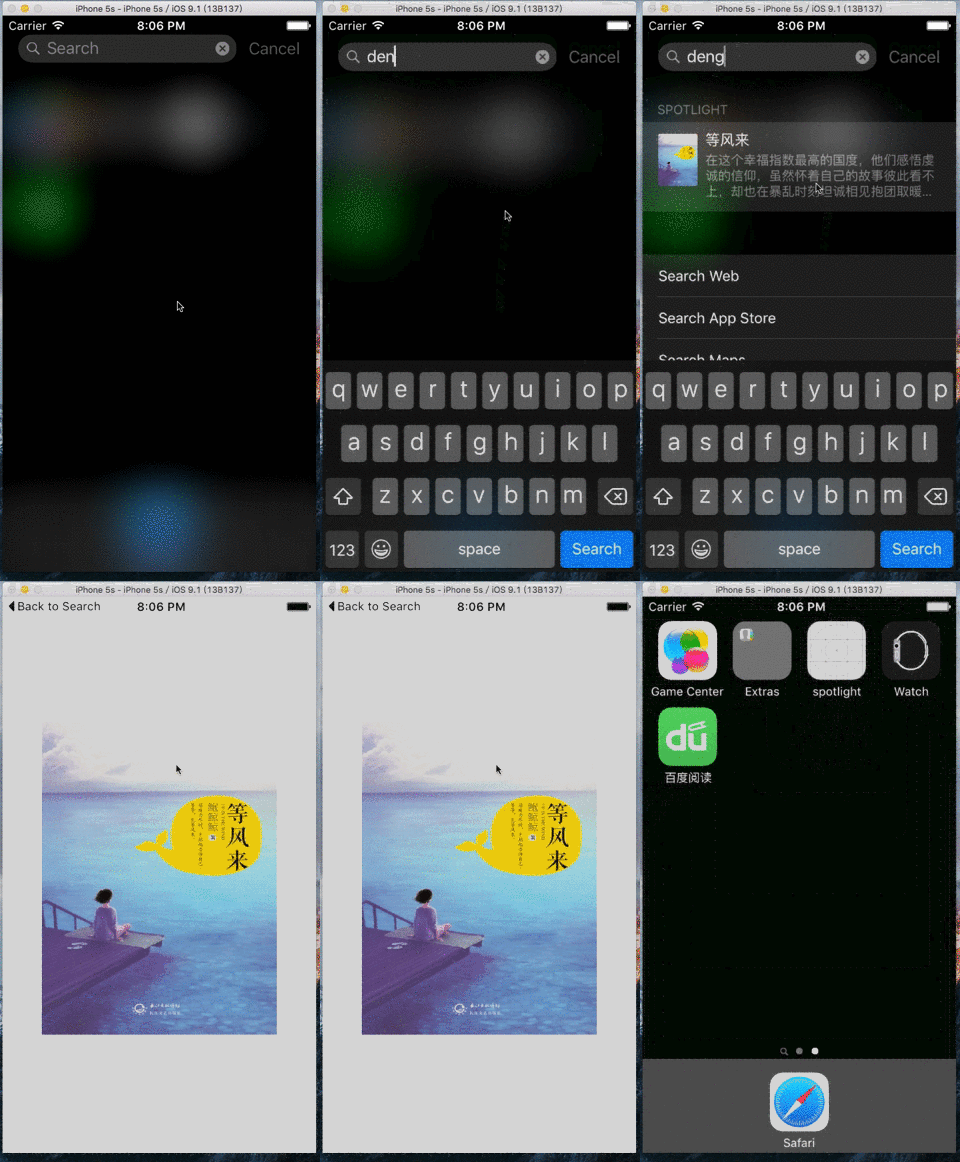
2.如何集成Spotlight
a.添加所需要的框架
#if __IPHONE_OS_VERSION_MAX_ALLOWED >= 90000

#import <CoreSpotlight/CoreSpotlight.h>

#import <MobileCoreServices/MobileCoreServices.h>

#endif
注,很多APP都是支持iOS9以下的,因此加入#if __IPHONE_OS_VERSION_MAX_ALLOWED >= 90000,可以解决iOS9以下设备运行崩溃的问题
b.创建 CSSearchableItemAttributeSet 对象

CSSearchableItemAttributeSet *attributeSet = [[CSSearchableItemAttributeSet alloc] initWithItemContentType:(NSString *)kUTTypeImage];

    attributeSet.title = spotlightTitle;                // 标题

    attributeSet.keywords = keywords;                   // 关键字,NSArray格式

    attributeSet.contentDescription = spotlightDesc;    // 描述

    attributeSet.thumbnailData = photo;                 // 图标, NSData格式

  // 把图片转换成NSData的方法
  UIImagePNGRepresentation([UIImage imageNamed:@"xxx.png"]
c.创建可检索条目CSSearchableItem
// spotlightInfo 可以作为一些数据传递给接受的地方

// domainId      id,通过这个id来判断是哪个spotlight

CSSearchableItem *item = [[CSSearchableItem alloc] initWithUniqueIdentifier:spotlightInfo domainIdentifier:domainId attributeSet:attributeSet];
d.添加检索入口
[[CSSearchableIndex defaultSearchableIndex] indexSearchableItems:@[item] completionHandler:^(NSError * error) {

     if (error) {

        NSLog(@"indexSearchableItems Error:%@",error.localizedDescription);

     }

}];
========完整代码========
- (void)insertSearchableItem:(NSData *)photo spotlightTitle:(NSString *)spotlightTitle description:(NSString *)spotlightDesc keywords:(NSArray *)keywords spotlightInfo:(NSString *)spotlightInfo domainId:(NSString *)domainId {

    CSSearchableItemAttributeSet *attributeSet = [[CSSearchableItemAttributeSet alloc] initWithItemContentType:(NSString *)kUTTypeImage];

    attributeSet.title = spotlightTitle;                // 标题

    attributeSet.keywords = keywords;                   // 关键字,NSArray格式

    attributeSet.contentDescription = spotlightDesc;    // 描述

    attributeSet.thumbnailData = photo;                 // 图标, NSData格式

    // spotlightInfo 可以作为一些数据传递给接受的地方

    // domainId      id,通过这个id来判断是哪个spotlight

    CSSearchableItem *item = [[CSSearchableItem alloc] initWithUniqueIdentifier:spotlightInfo domainIdentifier:domainId attributeSet:attributeSet];

    [[CSSearchableIndex defaultSearchableIndex] indexSearchableItems:@[item] completionHandler:^(NSError * error) {

        if (error) {

            NSLog(@"indexSearchableItems Error:%@",error.localizedDescription);

        }

    }];

}
========加载本地图片的使用方法========
[self insertSearchableItem:UIImagePNGRepresentation([UIImage imageNamed:@"xxx.png"]) spotlightTitle:@"等风来" description:@"等风来描述" keywords:@[@"鲍鲸鲸",@"大丽花"] spotlightInfo:@"传递过去的值" domainId:@"com.wb.spotlight"];
========加载网络图片的使用方法========
    dispatch_async(dispatch_get_global_queue(DISPATCH_QUEUE_PRIORITY_DEFAULT, 0), ^{

        NSData * data = [NSData dataWithContentsOfURL:[NSURL URLWithString:@"http://hiphotos.baidu.com/doc/pic/item/eaf81a4c510fd9f905f61934262dd42a2934a48e.jpg"]];

        [self insertSearchableItem:data spotlightTitle:@"等风来" description:@"等风来描述" keywords:@[@"鲍鲸鲸",@"大丽花"] spotlightInfo:@"传递过去的值" domainId:@"com.wb.spotlight"];

    });
========删除所有spotlight的方法========
[[CSSearchableIndex defaultSearchableIndex] deleteAllSearchableItemsWithCompletionHandler:^(NSError * _Nullable error) {

     if (error) {

         NSLog(@"%@", error.localizedDescription);

     }

 }];
========删除指定的spotlight的方法========
[[CSSearchableIndex defaultSearchableIndex] deleteSearchableItemsWithDomainIdentifiers:@"domainId" completionHandler:^(NSError * _Nullable error) {

     if (error) {

         NSLog(@"%@", error.localizedDescription);

     }

 }];
========点击spotlight后的响应方法========
- (BOOL)application:(UIApplication *)application continueUserActivity:(NSUserActivity *)userActivity restorationHandler:(void (^)(NSArray * _Nullable))restorationHandler {

    if ([[userActivity activityType] isEqualToString:CSSearchableItemActionType]) {

        NSString *uniqueIdentifier = [userActivity.userInfo objectForKey:CSSearchableItemActivityIdentifier];

        // 接受事先定义好的数值,如果是多个参数可以使用把json转成string传递过来,接受后把string在转换为json

        NSLog(@"传递过来的值%@", uniqueIdentifier);

    }

    return YES;

}
备注:
#if __IPHONE_OS_VERSION_MAX_ALLOWED >= 90000
  // 相关spotlight的方法等
#endif

// Spotlight支持iOS9以上设备运行,对与低版本的设备需加入这个防止崩溃问题
iOS9 开发新特性 Spotlight使用的更多相关文章
- iOS开发——新特性OC篇&IOS9 系统新特性
IOS9 系统新特性 2015年6月89号凌晨召开的WWDC 2015苹果开发者大会发布了全新的iOS 9系统,PC6小编今天给大家整理了这次iOS9的系统更新带来了哪些新的功能与升级,本次新功能一览 ...
- iOS开发——新特性OC篇&IOS9 SDK新特性
iOS9 SDK新特性 WWDC 2015苹果开发者大会是移动开发者一年一度的盛会,InfoQ中文站除了第一时间整理Keynote内容分享给大家之外,还邀请了资深的一线开发者分享他们的收获.本文为王巍 ...
- 转:iOS9的新特性以及适配方案
2015年9月8日,苹果宣布iOS 9操作系统的正式版在太平洋时间9月16日正式推出,北京时间9月17日凌晨1点推送. 新的iOS 9系统比iOS8更稳定,功能更全面,而且还更加开放.iOS 9加入了 ...
- 使用Git分支开发新特性或修复Bug与使用Git分支开发新特性或修复Bug
使用Git分支开发新特性或修复Bug 通过分支,可以在不影响原有代码的前提下改变代码,主要用于开发新功能新特性.下 一代产品 为已经发布的正式版修复bug 团队开发时为每个人建立一个分支,从而避免相互 ...
- iOS9的新特性以及适配方案-----转载
2015年9月8日,苹果宣布iOS 9操作系统的正式版在太平洋时间9月16日正式推出,北京时间9月17日凌晨1点推送. 新的iOS 9系统比iOS8更稳定,功能更全面,而且还更加开放.iOS 9加入了 ...
- iOS9 collectionView新特性
近日因为系统升级导致xcode6.系列版本出现bug,于是开始使用xcode7.在使用之余突然想到collectionView在iOS9中发布了一个可以移动cell的新特性,就尝试着将其实现,无奈ap ...
- 初识iOS9 iPad新特性SlideView和SplitView的适配
苹果刚发布了iOS9,在iPad上新增了两个新的特性SlideView和SplitView,前者可以在不关闭当前激活APP的情况下调出来另外个APP以30%比例显示进行操作使用,后者允许同时运行两个A ...
- iOS开发——新特性OC篇&Swift 2.0新特性
Swift 2.0新特性 转眼间,Swift已经一岁多了,这门新鲜.语法时尚.类型安全.执行速度更快的语言已经渐渐的深入广大开发者的心.我同样也是非常喜爱这门新的编程语言. 今年6月,一年一度 ...
- iOS开发——新特性OC篇&Objective新特性
Objective新特性 Overview 自 WWDC 2015 推出和开源 Swift 2.0 后,大家对 Swift 的热情又一次高涨起来,在羡慕创业公司的朋友们大谈 Swift 新特性的同时, ...
随机推荐
- AutoEventWireup
Page_PreInit & OnPreInit - whats the difference? https://forums.asp.net/t/1095903.aspx?Page_PreI ...
- jsorder 第三方修改版 修正bug 增加总价
我主要运用这个jsorder,修正了它的不足//1.0版本bug:刷新页面 无法增加或者删除原来添加的商品//1.1版本:修正了1.0版本 新增bug 能够修改原来的商品 但出现产品数量为0 仍然保 ...
- codeforces 667A A. Pouring Rain(水题)
题目链接: A. Pouring Rain time limit per test 1 second memory limit per test 256 megabytes input standar ...
- Ubuntu:Could not get lock /var/lib/dpkg/lock
在ubuntu上使用apt-get时,碰过如下问题: 看意思是上一次使用apt-get时异常退出了,锁住了,google了下解决方案如下: 1.先判断是否有apt-get进程在跑,同一时刻只能有一个a ...
- 「BZOJ3438」小M的作物(最小割
3438: 小M的作物 Time Limit: 10 Sec Memory Limit: 256 MBSubmit: 1891 Solved: 801[Submit][Status][Discus ...
- webpack 使用配置文件
webpack入门 大多数项目会需要很复杂的设置,这就是为什么webpack要支持配置文件.这比在终端中输入大量命令要高效的多,所以让我们常见一个取代CLI选项方式的配置文件 新建 webpa ...
- css 样式引入的方法 link 与import的区别
<link> 元素所参考的样式用户可以自由的选择加以改变,而导入的样式表单就自动的与剩下的样式表融合在一起了 CSS与HTML文档结合的4中方法:1 使用<link>元素链接到 ...
- 用文件作为Swap分区
用文件作为Swap分区 1.创建要作为swap分区的文件:增加1GB大小的交换分区,则命令写法如下,其中的count等于想要的块的数量(bs*count=文件大小).# dd if=/dev/zero ...
- mysql5.7根据.frm和.ibd文件恢复表结构和数据
一.恢复表结构 1.环境:Windows .mysql5.7:首先创建一个数据库,可以通过navicat来创建: 2.使用当前创建的数据库:use ww; 3.随意创建一张表,但是这张表的名字 ...
- 一些好用的Linux命令组合
1.删除0字节文件 代码如下: find -type f -size 0 -exec rm -rf {} \; 2.查看进程按内存从大到小排列 代码如下: ps -e -o "%C : %p ...