
微服务之:从零搭建ocelot网关和consul集群
介绍

微服务中有关键的几项技术,其中网关和服务服务发现,服务注册相辅相成。
首先解释几个本次教程中需要的术语
网关 Gateway(API GW / API 网关),顾名思义,是企业 IT 在系统边界上提供给外部访问内部接口服务的统一入口,简化了外部由于多服务协同完成任务时的繁琐配置。网关组件有Kong,ocelot,
服务发现:通过网关访问内部各个微服务,网关要找到所需服务的过程称为服务发现
服务注册:既然有服务发现,前提是要把所需服务提前“录入”,这个录入的过程称为服务注册。服务注册可配置文件(人肉方式不推荐),也可用服务注册组件如Consul或者Eureka等等(推荐)
搭建Consul集群(Windows)
官网下载Consul程序,https://www.consul.io/downloads.html
下载下来就是一个可执行文件Consul.exe
Consul有两种代理模式,一种server,一种client,官方建议Server端达到3台以上才可高可用,但不要太多,太多会给集群间数据同步造成压力,client数量不限。
多个server端之间会选择出一个leader,当一个server的leader宕机则会从其他server端”投票“选择新的leader
实践
这里server我们用2台实验
192.168.74.55
192.168.74.54
1台Client
192.168.74.161
consul启动有两种方式一种是命令行,一种是配置文件的方式。
命令行方式启动一个consul的server端
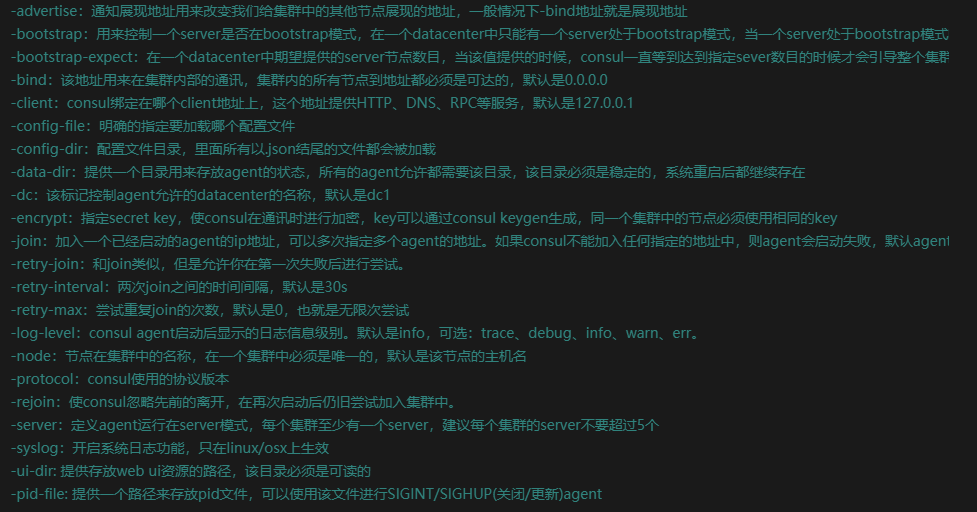
但是命令启动很繁琐,所以推荐下面的配置文件的方式启动
在consul同文件夹下建立一个server.json的配置文件
{

  "datacenter": "dc1",

  "data_dir": "opt/consul/data",

  "node_name": "consul-server01",

  "server": true,

  "bootstrap_expect": 2,

  "bind_addr": "192.168.74.55",

  "client_addr": "192.168.74.55",

  "ui":true

}
为了快速启动,再建立一个bat批处理文件runconsul.bat
consul agent -config-dir server.json

pause
双击runconsul.bat启动consul
在192.168.74.54服务器开启一个server端继续以上操作。
命令方式启动
consul agent -server -ui -data-dir opt/consul/data -node Server01 -bind 192.168.74.54 -client 192.168.74.54 -join=192.168.74.55
-join将192.168.74.54加入到192.168.74.55服务器
配置文件方式:
{

  "datacenter": "dc1",

  "data_dir": "opt/consul/data",

  "node_name": "consul-server2",

  "server": true,

  "bind_addr": "192.168.74.54",

  "client_addr": "192.168.74.54",

  "ui":true,

  "retry_join": ["192.168.74.55"],

  "retry_interval": "30s",

  "rejoin_after_leave": true,

  "start_join":["192.168.74.55"]

  }
在192.168.74.161服务器开启一个consul的client端
命令方式:
consul agent -ui -data-dir opt/consul/data -node ServerSlave -bind 192.168.74.161 -client 192.168.74.161 -join 192.168.74.55
配置文件方式:
{

  "datacenter": "dc1",

  "data_dir": "opt/consul/data",

  "node_name": "consul-client01",

  "server": false,

  "bind_addr": "192.168.74.161",

  "client_addr": "192.168.74.161",

  "ui":true,

  "retry_join": ["192.168.74.55"],

  "retry_interval": "30s",

  "rejoin_after_leave": true,

  "start_join":["192.168.74.55"]

}
效果
简单Consul集群到这里就搭建成功,只要访问三台服务器任意一个都可数据同步,演示:


netcore集成Consul服务注册
首先新建一个ConsulClient的类库

ConsulRegister.csproj所需组件如下:
<Project Sdk="Microsoft.NET.Sdk">

  <PropertyGroup>

    <TargetFramework>netstandard2.0</TargetFramework>

  </PropertyGroup>

  <ItemGroup>

    <PackageReference Include="Consul" Version="0.7.2.6" />

    <PackageReference Include="Microsoft.AspNetCore.Hosting.Abstractions" Version="2.1.0" />

    <PackageReference Include="Microsoft.AspNetCore.Http.Abstractions" Version="2.1.0" />

    <PackageReference Include="Microsoft.Extensions.Configuration.Abstractions" Version="2.1.0" />

    <PackageReference Include="Microsoft.Extensions.DependencyInjection.Abstractions" Version="2.1.0" />

    <PackageReference Include="Microsoft.Extensions.Options.ConfigurationExtensions" Version="2.1.0" />

  </ItemGroup>

</Project>
服务发现自动注册,无需手动绑定本机地址,会自动扫描本地ipv4地址和localhost地址,项目中无需再手动创建健康检查接口
ServiceDiscoveryOptions.cs

using System;

using System.Collections.Generic;

using System.Text;

namespace ConsulRegister

{

    /// <summary>

    /// 服务治理第三方组件Consul相关配置参数

    /// </summary>

    public class ServiceDiscoveryOptions

    {

        public string ServiceName { get; set; }

        public ConsulOptions Consul { get; set; }

    }

    public class ConsulOptions

    {

        public string HttpEndPoint { get; set; }

    }

}
RegisterToConsulExtension.cs

using Consul;

using Microsoft.AspNetCore.Builder;

using Microsoft.AspNetCore.Hosting;

using Microsoft.AspNetCore.Hosting.Server.Features;

using Microsoft.AspNetCore.Http;

using Microsoft.AspNetCore.Http.Features;

using Microsoft.Extensions.Configuration;

using Microsoft.Extensions.DependencyInjection;

using Microsoft.Extensions.Options;

using System;

using System.Linq;

using System.Net;

using System.Net.NetworkInformation;

using System.Net.Sockets;

namespace ConsulRegister

{

    public static class RegisterToConsulExtension

    {

        /// <summary>

        /// Add Consul

        /// 添加consul

        /// </summary>

        /// <param name="services"></param>

        /// <param name="configuration"></param>

        /// <returns></returns>

        public static IServiceCollection AddConsul(this IServiceCollection services, IConfiguration configuration)

        {

            // configuration Consul register address

            //配置consul注册地址

            services.Configure<ServiceDiscoveryOptions>(configuration.GetSection("ServiceDiscovery"));

            //configuration Consul client

            //配置consul客户端

            services.AddSingleton<IConsulClient>(sp => new Consul.ConsulClient(config =>

            {

                var consulOptions = sp.GetRequiredService<IOptions<ServiceDiscoveryOptions>>().Value;

                if (!string.IsNullOrWhiteSpace(consulOptions.Consul.HttpEndPoint))

                {

                    config.Address = new Uri(consulOptions.Consul.HttpEndPoint);

                }

            }));

            return services;

        }

        /// <summary>

        /// use Consul

        /// 使用consul

        /// The default health check interface format is http://host:port/HealthCheck

        /// 默认的健康检查接口格式是 http://host:port/HealthCheck

        /// </summary>

        /// <param name="app"></param>

        /// <returns></returns>

        public static IApplicationBuilder UseConsul(this IApplicationBuilder app)

        {

            IConsulClient consul = app.ApplicationServices.GetRequiredService<IConsulClient>();

            IApplicationLifetime appLife = app.ApplicationServices.GetRequiredService<IApplicationLifetime>();

            IOptions<ServiceDiscoveryOptions> serviceOptions = app.ApplicationServices.GetRequiredService<IOptions<ServiceDiscoveryOptions>>();

            var features = app.Properties["server.Features"] as FeatureCollection;

            var port = new Uri(features.Get<IServerAddressesFeature>()

                .Addresses

                .FirstOrDefault()).Port;

            Console.ForegroundColor = ConsoleColor.Blue;

            Console.WriteLine($"application port is :{port}");

            var addressIpv4Hosts = NetworkInterface.GetAllNetworkInterfaces()

            .OrderByDescending(c => c.Speed)

            .Where(c => c.NetworkInterfaceType != NetworkInterfaceType.Loopback && c.OperationalStatus == OperationalStatus.Up);

            foreach (var item in addressIpv4Hosts)

            {

                var props = item.GetIPProperties();

                //this is ip for ipv4

                //这是ipv4的ip地址

                var firstIpV4Address = props.UnicastAddresses

                    .Where(c => c.Address.AddressFamily == AddressFamily.InterNetwork)

                    .Select(c => c.Address)

                    .FirstOrDefault().ToString();

                var serviceId = $"{serviceOptions.Value.ServiceName}_{firstIpV4Address}:{port}";

                var httpCheck = new AgentServiceCheck()

                {

                    DeregisterCriticalServiceAfter = TimeSpan.FromMinutes(),

                    Interval = TimeSpan.FromSeconds(),

                    //this is default health check interface

                    //这个是默认健康检查接口

                    HTTP = $"{Uri.UriSchemeHttp}://{firstIpV4Address}:{port}/HealthCheck",

                };

                var registration = new AgentServiceRegistration()

                {

                    Checks = new[] { httpCheck },

                    Address = firstIpV4Address.ToString(),

                    ID = serviceId,

                    Name = serviceOptions.Value.ServiceName,

                    Port = port

                };

                consul.Agent.ServiceRegister(registration).GetAwaiter().GetResult();

                //send consul request after service stop

                //当服务停止后想consul发送的请求

                appLife.ApplicationStopping.Register(() =>

                {

                    consul.Agent.ServiceDeregister(serviceId).GetAwaiter().GetResult();

                });

                Console.ForegroundColor = ConsoleColor.Blue;

                Console.WriteLine($"health check service:{httpCheck.HTTP}");

            }

            //register localhost address

            //注册本地地址

            var localhostregistration = new AgentServiceRegistration()

            {

                Checks = new[] { new AgentServiceCheck()

                {

                    DeregisterCriticalServiceAfter = TimeSpan.FromMinutes(),

                    Interval = TimeSpan.FromSeconds(),

                    HTTP = $"{Uri.UriSchemeHttp}://localhost:{port}/HealthCheck",

                } },

                Address = "localhost",

                ID = $"{serviceOptions.Value.ServiceName}_localhost:{port}",

                Name = serviceOptions.Value.ServiceName,

                Port = port

            };

            consul.Agent.ServiceRegister(localhostregistration).GetAwaiter().GetResult();

            //send consul request after service stop

            //当服务停止后想consul发送的请求

            appLife.ApplicationStopping.Register(() =>

            {

                consul.Agent.ServiceDeregister(localhostregistration.ID).GetAwaiter().GetResult();

            });

            app.Map("/HealthCheck", s =>

            {

                s.Run(async context =>

                {

                    await context.Response.WriteAsync("ok");

                });

            });

            return app;

        }

    }

}
再新建一个.netcore的webapi项目WebA,并且引用ConsulRegister项目
在WebA项目中的Startup.cs文件中加入Consul服务
 public void ConfigureServices(IServiceCollection services)

        {

            services.AddConsul(Configuration);

            services.AddMvc().SetCompatibilityVersion(CompatibilityVersion.Version_2_1);

        }

        // This method gets called by the runtime. Use this method to configure the HTTP request pipeline.

        public void Configure(IApplicationBuilder app, IHostingEnvironment env)

        {

            if (env.IsDevelopment())

            {

                app.UseDeveloperExceptionPage();

            }

            app.UseConsul();

            app.UseMvc();

        }
在WebA项目的appsettings.json配置文件中加入以下Consul服务端配置
{

  "Logging": {

    "LogLevel": {

      "Default": "Warning"

    }

  },

  "AllowedHosts": "*",

  "ServiceDiscovery": {

    "ServiceName": "A",

    "Consul": {

      "HttpEndpoint": "http://192.168.74.161:8500"

    }

  }

}
这里服务注册就算完成
Ocelot网关搭建
接下来继续Ocelot借助于Consul实现服务发现
新建项目Ocelot.Gateway

将以下依赖加入Ocelot.Gateway.csproj中:
<Project Sdk="Microsoft.NET.Sdk.Web">

  <PropertyGroup>

    <TargetFramework>netcoreapp2.1</TargetFramework>

  </PropertyGroup>

  <ItemGroup>

    <PackageReference Include="Microsoft.AspNetCore.App" />

    <PackageReference Include="Ocelot" Version="12.0.1" />

    <PackageReference Include="Ocelot.Provider.Consul" Version="0.1.2" />

  </ItemGroup>

  <ItemGroup>

    <Content Update="ocelot.json">

      <CopyToOutputDirectory>PreserveNewest</CopyToOutputDirectory>

    </Content>

  </ItemGroup>

</Project>
新建ocelot.json文件
{

  "ReRoutes": [

    {

      "UseServiceDiscovery": true,

      "DownstreamPathTemplate": "/{url}",

      "DownstreamScheme": "http",

      "ServiceName": "A",

      "LoadBalancerOptions": {

        "Type": "RoundRobin"

      },

      "UpstreamPathTemplate": "/a/{url}",

      "UpstreamHttpMethod": [ "Get", "Post" ],

      "ReRoutesCaseSensitive": false

    }

  ],

  "GlobalConfiguration": {

    // 使用Consul服务治理

    "ServiceDiscoveryProvider": {

      "Host": "192.168.74.161",

      "Port": ,

      "ConfigurationKey": "Oceolot_A" //存储在Consul上的Key

    }

  }

}
修改Startup.cs文件如下:
   public class Startup

    {

        public Startup(IConfiguration configuration)

        {

            Configuration = configuration;

        }

        public IConfiguration Configuration { get; }

        // This method gets called by the runtime. Use this method to add services to the container.

        public void ConfigureServices(IServiceCollection services)

        {

            services.AddMvc().SetCompatibilityVersion(CompatibilityVersion.Version_2_1);

            services.AddOcelot(

                 new ConfigurationBuilder()

                 .AddJsonFile("ocelot.json", optional: false, reloadOnChange: true).Build())

                 .AddConsul()

                 .AddConfigStoredInConsul();

        }

        // This method gets called by the runtime. Use this method to configure the HTTP request pipeline.

        public void Configure(IApplicationBuilder app, IHostingEnvironment env)

        {

            if (env.IsDevelopment())

            {

                app.UseDeveloperExceptionPage();

            }

            else

            {

                app.UseHsts();

            }

            app.UseHttpsRedirection();

            app.UseOcelot().Wait();

        }

    }
发布WebA后复制两份分别启动
dotnet WebA.dll --urls="http://0.0.0.0:2001"
dotnet WebA.dll --urls="http://0.0.0.0:2002"
到这里相当于2001和2002程序简单集群了一下
可以发现日志中有 http://192.168.74.161:2002/HealthCheck调用信息:

这其实是consul进行健康检查进行的调用。
启动多个程序后,打开浏览器打开Consuld界面会发现注册了两个服务


这里ocelot网关和consul的服务注册和发现就算初步集成。
生产部署
如果生产环境是windows的情况,将consul做成windwos服务即可
sc create "ConsulServer" binPath="F:\XXX\consul.exe agent -config-dir XXX.json"
生产环境是linux则借助systemd做成守护进程即可
生产环境是docker,运行以下命令部署单节点,集群类似
docker run --restart=always -d --name=c13 -p : consul agent -server -bootstrap -ui -data-dir tmp/consul -bind 0.0.0.0 -client 0.0.0.0 -node dockerserver
目前集群搭建成功,但是连接的话如果指定某个端点的ip进行连接,端点宕机,就会导致网关一样无法连接consul进行服务发现。所以还需进行配置暴露一个端点让客户端连接,配置详情:https://www.consul.io/docs/connect/configuration.html
不过也可以做成虚拟ip进行多台consul的负载。客户端连接虚拟ip即可
项目地址:
微服务之:从零搭建ocelot网关和consul集群的更多相关文章
- 庐山真面目之十微服务架构 Net Core 基于 Docker 容器部署 Nginx 集群
庐山真面目之十微服务架构 Net Core 基于 Docker 容器部署 Nginx 集群 一.简介 前面的两篇文章,我们已经介绍了Net Core项目基于Docker容器部署在Linux服 ...
- 【微服务架构】SpringCloud之Eureka(注册中心集群篇)(三)
上一篇讲解了spring注册中心(eureka),但是存在一个单点故障的问题,一个注册中心远远无法满足实际的生产环境,那么我们需要多个注册中心进行集群,达到真正的高可用.今天我们实战来搭建一个Eure ...
- 庐山真面目之十二微服务架构基于Docker搭建Consul集群、Ocelot网关集群和IdentityServer版本实现
庐山真面目之十二微服务架构基于Docker搭建Consul集群.Ocelot网关集群和IdentityServer版本实现 一.简介 在第七篇文章<庐山真面目之七微服务架构Consul ...
- 庐山真面目之六微服务架构Consul集群、Ocelot网关集群和Nginx版本实现
庐山真面目之六微服务架构Consul集群.Ocelot网关集群和Nginx版本实现 一.简介 在上一篇文章<庐山真面目之五微服务架构Consul集群.Ocelot网关和Nginx版本实 ...
- 庐山真面目之七微服务架构Consul集群、Ocelot网关集群和IdentityServer4版本实现
庐山真面目之七微服务架构Consul集群.Ocelot网关集群和IdentityServer4版本实现 一.简介 在上一篇文章<庐山真面目之六微服务架构Consul集群.Ocelot网 ...
- ASP.NET Core微服务+Tabler前端框架搭建个人博客2--系统架构
功能分析 在整个微服务架构的搭建过程中,我们需要做的第一步就是对服务进行拆分,将一个完整的系统模块化,通过对各个模块互联,共同完成一个系统的工作.既然要做到模块化,那么必须明白你的系统的需求到底是什么 ...
- 【NET CORE微服务一条龙应用】第一章 网关使用与配置
简介 微服务的系统应用中,网关系统使用的是ocelot,ocelot目前已经比较成熟了 ocelot就不做介绍了,等整体介绍完后再进行各类扩展介绍,ocelot源码地址:https://github. ...
- 8分钟学会Consul集群搭建及微服务概念
Consul介绍: Consul 是由 HashiCorp 公司推出的开源软件,用于实现分布式系统的服务发现与配置.与其他分布式服务注册与发现的方案,Consul 的方案更“一站式”,内置了服务注册与 ...
- Ocelot+Consul 集群搭建实践
博客园已经有很多大神写过consul集群搭建了.大家都在玩,那我也不能托后退呢 不过自己研究下还是好的.毕竟每个人遇到的问题的不同 研究过才能说自己玩过consul,文章有部分名词解释是收集网络 Co ...
随机推荐
- 最近因为突然喜欢这方面的ui设计,所以搜刮了很多我试过可用性强的界面,又可爱又实用···分享给大家咯
最近因为突然喜欢这方面的ui设计,所以搜刮了很多我试过可用性强的界面,又可爱又实用···分享给大家咯 1.Side-Menu.Android 分类侧滑菜单,Yalantis 出品. 项目地址:http ...
- Redis常用命令【列表】
一.简介 基于Linked List实现,元素是字符串类型,列表头尾增删快,中间增删慢,增删元素是常态. 元素可以重复出现,最多包含2^32-1个元素. 二.命令 1.说明 1.1 B block 块 ...
- 计算机图形学(第2版 于万波 于硕 编著)第45页的Bresenham算法有错误
计算机图形学(第2版 于万波 于硕 编著)第45页的Bresenham算法有错误: 书上本来要写的是以x为阶越步长的方法,但是他写的是用一部分y为阶越步长的方法(其实也写的不对),最后以x为阶越步长的 ...
- spring4笔记----依赖注入的两种形式
设值注入:通过<property.../>元素驱动Spring执行setter的方法 构造注入:通过<constructor-arg.../>元素驱动Spring执行带有参数的 ...
- ctf学习(web题二)
web 下面是做bugku上一些web的总结 内容链接
- 数组实例的 copyWithin()
用途:在当前数组内部,将指定位置的成员复制到其他位置(会覆盖原有成员),然后返回当前数组.也就是说,使用这个方法,会修改数组本身. 用法:Array.prototype.copyWithin(targ ...
- LeetCode算法题-Maximum Depth of Binary Tree
这是悦乐书的第164次更新,第166篇原创 01 看题和准备 今天介绍的是LeetCode算法题中Easy级别的第23题(顺位题号是104).给定二叉树,找到它的最大深度.最大深度是从根节点到最远叶节 ...
- 单页应用 - Token 验证
单页应用 - Token 验证 转:https://juejin.im/post/58da720b570c350058ecd40f 第一次接触单页应用,记录公司项目关于Token验证知识. Token ...
- (转)Spring Boot (十九):使用 Spring Boot Actuator 监控应用
http://www.ityouknow.com/springboot/2018/02/06/spring-boot-actuator.html 微服务的特点决定了功能模块的部署是分布式的,大部分功能 ...
- UVA1613-K-Graph Oddity(贪心)
Problem UVA1613-K-Graph Oddity Accept: 108 Submit: 884Time Limit: 3000 mSec Problem Description Inp ...