
program_options
【program_options】
The program_options library allows program developers to obtain program options, that is (name, value) pairs from the user, via conventional methods such as command line and config file.
1、添加 options_description.
// Declare the supported options.

po::options_description desc("Allowed options");

desc.add_options()

    ("help", "produce help message")

    ("compression", po::value<int>(), "set compression level")

;

po::variables_map vm;

po::store(po::parse_command_line(ac, av, desc), vm);

po::notify(vm);

if (vm.count("help")) {

    cout << desc << "\n";

    return ;

}

if (vm.count("compression")) {

    cout << vm["compression"].as<int>() << ".\n";

}
使用示例:
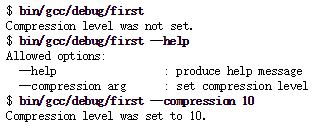
2、po::value
int opt;

po::options_description desc("Allowed options");

desc.add_options()

    ("help", "produce help message")

    ("optimization", po::value<int>(&opt)->default_value(),

  "optimization level")

    ("include-path,I", po::value< vector<string> >(),

  "include path")

    ("input-file", po::value< vector<string> >(), "input file")

;
使用示例:

3、po::positional_options_description
po::positional_options_description p;

p.add("input-file", -);

po::variables_map vm;

po::store(po::command_line_parser(ac, av).

          options(desc).positional(p).run(), vm);

po::notify(vm);
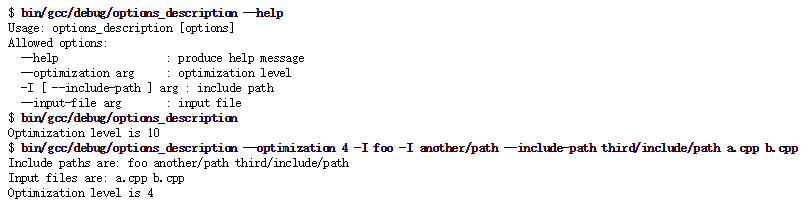
4、config file
     int opt;

        string config_file;

        // Declare a group of options that will be

        // allowed only on command line

        po::options_description generic("Generic options");

        generic.add_options()

            ("version,v", "print version string")

            ("help", "produce help message")

            ("config,c", po::value<string>(&config_file)->default_value("multiple_sources.cfg"),

                  "name of a file of a configuration.")

            ;

        // Declare a group of options that will be

        // allowed both on command line and in

        // config file

        po::options_description config("Configuration");

        config.add_options()

            ("optimization", po::value<int>(&opt)->default_value(),

                  "optimization level")

            ("include-path,I",

                 po::value< vector<string> >()->composing(),

                 "include path")

            ;

        // Hidden options, will be allowed both on command line and

        // in config file, but will not be shown to the user.

        po::options_description hidden("Hidden options");

        hidden.add_options()

            ("input-file", po::value< vector<string> >(), "input file")

            ;

        po::options_description cmdline_options;

        cmdline_options.add(generic).add(config).add(hidden);

        po::options_description config_file_options;

        config_file_options.add(config).add(hidden);

        po::options_description visible("Allowed options");

        visible.add(generic).add(config);

        po::positional_options_description p;

        p.add("input-file", -);

        po::variables_map vm;

        store(po::command_line_parser(ac, av).

              options(cmdline_options).positional(p).run(), vm);

        notify(vm);

        ifstream ifs(config_file.c_str());

        if (!ifs){

            cout << "can not open config file: " << config_file << "\n";

            return ;

        }

        else{

            store(parse_config_file(ifs, config_file_options), vm);

            notify(vm);

        }

        if (vm.count("help")) {

            cout << visible << "\n";

            return ;

        }

        if (vm.count("version")) {

            cout << "Multiple sources example, version 1.0\n";

            return ;

        }

        if (vm.count("include-path")){

            cout << vm["include-path"].as< vector<string> >() << "\n";

        }

        if (vm.count("input-file")){

            cout << vm["input-file"].as< vector<string> >() << "\n";

        }

        cout << opt << "\n";

参考:
1、https://www.boost.org/doc/libs/1_69_0/doc/html/program_options.html
program_options的更多相关文章
- boost:program_options
由于系统库getopt和getopt_long用起来不够直观,仔细看了下boost发现Boost.Program_options可以满足我的需求,它和getopt系列函数一样,可以抓起命令行参数,这里 ...
- program_options禁止命令行短参数
典型的 boost program_options的用法如下: #include <boost/program_options.hpp> using namespace boost::pr ...
- [C++Boost]程序参数项解析库Program_options使用指南
介绍 程序参数项(program options)是一系列name=value对,program_options 允许程序开发者获得通过命令行(command line)和配置文件(config fi ...
- boost之program_options库,解析命令行参数、读取配置文件
一.命令行解析 tprogram_options解析命令行参数示例代码: #include <iostream> using namespace std; #include <boo ...
- 使用Boost program_options控制程序输入
简介 很多人使用界面来输入数据,本文的程序介绍如何使用Boost的program_options控制输入. 程序中使用了: 1. 短选项 2. 可以指定多个参数的选项 程序 #include < ...
- boost库中的 program_options
1.阅读rviz中的源码时在rviz/visualizer_app.cpp中遇到如下代码: po::options_description options; options.add_options() ...
- boost::program_options 解析命令行参数
源码: #include <boost/program_options.hpp> namespace po = boost::program_options; int main(int a ...
- Boost命令行解释器的简单使用:Boost.Program_options
简介 如果使用比较多的命令行程序的话,对于命令行参数的输入肯定不会陌生,大部分的程序都是通过类似下面的形式进行输入的,比如熟悉的ls ls --all -l --color=auto 这里面包含了三种 ...
- C++ 系列:编译 boost
Copyright © 1900-2016, NORYES, All Rights Reserved. http://www.cnblogs.com/noryes/ 欢迎转载,请保留此版权声明. -- ...
随机推荐
- 新ubuntu系统装软件
新装的ubuntu系统安装软件: 1.ifconfig #sudo apt-get install net-tools 2.vim #sudo apt-get install vim 3.telnet ...
- 清空Sql server日志
日志文件时间长了很大很讨厌,这样清空 1.分离数据库 2.将原数据库的log文件改名 3.附加数据库,在log文件中会显示没有发现,点击删除按钮 4.确定即可
- 3阶马尔可夫链 自然语言处理python
一.简介: 把每三个三个单词作为一个整体进行训练. 举一个例子: input: my dream is that I can be an engineer, so I desi ...
- IDEA 运行spring boot出现端口占用的问题
Description: The Tomcat connector configured to listen on port 8080 failed to start. The port may al ...
- Unity的Write Defaults->从一个例子谈起
Write Defaults是什么? 在Unity的Animator中点击任何一个手动创建的State,我们就会在Inspector面板中看到下图的WriteDefaults选项 (图1,Animat ...
- php curl使用 常用操作
1. http Get 简单的只需要 这四行 就 $ch = curl_init (); curl_setopt ( $ch, CURLOPT_URL, "http://site" ...
- GNU C和C99标准中的可变参数宏(variadic macros)
用可变参数宏(variadic macros)传递可变参数表你可能很熟悉在函数中使用可变参数表,如: void printf(const char* format, …); 直到最近,可变参数表还是只 ...
- C# 通过GUID生成不重复的ID
/// <summary> /// 获得32位字符长度的ID /// </summary> /// <param name="information" ...
- 2489 小b和灯泡
2489 小b和灯泡 2 秒 262,144 KB 10 分 2 级题 小b有n个关闭的灯泡,编号为1...n. 小b会进行n轮操作,第i轮她会将编号为i的倍数的灯泡的开关状态取反,即开变成关,关变成 ...
- sublime编译javaScript脚本
处理步骤: 1. 首先到 nodejs.org 下载 Node.js 安装包并安装.2. 打开 Sublime Text 3 编辑器.选择菜单 Tools --> Build System -- ...