
itext实现pdf自动定位合同签订
需求
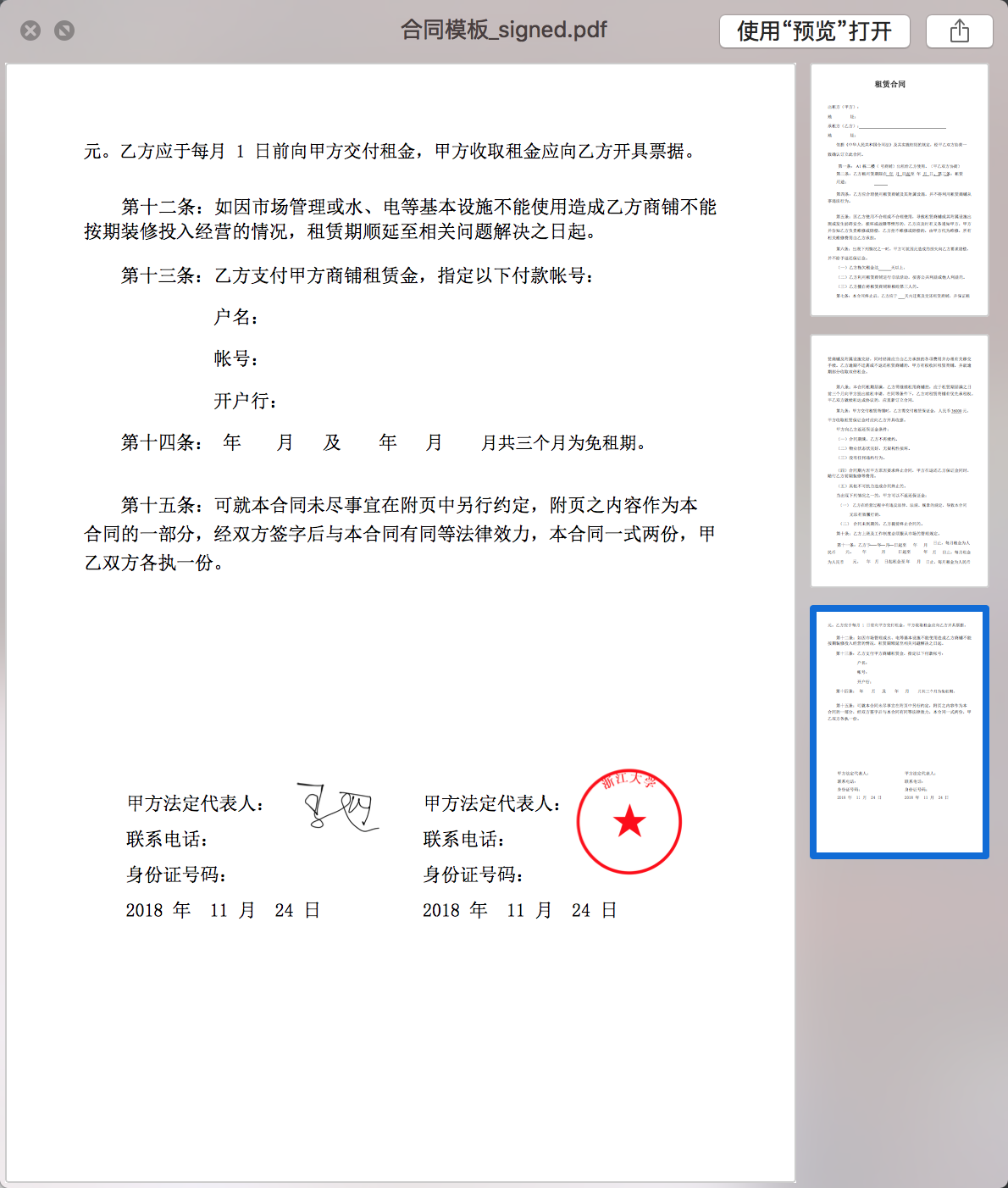
- 需要实现如下效果(最终效果)
思考
- 需求方的要求就是实现签订合同,实现方法不限,但过程中又提出需要在签章的过程中把签订日期的文字也打上去,这就有点坑了~
- 一开始的想法是想办法定位需要签名的位置,事实上同类app实现方式就是这样,在前端实现签名位置定位,把位置信息发给后端,后端就可以很方便把印章放上去。
- 但现实是现在前端不靠谱,暂时不能提供这样的功能;而且日期信息的填写也需要定位,这怎么办?用户不会手动去定位日期的位置,最多会调整下签名的位置才合理
- 然后我研究了下itext的api,并讨论决定尾部签名部分我们自己做。也就是上图中的下半部分的所有内容,包括甲方乙方,日期,签章等都通过程序自动定位上去
- 这样的想法遇到的难点,首先是y轴的定位问题。首先要找到文档的尾行在哪,在适当的距离进行文字的填写。我没有找到可以直接在文档末尾添加文字的api,如果各位知道麻烦指教一下。
步骤
- 因为有上述的问题,我首先考虑要找到尾行的文字才会考虑写代码。通过api研究,可以通过itext的监听器遍历文本拿到尾行文字等信息
- x周位置根据页面宽度调整
- 文字大小和字体类型问题。字体类型是我现在也没解决的,我没找到获取pdf文档字体类型和大小的api,请指教
- 因为没找到api所以我用的最笨的方法,通过获取字体的高度来确定字体大小,这样的文字写出来差别不会太大。至于字体,只能认为规定,合同字体统一宋体。
- 过程中还遇到的问题就是字体左边距对齐问题,很明显甲乙方在一行上,中间用空格来分割的话会很不标准。所以我最终决定用table,且左右边签名和文字分开进行写入。也就是甲签的时候写左半部分,乙签的时候写右半部分。当签完后就是上图的效果
- 说了这么多接下来直接上工具代码吧,如果要使用,直接把几个类代码复制过去,把字体路径换成自己的,文件路径改下就可以在main方法运行测试了
上代码
- PdfParser类,主要实现类,包含了main方法
package com.zhiyis.framework.util.itext;

import com.itextpdf.io.font.PdfEncodings;

import com.itextpdf.kernel.font.PdfFont;

import com.itextpdf.kernel.font.PdfFontFactory;

import com.itextpdf.kernel.geom.Rectangle;

import com.itextpdf.kernel.geom.Vector;

import com.itextpdf.kernel.pdf.PdfDocument;

import com.itextpdf.kernel.pdf.PdfReader;

import com.itextpdf.kernel.pdf.PdfWriter;

import com.itextpdf.kernel.pdf.canvas.parser.EventType;

import com.itextpdf.kernel.pdf.canvas.parser.PdfDocumentContentParser;

import com.itextpdf.kernel.pdf.canvas.parser.data.IEventData;

import com.itextpdf.kernel.pdf.canvas.parser.data.TextRenderInfo;

import com.itextpdf.kernel.pdf.canvas.parser.listener.IEventListener;

import com.itextpdf.layout.Document;

import com.itextpdf.layout.borders.Border;

import com.itextpdf.layout.element.Cell;

import com.itextpdf.layout.element.Paragraph;

import com.itextpdf.layout.element.Table;

import com.zhiyis.common.utils.DateUtil;

import com.zhiyis.common.utils.Sysconfig;

import com.zhiyis.framework.util.FileUtil;

import com.zhiyis.framework.util.SignPdf;

import lombok.extern.slf4j.Slf4j;

import java.io.File;

import java.io.IOException;

import java.io.InputStream;

import java.util.*;

/**

 * @author laoliangliang

 * @date 2018/11/23 15:03

 */

@Slf4j

public class PdfParser {

    private Sysconfig sysconfig;

    public PdfParser() {

    }

    public PdfParser(Sysconfig sysconfig) {

        this.sysconfig = sysconfig;

    }

    public enum SignType {

        //甲签

        SIGN_A(1),

        //乙签

        SIGN_B(2);

        private Integer type;

        SignType(Integer type) {

            this.type = type;

        }

        public Integer getType() {

            return type;

        }

    }

    public static void main(String[] args) {

        List<String> contents = new ArrayList<>();

        contents.add("甲方法定代表人:");

        contents.add("联系电话:");

        contents.add("身份证号码:");

        contents.add(DateUtil.format2str("yyyy 年  MM 月  dd 日"));

        String input = "/Users/laoliangliang/Downloads/合同模板 (1).pdf";

        String tempPath = "/Users/laoliangliang/Downloads/合同模板_signed.pdf";

        String filePath = "/Users/laoliangliang/Downloads/31.png";

        String fileOut = "/Users/laoliangliang/Downloads/合同模板_signed_signed_signed.pdf";

        PdfParser pdfParser = new PdfParser();

//        pdfParser.startSign(input, input, fileOut, filePath, SignType.SIGN_A, contents, false);

        pdfParser.startSign(input, fileOut, tempPath, filePath, SignType.SIGN_B, contents, true);

    }

    /**

     * 甲乙方签名方法

     *

     * @param rootPath 初始合同pdf路径

     * @param tempPath 基于哪份合同签章,比如甲方先签,这里填的就是初始合同地址;若是乙方签,这里填的就是甲方签过生成的合同地址

     * @param outPath  输出的合同地址,包含文件名

     * @param imgPath  签章图片地址

     * @param signType 甲方签章还是乙方签章,输入枚举类型

     * @param contents 签章处文本内容

     * @param already  理论上甲签的时候是false,表示没有签过,乙签的时候是true,表示甲已经签过,就算下面高度不够也不会新增页面

     *                 若需求改动,可以乙先签,那逻辑控制,先签的false,后签的true;

     *                 该项错误可能导致第二方签章时新启一页签章

     */

    public void startSign(String rootPath, String tempPath, String outPath, String imgPath, SignType signType, List<String> contents, boolean already) {

        String tempRootPath = "";

        try {

            //读取文章尾部位置

            MyRectangle myRectangle = getLastWordRectangle(rootPath);

            //还没签印的,临时文件路径

            tempRootPath = rootPath.substring(0, rootPath.length() - 4) + "_temp.pdf";

            //添加尾部内容

            SignPosition signPosition = addTailSign(myRectangle, tempPath, tempRootPath, signType.getType(), contents, already);

            InputStream in = PdfParser.class.getClassLoader().getResourceAsStream("keystore.p12");

            byte[] fileData = SignPdf.sign("123456", in, tempRootPath, imgPath, signPosition.getX(), signPosition.getY(), signPosition.getPageNum());

            FileUtil.uploadFile(fileData, outPath);

        } catch (Exception e) {

            log.error("签名出错", e);

        } finally {

            File file = new File(tempRootPath);

            if (file.exists()) {

                boolean flag = file.delete();

                if (flag) {

                    log.debug("临时文件删除成功");

                }

            }

        }

    }

    /**

     * 添加尾部签名部分(不含签名或印章)

     *

     * @param myRectangle 文档末尾位置和大致信息

     * @param input       输入文档路径

     * @param output      输出文档路径

     * @param type        1-甲签 2-乙签

     * @param content     填写内容

     * @param already     理论上甲签的时候是false,表示没有签过,乙签的时候是true,表示甲已经签过,就算下面高度不够也不会新增页面

     *                    若需求改动,可以乙先签,那逻辑控制,先签的false,后签的true

     * @throws Exception

     */

    private SignPosition addTailSign(MyRectangle myRectangle, String input, String output, Integer type, List<String> content, boolean already) throws Exception {

        PdfReader reader = new PdfReader(input);

        PdfWriter writer = new PdfWriter(output);

        PdfDocument pdf = new PdfDocument(reader, writer);

        int numberOfPages = pdf.getNumberOfPages();

        Document doc = new Document(pdf);

        String dateFontPath;

        if (sysconfig == null) {

            dateFontPath = "/Library/Fonts/simsun.ttc";

        }else{

            dateFontPath = sysconfig.getProperties().getProperty("date_font_path");

        }

        PdfFont font = PdfFontFactory.createFont(dateFontPath + ",1", PdfEncodings.IDENTITY_H, true);

        //判断签名高度是否够

        int size = content.size();

        float maxRecHeight = myRectangle.getMinlineHeight() * size;

        float v = myRectangle.getBottom() - maxRecHeight;

        boolean isNewPage = false;

        if (v <= myRectangle.getMinlineHeight() * 3) {

            isNewPage = true;

            if (!already) {

                pdf.addNewPage();

                numberOfPages++;

            }

            myRectangle.setBottom(myRectangle.getTop() * 2 - maxRecHeight * 2);

        }

        Table table = new Table(1);

        table.setPageNumber(numberOfPages);

        float bottom = (myRectangle.getBottom() - maxRecHeight) / 2;

        float left1;

        left1 = myRectangle.getLeft() + 30f;

        if (type == 2) {

            left1 = left1 + myRectangle.getWidth() / 2 - 15;

        }

        myRectangle.setLeft(left1);

        table.setFixedPosition(left1, bottom, 200);

        table.setBorder(Border.NO_BORDER);

        for (String text : content) {

            Paragraph paragraph = new Paragraph();

            paragraph.add(text).setFont(font).setFontSize(myRectangle.getHeight());

            Cell cell = new Cell();

            cell.add(paragraph);

            cell.setBorder(Border.NO_BORDER);

            table.addCell(cell);

        }

        doc.add(table);

        doc.flush();

        pdf.close();

        return getSignPosition(myRectangle, content, bottom, numberOfPages, isNewPage);

    }

    private SignPosition getSignPosition(MyRectangle myRectangle, List<String> content, float bottom, int numberOfPages, boolean isNewPage) {

        SignPosition signPosition = new SignPosition();

        //y轴位置,底部

        if (isNewPage) {

            signPosition.setY(bottom + (content.size() - 2) * myRectangle.getMinlineHeight());

        } else {

            signPosition.setY(bottom + (content.size() - 3) * myRectangle.getMinlineHeight());

        }

        //x轴位置,文字宽度+偏移量

        signPosition.setX(myRectangle.getLeft() + content.get(0).length() * myRectangle.getHeight() - 15f);

        signPosition.setPageNum(numberOfPages);

        return signPosition;

    }

    /**

     * 拿到文章末尾参数

     */

    private MyRectangle getLastWordRectangle(String input) throws IOException {

        PdfDocument pdfDocument = new PdfDocument(new PdfReader(input));

        MyEventListener myEventListener = new MyEventListener();

        PdfDocumentContentParser parser = new PdfDocumentContentParser(pdfDocument);

        parser.processContent(pdfDocument.getNumberOfPages(), myEventListener);

        List<Rectangle> rectangles = myEventListener.getRectangles();

        float left = 100000;

        float right = 0;

        float bottom = 100000;

        boolean isTop = true;

        Rectangle tempRec = null;

        float minV = 1000;

        MyRectangle myRectangle = new MyRectangle();

        //拿到文本最左最下和最右位置

        for (Rectangle rectangle : rectangles) {

            if (isTop) {

                myRectangle.setTop(rectangle.getY());

                isTop = false;

            }

            if (tempRec != null) {

                float v = tempRec.getY() - rectangle.getY();

                if (v < minV && v > 5f) {

                    minV = v;

                }

            }

            tempRec = rectangle;

            float lt = rectangle.getLeft();

            float rt = rectangle.getRight();

            float y = rectangle.getBottom();

            if (lt < left) {

                left = lt;

            }

            if (rt > right) {

                right = rt;

            }

            if (y < bottom) {

                bottom = y;

            }

        }

        Rectangle rectangle = rectangles.get(rectangles.size() - 1);

        float height = rectangle.getHeight();

        myRectangle.setHeight(height);

        myRectangle.setLeft(left);

        myRectangle.setRight(right);

        myRectangle.setBottom(bottom);

        myRectangle.setMinlineHeight(minV);

        myRectangle.setLineSpace(minV - height);

        myRectangle.setWidth(right - left);

        pdfDocument.close();

        return myRectangle;

    }

    static class MyEventListener implements IEventListener {

        private List<Rectangle> rectangles = new ArrayList<>();

        @Override

        public void eventOccurred(IEventData data, EventType type) {

            if (type == EventType.RENDER_TEXT) {

                TextRenderInfo renderInfo = (TextRenderInfo) data;

                if ("".equals(renderInfo.getText().trim())) {

                    return;

                }

                Vector startPoint = renderInfo.getDescentLine().getStartPoint();

                Vector endPoint = renderInfo.getAscentLine().getEndPoint();

                float x1 = Math.min(startPoint.get(0), endPoint.get(0));

                float x2 = Math.max(startPoint.get(0), endPoint.get(0));

                float y1 = Math.min(startPoint.get(1), endPoint.get(1));

                float y2 = Math.max(startPoint.get(1), endPoint.get(1));

                rectangles.add(new Rectangle(x1, y1, x2 - x1, y2 - y1));

            }

        }

        @Override

        public Set<EventType> getSupportedEvents() {

            return new LinkedHashSet<>(Collections.singletonList(EventType.RENDER_TEXT));

        }

        public List<Rectangle> getRectangles() {

            return rectangles;

        }

        public void clear() {

            rectangles.clear();

        }

    }

}
- MyRectangle 用来存文档尾部数据的实体类
package com.zhiyis.framework.util.itext;

/**

 * @author laoliangliang

 * @date 2018/11/23 16:11

 */

public class MyRectangle {

    private float width;

    private float left;

    private float right;

    private float bottom;

    private float top;

    private float height;

    /**

     * 行间间隔

     */

    private float lineSpace;

    /**

     * 最小行间距,从上一行底部到下一行底部的距离

     */

    private float minlineHeight;

    public float getWidth() {

        return width;

    }

    public void setWidth(float width) {

        this.width = width;

    }

    public float getLeft() {

        return left;

    }

    public void setLeft(float left) {

        this.left = left;

    }

    public float getRight() {

        return right;

    }

    public void setRight(float right) {

        this.right = right;

    }

    public float getBottom() {

        return bottom;

    }

    public void setBottom(float bottom) {

        this.bottom = bottom;

    }

    public float getHeight() {

        return height;

    }

    public void setHeight(float height) {

        this.height = height;

    }

    public float getLineSpace() {

        return lineSpace;

    }

    public void setLineSpace(float lineSpace) {

        this.lineSpace = lineSpace;

    }

    public float getMinlineHeight() {

        return minlineHeight;

    }

    public void setMinlineHeight(float minlineHeight) {

        this.minlineHeight = minlineHeight;

    }

    public float getTop() {

        return top;

    }

    public void setTop(float top) {

        this.top = top;

    }

}
- SignPosition 签章位置类
package com.zhiyis.framework.util.itext;

/**

 * 签章位置类

 * @author laoliangliang

 * @date 18/11/24 下午1:43

 */

public class SignPosition {

    private float x;

    private float y;

    private float width;

    private float height;

    private Integer pageNum;

    public Integer getPageNum() {

        return pageNum;

    }

    public void setPageNum(Integer pageNum) {

        this.pageNum = pageNum;

    }

    public float getX() {

        return x;

    }

    public void setX(float x) {

        this.x = x;

    }

    public float getY() {

        return y;

    }

    public void setY(float y) {

        this.y = y;

    }

    public float getWidth() {

        return width;

    }

    public void setWidth(float width) {

        this.width = width;

    }

    public float getHeight() {

        return height;

    }

    public void setHeight(float height) {

        this.height = height;

    }

}
- SignPdf 签章类
package com.zhiyis.framework.util;

import com.itextpdf.text.Image;

import com.itextpdf.text.Rectangle;

import com.itextpdf.text.pdf.PdfReader;

import com.itextpdf.text.pdf.PdfSignatureAppearance;

import com.itextpdf.text.pdf.PdfSignatureAppearance.RenderingMode;

import com.itextpdf.text.pdf.PdfStamper;

import com.itextpdf.text.pdf.security.*;

import com.itextpdf.text.pdf.security.MakeSignature.CryptoStandard;

import org.bouncycastle.jce.provider.BouncyCastleProvider;

import java.io.*;

import java.security.KeyStore;

import java.security.PrivateKey;

import java.security.Security;

import java.security.cert.Certificate;

import java.util.UUID;

/**

 * 签印

 */

public class SignPdf {

    /**

     * @param password     秘钥密码

     * @param inputStream  秘钥文件

     * @param signPdfSrc   签名的PDF文件

     * @param signImage    签名图片文件

     * @param x            x坐标

     * @param y            y坐标

     * @return

     */

    public static byte[] sign(String password, InputStream inputStream, String signPdfSrc, String signImage,

                              float x, float y,int page) {

        File signPdfSrcFile = new File(signPdfSrc);

        PdfReader reader = null;

        ByteArrayOutputStream signPDFData = null;

        PdfStamper stp = null;

        try {

            BouncyCastleProvider provider = new BouncyCastleProvider();

            Security.addProvider(provider);

            KeyStore ks = KeyStore.getInstance("PKCS12", new BouncyCastleProvider());

            // 私钥密码 为Pkcs生成证书是的私钥密码 123456

            ks.load(inputStream, password.toCharArray());

            String alias = (String) ks.aliases().nextElement();

            PrivateKey key = (PrivateKey) ks.getKey(alias, password.toCharArray());

            Certificate[] chain = ks.getCertificateChain(alias);

            reader = new PdfReader(signPdfSrc);

            signPDFData = new ByteArrayOutputStream();

            // 临时pdf文件

            File temp = new File(signPdfSrcFile.getParent(), System.currentTimeMillis() + ".pdf");

            stp = PdfStamper.createSignature(reader, signPDFData, '\0', temp, true);

            stp.setFullCompression();

            PdfSignatureAppearance sap = stp.getSignatureAppearance();

            sap.setReason("数字签名,不可改变");

            // 使用png格式透明图片

            Image image = Image.getInstance(signImage);

            sap.setImageScale(0);

            sap.setSignatureGraphic(image);

            sap.setRenderingMode(RenderingMode.GRAPHIC);

            int size = 120;

            // 是对应x轴和y轴坐标

            float lly = y;

            sap.setVisibleSignature(new Rectangle(x, lly, x + size, lly+size), page,

                    UUID.randomUUID().toString().replaceAll("-", ""));

            stp.getWriter().setCompressionLevel(5);

            ExternalDigest digest = new BouncyCastleDigest();

            ExternalSignature signature = new PrivateKeySignature(key, DigestAlgorithms.SHA512, provider.getName());

            MakeSignature.signDetached(sap, digest, signature, chain, null, null, null, 0, CryptoStandard.CADES);

            stp.close();

            reader.close();

            return signPDFData.toByteArray();

        } catch (Exception e) {

            e.printStackTrace();

        } finally {

            if (signPDFData != null) {

                try {

                    signPDFData.close();

                } catch (IOException e) {

                }

            }

            if (inputStream != null) {

                try {

                    inputStream.close();

                } catch (IOException e) {

                }

            }

        }

        return null;

    }

}
- 工具方法
public static boolean uploadFile(byte[] file, String filePath) throws Exception {

    String tempPath = filePath.substring(0,filePath.lastIndexOf("/"));

    File targetFile = new File(tempPath);

    if(!targetFile.exists()) {

        boolean out = targetFile.mkdirs();

        if(out) {

            log.info(filePath + " create success");

        } else {

            log.info(filePath + " create fail");

        }

    }

    FileOutputStream out1 = new FileOutputStream(filePath);

    out1.write(file);

    out1.flush();

    out1.close();

    File f = new File(filePath);

    return f.exists();

}
总结
- 公私钥的生成网上很多就自己去生成吧
- 如果想要测试效果的可以把签章部分先去掉也可以运行
- 我觉得这篇博客是我最有含金量的一篇了~我找了很多博客定位pdf签章的没有靠谱的,很多技术实现都很复杂,我最初版本,也就是前面有一篇博客实现就是改编自网上一篇博客的,但是有很多问题,代码也过于复杂难懂,弯弯绕绕且难以修改增强。
- 我研究了官方最新代码结合自己脑洞大开的思路,精简出了很简单的三个类,其实排除实体类,真正实现功能就一个PdfParser
- 如果觉得有用给我点个赞哦_
itext实现pdf自动定位合同签订的更多相关文章
- C#:IText构造PDF文件
IText构造PDF文件 1.1 生成Document Document是我们要生成的PDF文件所有元素的容器,因此要生成一个PDF文档,必须首先定义一个Document对象. Document有三种 ...
- iText导出pdf、word、图片
一.前言 在企业的信息系统中,报表处理一直占比较重要的作用,本文将介绍一种生成PDF报表的Java组件--iText.通过在服务器端使用Jsp或JavaBean生成PDF报表,客户端采用超级连接显示或 ...
- Itext导出PDF,word,图片案例
iText导出pdf.word.图片 一.前言 在企业的信息系统中,报表处理一直占比较重要的作用,本文将介绍一种生成PDF报表的Java组件--iText.通过在服务器端使用Jsp或JavaBean生 ...
- java itext替换PDF中的文本
itext没有提供直接替换PDF文本的接口,我们可以通过在原有的文本区域覆盖一个遮挡层,再在上面加上文本来实现. 所需jar包: 1.先在PDF需要替换的位置覆盖一个白色遮挡层(颜色可根据PDF文字背 ...
- 在linux环境下使用itext生成pdf
转载请注明出处 https://www.cnblogs.com/majianming/p/9537173.html 项目中需要对订单生成pdf文件,在不断的尝试之后,终于生成了比较满意的pdf文档. ...
- Java Itext 生成PDF文件
利用Java Itext生成PDF文件并导出,实现效果如下: PDFUtil.java package com.jeeplus.modules.order.util; import java.io.O ...
- (转)关于使用iText导出pdf
一.iText简介 iText是著名的开放源码的站点sourceforge一个项目,是用于生成PDF文档的一个java类库.通过iText不仅可以生成PDF或rtf的文档,而且可以将XML.Html文 ...
- C# iText split PDF C# 拆分PDF
Nuget install iText7 using iText.Kernel.Pdf; using System.Linq; using System.Text; using System.Thre ...
- 用itext生成PDF报错:Font 'STSong-Light1' with 'UniGB-UCS2-H' is not recognized.
用itext生成PDF报错,加上try catch捕获到异常是 BaseFont bFont = BaseFont.createFont("STSong-Light1", &quo ...
随机推荐
- java常用集合浅层解析-面试必备
ArrayList 1.动态数组 2.线程不安全 3.存储空间连续 4.查询快,添加删除慢 构造方法 /** + Shared empty array instance used for defaul ...
- asp.net上传图片到服务器
ASP.NET的FileUpload控件可用于上传文件到服务器.HoverTreeTop新增了一个“阅图”功能,图片就是用FileUpload上传的.阅图功能查看:http://hovertree.c ...
- Mybaits API docs
http://www.mybatis.org/mybatis-3/apidocs/index.html
- Quartz的自定义插件
quartz本身插件: LoggingJobHistoryPlugin,LoggingTriggerHistoryPlugin分别可以打印scheduler容器管理的所有triggers和jobDet ...
- list常用方法
1.切片: ①.顾头不顾尾,从头开始取,但不包括最后一个. ②.从左向右数为正,从零开始,从右开始为负,从-1开始 如: names=['1','2','3'] ames[-1]与names[2]效果 ...
- win10传奇手册CHM打开无法阅读解决
今天在阅读传奇的帮助文档时候,突然遇到了一个问题.打开为空白. 如图所示 我这个情况打开的时候会提示 这个时候我们把 打开此文件总是询问 这个对勾 去掉 惊喜有没有. 哈哈 .有问题欢迎大家私信我!
- django学习,session与cookie
Cookies,某些网站为了辨别用户身份.进行session跟踪而储存在用户本地终端上的数据(通常经过加密).Cookie最早是网景公司的前雇员Lou Montulli在1993年3月的发明.Cook ...
- java -version显示版本和JAvA_HOME配置不一样
当你需要安装多个版本的jdk时,可能会遇到更改了JAVA_HOME后java -version不变的情况. 一般情况下,将你的JAVA_HOME改为你要用的jdk的安装路径,然后你使用的就是这个版本的 ...
- temp--内蒙农信出差
============================2018.09.18~~~20181001================================== -------住宿----黎明花 ...
- Rabbimq 安装过程,还有踩得坑!centos 安装
一 .安装erlang 1 添加yum 源,在/etc/yum.repos.d 下添加 rabbitmq-erlang.repo,内容如下 # In /etc/yum.repos.d/rabbitmq ...