
cmd & tree & bash
cmd & tree & bash & tree ignore & tree --help & tree all in one
tree --help
$ tree --help

xgqfrms@NB2:/mnt/d/000-testing/light-ios-app/h5_app$ tree --help

usage: tree [-acdfghilnpqrstuvxACDFJQNSUX] [-H baseHREF] [-T title ]

        [-L level [-R]] [-P pattern] [-I pattern] [-o filename] [--version]

        [--help] [--inodes] [--device] [--noreport] [--nolinks] [--dirsfirst]

        [--charset charset] [--filelimit[=]#] [--si] [--timefmt[=]<f>]

        [--sort[=]<name>] [--matchdirs] [--ignore-case] [--] [<directory list>]

  ------- Listing options -------

  -a            All files are listed.

  -d            List directories only.

  -l            Follow symbolic links like directories.

  -f            Print the full path prefix for each file.

  -x            Stay on current filesystem only.

  -L level      Descend only level directories deep.

  -R            Rerun tree when max dir level reached.

  -P pattern    List only those files that match the pattern given.

  -I pattern    Do not list files that match the given pattern.

  --ignore-case Ignore case when pattern matching.

  --matchdirs   Include directory names in -P pattern matching.

  --noreport    Turn off file/directory count at end of tree listing.

  --charset X   Use charset X for terminal/HTML and indentation line output.

  --filelimit # Do not descend dirs with more than # files in them.

  --timefmt <f> Print and format time according to the format <f>.

  -o filename   Output to file instead of stdout.

  -------- File options ---------

  -q            Print non-printable characters as '?'.

  -N            Print non-printable characters as is.

  -Q            Quote filenames with double quotes.

  -p            Print the protections for each file.

  -u            Displays file owner or UID number.

  -g            Displays file group owner or GID number.

  -s            Print the size in bytes of each file.

  -h            Print the size in a more human readable way.

  --si          Like -h, but use in SI units (powers of 1000).

  -D            Print the date of last modification or (-c) status change.

  -F            Appends '/', '=', '*', '@', '|' or '>' as per ls -F.

  --inodes      Print inode number of each file.

  --device      Print device ID number to which each file belongs.

  ------- Sorting options -------

  -v            Sort files alphanumerically by version.

  -t            Sort files by last modification time.

  -c            Sort files by last status change time.

  -U            Leave files unsorted.

  -r            Reverse the order of the sort.

  --dirsfirst   List directories before files (-U disables).

  --sort X      Select sort: name,version,size,mtime,ctime.

  ------- Graphics options ------

  -i            Don't print indentation lines.

  -A            Print ANSI lines graphic indentation lines.

  -S            Print with CP437 (console) graphics indentation lines.

  -n            Turn colorization off always (-C overrides).

  -C            Turn colorization on always.

  ------- XML/HTML/JSON options -------

  -X            Prints out an XML representation of the tree.

  -J            Prints out an JSON representation of the tree.

  -H baseHREF   Prints out HTML format with baseHREF as top directory.

  -T string     Replace the default HTML title and H1 header with string.

  --nolinks     Turn off hyperlinks in HTML output.

  ---- Miscellaneous options ----

  --version     Print version and exit.

  --help        Print usage and this help message and exit.

  --            Options processing terminator.
# TREE [drive:][path] [/F] [/A]

# /F   显示每个文件夹中文件的名称。(带扩展名)

$ tree /f

# /A   使用 ASCII 字符,而不使用扩展字符。

$ tree /a
# 将带扩展名的文件目录输出到list.txt文件中

$ tree /f > list.txt
tree ignore
https://unix.stackexchange.com/a/47806

https://zaiste.net/tree_ignore_directories_with_patterns/
# ignore one folder

$ tree -I node_modules

# ignore multi folders

$ tree -I "node_modules|cache|test_*"

$ tree -I "node_modules|bower_components"
tree Level
# level 1

$ tree -L 1

.

├── app.js        # 应用的主入口,全局通用逻辑,应用编译入口

├── app.less

├── css

├── images

├── index.html    # 应用运行入口

├── lib

├── project.json  # 应用配置文件

├── ui

└── view
bug
E: Unable to locate package tree
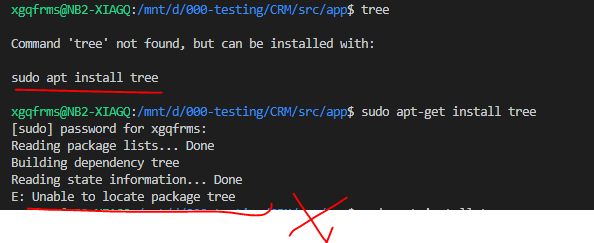
solution
# 1. update

$ sudo apt-get update

# 2. install

$ sudo apt install tree
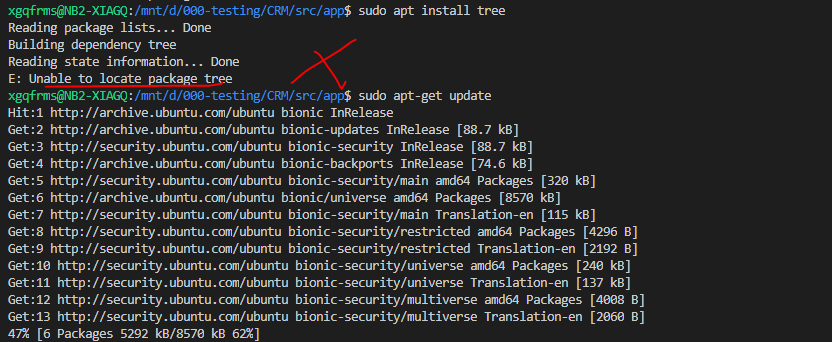

OK
https://github.com/xgqfrms-GitHub/Node-CLI-Tools/issues/20

CMD& tree
# TREE [drive:][path] [/F] [/A]

# /F   显示每个文件夹中文件的名称。(带扩展名)

$ tree /f

# /A   使用 ASCII 字符,而不使用扩展字符。

$ tree /a
# 将带扩展名的文件目录输出到list.txt文件中

$ tree /f > list.txt
tree
xgqfrms@NB2-XIAGQ:/mnt/d/000-testing/CRM$ tree --help

usage: tree [-acdfghilnpqrstuvxACDFJQNSUX] [-H baseHREF] [-T title ]

        [-L level [-R]] [-P pattern] [-I pattern] [-o filename] [--version]

        [--help] [--inodes] [--device] [--noreport] [--nolinks] [--dirsfirst]

        [--charset charset] [--filelimit[=]#] [--si] [--timefmt[=]<f>]

        [--sort[=]<name>] [--matchdirs] [--ignore-case] [--] [<directory list>]

  ------- Listing options -------

  -a            All files are listed.

  -d            List directories only.

  -l            Follow symbolic links like directories.

  -f            Print the full path prefix for each file.

  -x            Stay on current filesystem only.

  -L level      Descend only level directories deep.

  -R            Rerun tree when max dir level reached.

  -P pattern    List only those files that match the pattern given.

  -I pattern    Do not list files that match the given pattern.

  --ignore-case Ignore case when pattern matching.

  --matchdirs   Include directory names in -P pattern matching.

  --noreport    Turn off file/directory count at end of tree listing.

  --charset X   Use charset X for terminal/HTML and indentation line output.

  --filelimit # Do not descend dirs with more than # files in them.

  --timefmt <f> Print and format time according to the format <f>.

  -o filename   Output to file instead of stdout.

  -------- File options ---------

  -q            Print non-printable characters as '?'.

  -N            Print non-printable characters as is.

  -Q            Quote filenames with double quotes.

  -p            Print the protections for each file.

  -u            Displays file owner or UID number.

  -g            Displays file group owner or GID number.

  -s            Print the size in bytes of each file.

  -h            Print the size in a more human readable way.

  --si          Like -h, but use in SI units (powers of 1000).

  -D            Print the date of last modification or (-c) status change.

  -F            Appends '/', '=', '*', '@', '|' or '>' as per ls -F.

  --inodes      Print inode number of each file.

  --device      Print device ID number to which each file belongs.

  ------- Sorting options -------

  -v            Sort files alphanumerically by version.

  -t            Sort files by last modification time.

  -c            Sort files by last status change time.

  -U            Leave files unsorted.

  -r            Reverse the order of the sort.

  --dirsfirst   List directories before files (-U disables).

  --sort X      Select sort: name,version,size,mtime,ctime.

  ------- Graphics options ------

  -i            Don't print indentation lines.

  -A            Print ANSI lines graphic indentation lines.

  -S            Print with CP437 (console) graphics indentation lines.

  -n            Turn colorization off always (-C overrides).

  -C            Turn colorization on always.

  ------- XML/HTML/JSON options -------

  -X            Prints out an XML representation of the tree.

  -J            Prints out an JSON representation of the tree.

  -H baseHREF   Prints out HTML format with baseHREF as top directory.

  -T string     Replace the default HTML title and H1 header with string.

  --nolinks     Turn off hyperlinks in HTML output.

  ---- Miscellaneous options ----

  --version     Print version and exit.

  --help        Print usage and this help message and exit.

  --            Options processing terminator.

xgqfrms@NB2-XIAGQ:/mnt/d/000-testing/CRM$
tree level
$ tree -L 1

tree ignore multi folders
# tree ignore one folder

$ tree -I node_modules

# tree ignore multi folders

$ tree -I 'node_modules|build'
tree level
$ tree -L 3 -I "node_modules|bower_components"
https://www.cnblogs.com/xgqfrms/p/10729411.html

light h5 app demo
D:\000-testing\light-ios-app\h5_app>bash

xgqfrms@NB:/mnt/d/000-testing/light-ios-app/h5_app$ tree

#

├── app.js

├── app.less

├── css

│   ├── reset.css

│   └── style.less

├── images

│   ├── about-active.png

│   ├── about.png

│   ├── contact-active.png

│   ├── contact.png

│   ├── home-active.png

│   ├── home.png

│   ├── more.png

│   └── scan.png

├── index.html

├── lib

│   ├── package.json

│   └── px2rem.js

├── project.json

├── ui

│   └── ui.vue

└── view

    ├── index

    │   ├── about.vue

    │   ├── contact.vue

    │   └── home.vue

    └── index.vue

# 6 directories, 21 files

xgqfrms@NB:/mnt/d/000-testing/light-ios-app/h5_app$
cmd & tree & bash的更多相关文章
- cmd 与 bash 基础命令入门
身为一个程序员会用命令行来进行一些简单的操作,不是显得很装逼嘛!?嘿嘿~ ヾ(>∀<) cmd 与 bash 基础命令入门 简介 CMD 基础命令 ...
- [日常工作] cmd以及bash 直接使用当前目录的方法
1. 从知乎学到了一点.. 2. 之前想在比如f:\a\b 目录下执行cmd命令的时候 总是需要先 f: 再cd目录的方式. 3. 知乎上面学到 发现可以通过在当前目录下面 输入 cmd 或者是 b ...
- tree ignore & bash & cmd
tree ignore & bash & cmd tree ignore https://unix.stackexchange.com/a/47806 https://zaiste.n ...
- git 入门教程之 git bash 竟然不支持 tree 命令
开门见山 git bash 是 Windows 用户安装 git 时默认安装的命令行工具,不仅界面漂亮功能也不错,大多数情况下可以替代 Windows 原生的 cmd 命令行. 然而,git bash ...
- Dockerfile创建自定义Docker镜像以及CMD与ENTRYPOINT指令的比较
1.概述 创建Docker镜像的方式有三种 docker commit命令:由容器生成镜像: Dockerfile文件+docker build命令: 从本地文件系统导入:OpenVZ的模板. 关于这 ...
- cmd 导出目录树
cmd: tree /f >tree.txt
- PowerShell_零基础自学课程_2_Powershell与Cmd以及Unix/Linux Shell
上篇文章我说道,windows为了改变用户对其console界面的诟病,于是就从windows vista开始,计划要改变这种局面,于是就有 了Powershell的出现. 1.兼容shell命令 ...
- docker学习笔记11:Dockerfile 指令 CMD介绍
我们知道,通过docker run 创建并启动一个容器时,命令的最后可以指定容器启动后在容器内立即要执行的指令,如: docker run -i -t ubunu /bin/bash //表示容器 ...
- [转]【docker】CMD ENTRYPOINT 区别
本文转自:https://blog.csdn.net/u010900754/article/details/78526443 昨天用Dockerfile来启动mongodb的集群,启动参数--repl ...
随机推荐
- CSS的插入和选择器介绍
一.认识CSS样式 1.定义 CSS全称:层叠样式表(Cascading Style Sheets) 主要作用:定义HTML内容在浏览器内的显示样式,比如文字大小.颜色.字体加粗等 优点:通过定义某个 ...
- WCF无.SVC文件服务激活,及不添加服务引用调用WCF
一,新建WCF服务引用程序 1,删除.svc文件,全部删除. 2,新建 IService 类 namespace TestWcf { [ServiceContract] public interfac ...
- C# socket实践 - 简易版FTP(Server & Client)
写了个简易版的ftp(服务器和客户端),运行效果如下图: click download下载中的UI: 原理:模仿正规ftp方式,分成2个socket连接:文本命令socket.数据信道socket. ...
- 性能调优8:分组聚合 - group by
聚合实际上对数据做分组统计,SQL Server使用两种操作符来实现聚合,流聚合(Stream Aggregation)和哈希聚合(Hash aggration).流聚合是非阻塞性的,具有流的特性,流 ...
- IDEA报错Error:Module 'shop-common' production: java.lang.IndexOutOfBoundsException
问题描述: 本来项目是正常的,编译.运行.启动都是OK的,但是在一次电脑重启后,出现了以上这个问题:Error:Module 'shop-common' production: java.lang.I ...
- Centos7之Systemd(Service文件)详解
一.开机启动 对于那些支持 Systemd 的软件,安装的时候,会自动在/usr/lib/systemd/system目录添加一个配置文件. 如果你想让该软件开机启动,就执行下面的命令(以httpd. ...
- python第八章:多任务--小白博客
多线程threading 多线程特点: #线程的并发是利用cpu上下文的切换(是并发,不是并行)#多线程执行的顺序是无序的#多线程共享全局变量#线程是继承在进程里的,没有进程就没有线程#GIL全局解释 ...
- SQLSERVER事务日志已满 the transaction log for database 'xx' is full
解决办法:清除日志 USE [master] GO ALTER DATABASE DNName SET RECOVERY SIMPLE WITH NO_WAIT GO ALTER DATABASE D ...
- 使用publisher模式控制频繁的UI输出,避免Winform界面假死
http://www.cnblogs.com/Charltsing/p/publisher.html 最近测试task并发任务的效率与线程池的区别,发现了另外一个问题.task建立任务的速度很快,输出 ...
- Django 中的 cookie 和 session
一.cookie 由于HTTP协议是无状态的,而服务器端的业务必须是要有状态的.Cookie诞生的最初目的是为了存储web中的状态信息,以方便服务器端使用.比如判断用户是否是第一次访问网站.目前最新的 ...