
Elasticsearch 5.0Head插件
Elasticsearch 5.0 —— Head插件部署指南
使用ES的基本都会使用过head,但是版本升级到5.0后,head插件就不好使了。下面就看看如何在5.0中启动Head插件吧!
官方粗略教程
Running with built in server
enable cors by adding http.cors.enabled: true in elasticsearch configuration. Don’t forget to also set http.cors.allow-origin because no origin allowed by default. http.cors.allow-origin: "*" is valid value, however it’s considered as a security risk as your cluster is open to cross origin from anywhere.
Check Elasticsearch documentation on this parameter:
git clone git://github.com/mobz/elasticsearch-head.git

cd elasticsearch-head

npm install

grunt server
open http://localhost:9100/
This will start a local webserver running on port 9100 serving elasticsearch-head
Best option if you are likely to connect to several different clusters
部署5.0版本的ES
5.0版本的ES跟之前的版本最大的不同之处就是多了很多环境的校验,比如jdk,max-files等等。
设置内核参数
vi /etc/sysctl.conf

# 增加下面的内容

fs.file-max=65536

vm.max_map_count=262144
设置资源参数
vi /etc/security/limits.conf

# 修改

* soft nofile 32768

* hard nofile 65536
修改进程数
ulimit -u 2048修改elasticsearch的参数
修改一下es使用的参数:
# 换个集群的名字,免得跟别人的集群混在一起

cluster.name: es-5.0-test

# 换个节点名字

node.name: node-101

# 修改一下ES的监听地址,这样别的机器也可以访问

network.host: 0.0.0.0

# 默认的就好

http.port: 9200

# 增加新的参数,这样head插件可以访问es

http.cors.enabled: true

http.cors.allow-origin: "*"
注意,设置参数的时候:后面要有空格!
安装部署head
第一步,安装git
需要从github上面下载代码,因此先要安装git
yum -y install git安装完成后,就可以直接下载代码了:
git clone git://github.com/mobz/elasticsearch-head.git下载后,修改下777权限(简单粗暴),因为是独立启动head的,所以随便放一个位置就行了,参考:
/usr/elk/head/*****第二步,安装node
由于head插件本质上还是一个nodejs的工程,因此需要安装node,使用npm来安装依赖的包。(npm可以理解为maven)
去官网下载nodejs,https://nodejs.org/en/download/
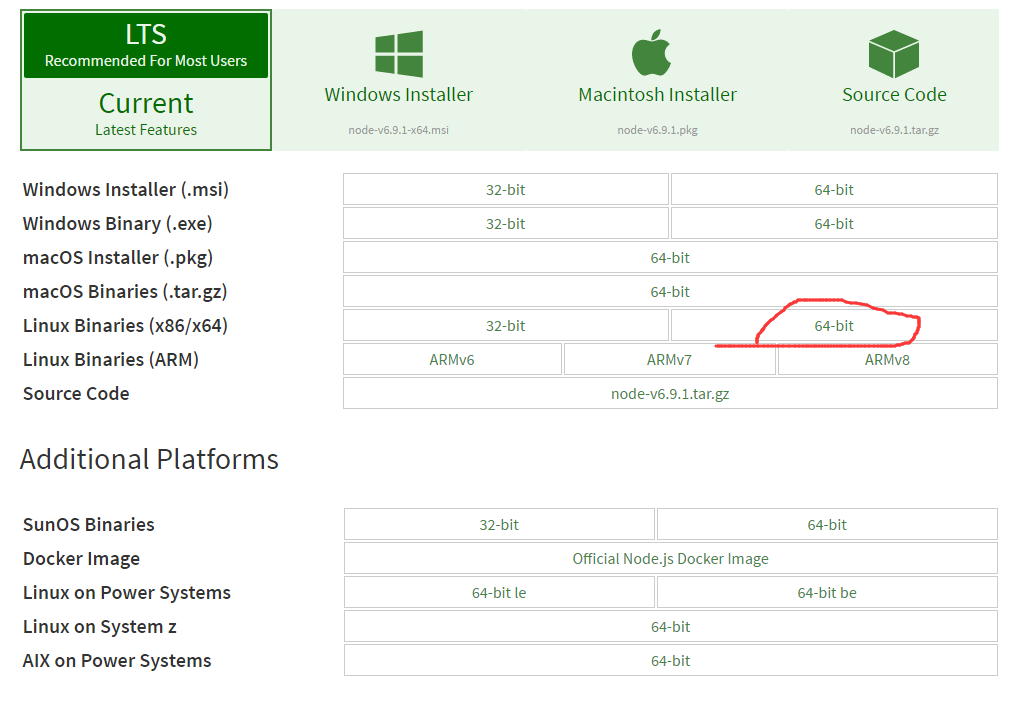
下载下来的jar包是xz格式的,一般的linux可能不识别,还需要安装xz.
yum -y install xz然后解压nodejs的安装包:
xz -d node*.tar.xz

tar -xvf node*.tar
解压完node的安装文件后,需要配置下环境变量,编辑/etc/profile,添加
# set node environment

export NODE_HOME=/usr/elk/node-v6.9.1-linux-x64

export PATH=$PATH:$NODE_HOME/bin
别忘记立即执行以下
source /etc/profile这个时候可以测试一下node是否生效:
[root@localnode1 node-v6.9.1-linux-x64]# echo $NODE_HOME

/usr/elk/node-v6.9.1-linux-x64

[root@localnode1 node-v6.9.1-linux-x64]# node -v

v6.9.1

[root@localnode1 node-v6.9.1-linux-x64]# npm -v

3.10.8
第三步,安装grunt
grunt是一个很方便的构建工具,可以进行打包压缩、测试、执行等等的工作,5.0里的head插件就是通过grunt启动的。因此需要安装一下grunt:
npm install grunt-cli安装完成后检查一下:
[root@localnode1 elasticsearch-head]# grunt -version

grunt-cli v1.2.0

grunt v0.4.5
第四步,修改head源码
由于head的代码还是2.6版本的,直接执行有很多限制,比如无法跨机器访问。因此需要用户修改两个地方:
修改服务器监听地址
目录:head/Gruntfile.js
connect: {

    server: {

        options: {

            port: 9100,

            hostname: '*',

            base: '.',

            keepalive: true

        }

    }

}
增加hostname属性,设置为*
修改连接地址:
目录:head/_site/app.js
修改head的连接地址:
this.base_uri = this.config.base_uri || this.prefs.get("app-base_uri") || "http://localhost:9200";把localhost修改成你es的服务器地址,如:
this.base_uri = this.config.base_uri || this.prefs.get("app-base_uri") || "http://10.10.10.10:9200";第五步,运行head
首先开启5.0 ES。
然后在head目录中,执行npm install 下载以来的包:
npm install 最后,启动nodejs
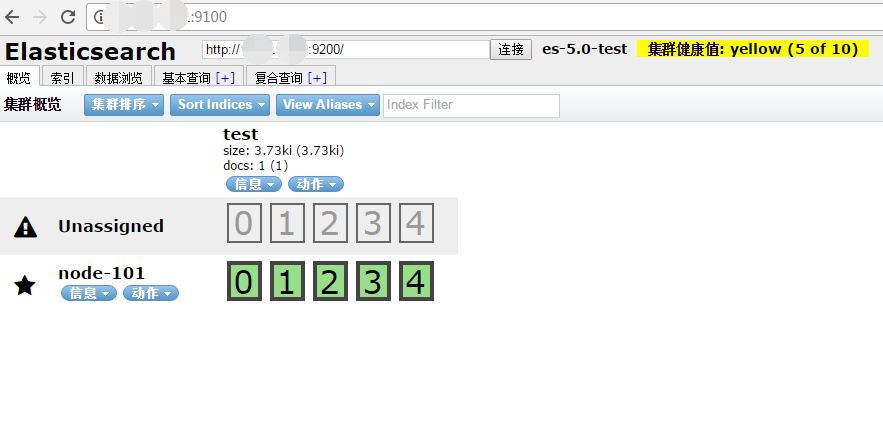
grunt server访问:target:9100
这个时候,访问http://xxx:9100就可以访问head插件了.
参考
Elasticsearch 5.0Head插件的更多相关文章
- ElasticSearch 2 (6) - 插件安装Head、Kopf与Bigdesk
ElasticSearch 2 (6) - 插件安装Head.Kopf与Bigdesk 摘要 安装Elasticsearch插件Head.Kopf与Bigdesk 版本 elasticsearch版本 ...
- ElasticSearch安装拼音插件 elasticsearch-analysis-pinyin
elasticsearch-analysis-pinyin 是 ElasticSearch的拼音插件.强大的功能支持拼音等的搜索 1.下载源代码 源码地址https://github.com/medc ...
- ElasticSearch之常用插件安装命令
#head监控安装,推荐 bin/plugin -install mobz/elasticsearch-head #bigdesk集群状态,推荐 bin/plugin -install lukas-v ...
- Elasticsearch之Hadoop插件的安装(图文详解)
这个Hadoop插件的安装是非常重要. Hadoop插件安装 在es的安装目录下 bin/plugin install elasticsearch/elasticsearch-repository-h ...
- Elasticsearch之sense插件安装之后的浏览详解
前提博客是 Elasticsearch之sense插件的安装(图文详解) 立马,可以看到 http://192.168.80.145:5601/app/sense 以后更新
- ElasticSearch安装SQL插件
ElasticSearch安装SQL插件下载地址(中国大佬开发的,膜拜ing):https://github.com/NLPchina/elasticsearch-sql 1.记得选择和自己Elast ...
- 使用SQL语法来查询Elasticsearch:Elasticsearch-SQL插件
简介 Elasticsearch-SQL是Elasticsearch的一个插件,它可以让我们通过类似SQL的方式对Elasticsearch中的数据进行查询.项目地址是:https://github. ...
- Elasticsearch及相关插件的安装
Elasticsearch及相关插件的安装 1.安装Elasticsearch并启动服务 2.安装第三方插件 2.1.Head插件 是Elasticsearch的一个集群管理工具,可以通过它来查看和搜 ...
- Elasticsearch安装X-Pack插件
Elasticsearch安装X-Pack插件, 基于已经安装好的6.2.2版本的Elasticsearch, 安装6.2.2版本的X-Pack插件. 1.下载x-pack的zip包到本地 https ...
随机推荐
- [Hive_add_9] Hive 的存储格式
0. 说明 Hive 的存储格式 | textfile | sequencefile | rcfile | orc | parquet | 1. Hive的存储格式 1.1 textfile 行式存储 ...
- win10安装nodejs遇到提示错误代码2503怎么办
我们在安装某个软件的时候,最闹心的就是遇到提示安装失败或错误,比如win10系统在安装nodejs遇到提示错误代码2503,遇见这个问题也不要慌张,今天小编就来告诉大家怎么解决这个问题. 1.打开智能 ...
- 《生命》第二集:Reptiles and Amphibians (爬行和两栖动物)
第二集也是一个个动物的片段,不过集中在爬行和两栖类动物上. 印度尼西亚的瀑布蟾蜍进化出神器强有力的脚,能够抓牢很多物体,是逃生的手段,同一环境下,卵石蟾蜍,能够缩紧全身肌肉,眼山坡下滑,是另一种逃生是 ...
- python 管道、数据共享、进程池
一.管道(Pipe)(了解) (详情参考:https://www.cnblogs.com/clschao/articles/9629392.html) 进程间通信(IPC)方式二:管道(不推荐使用,了 ...
- npm 安装卸载模块
npm安装模块 npm install xxx利用 npm 安装xxx模块到当前命令行所在目录 npm install -g xxx利用npm安装全局模块xxx 1 2 本地安装时将模块写入packa ...
- ES5-ES6-ES7_Generator 函数
Generator函数的概述 Generator 函数是 ES6 提供的一种异步编程解决方案 Generator函数指的是一种新的语法结构,是一个遍历器对象生成器,它内部可以封装多个状态,很适合用于异 ...
- 为什么swift是面向协议的编程--对面向对象机制的改进
主要目标是提供抽象能力和解决值类型的多态问题 Actually, Abrahams says, those are all attributes of types, and classes are j ...
- vue.js 官网及组件网站记录
官网 https://cn.vuejs.org/v2/guide/ 饿了么组件: http://element-cn.eleme.io/#/zh-CN/component/tree 异步请求框架插件 ...
- Linux:Day11(上) ifcfg命令
将Linux主机接入到网络中: 配置方式: 静态指定: ifcfg:ifconfig,route,netstat ip:object{link,addr,route},ss,tc 配置文件:syste ...
- docker 2 docker介绍
docker是基于go语言实现的云开源项目 docker的主要目标是‘build ,ship and run any app,anywhere’,也就是说通过对应用程序组件的封装,分发,部署,运行等生 ...