
Elasticsearch 5.0Head插件
Elasticsearch 5.0 —— Head插件部署指南
使用ES的基本都会使用过head,但是版本升级到5.0后,head插件就不好使了。下面就看看如何在5.0中启动Head插件吧!
官方粗略教程
Running with built in server
enable cors by adding http.cors.enabled: true in elasticsearch configuration. Don’t forget to also set http.cors.allow-origin because no origin allowed by default. http.cors.allow-origin: "*" is valid value, however it’s considered as a security risk as your cluster is open to cross origin from anywhere.
Check Elasticsearch documentation on this parameter:
git clone git://github.com/mobz/elasticsearch-head.git

cd elasticsearch-head

npm install

grunt server
open http://localhost:9100/
This will start a local webserver running on port 9100 serving elasticsearch-head
Best option if you are likely to connect to several different clusters
部署5.0版本的ES
5.0版本的ES跟之前的版本最大的不同之处就是多了很多环境的校验,比如jdk,max-files等等。
设置内核参数
vi /etc/sysctl.conf

# 增加下面的内容

fs.file-max=65536

vm.max_map_count=262144
设置资源参数
vi /etc/security/limits.conf

# 修改

* soft nofile 32768

* hard nofile 65536
修改进程数
ulimit -u 2048修改elasticsearch的参数
修改一下es使用的参数:
# 换个集群的名字,免得跟别人的集群混在一起

cluster.name: es-5.0-test

# 换个节点名字

node.name: node-101

# 修改一下ES的监听地址,这样别的机器也可以访问

network.host: 0.0.0.0

# 默认的就好

http.port: 9200

# 增加新的参数,这样head插件可以访问es

http.cors.enabled: true

http.cors.allow-origin: "*"
注意,设置参数的时候:后面要有空格!
安装部署head
第一步,安装git
需要从github上面下载代码,因此先要安装git
yum -y install git安装完成后,就可以直接下载代码了:
git clone git://github.com/mobz/elasticsearch-head.git下载后,修改下777权限(简单粗暴),因为是独立启动head的,所以随便放一个位置就行了,参考:
/usr/elk/head/*****第二步,安装node
由于head插件本质上还是一个nodejs的工程,因此需要安装node,使用npm来安装依赖的包。(npm可以理解为maven)
去官网下载nodejs,https://nodejs.org/en/download/
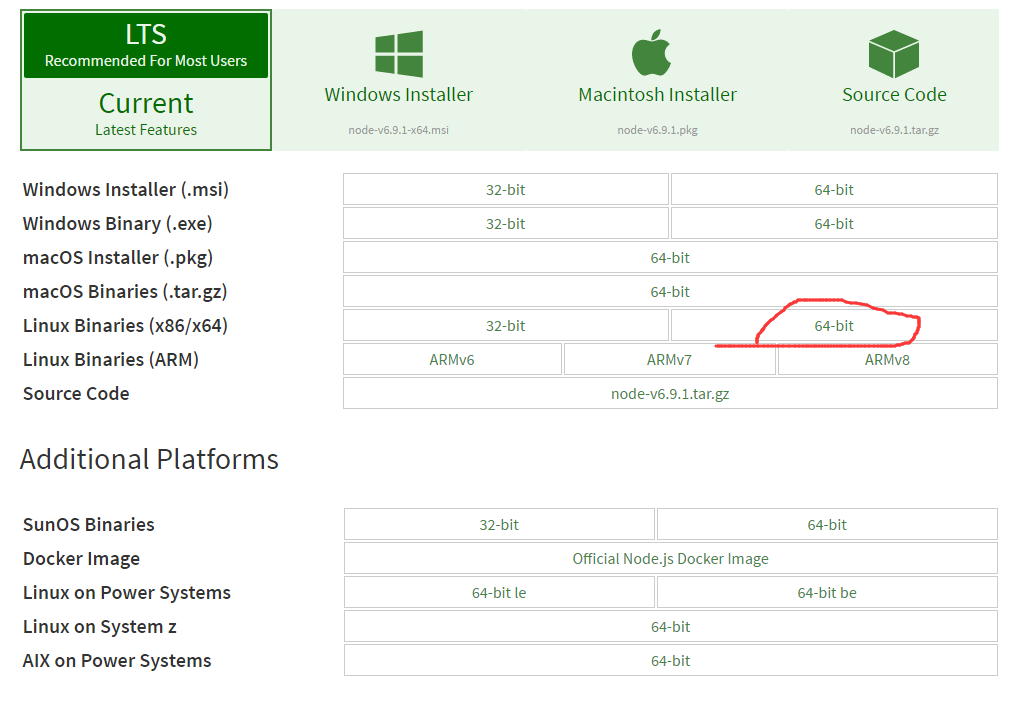
下载下来的jar包是xz格式的,一般的linux可能不识别,还需要安装xz.
yum -y install xz然后解压nodejs的安装包:
xz -d node*.tar.xz

tar -xvf node*.tar
解压完node的安装文件后,需要配置下环境变量,编辑/etc/profile,添加
# set node environment

export NODE_HOME=/usr/elk/node-v6.9.1-linux-x64

export PATH=$PATH:$NODE_HOME/bin
别忘记立即执行以下
source /etc/profile这个时候可以测试一下node是否生效:
[root@localnode1 node-v6.9.1-linux-x64]# echo $NODE_HOME

/usr/elk/node-v6.9.1-linux-x64

[root@localnode1 node-v6.9.1-linux-x64]# node -v

v6.9.1

[root@localnode1 node-v6.9.1-linux-x64]# npm -v

3.10.8
第三步,安装grunt
grunt是一个很方便的构建工具,可以进行打包压缩、测试、执行等等的工作,5.0里的head插件就是通过grunt启动的。因此需要安装一下grunt:
npm install grunt-cli安装完成后检查一下:
[root@localnode1 elasticsearch-head]# grunt -version

grunt-cli v1.2.0

grunt v0.4.5
第四步,修改head源码
由于head的代码还是2.6版本的,直接执行有很多限制,比如无法跨机器访问。因此需要用户修改两个地方:
修改服务器监听地址
目录:head/Gruntfile.js
connect: {

    server: {

        options: {

            port: 9100,

            hostname: '*',

            base: '.',

            keepalive: true

        }

    }

}
增加hostname属性,设置为*
修改连接地址:
目录:head/_site/app.js
修改head的连接地址:
this.base_uri = this.config.base_uri || this.prefs.get("app-base_uri") || "http://localhost:9200";把localhost修改成你es的服务器地址,如:
this.base_uri = this.config.base_uri || this.prefs.get("app-base_uri") || "http://10.10.10.10:9200";第五步,运行head
首先开启5.0 ES。
然后在head目录中,执行npm install 下载以来的包:
npm install 最后,启动nodejs
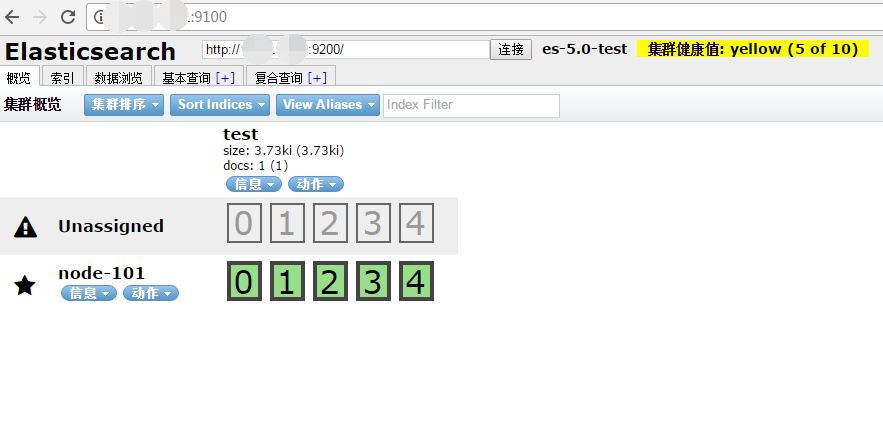
grunt server访问:target:9100
这个时候,访问http://xxx:9100就可以访问head插件了.
参考
Elasticsearch 5.0Head插件的更多相关文章
- ElasticSearch 2 (6) - 插件安装Head、Kopf与Bigdesk
ElasticSearch 2 (6) - 插件安装Head.Kopf与Bigdesk 摘要 安装Elasticsearch插件Head.Kopf与Bigdesk 版本 elasticsearch版本 ...
- ElasticSearch安装拼音插件 elasticsearch-analysis-pinyin
elasticsearch-analysis-pinyin 是 ElasticSearch的拼音插件.强大的功能支持拼音等的搜索 1.下载源代码 源码地址https://github.com/medc ...
- ElasticSearch之常用插件安装命令
#head监控安装,推荐 bin/plugin -install mobz/elasticsearch-head #bigdesk集群状态,推荐 bin/plugin -install lukas-v ...
- Elasticsearch之Hadoop插件的安装(图文详解)
这个Hadoop插件的安装是非常重要. Hadoop插件安装 在es的安装目录下 bin/plugin install elasticsearch/elasticsearch-repository-h ...
- Elasticsearch之sense插件安装之后的浏览详解
前提博客是 Elasticsearch之sense插件的安装(图文详解) 立马,可以看到 http://192.168.80.145:5601/app/sense 以后更新
- ElasticSearch安装SQL插件
ElasticSearch安装SQL插件下载地址(中国大佬开发的,膜拜ing):https://github.com/NLPchina/elasticsearch-sql 1.记得选择和自己Elast ...
- 使用SQL语法来查询Elasticsearch:Elasticsearch-SQL插件
简介 Elasticsearch-SQL是Elasticsearch的一个插件,它可以让我们通过类似SQL的方式对Elasticsearch中的数据进行查询.项目地址是:https://github. ...
- Elasticsearch及相关插件的安装
Elasticsearch及相关插件的安装 1.安装Elasticsearch并启动服务 2.安装第三方插件 2.1.Head插件 是Elasticsearch的一个集群管理工具,可以通过它来查看和搜 ...
- Elasticsearch安装X-Pack插件
Elasticsearch安装X-Pack插件, 基于已经安装好的6.2.2版本的Elasticsearch, 安装6.2.2版本的X-Pack插件. 1.下载x-pack的zip包到本地 https ...
随机推荐
- 南邮ctf-web的writeup
WEB 签到题 nctf{flag_admiaanaaaaaaaaaaa} ctrl+u或右键查看源代码即可.在CTF比赛中,代码注释.页面隐藏元素.超链接指向的其他页面.HTTP响应头部都可能隐藏f ...
- LeetCode算法题-Two Sum II - Input array is sorted
这是悦乐书的第179次更新,第181篇原创 01 看题和准备 今天介绍的是LeetCode算法题中Easy级别的第38题(顺位题号是167).给定已按升序排序的整数数组,找到两个数字,使它们相加到特定 ...
- winfrom之datagridview分页显示
这次datagridview绑定数据并分页操作,因为用到了webservice,所以代码会详细讲解.QueryByCondition是一个查询函数 客户端: PageData pageData=new ...
- 关于折半法查找的一些总结以及ArrayList类的总结
一.折半法查找的总结(这算法很好理解,但我花了好久琢磨他有啥用.....) 1.实际意义 折半法查找主要是为了能够很快在一个数组中找出我们所需要的那个元素,与往常我们通过一个一个比较的方法不同,折半法 ...
- B - 畅通工程再续 最小生成树
相信大家都听说一个“百岛湖”的地方吧,百岛湖的居民生活在不同的小岛中,当他们想去其他的小岛时都要通过划小船来实现.现在政府决定大力发展百岛湖,发展首先要解决的问题当然是交通问题,政府决定实现百岛湖的全 ...
- P3399 丝绸之路 dp
题目背景 张骞于公元前138年曾历尽艰险出使过西域.加强了汉朝与西域各国的友好往来.从那以后,一队队骆驼商队在这漫长的商贸大道上行进,他们越过崇山峻岭,将中国的先进技术带向中亚.西亚和欧洲,将那里的香 ...
- jar包内的文件导出的注意点
1.截取文件名 windows 和linux 通用 String fp[] = filePath.replaceAll("\\\\","/").split(&q ...
- linux命令中的“<”和“|”是什么意思?
”<” 表示的是输入重定向的意思,就是把<后面跟的文件取代键盘作为新的输入设备.”| ”则表示一个管道的意思,可以理解为东西从管道的一边流向另外一边. cat file.json | ...
- TensorFlow 学习资料
感谢几位大神的笔记: https://blog.csdn.net/column/details/13300.html?&page=3 https://blog.csdn.net/u014595 ...
- 【转】ffmpeg常用基本命令
[FFmpeg]FFmpeg常用基本命令 1.分离视频音频流 ffmpeg -i input_file -vcodec copy -an output_file_video //分离视频流 ffmpe ...