
emacs 设置emacs的外观
设置emacs的外观
emacs的外观包括文本区的外观,辅助区的外观,状态行的外观,光标的外观等,
每个外观都有名字,并且都有下面属性:
- Font Family: 字体名字
- Font Foundry: ?
- Width: 字体宽度
- Height: 字体宽度
- Weight: 字体重
- Slant: 斜体
- Underline: 下划线
- Overline: 上划线
- Strike-through: 透过线
- Box around text: ?
- Inverse-video: ?
- Foreground: 前景色
- Background: 背景色
- Stipple: ?
- Inherit: 继承别的外观
如何设置外观呢?emacs通过【Face】的东西来设置
face的定义:face可以定义字体,颜色等。大多数主编辑模式(major mode)分配各种face给函数名,注释,变量,关键字等,通过【Font Lock mode】。【Font Lock mode】的说明在后面。
Emacs can display text in several different styles, called faces. Each face can specify various face attributes, such as the font, height, weight, slant, foreground and background color, and underlining or overlining. Most major modes assign faces to the text automatically, via Font Lock mode.
注意:face里并不设定所有属性,没有被设定的属性就使用叫default的face的属性。比如face:popup-face,它只设定了前景色和背景色属性,所有它的其他属性的值就是face:default的相应属性的值。
这个概念非常重要,所以当改变了face:default里属性的值的话,就会影响所有face
list-faces-display :查看系统里有所有face
list-colors-display :查看系统里所有的颜色的名字和RGB值
set-face-foreground :改变指定face里的前景色(先输入要改变的face的名字,然后再输入颜色的名字)
set-face-background:改变指定face里的背景色(先输入要改变的face的名字,然后再输入颜色的名字)
ctrl h v 变量A:查看变量A的作用
Font Lock mode:
Font Lock mode is a minor mode, always local to a particular buffer, which assigns faces to (or fontifies) the text in the buffer. Each buffer's major mode tells Font Lock mode which text to fontify; for instance, programming language modes fontify syntactically relevant constructs like comments, strings, and function names.
Font Lock mode is enabled by default in major modes that support it. To toggle it in the current buffer, type M-x font-lock-mode.
font-lock-mode :作用在当前缓冲区
global-font-lock-mode:作用在当前缓冲区
Font Lock mode uses several specifically named faces to do its job, including font-lock-string-face, font-lock-comment-face, and others. The easiest way to find them all is to use
M-x customize-group 回车 font-lock-faces 回车. You can then use that customization buffer to customize the appearance of these faces.
从下图可以看出来:
1,关键字(font lock keyward face)后面是紫色,所以右面代码里关键字(template,protected,try等)部分全是紫色
2,函数名(font lock function name face)后面是蓝色,所以右面代码里函数名(insert,get_node等)部分全是蓝色
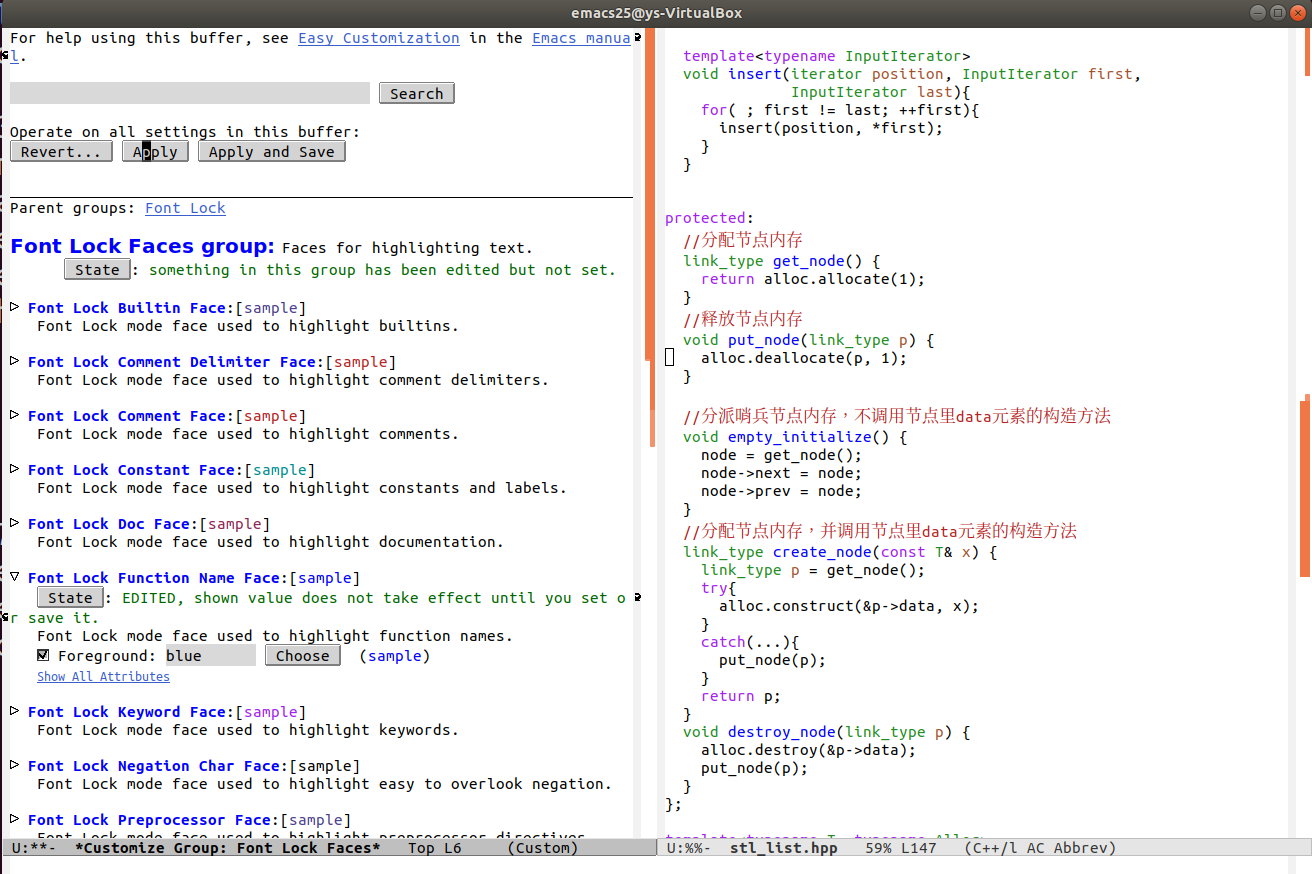
如何在上面的画面操作请参考Changing a Variable
注意:当通过用emacs改变变量的值后,会自动在.emacs里插入下面的代码。
(custom-set-variables

 ;; custom-set-variables was added by Custom.

 ;; If you edit it by hand, you could mess it up, so be careful.

 ;; Your init file should contain only one such instance.

 ;; If there is more than one, they won't work right.

)
注意:当通过用emacs改变face的设定后,会自动在.emacs里插入下面的代码。
;;设置face:default的背景色为黑色,前景色为白色,字体大小为218

(custom-set-faces

 ;; custom-set-variables was added by Custom.

 ;; If you edit it by hand, you could mess it up, so be careful.

 ;; Your init file should contain only one such instance.

 ;; If there is more than one, they won't work right.

)
注意:custom-set-faces和custom-set-variables在.emacs里只能出现一次。
c/c++ 学习互助QQ群:877684253

本人微信:xiaoshitou5854
emacs 设置emacs的外观的更多相关文章
- emacs设置了单例模式后无法设定文件关联解决办法
emacs设置单例模式的本质就是使用下列参数启动: C:\emacs-24.5\bin\emacsclientw.exe --no-wait --alternate-editor="C:\e ...
- emacs设置字体
* C-h f set-default-font set-default-font is an alias for `set-frame-font' in `frame.el'. (set-defau ...
- Emacs: 设置窗口标题格式
Emacs默认的窗口标题常常比较简单,例如我的默认标题是"emacs@ubuntu".如果想要在标题中显示更多的信息,我们可以对它进行一些设置.由于Emacs的可扩展性,这种修改实 ...
- emacs - GNU Emacs
总览 (SYNOPSIS) emacs [ command-line switches ] [ files ... ] 描述 (DESCRIPTION) GNU Emacs 是 Emacs 的 一个 ...
- emacs 配置.emacs
emacs 配置.emacs (require 'package) (package-initialize) (add-to-list'package-archives '("melpa&q ...
- iOS 11开发教程(十九)iOS11应用视图美化按钮之设置按钮的外观
iOS 11开发教程(十九)iOS11应用视图美化按钮之设置按钮的外观 美化按钮说白了就是对按钮的属性进行设置,设置按钮的属性有两种方法:一种是使用编辑界面中的属性检查器:另一种是使用代码进行设置.以 ...
- 设置emacs启动窗口的两种方法
1. 设置位置和大小 ;;设置窗口位置为屏库左上角(0,0) (set-frame-position (selected-frame) 0 0) ;;设置宽和高 (set-frame-width (s ...
- emacs设置tab缩进
这两天使用Emacs自带的JavaScriptMode时,发现与其它编辑器下缩进不同,而且用emacs重新缩进对齐后,再用其它的编辑器打时缩进却乱掉了.分析应该是Tab缩进的问题,在.emacs中增加 ...
- mac系统下为emacs设置中文字体,解决乱码问题
近期换了个系统,如今用mac系统. 当打开emacs后,中文支持的不是非常好.有的地方能显示.在.el文件的凝视里显示为口口口口口口口口这种框.例如以下图所看到的 找了半天.是由于中文字体的问题.仅仅 ...
随机推荐
- 手把手教你避开组件cover-view的那些坑
腾讯位置服务基于微信提供的小程序插件能力,专注于(围绕)地图功能,打造一系列小程序插件,可以帮助开发者简单.快速的构建小程序,是您实现地图功能的最佳伙伴.目前微信小程序插件提供路线规划.地铁图.地图选 ...
- 树莓派Raspberry pi安装系统/烧录系统
一:下载系统文件 1.树莓派官网系统下载链接:https://www.raspberrypi.org/downloads/raspbian/ (也可在百度云盘下载:https://pan.baidu. ...
- 网络编程~~~C/S B/S 架构
C: client 客户端 B: browse 浏览器 S: server 服务器端 C/S架构: 基于客户端与服务端之间的通信 优点: 个性化设置, 响应速度快 缺点: 开发成本和维护成本高, 占用 ...
- .Net Core 3.0开源可视化设计CMS内容管理系统建站系统
简介 ZKEACMS,又名纸壳CMS,是可视化编辑设计的内容管理系统.基于.Net Core开发可跨平台运行,并拥有卓越的性能. 纸壳CMS基于插件式设计,功能丰富,易于扩展,可快速创建网站. 布局设 ...
- 页面一刷新让文本框自动获取焦点-- 和自定义v-focus指令
<body> <div id="app"> <input type="text" value="" id=&q ...
- MongoDB学习笔记(三、MongoDB聚合与更新)
目录: 聚合 更新 更新选择器 ObjectId 更新操作的原子性 聚合: 聚合语法:db.collectionName.aggregate(aggregate_operation) 聚合操作其实就是 ...
- CentOS 7 配置SVN 笔记
一.通过yum 安装软件 yum install subversion -y 配置nfs 用来做版本库(略过) 格式 : NFS共享的目录 NFS客户端地址1(参数1,参数2,...) 客户端地址2( ...
- AcWing 795. 前缀和
题目地址 https://www.acwing.com/solution/AcWing/content/2075/ 题目描述输入一个长度为n的整数序列. 接下来再输入m个询问,每个询问输入一对l, ...
- springboot+jpa分库分表项目实例
分库分表场景 关系型数据库本身比较容易成为系统瓶颈,单机存储容量.连接数.处理能力都有限.当单表的数据量达到1000W或100G以后,由于查询维度较多,即使添加从库.优化索引,做很多操作时性能仍下降严 ...
- django--调用百度AI接口实现人脸注册登录
面部识别----考勤打卡.注册登录.面部支付等等...感觉很高大上,又很方便,下面用python中的框架--django完成一个注册登录的功能,调用百度AI的接口,面部识别在网上也有好多教程,可以自己 ...