
winform删除dataGridView列报异常:System.IndexOutOfRangeException:“索引 7 没有值
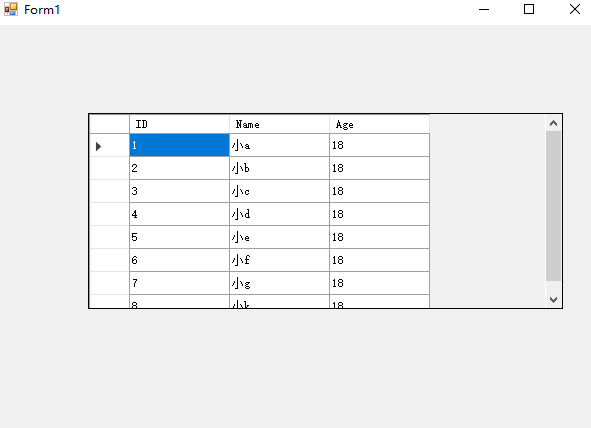
winform界面如下:
 using System;

 using System.Collections.Generic;

 using System.ComponentModel;

 using System.Data;

 using System.Drawing;

 using System.Linq;

 using System.Text;

 using System.Threading.Tasks;

 using System.Windows.Forms;

 namespace form1

 {

     public partial class Form1 : Form

     {

         List<Student> data = GetStudents();

         public Form1()

         {

             InitializeComponent();

             this.dataGridView1.DataSource = data;

         }

         public static List<Student> GetStudents()

         {

             return new List<Student>()

             {

                 new Student{ ID =,Name="小a",Age=},

                 new Student{ ID =,Name="小b",Age=},

                 new Student{ ID =,Name="小c",Age=},

                 new Student{ ID =,Name="小d",Age=},

                 new Student{ ID =,Name="小e",Age=},

                 new Student{ ID =,Name="小f",Age=},

                 new Student{ ID =,Name="小g",Age=},

                 new Student{ ID =,Name="小k",Age=}

             };

         }

         private void tsmDelete_Click(object sender, EventArgs e)

         {

             List<Student> students = new List<Student>();

             foreach (DataGridViewRow row in this.dataGridView1.SelectedRows)

             {

                 var student = row.DataBoundItem as Student;

                 if (student != null)

                 {

                      data.Remove(student);

                    // students.Add(student);

                 }

             }

             for (int i = ; i < students.Count(); i++)

             {

                 data.Remove(students[i]);

             }

             this.dataGridView1.DataSource = null;

             this.dataGridView1.DataSource = data;

         }

     }

 }
问题说明:右键删除行的时候异常,System.IndexOutOfRangeException:“索引 7 没有值。

删除的代码如下:
 private void tsmDelete_Click(object sender, EventArgs e)

        {

            foreach (DataGridViewRow row in this.dataGridView1.SelectedRows)

            {

                var student = row.DataBoundItem as Student;

                if (student != null)

                {

                     data.Remove(student);

                }

            }

            this.dataGridView1.DataSource = null;

            this.dataGridView1.DataSource = data;

        }
修改后的代码:
        private void tsmDelete_Click(object sender, EventArgs e)

        {

            List<Student> students = new List<Student>();

            foreach (DataGridViewRow row in this.dataGridView1.SelectedRows)

            {

                var student = row.DataBoundItem as Student;

                if (student != null)

                {

                students.Add(student);

                }

            }

            for (int i = 0; i < students.Count(); i++)

            {

                data.Remove(students[i]);

            }

            this.dataGridView1.DataSource = null;

            this.dataGridView1.DataSource = data;

        }
异常的原因分析:
this.dataGridView1.SelectedRows获取选中的行,假设删除的是第7行和第8行。
遍历去取删除这两行,类型DataGridViewRow 直接引用数据源中的值。第7行删除以后总行数就变成了7行 row.DataBoundItem去根据索引取第8行的值就超出了索引。
winform删除dataGridView列报异常:System.IndexOutOfRangeException:“索引 7 没有值的更多相关文章
- MVC4删除 pages引发的异常 System.Web.Optimization找不到引用
在MVC4的开发中,如果创建的项目为空MVC项目,那么在App_Start目录下没有BundleConfig.cs项的内容,在手动添加时在整个库中都找不到:System.Web.Optimizatio ...
- SQLServer\framework启动报异常:Module的类型初始值设定项引发异常
net framework卸载 重装 https://download.microsoft.com/download/E/4/1/E4173890-A24A-4936-9FC9-AF930FE3FA4 ...
- 集合遍历过程iterator, 添加删除元素报异常
list set 遍历过程中添加或者删除元素,报异常. 使用iterator 也会报异常 ConcurrentModificationException remove只能用迭代器的remove,而 ...
- DataGridView编辑实时生效和索引-1没有值问题
1. 问题:DataGridView单元格编辑后,只有离开焦点时,编辑的内容才会生效(在绑定的DataSource中生效). 使用 this.dataGridView1.CommitEdit(Dat ...
- C# winform单元格的formatted值的类型错误 DataGridView中CheckBox列运行时候System.FormatException异常
在DataGridView手动添加了CheckBox列;在窗体Show的时候,遇到一个错误:错误如下: DataGridView中发生一下异常:System.FormatException:单元格的F ...
- [Winform]DataGridView列自适应宽度
引言 在做winform项目中,数据控件DataGridView的使用多多少少是会用到的,如果不设置它的属性,默认情况下是不会自适应宽度的,你想查看某项的数据,就不得不将标题栏拖来拖去,挺烦的. 方法 ...
- DataGridView 中发生以下异常: System.Exception: 是 不是 Decimal 的有效值。 ---> System.FormatException: 输入字符串的格式不正确。
其实之前我自己是没测出这个问题的,但是一放到测试的手上就出来了,原因我知道在哪里改输什么东西,但是人家不知道啊.报错如下: --------------------------- “DataGridV ...
- DataGridView中的ComboboxCell报了System.ArgumentException:DagaGridViewComboBoxCell值无效错误
原因是初始化的时候给ComboboxCell绑定了一系列的值,但是真正赋值的时候却给了一个不在那一系列值范围中的值,所以就报了这个错 在开发的时候难免会因为数据的问题出现这个问题,为了不让系统崩掉,就 ...
- 异常:System.Data.EvaluateException: 未找到列[District].
异常:System.Data.EvaluateException: 未找到列[District]. 这里存在的问题不一定是说,数据源表没有该字段.此问题在于数据库字段包含空格字符.
随机推荐
- 静态链表-C语言实现
1.静态链表是在没有指针的编程语言里对链表的一种实现2.主要是用数组模拟指针3.在这里,使用结构体使数组的每一个空间可以存储一个数据元素(date)和一个游标(cur),游标的作用相当于链表的指针域, ...
- luogu P1031 均分纸牌
题目很简单,但是可以学一学贪心策略 把纸牌均匀分布,从左往右推掉不用的纸牌 #include <iostream> using namespace std; int main() { in ...
- B.Box
题目:盒子 题目:排列p是一个整数序列 p = [p1, p2,...,pn],由n个唯一的正整数组成 唯一的线索是你需要打开上锁的盒子 你只知道前缀的最大数,q1, q2, ..., qn,保证qi ...
- Django 11
目录 功能配置设计 跨站请求伪造CSRF 什么是CSRF 如果实现CSRF 如何避免CSRF CSRF相关的两个装饰器 auth模块 常用方法 扩展auth_user表中的字段 功能配置设计 实现类似 ...
- BIOS安全设置
1.开机按F2进入BIOS 2.进入 Security 界面 3.Set user password 用户密码 开机密码 设置为123456 4.Set supervisor password 进BI ...
- C语言每日一练——第1题
一.程序功能 程序的功能是:将大于整数m且紧靠m的k个素数存入数组xx.并把in.dat文件的内容输入到程序,并把输出结果输出道out.dat文件夹中例如:若输入17,5 则应该输入:19,23,29 ...
- NodeJS4-3静态资源服务器实战_优化成近似同步写法
实例3 上面有点回调,优化成近似同步的写法 route.js const fs =require('fs') const promisify = require('util').promisify; ...
- gitbook 入门教程之网站域名备案 icp 插件
欢迎访问 gitbook-plugin-icp 官网
- Codeforces Round #599 (Div. 2)
久违的写篇博客吧 A. Maximum Square 题目链接:https://codeforces.com/contest/1243/problem/A 题意: 给定n个栅栏,对这n个栅栏进行任意排 ...
- spring源码学习(三)--spring循环引用源码学习
在spring中,是支持单实例bean的循环引用(循环依赖)的,循环依赖,简单而言,就是A类中注入了B类,B类中注入了A类,首先贴出我的代码示例 @Component public class Add ...