
winform删除dataGridView列报异常:System.IndexOutOfRangeException:“索引 7 没有值
winform界面如下:
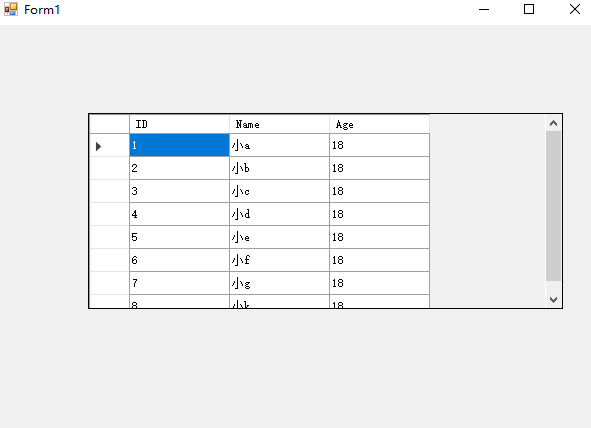
 using System;

 using System.Collections.Generic;

 using System.ComponentModel;

 using System.Data;

 using System.Drawing;

 using System.Linq;

 using System.Text;

 using System.Threading.Tasks;

 using System.Windows.Forms;

 namespace form1

 {

     public partial class Form1 : Form

     {

         List<Student> data = GetStudents();

         public Form1()

         {

             InitializeComponent();

             this.dataGridView1.DataSource = data;

         }

         public static List<Student> GetStudents()

         {

             return new List<Student>()

             {

                 new Student{ ID =,Name="小a",Age=},

                 new Student{ ID =,Name="小b",Age=},

                 new Student{ ID =,Name="小c",Age=},

                 new Student{ ID =,Name="小d",Age=},

                 new Student{ ID =,Name="小e",Age=},

                 new Student{ ID =,Name="小f",Age=},

                 new Student{ ID =,Name="小g",Age=},

                 new Student{ ID =,Name="小k",Age=}

             };

         }

         private void tsmDelete_Click(object sender, EventArgs e)

         {

             List<Student> students = new List<Student>();

             foreach (DataGridViewRow row in this.dataGridView1.SelectedRows)

             {

                 var student = row.DataBoundItem as Student;

                 if (student != null)

                 {

                      data.Remove(student);

                    // students.Add(student);

                 }

             }

             for (int i = ; i < students.Count(); i++)

             {

                 data.Remove(students[i]);

             }

             this.dataGridView1.DataSource = null;

             this.dataGridView1.DataSource = data;

         }

     }

 }
问题说明:右键删除行的时候异常,System.IndexOutOfRangeException:“索引 7 没有值。

删除的代码如下:
 private void tsmDelete_Click(object sender, EventArgs e)

        {

            foreach (DataGridViewRow row in this.dataGridView1.SelectedRows)

            {

                var student = row.DataBoundItem as Student;

                if (student != null)

                {

                     data.Remove(student);

                }

            }

            this.dataGridView1.DataSource = null;

            this.dataGridView1.DataSource = data;

        }
修改后的代码:
        private void tsmDelete_Click(object sender, EventArgs e)

        {

            List<Student> students = new List<Student>();

            foreach (DataGridViewRow row in this.dataGridView1.SelectedRows)

            {

                var student = row.DataBoundItem as Student;

                if (student != null)

                {

                students.Add(student);

                }

            }

            for (int i = 0; i < students.Count(); i++)

            {

                data.Remove(students[i]);

            }

            this.dataGridView1.DataSource = null;

            this.dataGridView1.DataSource = data;

        }
异常的原因分析:
this.dataGridView1.SelectedRows获取选中的行,假设删除的是第7行和第8行。
遍历去取删除这两行,类型DataGridViewRow 直接引用数据源中的值。第7行删除以后总行数就变成了7行 row.DataBoundItem去根据索引取第8行的值就超出了索引。
winform删除dataGridView列报异常:System.IndexOutOfRangeException:“索引 7 没有值的更多相关文章
- MVC4删除 pages引发的异常 System.Web.Optimization找不到引用
在MVC4的开发中,如果创建的项目为空MVC项目,那么在App_Start目录下没有BundleConfig.cs项的内容,在手动添加时在整个库中都找不到:System.Web.Optimizatio ...
- SQLServer\framework启动报异常:Module的类型初始值设定项引发异常
net framework卸载 重装 https://download.microsoft.com/download/E/4/1/E4173890-A24A-4936-9FC9-AF930FE3FA4 ...
- 集合遍历过程iterator, 添加删除元素报异常
list set 遍历过程中添加或者删除元素,报异常. 使用iterator 也会报异常 ConcurrentModificationException remove只能用迭代器的remove,而 ...
- DataGridView编辑实时生效和索引-1没有值问题
1. 问题:DataGridView单元格编辑后,只有离开焦点时,编辑的内容才会生效(在绑定的DataSource中生效). 使用 this.dataGridView1.CommitEdit(Dat ...
- C# winform单元格的formatted值的类型错误 DataGridView中CheckBox列运行时候System.FormatException异常
在DataGridView手动添加了CheckBox列;在窗体Show的时候,遇到一个错误:错误如下: DataGridView中发生一下异常:System.FormatException:单元格的F ...
- [Winform]DataGridView列自适应宽度
引言 在做winform项目中,数据控件DataGridView的使用多多少少是会用到的,如果不设置它的属性,默认情况下是不会自适应宽度的,你想查看某项的数据,就不得不将标题栏拖来拖去,挺烦的. 方法 ...
- DataGridView 中发生以下异常: System.Exception: 是 不是 Decimal 的有效值。 ---> System.FormatException: 输入字符串的格式不正确。
其实之前我自己是没测出这个问题的,但是一放到测试的手上就出来了,原因我知道在哪里改输什么东西,但是人家不知道啊.报错如下: --------------------------- “DataGridV ...
- DataGridView中的ComboboxCell报了System.ArgumentException:DagaGridViewComboBoxCell值无效错误
原因是初始化的时候给ComboboxCell绑定了一系列的值,但是真正赋值的时候却给了一个不在那一系列值范围中的值,所以就报了这个错 在开发的时候难免会因为数据的问题出现这个问题,为了不让系统崩掉,就 ...
- 异常:System.Data.EvaluateException: 未找到列[District].
异常:System.Data.EvaluateException: 未找到列[District]. 这里存在的问题不一定是说,数据源表没有该字段.此问题在于数据库字段包含空格字符.
随机推荐
- Flask开发成语接龙游戏,闲来无事手机玩玩自己写的游戏吧!
英语单词学习应用 周五发布的文章Flask开发天气查询软件,带你掌握pipenv的使用与手机Termux下的部署发布后,看到喜欢的人比较多.本来周末打算照着扇贝/极光单词,写一个英语单词自测工具.但苦 ...
- Kafka 安装配置 及 简单实验记录
1. 下载二进制文件并解压,并修改 broker.id 的值 wget http://apache.fayea.com/kafka/0.10.0.0/kafka_2.10-0.10.0.0.tgz - ...
- 洛谷 P1920 成功密码 题解
这是蒟蒻的第一篇题解,(之前的都没过,估计这篇也过不了 回到正题 这题,本蒟蒻第一眼看到以后,就决定咦,这不是模拟吗? 看到世界范围,嗯,打扰了. 扯回正题 首先,暴力肯定是A不了的(至少我A不了 但 ...
- npm 安装/删除/发布/更新/撤销 发布包
目录 一. npm安装包 1.1 什么时候用本地/全局安装? 1 当你试图安装命令行工具的时候,例如 grunt CLI的时候,使用全局安装 2. 当你试图通过npm install 某个模块,并通过 ...
- React中autoComplete="off" 失效
Turning Off Autocomplete in Chrome with React tl;dr Add a hidden input with an arbitrary value attri ...
- 用jquery实现楼层滚动对应导航高亮
html 结构排版: // 定位到页面左侧或者右侧 <div class="nav"> <ul id="menu-list"& ...
- 这个Python爬虫的简单入门及实用的实例,你会吗?
前言本文的文字及图片来源于网络,仅供学习.交流使用,不具有任何商业用途,版权归原作者所有,如有问题请及时联系我们以作处理.作者:HOT_and_COOl 利用爬虫可以进行数据挖掘,比如可以爬取别人的网 ...
- 如何禁止chrome浏览器http自动转成https
Chrome 浏览器 地址栏中输入 chrome://net-internals/#hsts 在 Delete domain security policies 中输入项目的域名,并 Delete 删 ...
- 微信团队分享:极致优化,iOS版微信编译速度3倍提升的实践总结
1.引言 岁月真是个养猪场,这几年,人胖了,微信代码也翻了. 记得 14 年转岗来微信时,用自己笔记本编译微信工程才十来分钟.如今用公司配的 17 年款 27-inch iMac 编译要接近半小时:偶 ...
- MySQL高级查询之索引创建、删除、增加、修改、慢sql、explain解释sql
day04数据库 昨日知识点回顾 1.单表操作 1.单表的操作 条件查询的优先级别: where > group by >having > order by > limit; ...