
Dynamics CRM中的注释(Note)及RollupRequest消息初探
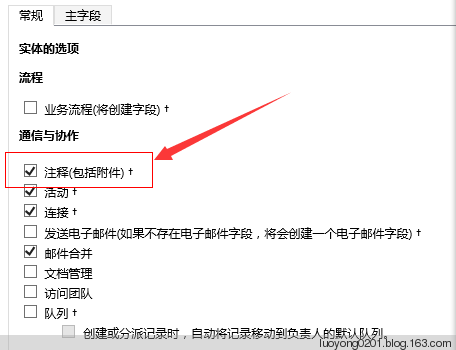

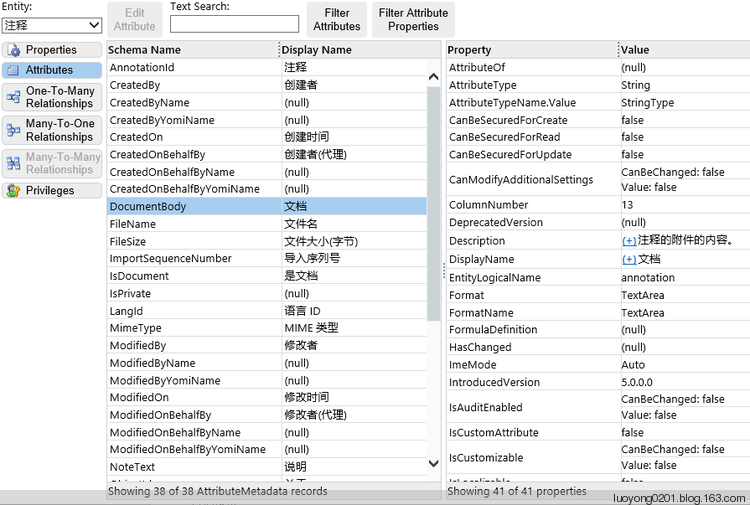
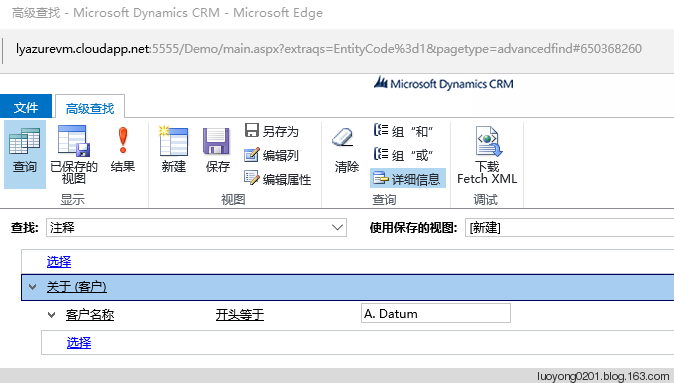
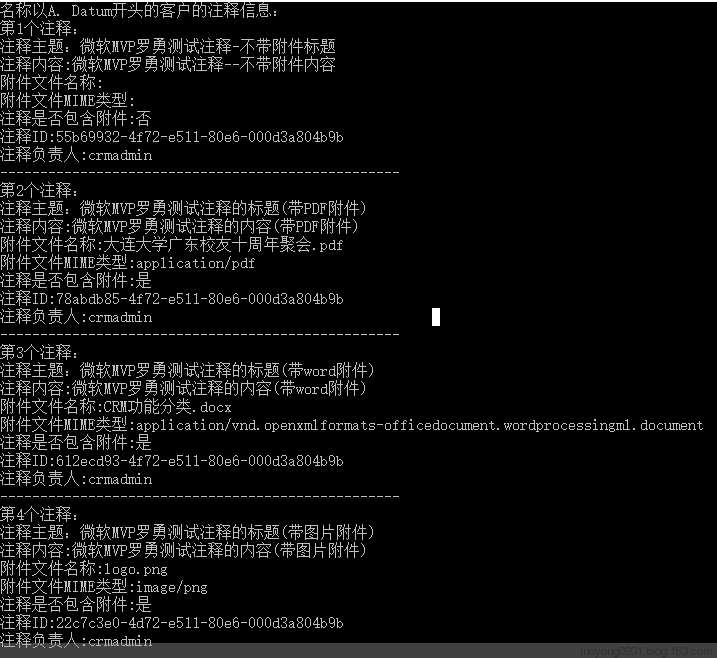
我们把这FetchXML下载下来,增加几个显示的字段,用代码执行以下看看:
   class Program

    {

        static void Main(string[] args)

        {

            var service = GetOrganizationService();

            var fetchXML = string.Format(@"<fetch mapping='logical' output-format='xml-platform' version='1.0' distinct='false'>

  <entity name='annotation'>

    <attribute name='subject' />

    <attribute name='notetext' />

    <attribute name='filename' />

    <attribute name='mimetype' />

    <attribute name='isdocument' />

    <attribute name='ownerid' />

    <attribute name='annotationid' />

    <order descending='false' attribute='subject' />

    <link-entity name='account' to='objectid' from='accountid' alias='ac'>

      <filter type='and'>

        <condition value='A. Datum%' attribute='name' operator='like' />

      </filter>

    </link-entity>

  </entity>

</fetch>");

            EntityCollection ec = service.RetrieveMultiple(new FetchExpression(fetchXML));

            Console.WriteLine("名称以A. Datum开头的客户的注释信息:");

            var i = ;

            foreach (var entity in service.RetrieveMultiple(new FetchExpression(fetchXML)).Entities)

            {

                Console.WriteLine("第" + i + "个注释:");

                Console.WriteLine("注释主题:" + entity.GetAttributeValue<string>("subject"));

                Console.WriteLine("注释内容:" + entity.GetAttributeValue<string>("notetext"));

                Console.WriteLine("附件文件名称:" + entity.GetAttributeValue<string>("filename"));

                Console.WriteLine("附件文件MIME类型:" + entity.GetAttributeValue<string>("mimetype"));

                Console.WriteLine("注释是否包含附件:" + (entity.GetAttributeValue<bool>("isdocument")?"是":"否"));

                Console.WriteLine("注释ID:" + entity.GetAttributeValue<Guid>("annotationid"));

                Console.WriteLine("注释负责人:" + entity.GetAttributeValue<EntityReference>("ownerid").Name);

                Console.WriteLine("--------------------------------------------------");

                i++;

            }

            Console.WriteLine("程序运行完成!");

            Console.ReadKey();

        }
        static void Main(string[] args)

        {

            var service = GetOrganizationService();

            var annotationEntity = new Entity("annotation");

            //新增带不带附件的注释

            annotationEntity["subject"] = "微软MVP罗勇用代码增加的不带附件的注释标题";

            annotationEntity["notetext"] = "微软MVP罗勇用代码增加的不带附件的注释内容";

            annotationEntity["isdocument"] = false;

            annotationEntity["objectid"] = new EntityReference("account", new Guid("858AB47F-494A-E511-80D2-000D3A802FAC"));

            service.Create(annotationEntity);

            //新增带附件的注释

            annotationEntity = new Entity("annotation");

            annotationEntity["subject"] = "微软MVP罗勇用代码增加的带附件的注释标题";

            annotationEntity["notetext"] = "微软MVP罗勇用代码增加的带附件的注释内容";

            annotationEntity["filename"] = "sugege.png";

            using (FileStream fs = File.OpenRead(@"D:\sugege.png"))

            {

                byte[] bytes = new byte[fs.Length];

                fs.Read(bytes, , bytes.Length);

                annotationEntity["documentbody"] = Convert.ToBase64String(bytes);

            }

            annotationEntity["mimetype"] = "image/png";

            annotationEntity["isdocument"] = true;

            annotationEntity["objectid"] = new EntityReference("account", new Guid("858AB47F-494A-E511-80D2-000D3A802FAC"));

            service.Create(annotationEntity);

            Console.WriteLine("程序运行完成!");

            Console.ReadKey();

        }
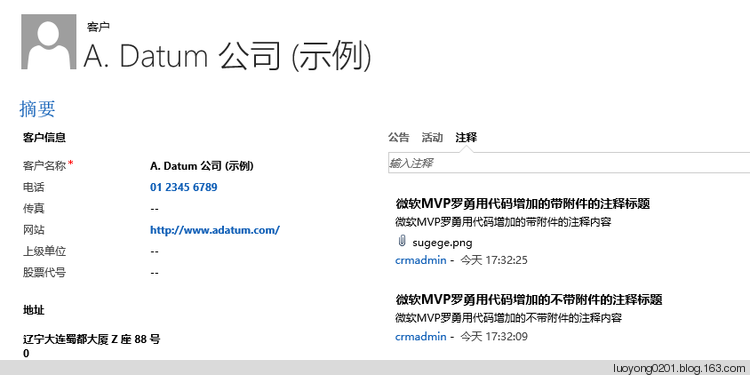
这个实体还支持消息RollupRequest,英文版的解释是:Retrieves the annotations (notes) related to the specified record (account, contact, or opportunity). 中文大概意思获取某条记录(仅支持客户,联系人,商机实体)相关的注释。如果不做实验的话,你可能会不明白这个相关到底是啥意思吧?我们用代码来看看:
        static void Main(string[] args)

        {

            var service = GetOrganizationService();

            var annotationEntity = new Entity("annotation");

            RollupRequest rollupreq = new RollupRequest();

            QueryExpression qe = new QueryExpression();

            qe.EntityName = "annotation";

            qe.ColumnSet = new ColumnSet("subject","notetext","createdon","objectid");

            qe.Distinct = false;

            qe.NoLock = true;

            qe.AddOrder("createdon", OrderType.Ascending);

            qe.Criteria = new FilterExpression

                                {

                                    FilterOperator = LogicalOperator.And,

                                    Conditions =

                                    {

                                        new ConditionExpression("subject", ConditionOperator.NotNull)

                                    },

                                };

            rollupreq.Query = qe;

            rollupreq.Target = new EntityReference("account", new Guid("858AB47F-494A-E511-80D2-000D3A802FAC"));

            rollupreq.RollupType = RollupType.Extended;

            RollupResponse rollupResponse = (RollupResponse)service.Execute(rollupreq);

            var i = ;

            foreach (var entity in rollupResponse.EntityCollection.Entities)

            {

                Console.WriteLine("第" + (i+) + "个注释:");

                Console.WriteLine("注释主题:" + entity.GetAttributeValue<string>("subject"));

                Console.WriteLine("注释内容:" + entity.GetAttributeValue<string>("notetext"));

                Console.WriteLine("创建时间:" + entity.GetAttributeValue<DateTime>("createdon"));

                //objectid字段不能获取它的Name属性,囧

                Console.WriteLine("是关于实体:" + entity.GetAttributeValue<EntityReference>("objectid").LogicalName + "的记录:" + entity.GetAttributeValue<EntityReference>("objectid").Id);

                i++;

            }

            Console.WriteLine("程序运行完成!");

            Console.ReadKey();

        }
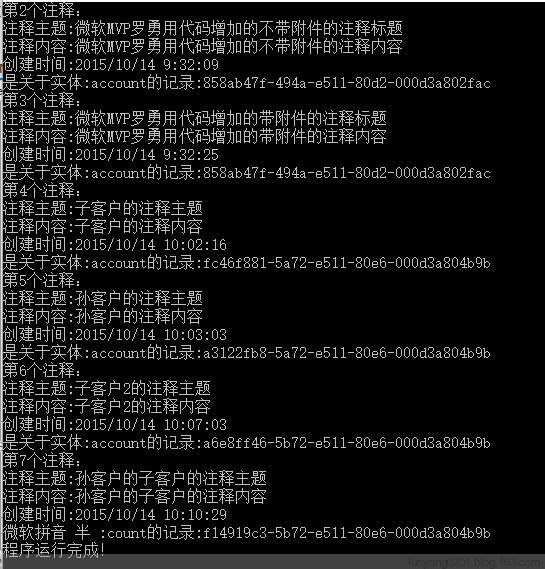
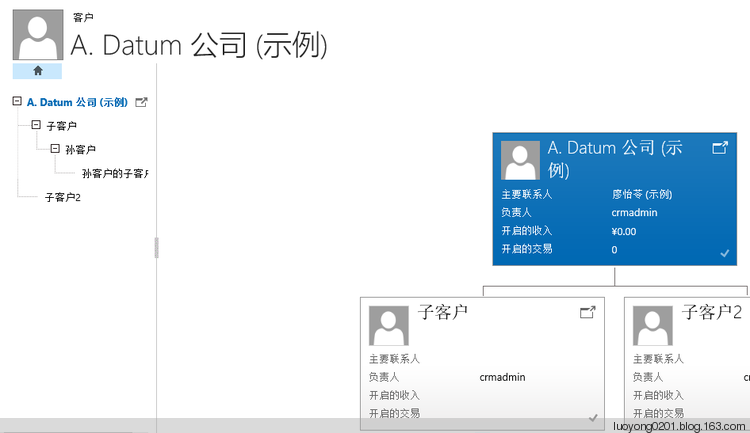
当然为了上面的代码更加好看到效果,我通过 客户的 上级单位 字段为目标客户建立了如下的层级关系:
Dynamics CRM中的注释(Note)及RollupRequest消息初探的更多相关文章
- 在Dynamics CRM中使用Bootstrap
我是微软Dynamics 365 & Power Platform方面的工程师罗勇,也是2015年7月到2018年6月连续三年Dynamics CRM/Business Solutions方面 ...
- Dyanmics CRM您无法登陆系统。原因可能是您的用户记录或所属的业务部门在Microoft Dynamics CRM中已被禁用
当在操作CRM时,做不论什么的写操作包含创建数据.更新数据.都会提示以下截图中的错误:"您无法登陆系统.原因可能是您的用户记录或所属的业务部门在Microoft Dynamics CRM中已 ...
- Dynamics CRM中一个查找字段引发的【血案】
摘要: 本人微信和易信公众号: 微软动态CRM专家罗勇 ,回复267或者20180311可方便获取本文,同时可以在第一间得到我发布的最新的博文信息,follow me!我的网站是 www.luoyon ...
- 在Dynamics CRM中自定义一个通用的查看编辑注释页面
关注本人微信和易信公众号: 微软动态CRM专家罗勇 ,回复162或者20151016可方便获取本文,同时可以在第一时间得到我发布的最新的博文信息,follow me! 注释在CRM中的显示是比较特别, ...
- Dynamics CRM中的操作(action)是否是一个事务(transaction)?
关注本人微信和易信公众号: 微软动态CRM专家罗勇 ,回复168或者20151104可方便获取本文,同时可以在第一时间得到我发布的最新的博文信息,follow me! 以前的博文 微软Dynamics ...
- Dynamics CRM中的地址知多D?
关注本人微信和易信公众号: 微软动态CRM专家罗勇 ,回复169或者20151105可方便获取本文,同时可以在第一时间得到我发布的最新的博文信息,follow me! CRM中的地址以前不是很了解,定 ...
- Dynamics CRM 中Web API中的深度创建(Deep Insert)
我是微软Dynamics 365 & Power Platform方面的工程师罗勇,也是2015年7月到2018年6月连续三年Dynamics CRM/Business Solutions方面 ...
- 您无法登陆系统。原因可能是您的用户记录或所属的业务部门在Microoft Dynamics CRM中已被禁用
问题发生在CRM 4.0 上 1 用户所在办事处及办事处上级被禁用. 2 如果已经重新启用了,还是报这个错误. 可以把停用的办事处及相关下级再重新--停用--启用一次试试. 3 如果还是报错,查看是否 ...
- Dynamics 365中的常用Associate和Disassociate消息汇总
摘要: 微软动态CRM专家罗勇 ,回复301或者20190123可方便获取本文,同时可以在第一间得到我发布的最新博文信息,follow me!我的网站是 www.luoyong.me . 因为编程时候 ...
随机推荐
- PlayJava Day019
今日所学: /* 2019.08.19开始学习,此为补档. */ 1.this: ①this是成员方法的一个特殊的固有的本地变量,它表达了调用这个方法的那个对象. ②在成员方法内部直接调用自己(thi ...
- C#中在多个地方调用同一个触发器从而触发同一个自定义委托的事件
场景 在Winfom中可以在页面上多个按钮或者右键的点击事件中触发同一个自定义的委托事件. 实现 在位置一按钮点击事件中触发 string parentPath = System.IO.Directo ...
- 简约清新日系你好五月通用PPT模板推荐
模版来源:http://ppt.dede58.com/peixunyanjiang/26488.html
- 多线程之NSOpertionQueue操作队列
//NSOpertionQueue NSOperation //Queue //主队列 和 自定义队列 //主队列是运行在主线程当中,自定义队列运行在后台 //NSOperation 定义需要执行的操 ...
- 一行代码在Linux服务器上搭建基于.Net Core的博客
如果你有一台Linux服务器(CentOS7+ 或者 Ubuntu 16.04+)可以使用以下命令快速搭建一个博客. curl http://cdn.zkeasoft.com/zkeacms-blog ...
- Codeforces Round #583 (Div. 1 + Div. 2, based on Olympiad of Metropolises)
传送门 A. Optimal Currency Exchange 枚举一下就行了. Code #include <bits/stdc++.h> using namespace std; t ...
- 关于rabbitmq
关于rabbitmq 1 简单介绍rabbitmq RabbitMQ是实现了高级消息队列协议(AMQP)的开源消息代理软件(亦称面向消息的中间件).RabbitMQ服务器是用Erlang语言编写的,而 ...
- layUI学习第二日:非模块化方法使用layUI
layUI采用非模块化方式(即所有模块一次性加载),操作示例代码如下(如果问怎么创建项目和工具,参考layUI学习第一日的步骤): 运行的结果如下: 运行的显示不会太持久,过几秒就会消失,具体封装的代 ...
- mock 模拟数据在框架中的简单使用
首先在框架中需要安装mock模块 cnpm i mockjs -S 其次在src文件夹下新建mock文件夹,在mock文件夹中新建一个index.js文件 代码如下: const Mock = req ...
- asp.net的原理
Asp.net的作业流是指什么?很多人都不是很了解,也不知道是用来干什么的有怎样运用,其实能够从简略的基础了解. 作业流(Workflow),便是“事务进程的部分或全体在核算机使用环境下的主动化”(i ...