
Linux查看CPU和内存情况
本文简单介绍在Linux上查看CPU和内存情况和一款系统资源查看工具htop。
查看CPU情况
以下是个人工作会经常使用到的服务器的信息。
查看所有CPU信息
可以通过如下命令查看所有CPU信息:
# cat /proc/cpuinfo
[starnight@344eeb24-3fac-11e9-b49d-0014101d20c6 ~]$ cat /proc/cpuinfo

processor    : 0

vendor_id    : GenuineIntel

cpu family    : 6

model        : 94

model name    : Intel(R) Core(TM) i7-6700 CPU @ 3.40GHz

stepping    : 3

microcode    : 0x7c

cpu MHz        : 3699.890

cache size    : 8192 KB

physical id    : 0

siblings    : 8

core id        : 0

cpu cores    : 4

apicid        : 0

initial apicid    : 0

fpu        : yes

fpu_exception    : yes

cpuid level    : 22

wp        : yes

flags        : fpu vme de pse tsc msr pae mce cx8 apic sep mtrr pge mca cmov pat pse36 clflush dts acpi mmx fxsr sse sse2 ss ht tm pbe syscall nx pdpe1gb rdtscp lm constant_tsc arch_perfmon pebs bts rep_good nopl xtopology nonstop_tsc aperfmperf eagerfpu pni pclmulqdq dtes64 monitor ds_cpl vmx smx est tm2 ssse3 fma cx16 xtpr pdcm pcid sse4_1 sse4_2 x2apic movbe popcnt tsc_deadline_timer aes xsave avx f16c rdrand lahf_lm abm 3dnowprefetch ida arat epb pln pts dtherm hwp hwp_noitfy hwp_act_window hwp_epp tpr_shadow vnmi flexpriority ept vpid fsgsbase tsc_adjust bmi1 hle avx2 smep bmi2 erms invpcid rtm mpx rdseed adx smap clflushopt xsaveopt xsavec xgetbv1 xsaves

bogomips    : 6816.08

clflush size    : 64

cache_alignment    : 64

address sizes    : 39 bits physical, 48 bits virtual

power management:

processor    : 1

vendor_id    : GenuineIntel

cpu family    : 6

model        : 94

model name    : Intel(R) Core(TM) i7-6700 CPU @ 3.40GHz

stepping    : 3

microcode    : 0x7c

cpu MHz        : 3699.890

cache size    : 8192 KB

physical id    : 0

siblings    : 8

core id        : 1

cpu cores    : 4

apicid        : 2

initial apicid    : 2

fpu        : yes

fpu_exception    : yes

cpuid level    : 22

wp        : yes

flags        : fpu vme de pse tsc msr pae mce cx8 apic sep mtrr pge mca cmov pat pse36 clflush dts acpi mmx fxsr sse sse2 ss ht tm pbe syscall nx pdpe1gb rdtscp lm constant_tsc arch_perfmon pebs bts rep_good nopl xtopology nonstop_tsc aperfmperf eagerfpu pni pclmulqdq dtes64 monitor ds_cpl vmx smx est tm2 ssse3 fma cx16 xtpr pdcm pcid sse4_1 sse4_2 x2apic movbe popcnt tsc_deadline_timer aes xsave avx f16c rdrand lahf_lm abm 3dnowprefetch ida arat epb pln pts dtherm hwp hwp_noitfy hwp_act_window hwp_epp tpr_shadow vnmi flexpriority ept vpid fsgsbase tsc_adjust bmi1 hle avx2 smep bmi2 erms invpcid rtm mpx rdseed adx smap clflushopt xsaveopt xsavec xgetbv1 xsaves

bogomips    : 6816.08

clflush size    : 64

cache_alignment    : 64

address sizes    : 39 bits physical, 48 bits virtual

power management:

processor    : 2

vendor_id    : GenuineIntel

cpu family    : 6

model        : 94

model name    : Intel(R) Core(TM) i7-6700 CPU @ 3.40GHz

stepping    : 3

microcode    : 0x7c

cpu MHz        : 3699.890

cache size    : 8192 KB

physical id    : 0

siblings    : 8

core id        : 2

cpu cores    : 4

apicid        : 4

initial apicid    : 4

fpu        : yes

fpu_exception    : yes

cpuid level    : 22

wp        : yes

flags        : fpu vme de pse tsc msr pae mce cx8 apic sep mtrr pge mca cmov pat pse36 clflush dts acpi mmx fxsr sse sse2 ss ht tm pbe syscall nx pdpe1gb rdtscp lm constant_tsc arch_perfmon pebs bts rep_good nopl xtopology nonstop_tsc aperfmperf eagerfpu pni pclmulqdq dtes64 monitor ds_cpl vmx smx est tm2 ssse3 fma cx16 xtpr pdcm pcid sse4_1 sse4_2 x2apic movbe popcnt tsc_deadline_timer aes xsave avx f16c rdrand lahf_lm abm 3dnowprefetch ida arat epb pln pts dtherm hwp hwp_noitfy hwp_act_window hwp_epp tpr_shadow vnmi flexpriority ept vpid fsgsbase tsc_adjust bmi1 hle avx2 smep bmi2 erms invpcid rtm mpx rdseed adx smap clflushopt xsaveopt xsavec xgetbv1 xsaves

bogomips    : 6816.08

clflush size    : 64

cache_alignment    : 64

address sizes    : 39 bits physical, 48 bits virtual

power management:

processor    : 3

vendor_id    : GenuineIntel

cpu family    : 6

model        : 94

model name    : Intel(R) Core(TM) i7-6700 CPU @ 3.40GHz

stepping    : 3

microcode    : 0x7c

cpu MHz        : 3699.890

cache size    : 8192 KB

physical id    : 0

siblings    : 8

core id        : 3

cpu cores    : 4

apicid        : 6

initial apicid    : 6

fpu        : yes

fpu_exception    : yes

cpuid level    : 22

wp        : yes

flags        : fpu vme de pse tsc msr pae mce cx8 apic sep mtrr pge mca cmov pat pse36 clflush dts acpi mmx fxsr sse sse2 ss ht tm pbe syscall nx pdpe1gb rdtscp lm constant_tsc arch_perfmon pebs bts rep_good nopl xtopology nonstop_tsc aperfmperf eagerfpu pni pclmulqdq dtes64 monitor ds_cpl vmx smx est tm2 ssse3 fma cx16 xtpr pdcm pcid sse4_1 sse4_2 x2apic movbe popcnt tsc_deadline_timer aes xsave avx f16c rdrand lahf_lm abm 3dnowprefetch ida arat epb pln pts dtherm hwp hwp_noitfy hwp_act_window hwp_epp tpr_shadow vnmi flexpriority ept vpid fsgsbase tsc_adjust bmi1 hle avx2 smep bmi2 erms invpcid rtm mpx rdseed adx smap clflushopt xsaveopt xsavec xgetbv1 xsaves

bogomips    : 6816.08

clflush size    : 64

cache_alignment    : 64

address sizes    : 39 bits physical, 48 bits virtual

power management:

processor    : 4

vendor_id    : GenuineIntel

cpu family    : 6

model        : 94

model name    : Intel(R) Core(TM) i7-6700 CPU @ 3.40GHz

stepping    : 3

microcode    : 0x7c

cpu MHz        : 3699.890

cache size    : 8192 KB

physical id    : 0

siblings    : 8

core id        : 0

cpu cores    : 4

apicid        : 1

initial apicid    : 1

fpu        : yes

fpu_exception    : yes

cpuid level    : 22

wp        : yes

flags        : fpu vme de pse tsc msr pae mce cx8 apic sep mtrr pge mca cmov pat pse36 clflush dts acpi mmx fxsr sse sse2 ss ht tm pbe syscall nx pdpe1gb rdtscp lm constant_tsc arch_perfmon pebs bts rep_good nopl xtopology nonstop_tsc aperfmperf eagerfpu pni pclmulqdq dtes64 monitor ds_cpl vmx smx est tm2 ssse3 fma cx16 xtpr pdcm pcid sse4_1 sse4_2 x2apic movbe popcnt tsc_deadline_timer aes xsave avx f16c rdrand lahf_lm abm 3dnowprefetch ida arat epb pln pts dtherm hwp hwp_noitfy hwp_act_window hwp_epp tpr_shadow vnmi flexpriority ept vpid fsgsbase tsc_adjust bmi1 hle avx2 smep bmi2 erms invpcid rtm mpx rdseed adx smap clflushopt xsaveopt xsavec xgetbv1 xsaves

bogomips    : 6816.08

clflush size    : 64

cache_alignment    : 64

address sizes    : 39 bits physical, 48 bits virtual

power management:

processor    : 5

vendor_id    : GenuineIntel

cpu family    : 6

model        : 94

model name    : Intel(R) Core(TM) i7-6700 CPU @ 3.40GHz

stepping    : 3

microcode    : 0x7c

cpu MHz        : 3699.890

cache size    : 8192 KB

physical id    : 0

siblings    : 8

core id        : 1

cpu cores    : 4

apicid        : 3

initial apicid    : 3

fpu        : yes

fpu_exception    : yes

cpuid level    : 22

wp        : yes

flags        : fpu vme de pse tsc msr pae mce cx8 apic sep mtrr pge mca cmov pat pse36 clflush dts acpi mmx fxsr sse sse2 ss ht tm pbe syscall nx pdpe1gb rdtscp lm constant_tsc arch_perfmon pebs bts rep_good nopl xtopology nonstop_tsc aperfmperf eagerfpu pni pclmulqdq dtes64 monitor ds_cpl vmx smx est tm2 ssse3 fma cx16 xtpr pdcm pcid sse4_1 sse4_2 x2apic movbe popcnt tsc_deadline_timer aes xsave avx f16c rdrand lahf_lm abm 3dnowprefetch ida arat epb pln pts dtherm hwp hwp_noitfy hwp_act_window hwp_epp tpr_shadow vnmi flexpriority ept vpid fsgsbase tsc_adjust bmi1 hle avx2 smep bmi2 erms invpcid rtm mpx rdseed adx smap clflushopt xsaveopt xsavec xgetbv1 xsaves

bogomips    : 6816.08

clflush size    : 64

cache_alignment    : 64

address sizes    : 39 bits physical, 48 bits virtual

power management:

processor    : 6

vendor_id    : GenuineIntel

cpu family    : 6

model        : 94

model name    : Intel(R) Core(TM) i7-6700 CPU @ 3.40GHz

stepping    : 3

microcode    : 0x7c

cpu MHz        : 3699.890

cache size    : 8192 KB

physical id    : 0

siblings    : 8

core id        : 2

cpu cores    : 4

apicid        : 5

initial apicid    : 5

fpu        : yes

fpu_exception    : yes

cpuid level    : 22

wp        : yes

flags        : fpu vme de pse tsc msr pae mce cx8 apic sep mtrr pge mca cmov pat pse36 clflush dts acpi mmx fxsr sse sse2 ss ht tm pbe syscall nx pdpe1gb rdtscp lm constant_tsc arch_perfmon pebs bts rep_good nopl xtopology nonstop_tsc aperfmperf eagerfpu pni pclmulqdq dtes64 monitor ds_cpl vmx smx est tm2 ssse3 fma cx16 xtpr pdcm pcid sse4_1 sse4_2 x2apic movbe popcnt tsc_deadline_timer aes xsave avx f16c rdrand lahf_lm abm 3dnowprefetch ida arat epb pln pts dtherm hwp hwp_noitfy hwp_act_window hwp_epp tpr_shadow vnmi flexpriority ept vpid fsgsbase tsc_adjust bmi1 hle avx2 smep bmi2 erms invpcid rtm mpx rdseed adx smap clflushopt xsaveopt xsavec xgetbv1 xsaves

bogomips    : 6816.08

clflush size    : 64

cache_alignment    : 64

address sizes    : 39 bits physical, 48 bits virtual

power management:

processor    : 7

vendor_id    : GenuineIntel

cpu family    : 6

model        : 94

model name    : Intel(R) Core(TM) i7-6700 CPU @ 3.40GHz

stepping    : 3

microcode    : 0x7c

cpu MHz        : 3699.890

cache size    : 8192 KB

physical id    : 0

siblings    : 8

core id        : 3

cpu cores    : 4

apicid        : 7

initial apicid    : 7

fpu        : yes

fpu_exception    : yes

cpuid level    : 22

wp        : yes

flags        : fpu vme de pse tsc msr pae mce cx8 apic sep mtrr pge mca cmov pat pse36 clflush dts acpi mmx fxsr sse sse2 ss ht tm pbe syscall nx pdpe1gb rdtscp lm constant_tsc arch_perfmon pebs bts rep_good nopl xtopology nonstop_tsc aperfmperf eagerfpu pni pclmulqdq dtes64 monitor ds_cpl vmx smx est tm2 ssse3 fma cx16 xtpr pdcm pcid sse4_1 sse4_2 x2apic movbe popcnt tsc_deadline_timer aes xsave avx f16c rdrand lahf_lm abm 3dnowprefetch ida arat epb pln pts dtherm hwp hwp_noitfy hwp_act_window hwp_epp tpr_shadow vnmi flexpriority ept vpid fsgsbase tsc_adjust bmi1 hle avx2 smep bmi2 erms invpcid rtm mpx rdseed adx smap clflushopt xsaveopt xsavec xgetbv1 xsaves

bogomips    : 6816.08

clflush size    : 64

cache_alignment    : 64

address sizes    : 39 bits physical, 48 bits virtual

power management:
通过一些正则命令,对信息进行简单处理得到我们想要直观了解的。
查看CPU处理器个数及核心数
[starnight@344eeb24-3fac-11e9-b49d-0014101d20c6 ~]$ cat /proc/cpuinfo | grep processor

processor    : 0

processor    : 1

processor    : 2

processor    : 3

processor    : 4

processor    : 5

processor    : 6

processor    : 7

[starnight@344eeb24-3fac-11e9-b49d-0014101d20c6 ~]$ cat /proc/cpuinfo | grep processor | wc -l

8

[starnight@344eeb24-3fac-11e9-b49d-0014101d20c6 ~]$ cat /proc/cpuinfo | grep cores

cpu cores    : 4

cpu cores    : 4

cpu cores    : 4

cpu cores    : 4

cpu cores    : 4

cpu cores    : 4

cpu cores    : 4

cpu cores    : 4
我们可以看到总共有8个CPU处理器,每个CPU含4个核心,所以总共是32核处理器。
查看内存情况
可以通过如下命令查看系统内存情况。
[starnight@344eeb24-3fac-11e9-b49d-0014101d20c6 ~]$ cat /proc/meminfo

MemTotal:       32702400 kB

MemFree:         3832872 kB

MemAvailable:    9085276 kB

Buffers:          581664 kB

Cached:          4648776 kB

SwapCached:            0 kB

Active:         24087688 kB

Inactive:        3200156 kB

Active(anon):   22058572 kB

Inactive(anon):    15576 kB

Active(file):    2029116 kB

Inactive(file):  3184580 kB

Unevictable:           0 kB

Mlocked:               0 kB

SwapTotal:       3932156 kB

SwapFree:        3932156 kB

Dirty:              1640 kB

Writeback:             0 kB

AnonPages:      22055476 kB

Mapped:           214600 kB

Shmem:             16764 kB

Slab:             366336 kB

SReclaimable:     292124 kB

SUnreclaim:        74212 kB

KernelStack:       47264 kB

PageTables:        92440 kB

NFS_Unstable:          0 kB

Bounce:                0 kB

WritebackTmp:          0 kB

CommitLimit:    20283356 kB

Committed_AS:   44230900 kB

VmallocTotal:   34359738367 kB

VmallocUsed:      605820 kB

VmallocChunk:   34359129668 kB

HardwareCorrupted:     0 kB

AnonHugePages:  18122752 kB

HugePages_Total:       0

HugePages_Free:        0

HugePages_Rsvd:        0

HugePages_Surp:        0

Hugepagesize:       2048 kB

DirectMap4k:      100336 kB

DirectMap2M:     2965504 kB

DirectMap1G:    30408704 kB
关于内存,更常用的命令是free。
free查看内存使用情况
[starnight@344eeb24-3fac-11e9-b49d-0014101d20c6 ~]$ free

              total        used        free      shared  buff/cache   available

Mem:       32702400    23234672     3867356       16812     5600372     9123264

Swap:       3932156           0     3932156

[starnight@344eeb24-3fac-11e9-b49d-0014101d20c6 ~]$ free -m    # 以M为单位显示

              total        used        free      shared  buff/cache   available

Mem:          31935       22690        3776          16        5469        8908

Swap:          3839           0        3839

[starnight@344eeb24-3fac-11e9-b49d-0014101d20c6 ~]$ free -h    # 以人可读的方式显示,单位G

              total        used        free      shared  buff/cache   available

Mem:            31G         22G        3.7G         16M        5.3G        8.7G

Swap:          3.7G          0B        3.7G
可以看到内存总共31G左右,可用8.7G。
查看CPU和内存使用情况
Linux下可以使用Top命令查看系统CPU和内存的使用情况。
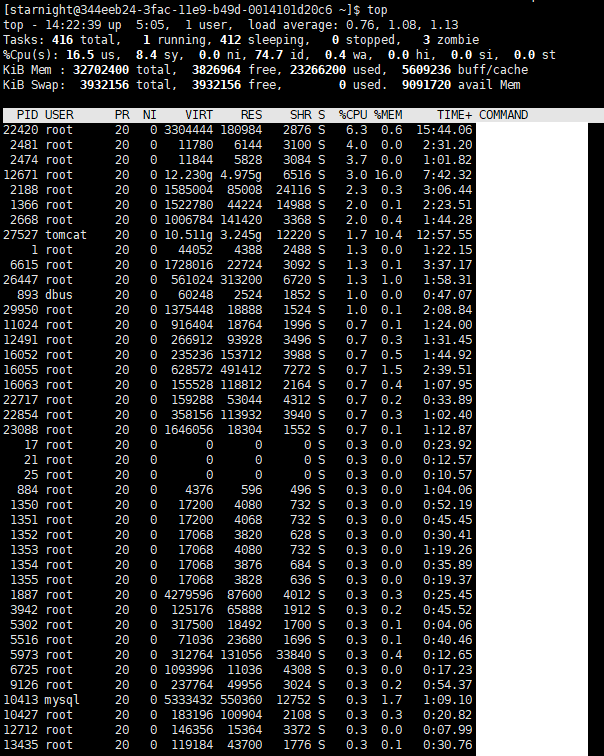
top命令详解
进程列表部分:
  PID:进程的ID

  USER:进程所有者

  PR:进程的优先级别,越小越优先被执行

  NInice:值

  VIRT:进程占用的虚拟内存

  RES:进程占用的物理内存

  SHR:进程使用的共享内存

  S:进程的状态。S表示休眠,R表示正在运行,Z表示僵死状态,N表示该进程优先值为负数

  %CPU:进程占用CPU的使用率

  %MEM:进程使用的物理内存和总内存的百分比

  TIME+:该进程启动后占用的总的CPU时间,即占用CPU使用时间的累加值。

  COMMAND:进程启动命令名称
系统信息栏:
  第一行(top):

    系统当前时刻;

    系统启动后到现在的运作时间;

    当前登录到系统的用户,更确切的说是登录到用户的终端数;

    当前系统负载的平均值,三个值分别为1分钟前、5分钟前、15分钟前进程的平均数;

  第二行(Tasks):

    total:当前系统进程总数;

    running:当前运行中的进程数;

    sleeping:当前处于睡眠状态中的进程数;

    stopped:被停止的系统进程数;

    zombie:僵尸进程数;

  第三行(Cpus):

    分别表示了 CPU 当前的使用率;

  第四行(Mem):

    分别表示了内存总量、当前使用量、空闲内存量、以及缓冲使用中的内存量;

  第五行(Swap):

    表示类别同第四行(Mem),但此处反映着交换分区(Swap)的使用情况。
htop工具
官网描述是Unix下一款交互式的进程查看工具,可以方便地查看运行中进程的资源占用情况。
htop - an interactive process viewer for Unix
Ubuntu下可简单使用命令安装:
# sudo apt install htop
直接输入htop即可查看。
上面红框部分为摘要信息(Summary),其中1,2为两个CPU核心,CPU、内存、交换分区资源占用大小一目了然。
中部跟前述的top命令类似,便不赘述。
底部“工具栏”显示可使用的快捷键。
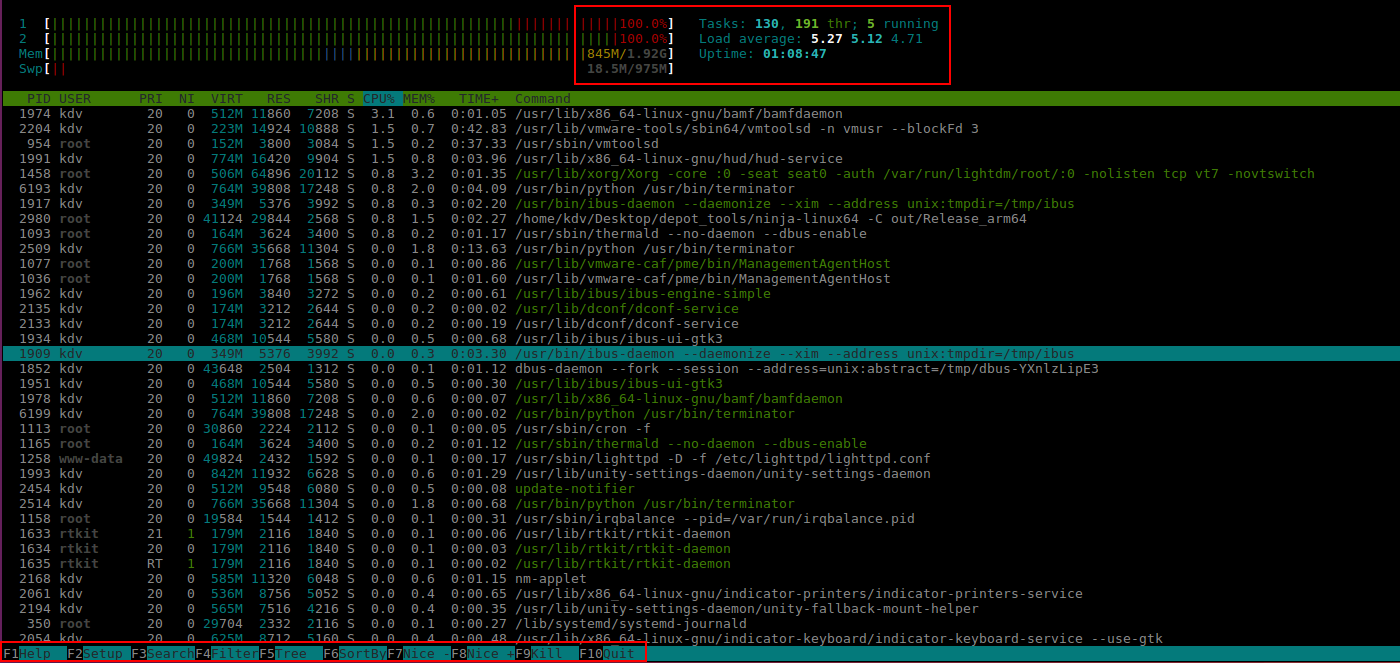
比如可以用F5以树形结构显示进程/线程之间的父子关系:

参考:
Linux查看CPU和内存情况的更多相关文章
- Linux查看CPU和内存使用情况 【转】
Linux查看CPU和内存使用情况 在系统维护的过程中,随时可能有需要查看 CPU 使用率,并根据相应信息分析系统状况的需要.在 CentOS 中,可以通过 top 命令来查看 CPU 使用状况.运行 ...
- Linux查看CPU和内存使用情况总结
Linux查看CPU和内存使用情况:http://www.cnblogs.com/xd502djj/archive/2011/03/01/1968041.html 在做Linux系统优化的时候,物理内 ...
- Linux 查看CPU和内存的使用情况
Linux 查看CPU和内存的使用情况 如何查看Linux机器的CPU和内存的使用情况. 可以通过如下方式: 1.查看CPU和内存的实时使用情况 使用如下命令: top 命令执行后,效果如下(资源的使 ...
- Linux 查看CPU,内存,硬盘 !转
Linux 查看CPU,内存,硬盘 本文转自:http://hi.baidu.com/mumachuntian/item/a401368dbe8a66cab07154e8 1 查看CPU 1.1 查看 ...
- Linux查看CPU和内存使用情况(转)
在系统维护的过程中,随时可能有需要查看 CPU 使用率,并根据相应信息分析系统状况的需要.在 CentOS 中,可以通过 top 命令来查看 CPU 使用状况.运行 top 命令后,CPU 使用状态会 ...
- Linux查看CPU和内存使用情况
在系统维护的过程中,随时可能有需要查看 CPU 使用率,并根据相应信息分析系统状况的需要.在 CentOS 中,可以通过 top 命令来查看 CPU 使用状况.运行 top 命令后,CPU 使用状态会 ...
- Linux查看CPU和内存使用情况【转】
转自:http://www.cnblogs.com/xd502djj/archive/2011/03/01/1968041.html 在系统维护的过程中,随时可能有需要查看 CPU 使用率,并根据相应 ...
- top命令 Linux查看CPU和内存使用情况
一.top命令 top命令是一个功能十分强大的监控系统的工具,对于系统管理员而言尤其重要.但是,它的缺点是会消耗很多系统资源. 在系统维护的过程中,随时可能有需要查看 CPU 使用率,并根据相应信息分 ...
- 【转】Linux查看CPU和内存使用情况
=====================================top============================================== 在系统维护的过程中,随时可 ...
随机推荐
- wxxcx_learn异常处理
属于基础框架,分级别 捕获异常,处理异常(记录日志,修复异常,返回客户端错误),抛出异常 全局异常处理(AOP)对错误同一格式化 try{ $banner = BannerModel::getBann ...
- 【IntelliJ Idea】常用快捷键
[IntelliJ Idea]常用快捷键 转载:https://www.cnblogs.com/yangchongxing/p/10654018.html ============= 调试 ===== ...
- 【设计模式】单例模式-Singleton
[设计模式]单例模式-SingletonEnsure a class has only one instance, and provide a global point to access of it ...
- 还不懂MySQL索引?这1次彻底搞懂B+树和B-树
前言 看了很多关于索引的博客,讲的大同小异.但是始终没有让我明白关于索引的一些概念,如B-Tree索引,Hash索引,唯一索引….或许有很多人和我一样,没搞清楚概念就开始研究B-Tree,B+Tree ...
- 《Java基础知识》Java字符串详解
本文内容: String类的概述 String类的使用步骤 String类的常用方法 本文目的: 能够使用String类的构造方法创建字符串对象 能够明确String类的构造方法创建对象,和直接赋值创 ...
- JS正则表达式语法(含ES6)(表格简要总结)
文章目录 JS正则表达式 1. JS中正则表达式定义 2. 直接量字符 3. 字符类 4. 重复字符 5. 选择,分组和引用 6. 指定匹配位置 7. 修饰符 8. String 方法 9. RegE ...
- 表达式和运算符知识总结(js)
文章目录: 一. 表达式和语句的区别 二. 自增自减运算符的运算规则 一. 表达式和语句的区别 表达式(expression)是JavaScript中的一个短语,JavaScript解释器会将其计算( ...
- VScode安装golang插件详细教程
可能是由于非科班自学编程,所以在安装插件的时候虽然参考了很多人写的教程,但是总安装不成功,在综合各位大牛的教程之后进行总结,并且亲自实践安装成功,希望能给初学编程的人一些帮助,如果有不对的地方还希望大 ...
- CAD绘图效率低?教你4个CAD绘图技巧,绘图效率提升十倍
CAD绘图一直是一个谜一样的存在,说它简单吧,很多人都无法完全精通,说它难吧,很多人也都自学成才了. 如何学好CAD绘图是个难题,但是老话说的好,只要思想不滑坡,办法总比困难多,掌握以下这些CAD绘图 ...
- CODING 代码多仓库实践
关于代码的管理问题已经讨论多年,随着企业业务的复杂度提高.软件行业技术栈的选择度变宽泛,现代软件的代码仓库也变得越来越庞大和复杂.一个中型项目,将测试代码.核心业务代码.编译构建.部署打包等基础设施的 ...