
Android ndk 加载简单的gif 图像
首先获取一个安卓权限
<uses-permission android:name="android.permission.WRITE_EXTERNAL_STORAGE"></uses-permission>

    <uses-permission android:name="android.permission.READ_EXTERNAL_STORAGE"></uses-permission>
创建一个GifInfoHandle 类
并且调用c++接口
package com.example.ndkdemo;

import android.graphics.Bitmap;

public class GifInfoHandle {

    private  volatile  long gifInfoPtr;

    static {

        System.loadLibrary("android_gif");

    }

    public GifInfoHandle(String path)

    {

        gifInfoPtr=openFile(path);

    }

public long renderFrame(Bitmap bitmap)

{

   return renderFrame(gifInfoPtr,bitmap);

}

public  synchronized  int getwidth()

{

return  getwidth(gifInfoPtr);

}

    public  synchronized  int getHeight()

    {

        return  getheight(gifInfoPtr);

    }

    //调用 native

    private  native  long openFile(String path); //打开文件路径

    private  native  long renderFrame( long gifInfoPtr, Bitmap bitmap); //获取帧率

    private  native  int getwidth(long gifInfoPtr); //获取宽度

    private  native  int getheight(long gifInfoPtr); //获取高度

}
通过配置c++代码获取回调接口
jint getwidth(GifInfo *info){

    return info->originalWidth;

}

jint getHeight(GifInfo *info){

    return  info->originalHeight;

}

JNIEXPORT jlong JNICALL

Java_com_example_ndkdemo_GifInfoHandle_openFile(JNIEnv *env, jobject thiz, jstring path) {

    // TODO: implement openFile()

    return openFile(env,path);

}

JNIEXPORT jlong JNICALL

Java_com_example_ndkdemo_GifInfoHandle_renderFrame(JNIEnv *env, jobject thiz, jlong gif_info_ptr,

                                                   jobject bitmap) {

    // TODO: implement renderFrame()

    return  renderFrame(env,gif_info_ptr,bitmap);

}

JNIEXPORT jint JNICALL

Java_com_example_ndkdemo_GifInfoHandle_getwidth(JNIEnv *env, jobject thiz, jlong gif_info_ptr) {

    // TODO: implement getwidth()

 getwidth(gif_info_ptr);

}

JNIEXPORT jint JNICALL

Java_com_example_ndkdemo_GifInfoHandle_getheight(JNIEnv *env, jobject thiz, jlong gif_info_ptr) {

    // TODO: implement getheight()

    getHeight(gif_info_ptr);

}
这里用的动态库在这个网站获取 https://sourceforge.net/projects/giflib/
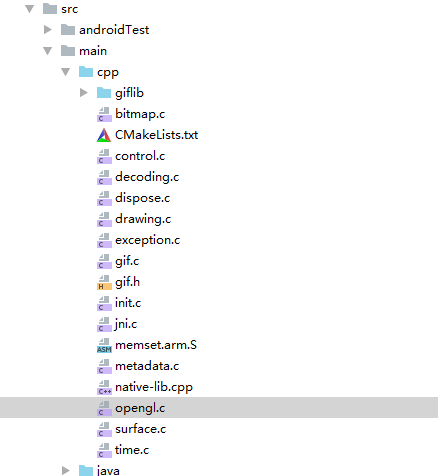
通过主页面获取回调方法
package com.example.ndkdemo;

import androidx.annotation.NonNull;

import androidx.appcompat.app.AppCompatActivity;

import android.graphics.Bitmap;

import android.os.Bundle;

import android.os.Environment;

import android.os.Handler;

import android.os.Message;

import android.util.Log;

import android.widget.ImageView;

import android.widget.TextView;

import java.io.File;

public class MainActivity extends AppCompatActivity {

    // Used to load the 'native-lib' library on application startup.

    private ImageView imageView;

    private String path = Environment.getExternalStorageDirectory().getAbsolutePath() + File.separator + "ds.gif";

    private Bitmap bitmap;

    private GifInfoHandle infoHandle;

    @Override

    protected void onCreate(Bundle savedInstanceState) {

        super.onCreate(savedInstanceState);

        setContentView(R.layout.activity_main);

        Log.e("TAG", "onCreate: "+path );

        imageView=findViewById(R.id.image);

        infoHandle=new GifInfoHandle(path);

        int width=infoHandle.getwidth();

        int height=infoHandle.getHeight();

        bitmap =Bitmap.createBitmap(width,height,Bitmap.Config.ARGB_8888);

        imageView.setImageBitmap(bitmap);

        long nextFrameTime=infoHandle.renderFrame(bitmap);

        infoHandle.renderFrame(bitmap);

        //循环绘制

        handler.sendEmptyMessageDelayed(1,nextFrameTime);

    }

    Handler handler=new Handler(){

        @Override

        public void handleMessage(@NonNull Message msg) {

            super.handleMessage(msg);

            long nextFrameTime =infoHandle.renderFrame(bitmap);

            imageView.setImageBitmap(bitmap);

            handler.sendEmptyMessageDelayed(1,nextFrameTime);

        }

    };

    }
下面是这次的源码
链接:https://pan.baidu.com/s/133c9Fk7BXwPrugP5wCrv5A
提取码:5wa1
复制这段内容后打开百度网盘手机App,操作更方便哦
Android ndk 加载简单的gif 图像的更多相关文章
- 【转载】cocos2dx 中 Android NDK 加载动态库的问题
原文地址:http://blog.csdn.net/sozell/article/details/10551309 cocos2dx 中 Android NDK 加载动态库的问题 闲聊 最近在接入各 ...
- Android 懒加载简单介绍
1.懒加载介绍 1.1.效果预览 1.2.效果讲解 当页面可见的时候,才加载当前页面. 没有打开的页面,就不会预加载. 说白了,懒加载就是可见的时候才去请求数据. 1.3.懒加载文章传送门 参考文章: ...
- Android NDK加载SD卡中的so
最近公司框架刚移植完成,由于框架程序要调用子程序,每个子程序都是一个so文件,有好几百个,把所有的so和apk打包不现实,及时可以升级维护也很麻烦.所以需要放SD卡中.考虑两种方式 1 放到设备中的 ...
- fackbook的Fresco (FaceBook推出的Android图片加载库-Fresco)
[Android开发经验]FaceBook推出的Android图片加载库-Fresco 欢迎关注ndroid-tech-frontier开源项目,定期翻译国外Android优质的技术.开源库.软件 ...
- FaceBook推出的Android图片加载库-Fresco
FaceBook推出的Android图片加载库-Fresco 原文链接:Introducing Fresco: A new image library for Android 译者 : ZhaoKai ...
- Android图片加载库:最全面的Picasso讲解
前言 上文已经对当今 Android主流的图片加载库 进行了全面介绍 & 对比 如果你还没阅读,我建议你先移步这里阅读 今天我们来学习其中一个Android主流的图片加载库的使用 - Pica ...
- 演化理解 Android 异步加载图片
原文:http://www.cnblogs.com/ghj1976/archive/2011/05/06/2038738.html#3018499 在学习"Android异步加载图像小结&q ...
- Android 图片加载库Glide 实战(二),占位符,缓存,转换自签名高级实战
http://blog.csdn.net/sk719887916/article/details/40073747 请尊重原创 : skay <Android 图片加载库Glide 实战(一), ...
- Android图片加载框架Picasso最全使用教程1
Picasso介绍 Picasso是Square公司开源的一个Android图形缓存库 A powerful image downloading and caching library for And ...
随机推荐
- CSS 盒子模型、RestCSS、浮动、定位
盒子模型 边框:border 左边框:border-left 右边框:border-right 上边框:border-top 下边框:border-bottom 复合样式:border 边框颜色:bo ...
- Maven——向Maven本地仓库中手动添加依赖包(ps:ojdbc.jar)
maven中央仓库中并非包含所有现有的依赖包和插件,部分依赖包和插件需要手动地进行添加(如ojdbc.jar) 一.添加JDK系统环境变量(maven是基于Java的,可参考:https://www. ...
- 微软发布ML.NET 1.0
原文地址:https://devblogs.microsoft.com/dotnet/announcing-ml-net-1-0/ 我们很高兴地宣布今天发布ML.NET 1.0. ML.NET是一个 ...
- react + typescript 学习
react,前端三大框架之一,也是非常受开发者追捧的一门技术.而 typescript 是 javascript 的超集,主要特点是对 类型 的检查.二者的结合必然是趋势,不,已经是趋势了.react ...
- PHP命令执行漏洞初探
PHP命令执行漏洞初探 Mirror王宇阳 by PHP 命令执行 PHP提供如下函数用于执行外部应用程序:例如:system().shell_exec().exec().passthru() sys ...
- IS guide:Eric Steven Raymond in《How To Become A Hacker》
Learn how to program.This, of course, is the fundamental hacking skill. If you don't know any comput ...
- 发送RCS成功的消息log_1
//12-02 16:39:00.869323 24174 27394 I CarrierServices: [1172] cpb.x: Send INVITE//12-02 16:39:00.920 ...
- Android TeaPickerView数据级联选择器
数据级联选择器.三级联动.二级联动.层级联动.多数据筛选.必藏 (Data Cascade Selector, Hierarchical Structure, Multiple Data Screen ...
- [Go] 利用函数类型实现封装中的回调
当进行业务逻辑开发的时候,经常要进行封装,封装成独立的类文件,在类文件的属性中预留出函数类型的API 在调用该类文件中某些方法的时候,也根据业务需要调用类属性中的函数, 在主业务中可以传递特定的函数注 ...
- Vm虚拟机最小化安装linux并配置NAT网络连接(全图)