
Windows平台python验证码识别
参考:
http://oatest.dragonbravo.com/Authenticate/SignIn?returnUrl=%2f
http://drops.wooyun.org/tips/6313
http://blog.csdn.net/nwpulei/article/details/8457738
http://www.pythonclub.org/project/captcha/python-pil
http://blog.csdn.net/csapr1987/article/details/7728315 创建二维码图片
python验证码识别库安装
1.安装图像处理库PIL,即Python Image Library。
下载地址:http://www.pythonware.com/products/pil/
2. 安装google OCR识别引擎pytesseract
以管理员身份运行命令提示行。
cd C:\Python27\Scripts
pip install pytesseract
单色无干扰验证码识别
对于完全单色没有任何干挠的验证码,识别起来比较容易。代码如下:
import os

import pytesseract

import Image

os.chdir('C:\Users\Administrator\Downloads\picture')

image = Image.open('verifycode.jpg')

vcode = pytesseract.image_to_string(image)

print vcode
彩色有干扰验证码识别
- 中值过滤去噪。此种类型验证码包含了噪点,所以第一步就是去噪。
- 对图像亮度进行加强处理。中值过滤时,不少噪点淡化了,但是如果直接转换为单色,这些噪点又被强化显示了,因此增加这一步对图像亮度进行加强处理。
- 转换为单色。即通过二值化,将低于阈值的设置为0,高于阈值的设置为1,从而实现将图片变为黑白色。黑色像素输出1,白色像素输出0。
代码如下:
os.chdir('C:\Users\Administrator\Downloads\picture')

image = Image.open('vcode.gif')

images = image.filter(ImageFilter.MedianFilter())

enhancer = ImageEnhance.Contrast(images)

images = enhancer.enhance(2)

images = images.convert('')

images.show()
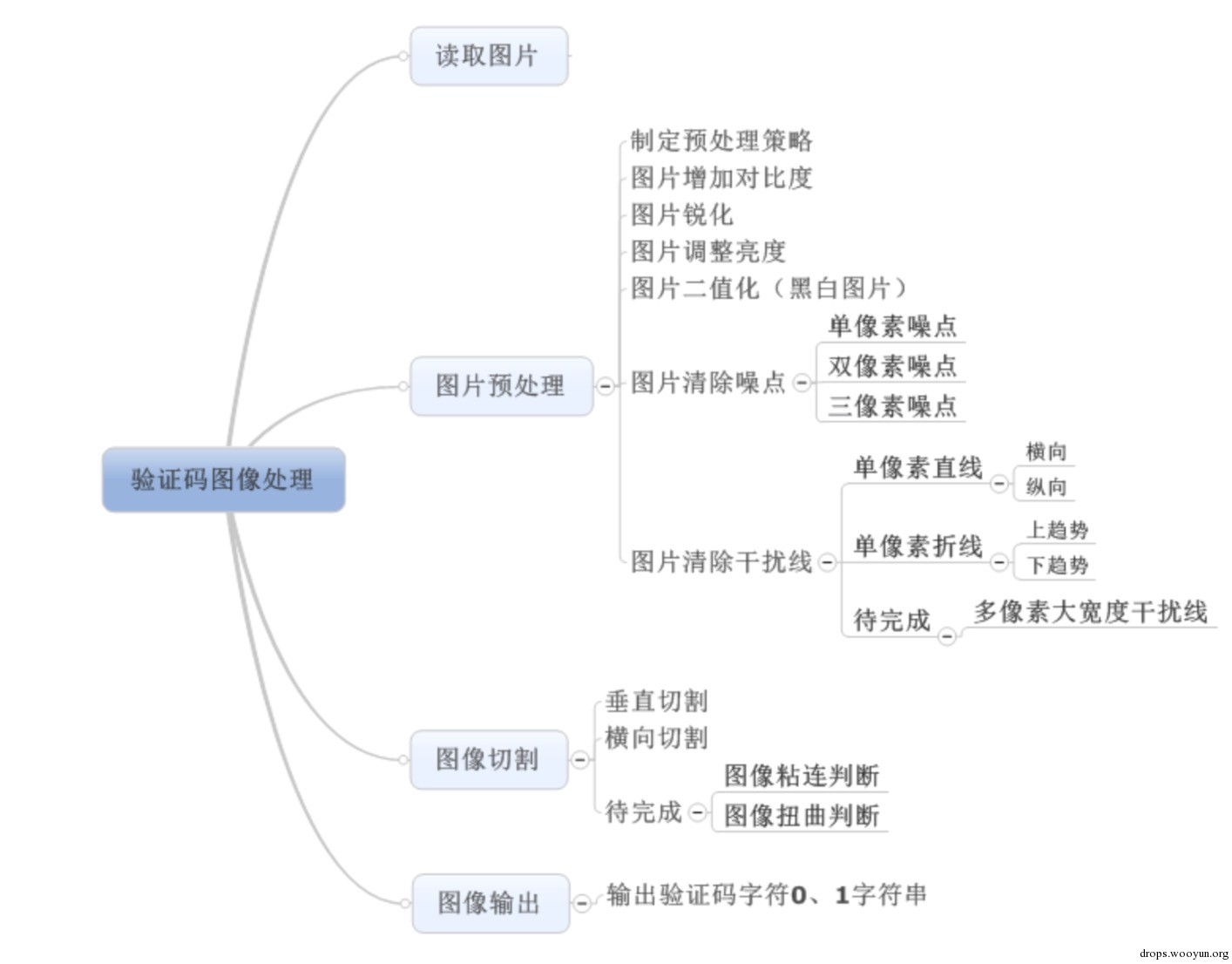
验证码图像处理脑图如下:
附上pytesseract简介:
Metadata-Version: 1.1
Name: pytesseract
Version: 0.1.6
Summary: Python-tesseract is a python wrapper for google's Tesseract-OCR
Home-page: https://github.com/madmaze/python-tesseract
Author: Matthias Lee
Author-email: pytesseract@madmaze.net
License: GPLv3
Description: Python-tesseract is an optical character recognition (OCR) tool for python.
That is, it will recognize and "read" the text embedded in images.
Python-tesseract is a wrapper for google's Tesseract-OCR
( http://code.google.com/p/tesseract-ocr/ ). It is also useful as a
stand-alone invocation script to tesseract, as it can read all image types
supported by the Python Imaging Library, including jpeg, png, gif, bmp, tiff,
and others, whereas tesseract-ocr by default only supports tiff and bmp.
Additionally, if used as a script, Python-tesseract will print the recognized
text in stead of writing it to a file. Support for confidence estimates and
bounding box data is planned for future releases.
USAGE:
```
> try:
> import Image
> except ImportError:
> from PIL import Image
> import pytesseract
> print(pytesseract.image_to_string(Image.open('test.png')))
> print(pytesseract.image_to_string(Image.open('test-european.jpg'), lang='fra'))
```
INSTALLATION:
Prerequisites:
* Python-tesseract requires python 2.5 or later or python 3.
* You will need the Python Imaging Library (PIL). Under Debian/Ubuntu, this is
the package "python-imaging" or "python3-imaging" for python3.
* Install google tesseract-ocr from http://code.google.com/p/tesseract-ocr/ .
You must be able to invoke the tesseract command as "tesseract". If this
isn't the case, for example because tesseract isn't in your PATH, you will
have to change the "tesseract_cmd" variable at the top of 'tesseract.py'.
Under Debian/Ubuntu you can use the package "tesseract-ocr".
Installing via pip:
See the [pytesseract package page](https://pypi.python.org/pypi/pytesseract)
```
$> sudo pip install pytesseract
```
Installing from source:
```
$> git clone git@github.com:madmaze/pytesseract.git
$> sudo python setup.py install
```
LICENSE:
Python-tesseract is released under the GPL v3.
CONTRIBUTERS:
- Originally written by [Samuel Hoffstaetter](https://github.com/hoffstaetter)
- [Juarez Bochi](https://github.com/jbochi)
- [Matthias Lee](https://github.com/madmaze)
- [Lars Kistner](https://github.com/Sr4l)
Keywords: python-tesseract OCR Python
Platform: UNKNOWN
Classifier: Programming Language :: Python
Classifier: Programming Language :: Python :: 2
Classifier: Programming Language :: Python :: 3
Windows平台python验证码识别的更多相关文章
- Python+Request库+第三方平台实现验证码识别示例
1.登录时经常的出现验证码,此次结合Python+Request+第三方验证码识别平台(超级鹰识别平台) 2.首先到超级鹰平台下载对应语言的识别码封装,超级鹰平台:http://www.chaojiy ...
- python验证码识别
关于利用python进行验证码识别的一些想法 用python加“验证码”为关键词在baidu里搜一下,可以找到很多关于验证码识别的文章.我大体看了一下,主要方法有几类:一类是通过对图片进行处 理,然后 ...
- Python 验证码识别-- tesserocr
Python 验证码识别-- tesserocr tesserocr 是 Python 的一个 OCR 识别库 ,但其实是对 tesseract 做的一 层 Python API 封装,所以它的核心是 ...
- 【转】Python验证码识别处理实例
原文出处: 林炳文(@林炳文Evankaka) 一.准备工作与代码实例 1.PIL.pytesser.tesseract (1)安装PIL:下载地址:http://www.pythonware.com ...
- Python 验证码识别(别干坏事哦...)
关于python验证码识别库,网上主要介绍的为pytesser及pytesseract,其实pytesser的安装有一点点麻烦,所以这里我不考虑,直接使用后一种库. python验证码识别库安装 要安 ...
- Windows平台Python Pyramid实战从入门到进阶:第一个服务
Pyramid是比较流行的Python Web 框架,比较灵活,功能也很强大.最近项目上用到,便打算学习一下.网上教程比较少,而且很多都是针对linux平台的,我是windows土著所以对那些linu ...
- windows平台python 2.7环境编译安装zbar
最近一个项目需要识别二维码,找来找去找到了zbar和zxing,中间越过无数坑,总算基本上弄明白,分享出来给大家. 一.zbar官方介绍 ZBar 是款桌面电脑用条形码/二维码扫描工具,支持摄像头及图 ...
- Python验证码识别处理实例(转载)
版权声明:本文为博主林炳文Evankaka原创文章,转载请注明出处http://blog.csdn.net/evankaka 一.准备工作与代码实例 1.PIL.pytesser.tesseract ...
- Python验证码识别处理实例(转)
一.准备工作与代码实例 1.PIL.pytesser.tesseract (1)安装PIL:下载地址:http://www.pythonware.com/products/pil/(CSDN下载) 下 ...
随机推荐
- 多线程编程(Linux C)
多线程编程可以说每个程序员的基本功,同时也是开发中的难点之一,本文以Linux C为例,讲述了线程的创建及常用的几种线程同步的方式,最后对多线程编程进行了总结与思考并给出代码示例. 一.创建线程 多线 ...
- ProcessBuilder waitFor 调用外部应用
小程序项目最初使用ffmpeg转换微信录音文件为wav格式,再交给阿里云asr识别成文字.视频音频转换最常用是ffmpeg. 1 ffmpeg -i a.mp3 b.wav 相关文章: 小程序实现语音 ...
- 有容云-PPT | 当微服务遇见容器
编者注: 本文为10月29日有容云高级技术顾问龙淼在Docker Live时代线下系列-广州站中演讲的PPT,本次线下沙龙为有容云倾力打造Docker Live时代系列主题线下沙龙,每月一期畅聊容器技 ...
- MapReduce 运行全过程解析
关注公众号,大家可以在公众号后台回复“博客园”,免费获得作者 Java 知识体系/面试必看资料. 前言 前面我们讲了 MapReduce 的编程模型,我们知道他主要分成两大阶段来完成一项任务,一是 m ...
- Oracle jdbc 插入 clob blob
Oracle 使用 clob 与 blob 插入一些比较庞大的文本或者文件,JDBC 插入时 也比较简单 表结构 CREATE TABLE test_info ( user_id int NOT NU ...
- SimpleDateFormat线程不安全问题解决及替换方法
场景:在多线程情况下为避免多次创建SimpleDateForma实力占用资源,将SimpleDateForma对象设置为static. 出现错误:SimpleDateFormat定义为静态变量,那么多 ...
- intellIJ IDEA学习笔记3
intellij idea 的快捷鍵 https://blog.csdn.net/wei83523408/article/details/60472168 https://www.cnblogs.co ...
- HTML5标签的使用和作用
在菜鸟教程中找了一些关于HTML5的知识点,觉得很有用,可以整理一下,以后使用. 这是一个基本的HTML5文档: <!DOCTYPE html><html><head&g ...
- Docker之- 使用Docker 镜像和仓库
目录 使用Docker 镜像和仓库 什么是 Docker 镜像 列出 Docker 镜像 tag 标签 Docker Hub 拉取镜像 查找镜像 构建镜像 创建Docker Hub 账号 使用 Doc ...
- 云上RDS架构
概述 越来越多的企业选择上云,最基础的云服务就是IaaS(Infrastructure as a Service)服务,直观理解就是虚拟主机,用户不用再自建机房,自己购买服务器,而是直接向云厂商购买虚 ...