
详谈springboot启动类的@SpringBootApplication注解
前几天我们学会了如何创建springboot项目今天我们说一下他是怎么运行的为什么不需要我们再去编写繁重的配置文件的
@SpringBootApplication
首先我们看一下这个注解,他是用来标注在主程序的,表明他是一个springboot项目
@Target({ElementType.TYPE})

  @Retention(RetentionPolicy.RUNTIME)

  @Documented

  @Inherited

  @SpringBootConfiguration

  @EnableAutoConfiguration

  @ComponentScan(

      excludeFilters = {

        @Filter(type = FilterType.CUSTOM,classes = {TypeExcludeFilter.class}),

        @Filter( type = FilterType.CUSTOM,classes = {AutoConfigurationExcludeFilter.class})

      }

  )

  public @interface SpringBootApplication {
}
点进@SpringBootApplication注解后我们重点关注最后三个注解
@ComponentScan(包扫描)
component是组件,scan是扫描,所以这个注解的含义就是用来扫描组件的,
componentScan就是扫描所标注的类所在包下的所有需要注入的组件,将其注入,这里他是在@SpringBootApplication 中体现的,所以这个注解会自动注入所有在主程序所在包下的组件
以前在ssm项目中我们需要去配置我们的包扫描
<context:component-scan base-package="com.xxx"></context:component-scan>
@EnableAutoConfiguration(开启自动装配)
@Target({ElementType.TYPE})
@Retention(RetentionPolicy.RUNTIME)
@Documented
@Inherited
@AutoConfigurationPackage
@Import({AutoConfigurationImportSelector.class})
public @interface EnableAutoConfiguration {
String ENABLED_OVERRIDE_PROPERTY = "spring.boot.enableautoconfiguration";
Class<?>[] exclude() default {};
String[] excludeName() default {};
}
这里我们关注两个注解
一、@AutoConfigurationPackage
 @Target({ElementType.TYPE})

  @Retention(RetentionPolicy.RUNTIME)

  @Documented

  @Inherited

  @Import({Registrar.class})

  public @interface AutoConfigurationPackage {

  }
在这个注解中,主要是获取我们注解所在包下的组件去进行注册
static class Registrar implements ImportBeanDefinitionRegistrar, DeterminableImports {
Registrar() {
}
//metadata是我们注解所在的元信息
public void registerBeanDefinitions(AnnotationMetadata metadata, BeanDefinitionRegistry registry) {
//看这里 将我们注解所在包下所有的组件去进行注册
AutoConfigurationPackages.register(registry, (new AutoConfigurationPackages.PackageImport(metadata)).getPackageName());
}
public Set<Object> determineImports(AnnotationMetadata metadata) {
return Collections.singleton(new AutoConfigurationPackages.PackageImport(metadata));
}
}
register方法:通过AutoConfigurationPackages去对包下的组件进行注册
private static final String BEAN = AutoConfigurationPackages.class.getName();
public static void register(BeanDefinitionRegistry registry, String... packageNames) {
//先判断整个BEAN有没有被注册
if (registry.containsBeanDefinition(BEAN)) {
//获取bean的定义
BeanDefinition beanDefinition = registry.getBeanDefinition(BEAN);
//通过bean获取构造函数的参数值
ConstructorArgumentValues constructorArguments = beanDefinition.getConstructorArgumentValues();
//添加参数值,
constructorArguments.addIndexedArgumentValue(0, addBasePackages(constructorArguments, packageNames));
} else {
//创建一个新的bean的定义
GenericBeanDefinition beanDefinition = new GenericBeanDefinition();
//设置bean的类型为AutoConfigurationPackages类型
beanDefinition.setBeanClass(AutoConfigurationPackages.BasePackages.class);
beanDefinition.getConstructorArgumentValues().addIndexedArgumentValue(0, packageNames);
beanDefinition.setRole(2);
//进行bean的注册
registry.registerBeanDefinition(BEAN, beanDefinition);
}
}
二、@Import({AutoConfigurationImportSelector.class})
装配我们的 自动配置导入选择器
我们点进去这个类,下面有一个方法getAutoConfigurationEntry 获取自动装配的入口、
protected AutoConfigurationImportSelector.AutoConfigurationEntry getAutoConfigurationEntry(AutoConfigurationMetadata autoConfigurationMetadata, AnnotationMetadata annotationMetadata) {

          if (!this.isEnabled(annotationMetadata)) {

              return EMPTY_ENTRY;

          } else {

              AnnotationAttributes attributes = this.getAttributes(annotationMetadata);

              List<String> configurations = this.getCandidateConfigurations(annotationMetadata, attributes);

              configurations = this.removeDuplicates(configurations);

              Set<String> exclusions = this.getExclusions(annotationMetadata, attributes);

              this.checkExcludedClasses(configurations, exclusions);

              configurations.removeAll(exclusions);

              configurations = this.filter(configurations, autoConfigurationMetadata);

              this.fireAutoConfigurationImportEvents(configurations, exclusions);

              return new AutoConfigurationImportSelector.AutoConfigurationEntry(configurations, exclusions);

          }

      }
这个方法他主要是获取了configurations的一个集合在这我们点进去getCandidateConfigurations方法
protected List<String> getCandidateConfigurations(AnnotationMetadata metadata, AnnotationAttributes attributes) {

          List<String> configurations = SpringFactoriesLoader.loadFactoryNames(this.getSpringFactoriesLoaderFactoryClass(), this.getBeanClassLoader());

          Assert.notEmpty(configurations, "No auto configuration classes found in META-INF/spring.factories. If you are using a custom packaging, make sure that file is correct.");

          return configurations;

      }
我们首先看他这个红色报错信息:在META-INF/spring.factories中没有找到自动配置类。根据他的错误信息我们可以得出他是从META-INF/spring.factories获取我们的自动配置信息的
我们也可以在点进这个loadFactoryNames这个方法
public static List<String> loadFactoryNames(Class<?> factoryClass, @Nullable ClassLoader classLoader) {
String factoryClassName = factoryClass.getName();
//调用了下面的方法loadSpringFactories
return (List)loadSpringFactories(classLoader).getOrDefault(factoryClassName, Collections.emptyList());
}
private static Map<String, List<String>> loadSpringFactories(@Nullable ClassLoader classLoader) {
MultiValueMap<String, String> result = (MultiValueMap)cache.get(classLoader);
if (result != null) {
return result;
} else {
try {
//根据类加载器去获取配置文件里的信息
Enumeration<URL> urls = classLoader != null ? classLoader.getResources("META-INF/spring.factories") : ClassLoader.getSystemResources("META-INF/spring.factories");
LinkedMultiValueMap result = new LinkedMultiValueMap();
while(urls.hasMoreElements()) {
URL url = (URL)urls.nextElement();
UrlResource resource = new UrlResource(url);
//配置信息经过多次转换最终成为properties形式
Properties properties = PropertiesLoaderUtils.loadProperties(resource);
Iterator var6 = properties.entrySet().iterator();
//循环获取所有的配置信息
while(var6.hasNext()) {
Entry<?, ?> entry = (Entry)var6.next();
String factoryClassName = ((String)entry.getKey()).trim();
String[] var9 = StringUtils.commaDelimitedListToStringArray((String)entry.getValue());
int var10 = var9.length;
for(int var11 = 0; var11 < var10; ++var11) {
String factoryName = var9[var11];
result.add(factoryClassName, factoryName.trim());
}
}
}
cache.put(classLoader, result);
return result;
} catch (IOException var13) {
throw new IllegalArgumentException("Unable to load factories from location [META-INF/spring.factories]", var13);
}
}
}
而这个配置文件在哪里呢
在我们项目的External Libraries中找到我们的spring-boot-autoconfigure中
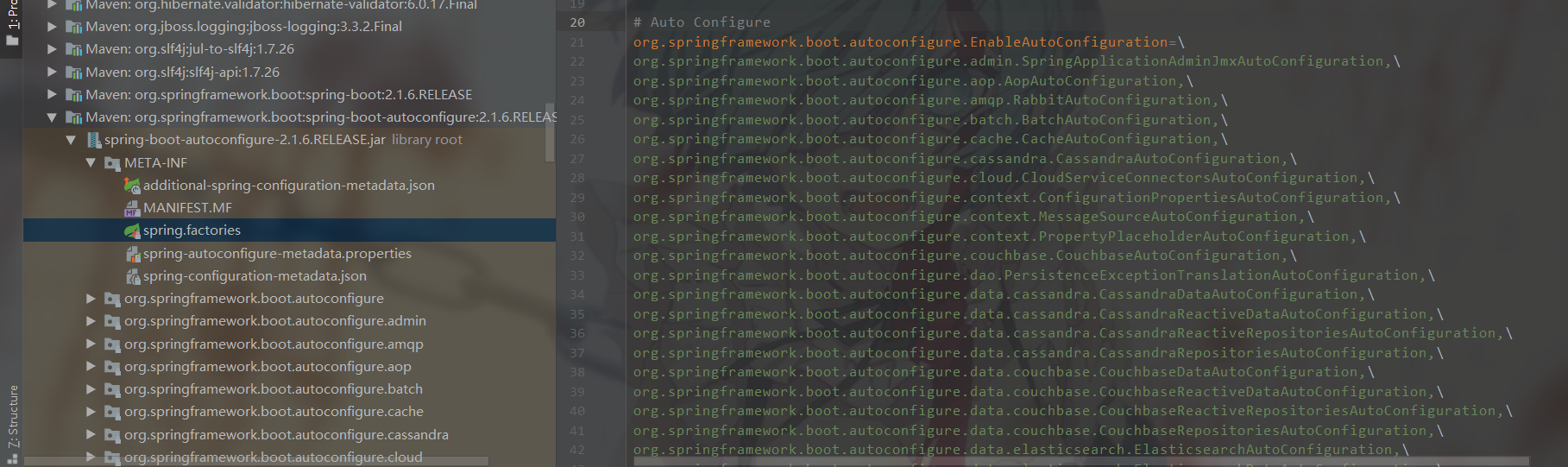

这样就完成我们默认的一些自动装配了
@SpringBootConfiguration
这个方法就比较简单了,表明了这是一个配置类
  @Target({ElementType.TYPE})

  @Retention(RetentionPolicy.RUNTIME)

  @Documented

  @Configuration

  public @interface SpringBootConfiguration {

  }
到这我们三个注解就讲完了,有什么问题请大佬们指明谢谢。
有过挣扎,有过失败,但仍然会爬起来继续战斗
详谈springboot启动类的@SpringBootApplication注解的更多相关文章
- springboot系列(三) 启动类中关键注解作用解析
一.Springboot:请求入口 @SpringBootApplication @EnableAspectJAutoProxy @EnableScheduling @EnableTransactio ...
- springboot 启动类CommandLineRunner(转载)
在Spring boot项目的实际开发中,我们有时需要项目服务启动时加载一些数据或预先完成某些动作.为了解决这样的问题,Spring boot 为我们提供了一个方法:通过实现接口 CommandLin ...
- springboot 启动类启动跳转到前端网页404问题的两个解决方案
前段时间研究springboot 发现使用Application类启动的话, 可以进入Controller方法并且返回数据,但是不能跳转到WEB-INF目录下网页, 前置配置 server: port ...
- Springboot启动类及注解说明
Spring boot的启动是基于main方法的,其主要注解为: 1. @springBootApplication:项目的启动注解,是一个组合注解,包含@SpringbootConfiguratio ...
- Springboot测试类之@RunWith注解
@runWith注解作用: --@RunWith就是一个运行器 --@RunWith(JUnit4.class)就是指用JUnit4来运行 --@RunWith(SpringJUnit4ClassRu ...
- SpringBoot学习之@SpringBootApplication注解
下面是我们经常见到SpringBoot启动类代码: @SpringBootApplicationpublic class DemoApplication extends SpringBootServl ...
- SpringBoot启动tomcat源码解读
一.SpringBoot自动拉起Tomcat 原文链接:http://www.studyshare.cn/blog-front/blog/details/1136 SpringBoot框架是当前比较流 ...
- Springboot中使用自定义参数注解获取 token 中用户数据
使用自定义参数注解获取 token 中User数据 使用背景 在springboot项目开发中需要从token中获取用户信息时通常的方式要经历几个步骤 拦截器中截获token TokenUtil工具类 ...
- SpringBoot启动嵌入式tomcat源码解读
一.SpringBoot自动拉起Tomcat SpringBoot框架是当前比较流行的java后端开发框架,与maven结合大大简化了开发人员项目搭建的步骤,我们知道SpringBoot的启动类启动后 ...
随机推荐
- 手把手教你如何在阿里云ECS搭建Python TensorFlow Jupyter
前段时间在阿里云买了一台服务器,准备部署网站,近期想玩一些深度学习项目,正好拿来用.TensorFlow官网的安装仅提及Ubuntu,但我的ECS操作系统是 CentOS 7.6 64位,搭建Pyth ...
- [剑指offer]第1题,二维数组中的查找
①题目 在一个二维数组中(每个一维数组的长度相同),每一行都按照从左到右递增的顺序排序,每一列都按照从上到下递增的顺序排序.请完成一个函数,输入这样的一个二维数组和一个整数,判断数组中是否含有该整数. ...
- 半自动安装 linux 系统
基于图形软件生成应答文件,实现半自动化安装 linux 操作系统 1.yum install -y system-config-kickstart 安装生成自动化安装操作系统的应答文件 2.syste ...
- python:沙盒(virtualenv)
当电脑需要使用多个版本的python时,可以使用沙盒:或者使用docker: virtualenv是Python自带的,通过pip安装的 [root@centos7 public]# cd jinji ...
- django_4:数据库1——django操作数据库
创建数据库记录(插入) 使用python3 manage.py shell(python3亲测好使) ipython3 manage.py shell(亲测不好使) 方式一. [root@centos ...
- Java描述设计模式(24):备忘录模式
本文源码:GitHub·点这里 || GitEE·点这里 一.生活场景 1.场景描述 常见的视频播放软件都具备这样一个功能:假设在播放视频西游记,如果这时候切换播放视频红楼梦,当再次切回播放西游记时, ...
- Golang 入门系列(十六)锁的使用场景主要涉及到哪些?读写锁为什么会比普通锁快
前面已经讲过很多Golang系列知识,感兴趣的可以看看以前的文章,https://www.cnblogs.com/zhangweizhong/category/1275863.html, 接下来要说的 ...
- Java Web登录界面
非常激动的开通了我的第一个博客,在这里希望大家能多多指点,相互学习. 一个简单的登录界面 首先我们先把这个登录分为三块: 一.数据库 数据库我用的是MYSQL: 二.前端 三.后台 1. 后台代码的 ...
- sublimetext使用教程
图片来自网络,仅供参考 前言 随着我们编写的代码越来越复杂,DevC++以不再能满足我们的需求,所以,我们需要 一个能够进行调试,编译,运行等等功能的现代化ide,sublimetext(以下简称ST ...
- Java 大黑话讲解设计模式 -- UML类图
目录 1.啥是UML类图? 2.UML类图有啥用? 3.正式理解UML类图 4.使用idea画第一个UML类图 5.类之间的关系图[必须牢记] 6.类之间的关系 6.1.依赖 6.2.泛化 6.3.实 ...