
三大文本处理工具grep、sed及awk
一、 用grep在文件中搜索文本
grep能够接受正则表达式,生成各种格式的输出。除此之外,它还有大量有趣的选项。
1、 搜索包含特定模式的文本行:
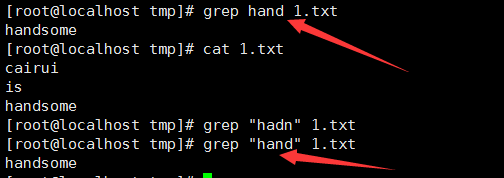
2、 从stdin中读取:

3、 单个grep命令可以对多个文件进行搜索:

4、 --color选项在输出行中着重标记出匹配到的单词:

5、 grep中使用正则表达式时使用(grep -E或者egrep)

6、 只输出文件中匹配到的文本部分,可以使用-o:

7、 要显示除匹配行外的所有行用-v选项:

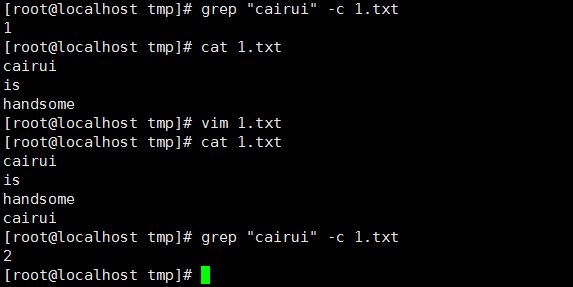
8、 统计文件或文本中包含匹配字符串的行数,-c(在单行出现多个匹配,只匹配一次):
9、 打印出包含匹配字符串的行号,-n:

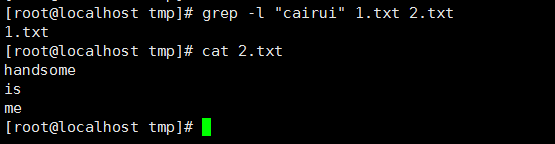
10、 搜索多个文件并找出匹配文本位于哪一个文件,-l(-L与之作用相反):
11、 递归搜素文件,-r(-R与之作用相同):

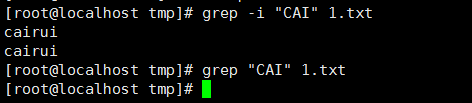
12、 忽略样式中的大小写,-i:
13、 用grep匹配多个样式,-e:

14、 在grep搜索中指定(--include)或排除(--exclude)文件:
目录中递归搜索所有的.c和.cpp文件

在搜索中排除所有的README文件

如果需要排除目录,使用--exclude-dir选项
15、 grep静默输出,-q:
不输出任何内容,如果成功匹配返回0,如果失败返回非0值。
16、 打印出匹配文本之前或之后的行:
[root@localhost tmp]# seq

[root@localhost tmp]# seq  | grep  -A 3  #打印匹配的后指定行数

[root@localhost tmp]# seq  | grep  -B 3  #打印匹配前指定行数

[root@localhost tmp]# seq  | grep  -C 3    #打印匹配前后指定行数
二、 使用sed进行文本替换
sed是流编辑器(stream editor)的缩写。sed一个用法为文本替换。
[root@cairui ~]# sed --help

Usage: sed [OPTION]... {script-only-if-no-other-script} [input-file]...

  -n, --quiet, --silent

                 suppress automatic printing of pattern space  #取消自动打印模式空间

  -e script, --expression=script

                 add the script to the commands to be executed  #添加“脚本”到程序的运行列表

  -f script-file, --file=script-file

                 add the contents of script-file to the commands to be executed  #添加“脚本文件”到程序的运行列表

  --follow-symlinks

                 follow symlinks when processing in place; hard links

                 will still be broken.

  -i[SUFFIX], --in-place[=SUFFIX]

                 edit files in place (makes backup if extension supplied).

                 The default operation mode is to break symbolic and hard links.

                 This can be changed with --follow-symlinks and --copy.

  -c, --copy

                 use copy instead of rename when shuffling files in -i mode.

                 While this will avoid breaking links (symbolic or hard), the

                 resulting editing operation is not atomic.  This is rarely

                 the desired mode; --follow-symlinks is usually enough, and

                 it is both faster and more secure.

  -l N, --line-length=N

                 specify the desired line-wrap length for the `l' command

  --posix

                 disable all GNU extensions.

  -r, --regexp-extended

                 use extended regular expressions in the script.

  -s, --separate

                 consider files as separate rather than as a single continuous

                 long stream.

  -u, --unbuffered

                 load minimal amounts of data from the input files and flush

                 the output buffers more often

      --help     display this help and exit

      --version  output version information and exit

If no -e, --expression, -f, or --file option is given, then the first

non-option argument is taken as the sed script to interpret.  All

remaining arguments are names of input files; if no input files are

specified, then the standard input is read.

GNU sed home page: <http://www.gnu.org/software/sed/>.

General help using GNU software: <http://www.gnu.org/gethelp/>.

E-mail bug reports to: <bug-gnu-utils@gnu.org>.

Be sure to include the word ``sed'' somewhere in the ``Subject:'' field.
1、 sed可以替换给定文本的字符串:



该使用从stdin中读取输入,不影响原本的内容
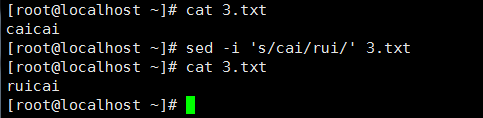
2、默认情况下sed命令打印替换后的文本,如果想连原文本一起修改加-i命令,-i:
3、 之前的sed都是替换第一个匹配到的内容,想要全部替换就要在末尾加g:
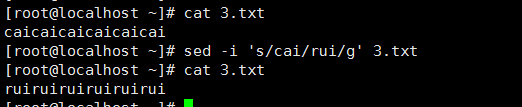
从第N个匹配开始替换

sed中的/为定界符,使用任何其他符号都可以替代

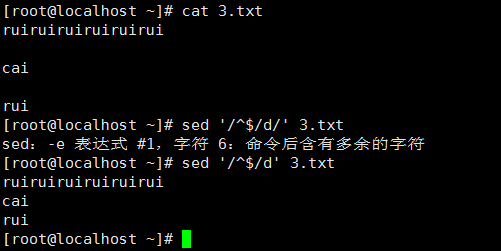
4、 移除空白行
三、 使用awk进行高级文本处理
awk是一款设计用于数据流的工具。它对列和行进行操作。awk有很多内建的功能,比如数组、函数等,和C有很多相同之处。awk最大的优势是灵活性。
[root@cairui ~]# awk --help

Usage: awk [POSIX or GNU style options] -f progfile [--] file ...

Usage: awk [POSIX or GNU style options] [--] 'program' file ...

POSIX options:        GNU long options:

    -f progfile        --file=progfile

    -F fs            --field-separator=fs

    -v var=val        --assign=var=val

    -m[fr] val

    -O            --optimize

    -W compat        --compat

    -W copyleft        --copyleft

    -W copyright        --copyright

    -W dump-variables[=file]    --dump-variables[=file]

    -W exec=file        --exec=file

    -W gen-po        --gen-po

    -W help            --help

    -W lint[=fatal]        --lint[=fatal]

    -W lint-old        --lint-old

    -W non-decimal-data    --non-decimal-data

    -W profile[=file]    --profile[=file]

    -W posix        --posix

    -W re-interval        --re-interval

    -W source=program-text    --source=program-text

    -W traditional        --traditional

    -W usage        --usage

    -W use-lc-numeric    --use-lc-numeric

    -W version        --version

To report bugs, see node `Bugs' in `gawk.info', which is

section `Reporting Problems and Bugs' in the printed version.

gawk is a pattern scanning and processing language.

By default it reads standard input and writes standard output.

Examples:

    gawk '{ sum += $1 }; END { print sum }' file

    gawk -F: '{ print $1 }' /etc/passwd
awk脚本的结构基本如下所示:
awk ' BEGIN{ print "start" } pattern { commands } END { print "end" }' file
awk脚本通常由3部分组成。BEGIN,END和带模式匹配选项的常见语句块。这3个部分都是可选的。
1、工作原理
(1)执行BEGIN { commands }语句块中的语句。
(2)从文件或stdin中读取一行,然后执行pattern { commands }。重复这个过程,直到文件全部被读取完毕。
(3)当读至输入流末尾时,执行END { commands }语句块。
其中最重要的部分就是pattern语句块中的通用命令。这个语句块同样是可选的。如果不提供该语句块,则默认执行{ print },即打印所读取到的每一行。awk对于每一行,都会执行这个语句块。这就像一个用来读取行的while循环,在循环中提供了相应的语句。


三大文本处理工具grep、sed及awk的更多相关文章
- 【Linux】 字符串和文本处理工具 grep & sed & awk
Linux字符串&文本处理工具 因为用linux的时候主要用到的还是字符交互界面,所以对字符串的处理变得十分重要.这篇介绍三个常用的字符串处理工具,包括grep,sed和awk ■ grep ...
- 三大文本处理工具grep、sed及awk的简单介绍
grep.sed和awk都是文本处理工具,虽然都是文本处理工具单却都有各自的优缺点,一种文本处理命令是不能被另一个完全替换的,否则也不会出现三个文本处理命令了.只不过,相比较而言,sed和awk功能更 ...
- shell之三大文本处理工具grep、sed及awk
grep.sed和awk都是文本处理工具,虽然都是文本处理工具单却都有各自的优缺点,一种文本处理命令是不能被另一个完全替换的,否则也不会出现三个文本处理命令了.只不过,相比较而言,sed和awk功能更 ...
- 【OS_Linux】三大文本处理工具之sed命令
1.sed命令的简介及用法 sed:即为流编辑器,“stream editor”的缩写.他先将源文件读取到临时缓存区(也叫模式空间)中,再对满足匹配条件的各行执行sed命令.sed命令只针对缓存区中的 ...
- linux(5)--补充(管道| / 重定向> / xargs)/find 与xargs结合使用/vi,grep,sed,awk(支持正则表达式的工具程序)
本节中正则表达式的工具程序 grep,sed和awk是重点,也是难点!!! 先补充一下一. 管道| / 重定向> / xargs 如:1. 管道和重定向的区别:具体可以见 http://www. ...
- grep, sed 与 awk 补补课,到底怎么用!
grep, sed 与 awk 相当有用 ! gerp 查找, sed 编辑, awk 根据内容分析并处理. awk(关键字:分析&处理) 一行一行的分析处理 awk '条件类型1{动作1}条 ...
- 日志分析查看——grep,sed,sort,awk运用
概述 我们日常应用中都离不开日志.可以说日志是我们在排查问题的一个重要依据.但是日志并不是写了就好了,当你想查看日志的时候,你会发现线上日志堆积的长度已经超越了你一行行浏览的耐性的极限了.于是,很有必 ...
- Linux 文本处理工具grep,sed,awk
grep.sed和awk都是文本处理工具,虽然都是文本处理工具单却都有各自的优缺点,一种文本处理命令是不能被另一个完全替换的,否则也不会出现三个文本处理命令了.只不过,相比较而言,sed和awk功能更 ...
- 正则表达式学习之grep,sed和awk
正则表达式是用于描述字符排列和匹配模式的一种语法,它主要用于字符串的模式分割.匹配.查找以及替换操作. 描述一个正则表达式需要字符类.数量限定符.位置限定符.规定一些特殊语法表示字符类,数量限定符和位 ...
随机推荐
- (转)NHibernate各种数据库配置写法
本文转载自:http://blog.csdn.net/hsg77/article/details/23463733 //NHibernate各种数据库连接参数文件配置方法说明 //配置文件Config ...
- 详解NXP Cortex-M3加密设置
加密芯片是对内部集成了各类对称与非对称算法,自身具有极高安全等级,可以保证内部储存的密钥和信息数据不被非法读取与篡改的一类安全芯片的通称.使用到安全加密芯片的产品:银行加密U盾.刻录机.加密硬盘.P ...
- 机器学习:集成学习(OOB 和 关于 Bagging 的更多讨论)
一.oob(Out - of - Bag) 定义:放回取样导致一部分样本很有可能没有取到,这部分样本平均大约有 37% ,把这部分没有取到的样本称为 oob 数据集: 根据这种情况,不对数据集进行 t ...
- $timeout()定时器
非常不幸的一点是,人们似乎常常将AngularJS中的$timeOut()函数看做是一个内置的.无须在意的函数.但是,如果你忘记了$timeOut()的回调函数将会造成非常不好的影响,你可能会因此遇到 ...
- Windows下自由创建.htaccess文件的N种方法
.htaccess是apache的访问控制文件,apache中httpd.conf的选项配合此文件,完美实现了目录.站点的访问控 制,当然最多的还是rewrite功能,即URL重写,PHP中实现伪静态 ...
- 用JS实现,图片放大和缩小
<!DOCTYPE html> <html> <head> <meta charset="utf-8"> <title> ...
- eclipse中。安装findbugs java检测工具
问题提出: 当我们编写完代码,做完单元测试等各种测试后就提交正式运行,只能由运行的系统来检测我们代码是否有问题了,代码中隐藏的错误在系统运行的过程中被发现后,然后再来进行相应的修改,那么后期修改的代价 ...
- find查找、split分隔、replace替换
#!/usr/bin/env python r = "asada" ret = r.find("d") print(ret)#返回所在位置的索引 ret =r. ...
- Mybatis的批处理以及执行Update返回行数为负数
项目中用到了批量更新. 在开发当中,可能经常会遇到批量处理这种情况,一般都再在java层面进行, 其本质是节省数据库连接打开关闭的的次数,占用更少的运行内存. 下面先记一下批处理映射吧: mybati ...
- gearman client的doBackground 与doNormal方法的区别
doNormal方法是阻塞的,需要等到worker处理完之后才返回,否则一直阻塞住; doBackground 方法是非阻塞的,只要将数据发送到gearmand之后,就立马返回,不等待worker的处 ...