
【spring Boot】2.在Myecplise上把spring Boot项目打包 war包和jar包
========================================================第一部分=============================================================
第一部分:使用maven项目中自带的插件,将maven的web项目打包成war包
使用的项目是上一章中的maven项目,原封不动
看一下pom.xml文件
<project xmlns="http://maven.apache.org/POM/4.0.0" xmlns:xsi="http://www.w3.org/2001/XMLSchema-instance" xsi:schemaLocation="http://maven.apache.org/POM/4.0.0 http://maven.apache.org/xsd/maven-4.0.0.xsd">

  <modelVersion>4.0.0</modelVersion>

  <groupId>com.sxd.springBootExample</groupId>

  <artifactId>firstSpringBootExample</artifactId>

  <version>0.0.1-SNAPSHOT</version>

  <packaging>war</packaging>

  <build>

      <plugins>

          <plugin>

              <artifactId>maven-war-plugin</artifactId>

              <configuration>

                  <version>3.0</version>

              </configuration>

          </plugin>

      </plugins>

  </build>

    <!-- 引入parent项目,其实就是一个项目jar,版本自己在http://mvnrepository.com/search?q=spring-boot-starter-parent 选择即可 -->

    <parent>

        <groupId>org.springframework.boot</groupId>

        <artifactId>spring-boot-starter-parent</artifactId>

        <version>1.5.7.RELEASE</version>

    </parent>

      <!-- 要跑起来一个web项目,就引入这一个jar即可,版本不用写,parent中已经声明了的 -->

    <dependencies>

        <dependency>

            <groupId>org.springframework.boot</groupId>

            <artifactId>spring-boot-starter-web</artifactId>

        </dependency>

    </dependencies>

</project>
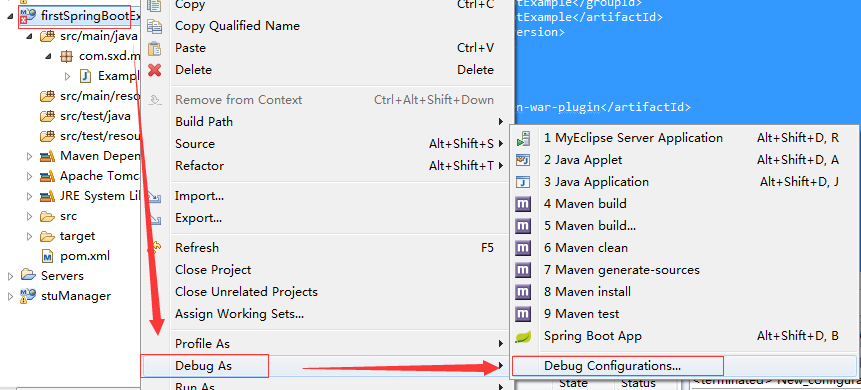
1.右键项目--->Debugs As--->Debugs Configurations
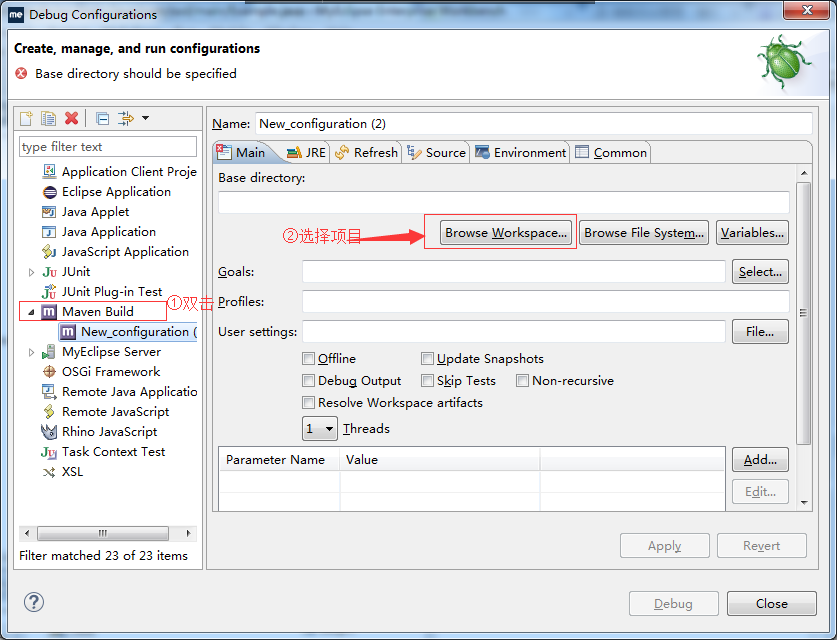
2.跟着步骤走
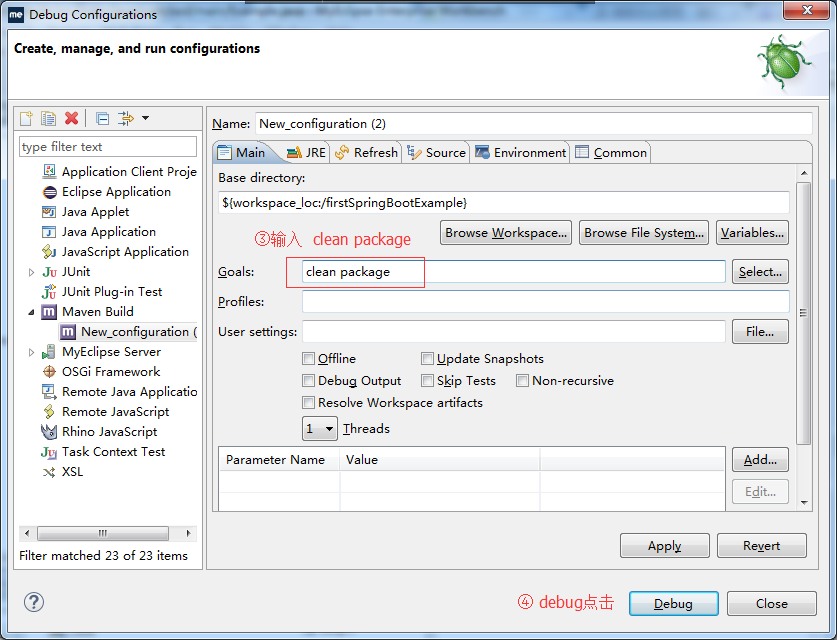
3.报错啦:
No compiler is provided in this environment. Perhaps you are running on a JRE rather than a JDK
[INFO] Scanning for projects...

[INFO]

[INFO] Using the builder org.apache.maven.lifecycle.internal.builder.singlethreaded.SingleThreadedBuilder with a thread count of 1

[INFO]

[INFO] ------------------------------------------------------------------------

[INFO] Building firstSpringBootExample 0.0.1-SNAPSHOT

[INFO] ------------------------------------------------------------------------

[INFO]

[INFO] --- maven-clean-plugin:2.6.1:clean (default-clean) @ firstSpringBootExample ---

[INFO] Deleting D:\workspace2\firstSpringBootExample\target

[INFO]

[INFO] --- maven-resources-plugin:2.6:resources (default-resources) @ firstSpringBootExample ---

[INFO] Using 'UTF-8' encoding to copy filtered resources.

[INFO] Copying 0 resource

[INFO] Copying 0 resource

[INFO]

[INFO] --- maven-compiler-plugin:3.1:compile (default-compile) @ firstSpringBootExample ---

[INFO] Changes detected - recompiling the module!

[INFO] Compiling 1 source file to D:\workspace2\firstSpringBootExample\target\classes

[INFO] -------------------------------------------------------------

[ERROR] COMPILATION ERROR :

[INFO] -------------------------------------------------------------

[ERROR] No compiler is provided in this environment. Perhaps you are running on a JRE rather than a JDK?

[INFO] 1 error

[INFO] -------------------------------------------------------------

[INFO] ------------------------------------------------------------------------

[INFO] BUILD FAILURE

[INFO] ------------------------------------------------------------------------

[INFO] Total time: 2.398 s

[INFO] Finished at: 2017-10-01T17:41:26+08:00

[INFO] Final Memory: 13M/232M

[INFO] ------------------------------------------------------------------------

[ERROR] Failed to execute goal org.apache.maven.plugins:maven-compiler-plugin:3.1:compile (default-compile) on project firstSpringBootExample: Compilation failure

[ERROR] No compiler is provided in this environment. Perhaps you are running on a JRE rather than a JDK?

[ERROR] -> [Help 1]

[ERROR]

[ERROR] To see the full stack trace of the errors, re-run Maven with the -e switch.

[ERROR] Re-run Maven using the -X switch to enable full debug logging.

[ERROR]

[ERROR] For more information about the errors and possible solutions, please read the following articles:

[ERROR] [Help 1] http://cwiki.apache.org/confluence/display/MAVEN/MojoFailureException
解决方法:http://www.cnblogs.com/sxdcgaq8080/p/7617542.html
4.解决错误之后,重新进行打包操作
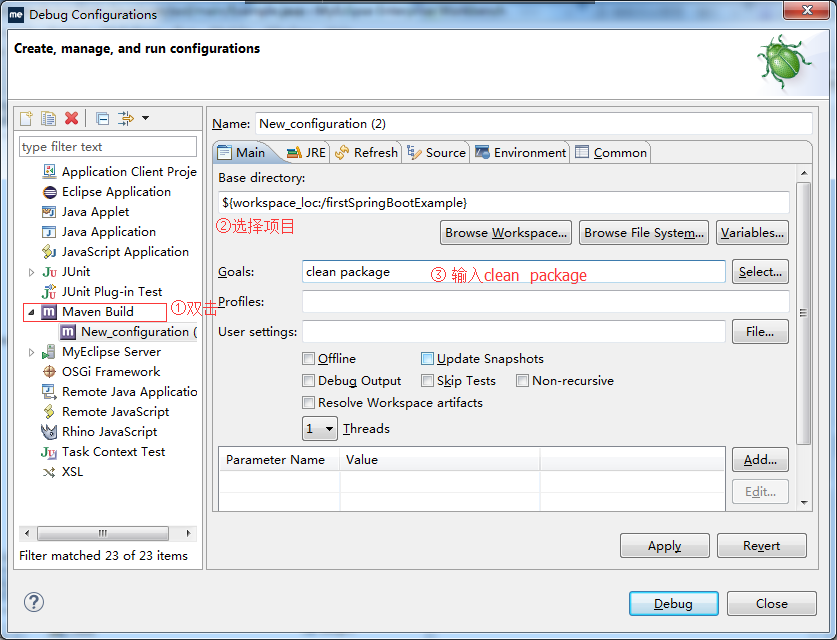
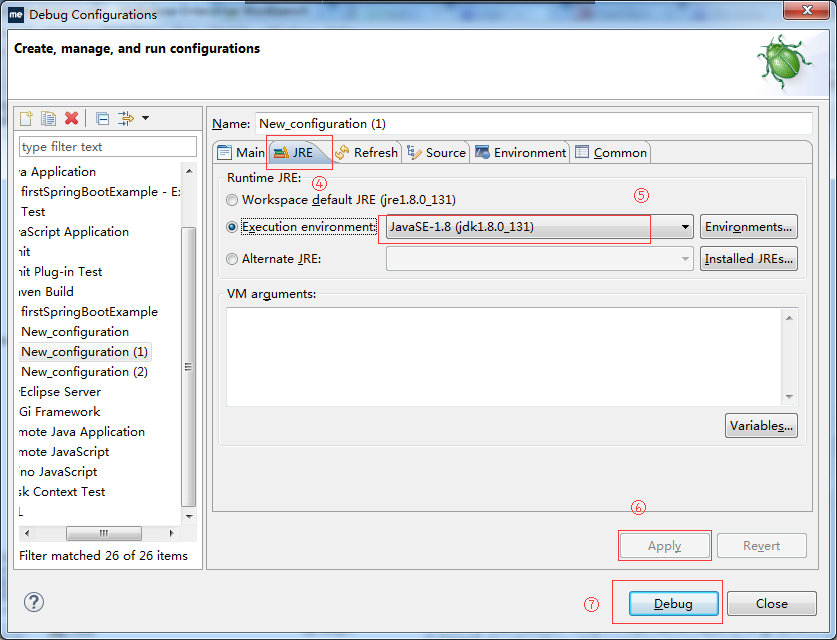
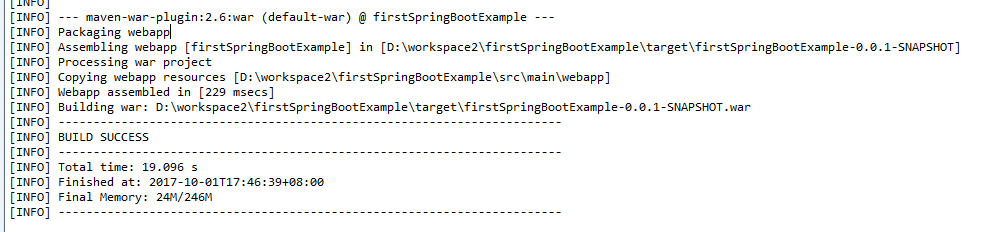
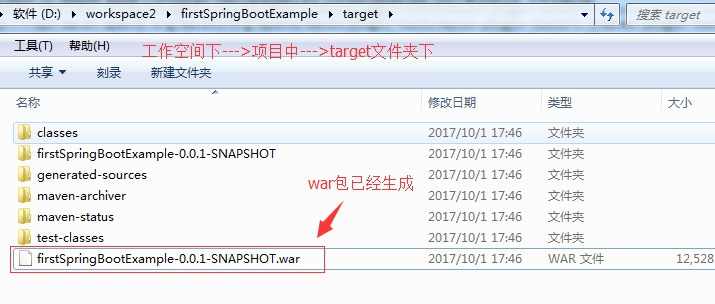
5.执行之后结果如下:
=====================================================第二部分=========================================================
第二部分,使用springBoot提供的插件,将项目打包为jar包
【spring Boot】2.在Myecplise上把spring Boot项目打包 war包和jar包的更多相关文章
- 通过idea 打包 spring maven项目打包为可执行jar包
用assembly打包一直报错: shangyanshuodeMacBook-Pro:target shangyanshuo$ java -jar jobscrawler-1.0-SNAPSHOT-j ...
- spring boot:在项目中引入第三方外部jar包集成为本地jar包(spring boot 2.3.2)
一,为什么要集成外部jar包? 不是所有的第三方库都会上传到mvnrepository, 这时我们如果想集成它的第三方库,则需要直接在项目中集成它们的jar包, 在操作上还是很简单的, 这里用luos ...
- 关于IDEA的Maven打jar包springboot项目问题,打成可执行jar包,IDEA创建的maven项目和spring initializr项目
Spring Initializr创建的项目 源文件地址 https://github.com/TaoPanfeng/maven-package 项目的创建步骤 进行打包 clear package ...
- 使用maven-shade-plugin打包spring项目为可执行的jar包
使用maven-shade-plugin打包spring项目为可执行的jar包,打包后的jar包里面包含依赖的jar包. POM文件: <plugin> <groupId>or ...
- spring项目使用mave将第三方jar包打进war包中
背景:一个标准的ssm项目,需要使用到第三方jar,现需要将项目发布到liunx的服务器上,将项目打成war包,第三方war包也需要打进去 首先是直接打包,发现第三方jar包并没有打进去......蛋 ...
- Spring Boot 2.0 Intellij Idea 中图文详解打包成可执行Jar
我们使用Spring Boot 2.0 创建好我们的项目后,我们一般需要打包,然后部署到服务器上. 打包步骤: 1. 选中项目,右键——> Open Module Settings. 2. 切换 ...
- Spring Boot打war包和jar包的目录结构简单讲解
Spring Boot项目可以制作成jar包和war包,其目录结构是不一样的,具体的如下所示: 1.war包目录结构分析WAR(Web Archivefile)网络应用程序文件,是与平台无关的文件格式 ...
- 8.spring:事务管理(上):Spring的数据库编程、编程式事务管理
Spring的数据库编程 Spring框架提供了JDBC模板模式------>JdbcTemplate 简化了开发,在开发中并不经常是使用 实际开发更多使用的是Hibernate和MyBatis ...
- IDEA下spring boot项目打包war包部署外部tomcat问题
第一步,修改配置pom.xml文件 <packaging>war</packaging> <dependency> <groupId>org.sprin ...
随机推荐
- RabbitMQ vhost 配置
RabbitMQ vhost 配置 rabbitmqctl set_vhost_limits是用来定义虚拟主机限制的命令 配置最大连接限制 要限制vhost vhost_name中并发客户端连接的 总 ...
- APIO2017游记
铁牌选手爆零滚粗记QAQ........ CCF说不让讨论APIO相关内容不过现在应该没事了吧QAQ day0:上午还在学校填清北夏令营的表,下午上火车去北京,晚上颓颓颓...... day1:上午网 ...
- nginx支持pathinfo
server { root /webserver/www/api; listen ; server_name api.dnxia.com; location / { if (!-e $request_ ...
- DP———4.完全背包问题(容量为V的背包可装最大价值的问题)
Piggy-Bank Time Limit: 2000/1000 MS (Java/Others) Memory Limit: 65536/32768 K (Java/Others)Total ...
- H-1-B签证简介
H 1-B签证简介 H 1-B签证是美国雇主为外籍高级技术人员申请的一种工作签证,有效期为3年,可在到期后再延长6年.每年新的配额是6.5万人,另外还有2万个名额是留给在美国获得高级学位(硕士以上学位 ...
- WebApi初探之基本操作(CRUD)
public class ProductsController : ApiController { static List<Product> products = new List< ...
- [ CodeVS冲杯之路 ] P1014
不充钱,你怎么AC? 题目:http://codevs.cn/problem/1014/ 一道不用考虑价值的DP题,那么我们可以用 0 和 1 表示是否能够达到该步骤 #include<cstd ...
- Android Sshd使用
1. 介绍 因为某些原因, 笔者需要在android上开发, 使用adb比较麻烦, 于是想使用sshd. 推荐的软件是openssh, 其他选择有dropbear, mosh.当然还有其他选择, 如 ...
- 《Linux命令行与shell脚本编程大全 第3版》高级Shell脚本编程---47
以下为阅读<Linux命令行与shell脚本编程大全 第3版>的读书笔记,为了方便记录,特地与书的内容保持同步,特意做成一节一次随笔,特记录如下:
- Linux内存管理之mmap详解 【转】
转自:http://blog.chinaunix.net/uid-26669729-id-3077015.html 一. mmap系统调用 1. mmap系统调用 mmap将一个文件或者其它对象映射进 ...