
11、SpringBoot------定时任务


开发工具:STS
代码下载链接:https://github.com/theIndoorTrain/Springboot/tree/52ef6c0c805913db1e66ed18671c322e284233f0
前言:
之前我们有讲过Quartz任务调度。
现在,我们来讲解下Spring自己的任务调度。
在Springboot项目中,这种超级简单的调度方式将会给我们带来便利。
任务一:
5s后开始,每10s执行一次,执行一次任务要2s;
1.在启动类中开启任务调度,加上@EnableScheduling
 package com.xm;

 import java.text.SimpleDateFormat;

 import java.util.Date;

 import org.springframework.boot.SpringApplication;

 import org.springframework.boot.autoconfigure.SpringBootApplication;

 import org.springframework.scheduling.annotation.EnableScheduling;

 @EnableScheduling

 @SpringBootApplication

 public class Demo0061Application {

     public static void main(String[] args) {

                  SpringApplication.run(Demo0061Application.class, args);
       System.out.println("Start Job:"+new SimpleDateFormat("yyyy-MM-dd HH:mm:ss").format(new Date()));

     }

 }
2.定义任务
 package com.xm.job;

 import java.text.SimpleDateFormat;

 import java.util.Date;

 import org.springframework.scheduling.annotation.Scheduled;

 import org.springframework.stereotype.Component;

 @Component

 public class HelloJob {

     @Scheduled(initialDelay=5000,fixedRate=10000)

     public void run() {

         System.out.println(new SimpleDateFormat("yyyy-MM-dd HH:mm:ss").format(new Date()));

         try {

             Thread.sleep(2000);

         } catch (InterruptedException e) {

             // TODO Auto-generated catch block

             e.printStackTrace();

         }

         System.out.println("hello world");

     }

 }
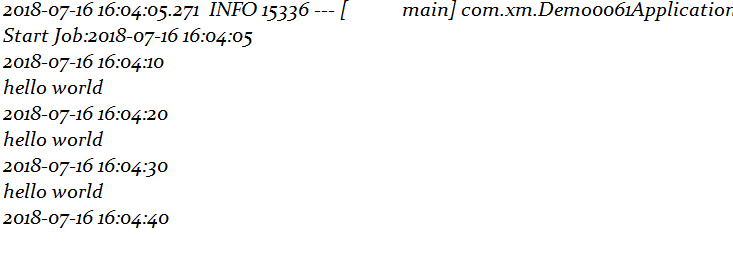
3.运行结果截图
4.分析
1.initialDelay=5000:任务开始时间为5s以后
2.fixedRate=10000:任务每10s之内完成一次
在这里任务时间是小于fixedRate
现在我们让任务运行时间改为11s
       @Scheduled(initialDelay=5000,fixedRate=10000)

    public void run() {

        System.out.println(new SimpleDateFormat("yyyy-MM-dd HH:mm:ss").format(new Date()));

        try {

            Thread.sleep(11000);

        } catch (InterruptedException e) {

            // TODO Auto-generated catch block

            e.printStackTrace();

        }

        System.out.println("hello world");

    }
运行结果为:

任务二:
5s后开始,每间隔10s执行一次,执行一次任务要2s;
1.定义任务
    @Scheduled(initialDelay=5000,fixedDelay=10000)

    public void run() {

        System.out.println(new SimpleDateFormat("yyyy-MM-dd HH:mm:ss").format(new Date()));

        try {

            //Thread.sleep(11000);

            Thread.sleep(2000);

        } catch (InterruptedException e) {

            // TODO Auto-generated catch block

            e.printStackTrace();

        }

        System.out.println("hello world");

    }
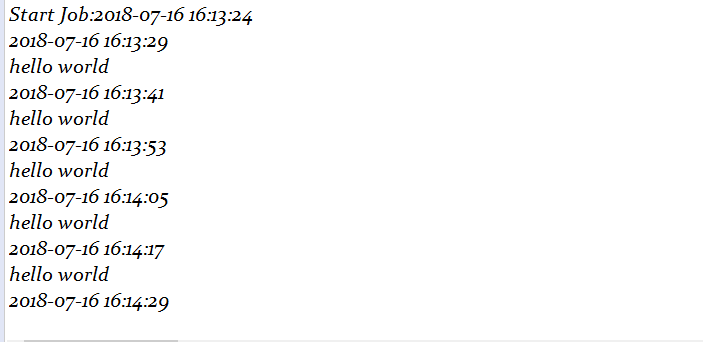
2.运行结果截图:
分析:
fixedDelay:每次任务完成结束后再开始计时
任务三:
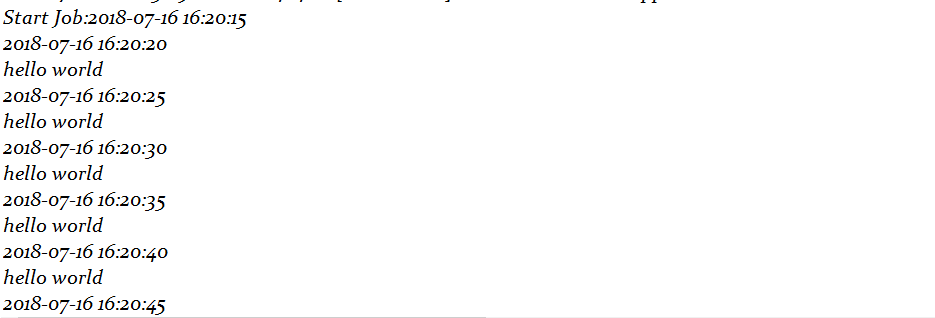
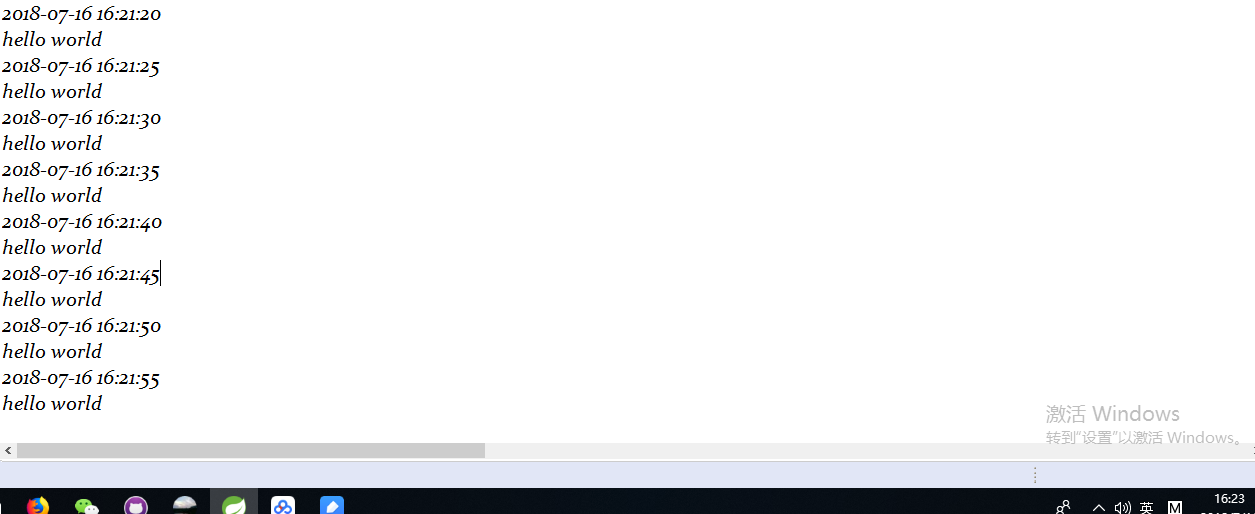
每天16:00:00开始到16:21:59每5s执行一次
1.定义任务
     @Scheduled(cron="0/5 0-21 16 * * ?")

     public void run() {

         System.out.println(new SimpleDateFormat("yyyy-MM-dd HH:mm:ss").format(new Date()));

         try {

             //Thread.sleep(11000);

             Thread.sleep(2000);

         } catch (InterruptedException e) {

             // TODO Auto-generated catch block

             e.printStackTrace();

         }

         System.out.println("hello world");

     }
2.运行结果截图:
3.分析
这里运用到了Cron表达式,请点击这里查看详解。3.初识Cron表达式
2018-07-16
11、SpringBoot------定时任务的更多相关文章
- SpringBoot定时任务@Scheduled
SpringBoot定时任务主要由两个注解完成. @Scheduled加在方法上面. @EnableScheduling加在类上面.可以是Application类,也可以是@Component类,还可 ...
- SpringBoot定时任务 - 集成quartz实现定时任务(单实例和分布式两种方式)
最为常用定时任务框架是Quartz,并且Spring也集成了Quartz的框架,Quartz不仅支持单实例方式还支持分布式方式.本文主要介绍Quartz,基础的Quartz的集成案例本,以及实现基于数 ...
- SpringBoot定时任务 - 开箱即用分布式任务框架xxl-job
除了前文介绍的ElasticJob,xxl-job在很多中小公司有着应用(虽然其代码和设计等质量并不太高,License不够开放,有着个人主义色彩,但是其具体开箱使用的便捷性和功能相对完善性,这是中小 ...
- springboot 定时任务部署至linux服务器上后会执行两次问题
springboot定时任务在本地运行时,正常执行且只执行一次,但是在maven打包成war包,部署至linux服务器上之后,定时任务奇怪的执行了两次. 由于未做负载均衡,所以可以先排除是因为多台服务 ...
- Spring boot(三) springboot 定时任务
这个不多说,springboot 定时任务非常简单就可以实现了. 30s运行一次 , @Scheduled(cron="0,30 * * * * ?") 通过这个控制定时时间 cr ...
- springboot定时任务之旅
springboot定时任务 假设场景:单体应用的定时任务,假设我们已经有了一个搭建好的springboot应用,但是需要添加一个定时执行的部分(比如笔者遇到的是定时去请求一个接口数据来更新某个表), ...
- 小D课堂 - 零基础入门SpringBoot2.X到实战_第10节 SpringBoot整合定时任务和异步任务处理_41、SpringBoot定时任务schedule讲解
笔记 1.SpringBoot定时任务schedule讲解 简介:讲解什么是定时任务和常见定时任务区别 1.常见定时任务 Java自带的java.util.Timer类 ...
- SpringBoot学习笔记(七):SpringBoot使用AOP统一处理请求日志、SpringBoot定时任务@Scheduled、SpringBoot异步调用Async、自定义参数
SpringBoot使用AOP统一处理请求日志 这里就提到了我们Spring当中的AOP,也就是面向切面编程,今天我们使用AOP去对我们的所有请求进行一个统一处理.首先在pom.xml中引入我们需要的 ...
- SpringBoot定时任务 - 什么是ElasticJob?如何集成ElasticJob实现分布式任务调度?
前文展示quartz实现基于数据库的分布式任务管理和job生命周期的控制,那在分布式场景下如何解决弹性调度.资源管控.以及作业治理等呢?针对这些功能前当当团队开发了ElasticJob,2020 年 ...
- springboot定时任务,去掉指定日期
今天用springboot写到一个需求:每周定时发送任务,但是要避开法定节假日. 网上找了些博客看,主要参考了https://www.cnblogs.com/lic309/p/4089633.html ...
随机推荐
- (转)使用介质设备安装 AIX 以通过 HMC 安装分区
使用介质设备安装 AIX 以通过 HMC 安装分区 原文:https://www.ibm.com/support/knowledgecenter/zh/ssw_aix_72/com.ibm.aix.h ...
- 关于Vim 的插件snipmate 以及它的安装方式
在网上看了http://study.163.com/course/courseMain.htm?courseId=269016#/courseMain 里关于snipmate 的视频 snipma ...
- Hash表的原理
哈希的概念:Hash,一般翻译做“散列”,也有直接音译为“哈希”的,就是把任意长度的输入(又叫做预映射, pre-image),通过散列算法,变换成固定长度的输出,该输出就是散列值.这种转换是一种压缩 ...
- HDU 5371——Hotaru's problem——————【manacher处理回文】
Hotaru's problem Time Limit: 4000/2000 MS (Java/Others) Memory Limit: 65536/65536 K (Java/Others) ...
- SQL Server和ASP.NET的操作基本操作
ado.net提供了丰富的数据库操作,这些操作可以分为三个步骤: 第一,使用SqlConnection对象连接数据库: 第二,建立SqlCommand对象,负责SQL语句的执行和存储过程的调用: 第三 ...
- window.open方法解析
一.前言 最近在项目中需要新窗口打开一个第三方的页面,大家都知道,使用window.open打开新窗口某些情况下会被浏览器的屏蔽程序阻止.如果要打开的URL是通过AJAX获取的,就一定会被浏览器拦截. ...
- vueHistory 模式下,布置到服务器上路由刷新会报nginx404错误
之前写完vue项目后,布置到服务器,用nginx反向代理后,一开始进去,进各种路由都是没问题的,但是一旦f5刷新后就会出现一个nginx404的错误. 经过翻阅vue文档后,发现这是vueHistor ...
- 【干货】Html与CSS入门学习笔记9-11
九.盒模型 与元素亲密接触 1.盒模型 css将每个元素都看做一个盒子,包括以下属性: 内容区content area:包含内容,内容可以决定大小,也可以自行设定宽度和高度.元素的width属性指定的 ...
- JS之获取子节点
在JS中获取子节点有以下几种方法: firstElementChild.firstChild.childNodes和children 我们通过一个例子来分析这几种方法的区别(获取div下的p标签) 输 ...
- 即将要被淘汰的兼容之--CSS Hack
css hack 条件注释法只在IE下生效<!--[if IE]>这段文字只在IE浏览器显示<![endif]-->只在IE6下生效<!--[if IE 6]>这段 ...