
DateTools,可能是最好用的iOS日期工具库
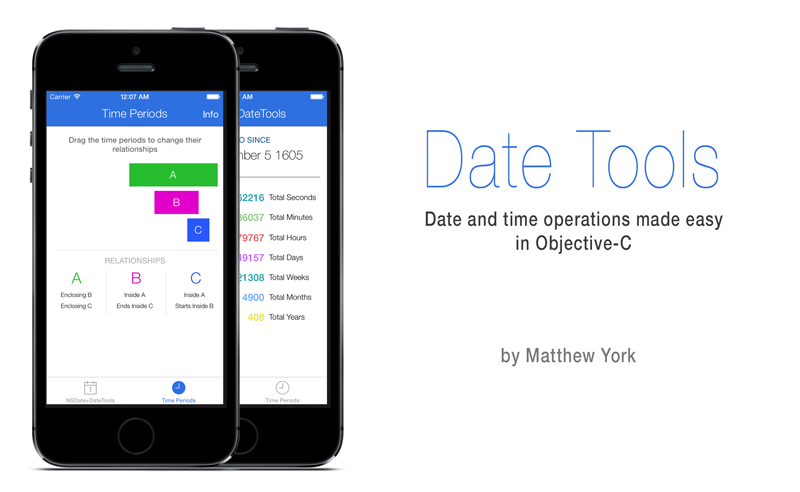
项目简介
DateTools 用于提高Objective-C中日期和时间相关操作的效率.灵感来源于 DateTime和[Time Period Library](Time Period Library).
安装
使用 Cocoapods 安装
pod 'DateTools'
NSDate+DateTools
DateTools让NSDate功能更完整,可以让你更容易地去获取日期各个组件的信息,如年 月 日等.
获取字符串形式的时间间隔.
DateTools 可以让你获取距离一个过去的时间点距离当前时间的字符串表示.和Twitter中很像,这个时间字符串有完整形式和缩略形式两种.你可以像下面这样使用:
NSDate *timeAgoDate = [NSDate dateWithTimeIntervalSinceNow:-4];

NSLog(@"Time Ago: %@", timeAgoDate.timeAgoSinceNow);

NSLog(@"Time Ago: %@", timeAgoDate.shortTimeAgoSinceNow);

//输出:

//Time Ago: 4 seconds ago

//Time Ago: 4s

// 如果工程支持国际化,并且模拟器或真机环境设为简体中文,则会输出:

// Time Ago: 4秒钟前

// Time Ago: 4秒
如果你的工程支持国际化,DateTools现在会自动支持以下语言的本地化:
- ar (Arabic)
- bg (Bulgarian)
- ca (Catalan)
- zh_Hans (简体中文)
- zh_Hant (繁体中文)
- cs (Czech)
- da (Danish)
- nl (Dutch)
- en (English)
- fi (Finnish)
- fr (French)
- de (German)
- gre (Greek)
- gu (Gujarati)
- he (Hebrew)
- hi (Hindi)
- hu (Hungarian)
- is (Icelandic)
- id (Indonesian)
- it (Italian)
- ja (Japanese)
- ko (Korean)
- lv (Latvian)
- ms (Malay)
- nb (Norwegian)
- pl (Polish)
- pt (Portuguese)
- ro (Romanian)
- ru (Russian)
- sl (Slovenian)
- es (Spanish)
- sv (Swedish)
- th (Thai)
- tr (Turkish)
- uk (Ukrainian)
- vi (Vietnamese)
- cy (Welsh)
- hr (Croatian)
获取日期的某个组成部分,如年月周日时分秒等.
使用 DateTools 可以很容易地获取日期对象的某一组成部分:
NSDate * date = [NSDate date];

NSInteger year = date.year;

NSInteger month = date.month;

NSLog(@"year: %ld, month: %ld", (long)year, (long)month); // year: 2015, month: 9
如果你不想使用公历,可以这样做:
NSInteger day = [date dayWithCalendar:calendar];
如果你想改变 DateTools 使用的默认日历,可以改写 NSDate+DateTools.m 中的 defaultCalendar 方法.
日期编辑
可以使用 dateByAdding... 或 dateBySubtractingYears... 进行日期按年/月/日/时分/秒等增加或减少:
NSDate * date = [NSDate date];

NSInteger oldYear = date.year;

NSDate *newDate = [date dateByAddingYears:1];

NSInteger newYear = newDate.year;

NSLog(@"oldYear: %ld newYear: %ld", (long)oldYear, (long)newYear); // 输出: oldYear: 2015 newYear: 2016
日期比较
DateTools 提供下列方法,比较两个日期的大小,返回结果为一个布尔值:
- isEarlierThan
- isEarlierThanOrEqualTo
- isLaterThan
- isLaterThanOrEqualTo
如果想获取两个日期具体的差值: 获取毫秒间隔可以使用 NSDate 提供的 timeIntervalSinceDate:和 timeIntervalSinceNow 方法;获取相差多少年/月/周/日/时/分/秒等,可以直接使用 DateTools的扩展方法.
NSInteger yearsApart = [firstDate yearsFrom:secondDate];
类似yearsFrom:用于日期比较的方法包括:
yearsFrom:,yearsUntil,yearsAgo,yearsEarlierThan:,yearsLaterThan:monthsFrom:,monthsUntil,monthsAgo,monthsEarlierThan:,monthsLaterThan:weeksFrom:,weeksUntil,weeksAgo,weeksEarlierThan:,weeksLaterThan:daysFrom:,daysUntil,daysAgo,daysEarlierThan:,daysLaterThan:hoursFrom:,hoursUntil,hoursAgo,hoursEarlierThan:,hoursLaterThan:minutesFrom:,minutesUntil,minutesAgo,minutesEarlierThan:,minutesLaterThan:secondsFrom:,secondsUntil,secondsAgo,secondsEarlierThan:,secondsLaterThan:
日期的格式化输出
可以使用 code>formattedDateWithStyle: 和 formattedDateWithFormat: 方法格式化输出日期:
NSDate * date = [NSDate date];

NSString * dateStr = [date formattedDateWithStyle: NSDateFormatterFullStyle];

// 此处输出的具体内容会根据你的手机或模拟器语言环境的不同而不同.

NSLog(@"%@", dateStr); // 输出: 2015年9月25日 星期五

dateStr =  [date formattedDateWithFormat:@"YYYY/MM/dd HH:mm:ss"];

NSLog(@"%@", dateStr); // 输出: 2015/09/25 15:19:23
时间段
DateTools 通过 DTTimePeriod类来简化时间段相关的操作.
初始化
已知开始和结束时间,可以使用下面的方法初始化时间段对象:
DTTimePeriod *timePeriod = [[DTTimePeriod alloc] initWithStartDate:startDate endDate:endDate];
或者,已知起始或结束时间,同时知道时间段的总时长,可以用类似下面的方法创建时间端对象:
// 创建一个时间段,从现在开始,共5个小时.

DTTimePeriod *timePeriod = [DTTimePeriod timePeriodWithSize:DTTimePeriodSizeHour amount:5 startingAt:[NSDate date]];
时间段信息
可以通过 DTTimePeriod 的实例方法来获取时间段的相关信息:
hasStartDate- 返回YES,如果有起始时间.hasEndDate- 返回YES,如果有结束时间.isMoment- 返回YES,如果起始时间和结束时间相同.durationIn....- 返回指定单位下时间段的长度.
DTTimePeriod *timePeriod = [[DTTimePeriod alloc] initWithStartDate:date endDate: [date dateByAddingDays: 10]];

NSLog(@"相差 %g 天", [timePeriod durationInDays]); // 输出: 相差 10 天
操作
可以对时间段进行移动,延长或缩短的操作.
移动
当一个时间段被移动时,起始时间和结束时间会相应地同步迁移或推后.可以使用下面两个方法移动时间段:
shiftEarlierWithSize:amount:时间段整体前移shiftLaterWithSize:amount:时间段整体推后
延长/缩短
可以通过保持起始点/中间时间点/结束时间点不变,然后改变开始或结束时间点,以得到延长或缩短时间段的目的:
// 通过前移起始时间,把时间段总时长从1分钟变为2分钟.

DTTimePeriod *timePeriod  = [DTTimePeriod timePeriodWithSize:DTTimePeriodSizeMinute endingAt:[NSDate date]];

[timePeriod lengthenWithAnchorDate:DTTimePeriodAnchorEnd size:DTTimePeriodSizeMinute amount:1];
关系
可以使用 DTTimePeriod 的关系操作相关的方法,来判断两个时间段的相互关系,如是否包含,是否是同一段时间等.
基础
下图表格列出了两个时间段所有可能的关系:
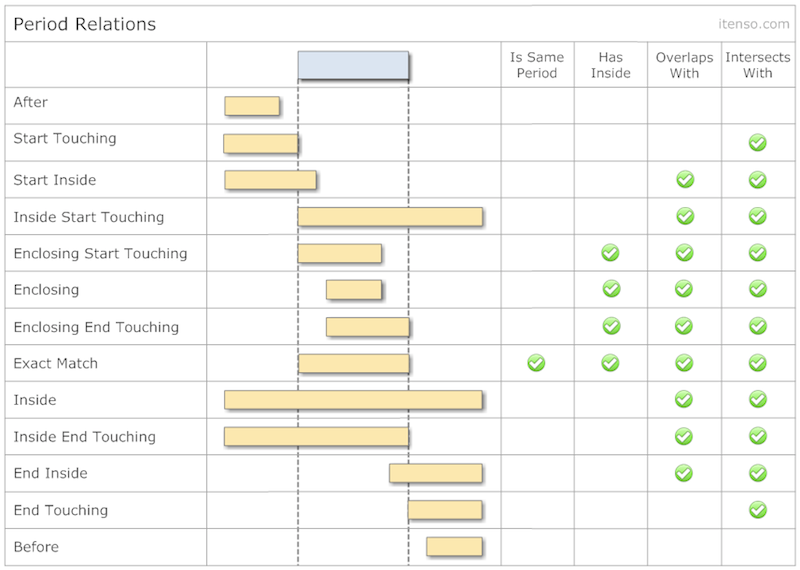
可通过下列方法判断两个时间段的关系:
- isEqualToPeriod:
- isInside:
- contains:
- overlapsWith:
- intersects:
你可以通过下面这个方法获取相对于另一个时间段的关系:
-(DTTimePeriodRelation)relationToPeriod:(DTTimePeriod *)period;
所有可能的时间段间的关系都列在了枚举 DTTimePeriodRelation 中了.
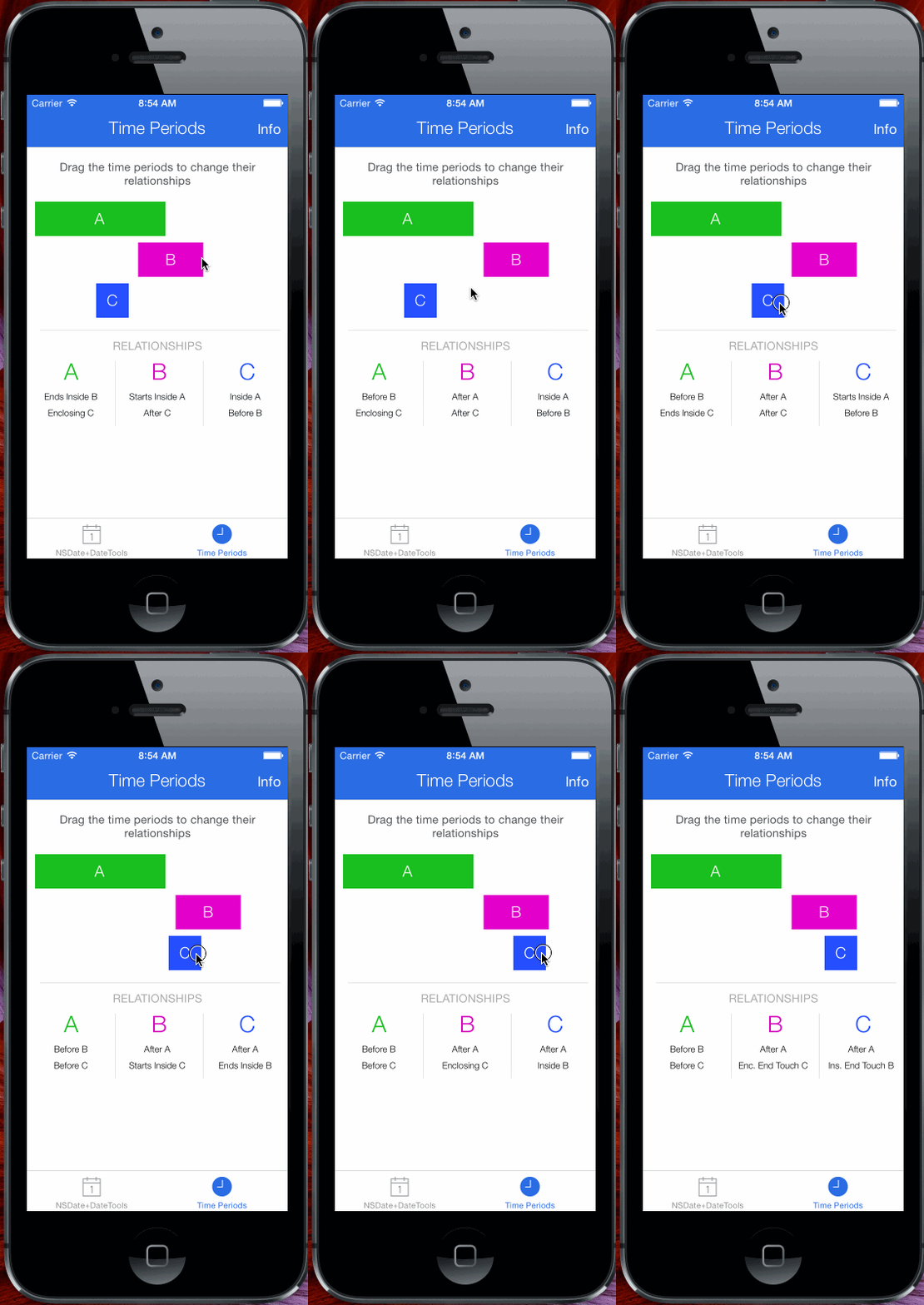
点击示例中 Time Periods 按钮,然后滑动滑块,可以更好地掌握时间段之间的相互关系
时间段集合
DateTools 提供两种时间段集合类: DTTimePeriodCollection 和 DTTimePeriodChain.前者,允许存储彼此有交集的时间段;后者,不允许存储彼此有交集的时间段.
这两个时间段集合类,操作和 NSArray 很像.你可以添加,插入和移除 DTTimePeriod 对象,就像你在数组时的那样.唯一的不同是,两中集合存储时间段的方式.
DTTimePeriodCollection 和 DTTimePeriodChain,是为了简化基于多个时间段的逻辑处理.比如同一团队中,给不同的人设置任务的起始和结束时间,此时如果使用 DTTimePeriodCollection 来处理各个时间段,可以直接得到团队总任务的起始时间和结束时间.
DTTimePeriodCollection
DTTimePeriodCollection 是一个规则相对宽松的集合.默认无序(指的是顺序和各个时间段的起止时间无关.),但支持手动排序;拥有自己的属性,比如基于内粗存储的时间段计算出的此集合的开始时间和结束时间.这个结合允许存储有交集的时间段.
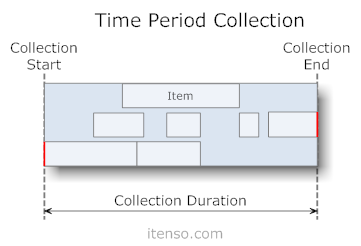
可以像下面这样创建新的DTTimePeriodCollection集合:
// 创建集合.

DTTimePeriodCollection *collection = [DTTimePeriodCollection collection];

// 创建时间段

NSDateFormatter * dateFormatter = [[NSDateFormatter alloc]init];

[dateFormatter setDateFormat: @"YYYY MM dd HH:mm:ss.SSS"];

DTTimePeriod *firstPeriod = [DTTimePeriod timePeriodWithStartDate:[dateFormatter dateFromString:@"2014 11 05 18:15:12.000"] endDate:[dateFormatter dateFromString:@"2015 11 05 18:15:12.000"]];

DTTimePeriod *secondPeriod = [DTTimePeriod timePeriodWithStartDate:[dateFormatter dateFromString:@"2015 11 05 18:15:12.000"] endDate:[dateFormatter dateFromString:@"2016 11 05 18:15:12.000"]];

// 把时间段添加到集合中.

[collection addTimePeriod:firstPeriod];

[collection addTimePeriod:secondPeriod];

// 从集合中获取时间段.

firstPeriod = collection[0];
排序
有三类给集合内时间段排序的方法:
- 根据起始时间排序 -
sortByStartAscending,sortByStartDescending - 根据结束时间排序 -
sortByEndAscending,sortByEndDescending - 根据时长排序 -
sortByDurationAscending,sortByDurationDescending
操作
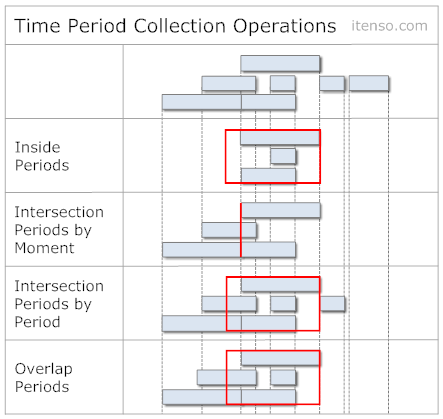
也可以去获取一个 NSDate 对象或一个 DTTimePeriod 对象与一个 时间段结合的相对关系.例如,你可以通过 periodsIntersectedByDate: 方法获取所有与某个时间有交集的时间段.这个方法会返回一个新的 DTTimePeriodCollection 对象,里面包含所有符合条件的时间段.
有许多类似的方法,如下图:
DTTimePeriodChain
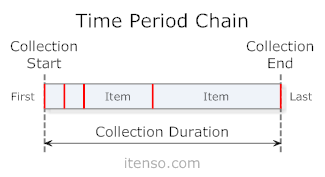
DTTimePeriodChain 以较为严格的方式存储时间段对象. DTTimePeriodChain集合通常依据开始和结束时间存储时间段对象,并且有自己的属性,如 根据内部存储的时间段对象推断出来的此集合的开始时间和结束时间. DTTimePeriodChain 内部存储的时间段对象不允许有交集.这种集合很适用于连续会议或约会等日程类事务的建模.
创建一个新的 DTTimePeriodChain 集合:
// 创建集合.

DTTimePeriodChain *chain = [DTTimePeriodChain chain];

// 创建时间段

NSDateFormatter * dateFormatter = [[NSDateFormatter alloc]init];

[dateFormatter setDateFormat: @"YYYY MM dd HH:mm:ss.SSS"];

DTTimePeriod *firstPeriod = [DTTimePeriod timePeriodWithStartDate:[dateFormatter dateFromString:@"2014 11 05 18:15:12.000"] endDate:[dateFormatter dateFromString:@"2015 11 05 18:15:12.000"]];

DTTimePeriod *secondPeriod = [DTTimePeriod timePeriodWithStartDate:[dateFormatter dateFromString:@"2015 11 05 18:15:12.000"] endDate:[dateFormatter dateFromString:@"2016 11 05 18:15:12.000"]];

// 添加时间段对象到集合中.

[chain addTimePeriod:firstPeriod];

// 如果后存入的时间和前一个存入的时间无法前后完全衔接,则后一个时间会适当前移或后移,以使前后时间段紧凑.

[chain addTimePeriod:secondPeriod];

// 获取集合中的元素.

firstPeriod = chain[0];
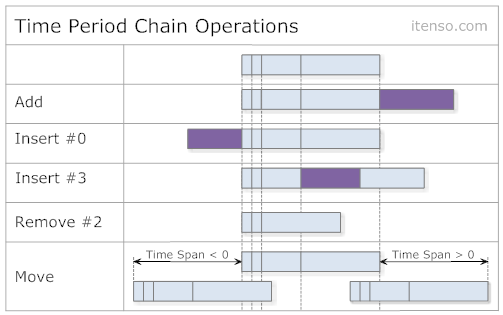
新加入的时间段,时长不变,起始时间变为前一个时间段的结束时间,结束时间对应前移后后移.在非零位置新插入的时间,其后的时间段相应后移.在零位置插入的时间,集合的起始时间前移.操作图解如下:
操作
像 DTTimePeriodCollection 一样, DTTimePeriodChain 也可以进行相等性比较,并且也可以前移后后移.其他执行的方法在下图列出:
DateTools,可能是最好用的iOS日期工具库的更多相关文章
- JHChart 1.1.0 iOS图表工具库中文ReadMe
JHChart(最新版本1.1.0) 好吧,的确当前的github上已经存有不少的iOS图表工具库,然而,当公司的项目需要图表时,几乎没有哪个第三方能够完全满足我的项目需求.无奈之下,本人不得不花费一 ...
- JHChart iOS图表工具库1.0.3新版本详解
前言. 从2016年4月14日开始,本人着手开发了JHChart图表工具库.经过断断续续的开发,截止到现在,已经实现了折线图.柱状图.饼状图.环形图和表格样式的图表功能.为了方便使用,我已经将一个简单 ...
- iOS 常用工具库LFKit功能介绍
简介:LFKit包含了平时常用的category,封装的常用组件,一些工具类. 需要LFKit中所有自定义控件的pod 'LFKit/Component' 需要LFKit中所有category的pod ...
- placeholder的字体样式改变,滚动条的颜色改变,ios日期兼容
placeholder:::-webkit-input-placeholder { color: rgba(153, 153, 153, 0.541);font-size:12px;}:-moz-pl ...
- 日期工具类 DateTools
为了跟其他日期工具类进行区分起名字DateTools public class DateTools { /** The DAT e_ forma t1. */ public static String ...
- Java与IOS日期格式
//JAVA日期格式 Date date = new Date(); SimpleDateFormat dateFormat = new SimpleDateFormat("yyyy-MM- ...
- IOS常用第三方库《转》
UI 动画 网络相关 Model 其他 数据库 缓存处理 PDF 图像浏览及处理 摄像照相视频音频处理 响应式框架 消息相关 版本新API的Demo 代码安全与密码 测试及调试 AppleWatch ...
- iOS开发--开源库
图像: 1.图片浏览控件MWPhotoBrowser 实现了一个照片浏览器类似 iOS 自带的相册应用,可显示来自手机的图片或者是网络图片,可自动从网络下载图片并进行缓存.可对图片进行缩 ...
- iOS常用第三方库大全,史上最全第三方库收集
下拉刷新 EGOTableViewPullRefresh – 最早的下拉刷新控件. SVPullToRefresh – 下拉刷新控件. MJRefresh – 仅需一行代码就可以为UITableVie ...
随机推荐
- javascript Array数组详解 各种方法
1.数组的声明方法(1): arrayObj = new Array(); //创建一个数组.复制代码 代码如下: var arr1 = new Array(); (2):arrayObj = new ...
- visual stdio使用
现在转换使用visual stdio,因为很多和以前的快捷键不同,也不打算换了,这样可移动性应该更好吧. 1.注释代码, 首先按下ctrl + k,然后再按下ctrl + c 2.取消注释,首先按下c ...
- 性能测试工具LoadRunner06-LR之Virtual User Generator 事务(Transaction)
定义 为了衡量某个操作的性能,需要在操作的开始和结束位置插入这样一个范围,这就定义了一个transaction. 原因 从性能测试的角度出发,我们需要知道不同的操作所花费的时间,这样就能衡量不同的操作 ...
- (转)ping命令
ping命令 原文:https://www.cnblogs.com/peida/archive/2013/03/06/2945407.html Linux系统的ping命令是常用的网络命令,它通常用来 ...
- day03 - Python基础3
本节内容 1. 函数基本语法及特性 2. 参数与局部变量 3. 返回值 嵌套函数 4.递归 5.匿名函数 6.函数式编程介绍 7.高阶函数 8.内置函数 温故知新 ...
- CentOS 上安装 GIT 服务
获取 YUM 中 GIT 信息: yum info git 查看当前 GIT 的版本: git --version 或 git version 卸载当前版本的 GIT: ...
- iview 中 select 值不对
<Select v-model="formValidate.departmentId" @on-change="selectDepartment"> ...
- Android开发由eclipse转Android Studio中一些常见出错问题解决方法
1.给一个Activity添加了一个Dialog主题,结果出现了下面的问题,在eclipse却没有出错 <activity android:name=".DialogActivity& ...
- 笨办法学Python(二十六)
习题 26: 恭喜你,现在可以考试了! 你已经差不多完成这本书的前半部分了,不过后半部分才是更有趣的.你将学到逻辑,并通过条件判断实现有用的功能. 在你继续学习之前,你有一道试题要做.这道试题很难,因 ...
- C#调用C++的dll存在的问题
C#调用C++写的DLL时,在C#程序中,使用DllImport定义C++导出函数的定义信息,之前在C++中定义导出函数时,使用了long作为参数类型,使用C#调用时,开始在64位版本是哪个测试,一切 ...