
(七)Thymeleaf的 th:* 属性之—— th: ->设值& 遍历迭代& 条件判断
3.4 属性值的设置
3.4.1 使用th:attr来设置属性的值
<form action="subscribe.html" th:attr="action=@{/subscribe}">

  <fieldset>

    <input type="text" name="email" />

    <input type="submit" value="Subscribe!" th:attr="value=#{subscribe.submit}"/>

  </fieldset>

</form>
设置多个属性值:
<img src="../../images/gtvglogo.png"

     th:attr="src=@{/images/gtvglogo.png},title=#{logo},alt=#{logo}" />
会的多的不一定会的精,th:attr 虽然可以设置很多属性值,但其设置属性值非常不规范不美观,不建议使用。(这点很像全栈工程师的尴尬地位,你虽然都能做,但很多公司招聘的时候还是前后端分开来招)。可以使用其他th:*属性,其任务是设置特定的标记属性(而不仅仅是任何属性th:attr)。

3.4.2 一次性设置值相同的属性
有两个叫比较特殊的属性th:alt-title和th:lang-xmllang可用于同时设置两个属性相同的值。特别:
th:alt-title将设置alt和title。th:lang-xmllang将设置lang和xml:lang。
<img src="../../images/gtvglogo.png"

     th:src="@{/images/gtvglogo.png}" th:alt-title="#{logo}" />
equals.
<img src="../../images/gtvglogo.png"

     th:src="@{/images/gtvglogo.png}" th:title="#{logo}" th:alt="#{logo}" />
3.4.3 Appending and prepending(附加和前缀)
th:attrappend th:attrprepend (append (suffix) or prepend (prefix) the result of their evaluation to the existing attribute values)
th:attrappend属性值前缀,例如一个标签的类名为a,想要变为“a b”,即增加一个类样式,可以使用此属性.
<!--将要添加的CSS类的名称(未设置,刚添加)存储到上下文变量中的一个按钮中,因为要使用的特定CSS类将取决于用户所做的某些操作之前-->

<input type="button" value="Do it!" class="btn" th:attrappend="class=${' ' + cssStyle}" />
<!--向元素添加CSS类或样式片段,而不覆盖现有元素-->

<tr th:each="prod : ${prods}" class="row" th:classappend="${prodStat.odd}? 'odd'">
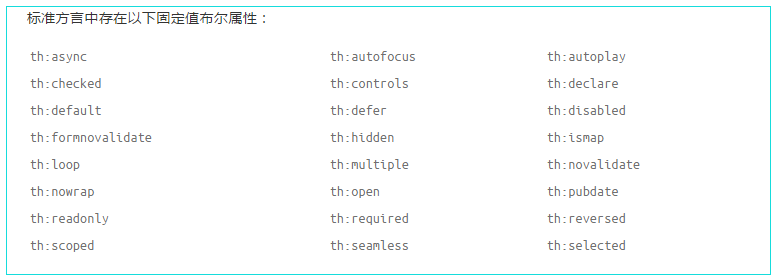
3.4.4 布尔值属性(属性值为布尔值)
以th:checked为例,选中为true,未选中为false,thymeleaf解析时不会设置th:checked属性。
<input type="checkbox" name="active" th:checked="true" /> 选中
3.5 th:each
  <table>

      <tr>

        <th>NAME</th>

        <th>PRICE</th>

        <th>IN STOCK</th>

      </tr>

      <tr th:each="prod : ${prods}">

        <td th:text="${prod.name}">Onions</td>

        <td th:text="${prod.price}">2.41</td>

        <td th:text="${prod.inStock}? #{true} : #{false}">yes</td>

      </tr>

    </table>
<tr th:each="prod,iterStat : ${prods}" th:class="${iterStat.odd}? 'odd'">

    <td th:text="${prod.name}">Onions</td>

    <td th:text="${prod.price}">2.41</td>

    <td th:text="${prod.inStock}? #{true} : #{false}">yes</td>

  </tr>
iterStat称作状态变量,属性有:
- index: 当前迭代对象的index(从0开始计算)
- count: 当前迭代对象的index(从1开始计算)
- size: 被迭代对象的大小 current:当前迭代变量
- even/odd: 布尔值,当前循环是否是偶数/奇数(从0开始计算)
- first: 布尔值,当前循环是否是第一个
- last: 布尔值,当前循环是否是最后一个
<ol>

        <li>List循环:

            <table border="1">

              <tr>

                <th>用户名</th>

                <th>邮箱</th>

                <th>管理员</th>

                <th>状态变量:index</th>

                <th>状态变量:count</th>

                <th>状态变量:size</th>

                <th>状态变量:current.userName</th>

                <th>状态变量:even</th>

                <th>状态变量:odd</th>

                <th>状态变量:first</th>

                <th>状态变量:last</th>

              </tr>

              <tr  th:each="user,userStat : ${list}">

                <td th:text="${user.userName}">Onions</td>

                <td th:text="${user.email}">test@test.com.cn</td>

                <td th:text="${user.isAdmin}">yes</td>

                 <th th:text="${userStat.index}">状态变量:index</th>

                <th th:text="${userStat.count}">状态变量:count</th>

                <th th:text="${userStat.size}">状态变量:size</th>

                <th th:text="${userStat.current.userName}">状态变量:current</th>

                <th th:text="${userStat.even}">状态变量:even****</th>

                <th th:text="${userStat.odd}">状态变量:odd</th>

                <th th:text="${userStat.first}">状态变量:first</th>

                <th th:text="${userStat.last}">状态变量:last</th>

              </tr>

            </table>

        </li>

        <li>Map循环:

            <div th:each="mapS:${map}">

            <div th:text="${mapS}"></div>

            </div>

        </li>

        <li>数组循环:

            <div th:each="arrayS:${arrays}">

            <div th:text="${arrayS}"></div>

            </div>

        </li>

        </ol>
3.6 条件判断
3.6.1 th:if th:unless
①th:if使用
<a href="comments.html"

   th:href="@{/product/comments(prodId=${prod.id})}"

   th:if="${not #lists.isEmpty(prod.comments)}">view</a>
② th:unless
<a href="comments.html"

   th:href="@{/comments(prodId=${prod.id})}"

   th:unless="${#lists.isEmpty(prod.comments)}">view</a>
3.6.2 th:switch th:case
<div th:switch="${user.role}">

  <p th:case="'admin'">User is an administrator</p>

  <p th:case="#{roles.manager}">User is a manager</p>

</div>
(七)Thymeleaf的 th:* 属性之—— th: ->设值& 遍历迭代& 条件判断的更多相关文章
- kuangbin专题七 HDU1698 Just a Hook (区间设值 线段树)
In the game of DotA, Pudge’s meat hook is actually the most horrible thing for most of the heroes. T ...
- spring boot 与 thymeleaf (3): 设置属性、条件、遍历、局部变量、优先级、内联语法
前面记录了 thymeleaf 基本表达式, 这里继续看一下其他功能. 一. 设置属性值 这里的controller, html框架 还是沿用上一篇的部分. html: <div class=& ...
- spring事物的七种事物传播属性行为及五种隔离级别
首先,说说什么事务(Transaction). 事务,就是一组操作数据库的动作集合.事务是现代数据库理论中的核心概念之一.如果一组处理步骤或者全部发生或者一步也不执行,我们称该组处理步骤为一个事务.当 ...
- js中对style中的多个属性进行设值
js中对style中的多个属性进行设值: 看一下案例自然就明白: document.getElementById("my_wz1").style.cssText="bac ...
- 七、vue计算属性
细节流程图 初始化 计算属性的初始化是发生在 Vue 实例初始化阶段的 initState 函数中,执行了 if (opts.computed) initComputed(vm, opts.compu ...
- Spring 设值注入 构造注入 p命名空间注入
注入Bean属性---构造注入配置方案 在Spring配置文件中通过<constructor-arg>元素为构造方法传参 注意: 1.一个<constructor-arg>元素 ...
- 元素操作(sizing,尺寸获取,设值,偏移算法,坐标算法)
css3的Sizing Box-sizing是css3的box属性之一,遵循css的boxmodel原理,css中box model是分为两种,第一种是w3c的标准模型,另一种是ie的传统模型,他们相 ...
- Spring接口编程_设值注入和构造注入
说明: UserManagerImp是设值注入,UserManagerImp2是构造注入 接口不注入,也就是在Spring配置文件中没有接口的<bean>,但是定义的时候是用接口 priv ...
- Java Spring学习笔记----Bean的依赖注入(设值注入方式)1
Spring常用的两种依赖注入方式:一种是设值注入方式,利用Bean的setter方法设置Bean的属性值:另一种是构造注入,通过给Bean的构造方法传递参数来实现Bean的属性赋值: 1.设值注入方 ...
随机推荐
- C++ emplace_back
在C++开发过程中,我们经常会用STL的各种容器,比如vector,map,set等,这些容器极大的方便了我们的开发.在使用这些容器的过程中,我们会大量用到的操作就是插入操作,比如vector的pus ...
- python 实现经典算法
import time start_time = time.clock() list_ = [9, 2, 7, 4, 5, 6, 3, 8, 1] """ # 堆排序(通 ...
- 第一章:1-11、在上题的分组交换网中,设报文长度和分组长度分别为x和(p+h)(bit),其中p为分组的数据部分的长度,而h为每个分组所带的控制信息固定长度,与p的大小无关。通信的两端共经过k段链路。链路的数据率为b(bit/s),但传播时延和结点的排队时间均可忽略不计。若打算使总的时延为最小,问分组的数据部分长度p应取为多大?
<计算机网络>谢希仁著第四版课后习题答案答: 分组个x/p, 传输的总比特数:(p+h)x/p 源发送时延:(p+h)x/pb 最后一个分组经过k-1个分组交换机的转发,中间发送时延:(k ...
- Python实现微信小程序支付功能
由于最近自己在做小程序的支付,就在这里简单介绍一下讲一下用python做小程序支付这个流程.当然在进行开发之前还是建议读一下具体的流程,清楚支付的过程. 1.支付交互流程 当然具体的参数配置可以参考官 ...
- [P2023][AHOI2009]维护序列(线段树)
题目描述 老师交给小可可一个维护数列的任务,现在小可可希望你来帮他完成. 有长为N的数列,不妨设为a1,a2,…,aN .有如下三种操作形式: (1)把数列中的一段数全部乘一个值; (2)把数列中的一 ...
- POJ 2739:Sum of Consecutive Prime Numbers(Two pointers)
[题目链接] http://poj.org/problem?id=2739 [题目大意] 求出一个数能被拆分为相邻素数相加的种类 [题解] 将素数筛出到一个数组,题目转化为求区段和等于某数的次数,尺取 ...
- 六. 异常处理6.try语句的嵌套
Try语句可以被嵌套.也就是说,一个try语句可以在另一个try块内部.每次进入try语句,异常的前后关系都会被推入堆栈.如果一个内部的try语句不含特殊异常的catch处理程序,堆栈将弹出,下一个t ...
- 【OpenJudge3531】【背包DP】【膜法交配律】判断整除
判断整除 总时间限制: 1000ms 内存限制: 65536kB [描述] 一个给定的正整数序列,在每个数之前都插入+号或-号后计算它们的和.比如序列:1.2.4共有8种可能的序列:(+1) + (+ ...
- python正则表达式-re模块
目录: 一.正则函数 二.re模块调用 三.贪婪模式 四.分组 五.正则表达式修饰符 六.正则表达式模式 七.常见的正则表达式 导读: 想要使用python的正则表达式功能就需要调用re模块,re模块 ...
- iOS禁止多点操作(按钮和Table项)
1)避免同时点击多个按钮: [btn setExclusiveTouch:YES]; 设置确保当btn点击时,其他按钮不响应: (2)避免同时点击UITableView中多个row -(NSIndex ...