
springboot之assembly的文件配置
一、在使用springboot框架的时候,存在一个问题。就是我们配置yaml文件,需要单独提出来做参数修改。当然这个是可以通过spring.profiles.active的方式来配置dev,prod等环境的激活。但是我们如果存在环境不确定,或者需要启动脚本,启动项目的时候,这样通过jar的方式后续会处理很多工作。所以前期的集成工作还是很有必要的。
二、这里有一个简单的例子,用于参数配置方式
1)目录结构
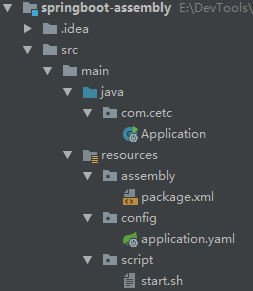
2)需要的依赖包(pom.xml)
  <parent>

        <groupId>org.springframework.boot</groupId>

        <artifactId>spring-boot-starter-parent</artifactId>

        <version>2.0.0.RELEASE</version>

    </parent>

    <dependencies>

        <dependency>

            <groupId>org.springframework.boot</groupId>

            <artifactId>spring-boot-starter-web</artifactId>

        </dependency>

    </dependencies>
3)maven的构建过程
   <build>

        <finalName>assembly</finalName>

        <plugins>

            <plugin>

                <groupId>org.springframework.boot</groupId>

                <artifactId>spring-boot-maven-plugin</artifactId>

                <configuration>

                    <includeSystemScope>true</includeSystemScope>

                </configuration>

            </plugin>

            <plugin>

                <!--主要使用的是maven提供的assembly插件完成-->

                <artifactId>maven-assembly-plugin</artifactId>

                <executions>

                    <execution>

                        <configuration>

                            <appendAssemblyId>false</appendAssemblyId>

                            <!--具体的配置文件-->

                            <descriptors>${project.basedir}/src/main/resources/assembly/package.xml</descriptors>

                        </configuration>

                        <id>make-assembly</id>

                        <!--绑定到maven操作类型上-->

                        <phase>package</phase>

                        <!--运行一次-->

                        <goals>

                            <goal>single</goal>

                        </goals>

                    </execution>

                </executions>

            </plugin>

        </plugins>

    </build>
4)集成过程(package.xml)
<?xml version='1.0' encoding='UTF-8'?>

<assembly xmlns="http://maven.apache.org/ASSEMBLY/2.0.0"

          xmlns:xsi="http://www.w3.org/2001/XMLSchema-instance"

          xsi:schemaLocation="http://maven.apache.org/ASSEMBLY/2.0.0 http://maven.apache.org/xsd/assembly-2.0.0.xsd">

    <!--打包名称,唯一标识-->

    <id>${project.build.finalName}</id>

    <!--打包格式,可以手动修改-->

    <formats>

        <format>tar.gz</format>

    </formats>

    <!--文件设置-->

    <fileSets>

        <fileSet>

            <!--目标目录,会处理目录里面的所有文件-->

            <directory>${project.basedir}/src/main/resources/config</directory>

            <!--相对于打包后的目录-->

            <outputDirectory>config</outputDirectory>

            <!--文件过滤-->

            <includes>

                <include>*.*</include>

            </includes>

        </fileSet>

        <fileSet>

            <directory>${project.basedir}/src/main/resources/script</directory>

            <outputDirectory>/</outputDirectory>

            <includes>

                <include>*.*</include>

            </includes>

            <!--文件权限-->

            <fileMode>0755</fileMode>

            <!--如果是脚本,一定要改为unix.如果是在windows上面编码,会出现dos编写问题-->

            <lineEnding>unix</lineEnding>

        </fileSet>

    </fileSets>

    <files>

        <!--包含打包后的jar文件,可以不加入<outputDirectory/>,默认打包的目录-->

        <file>

            <source>${project.build.directory}/${project.build.finalName}.jar</source>

        </file>

        <!--这种方式也可以进行文件处理,但是针对单文件-->

       <!-- <file>

            <source>${project.basedir}/src/main/resources/script/start.sh</source>

            <fileMode>0755</fileMode>

            <lineEnding>unix</lineEnding>

        </file>-->

    </files>

</assembly>
备注:具体的参数的意义可以参考官网:http://maven.apache.org/plugins/maven-assembly-plugin/assembly.html
5)通过maven的package打包

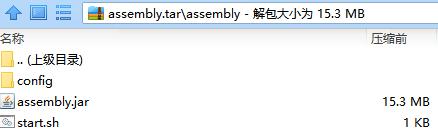
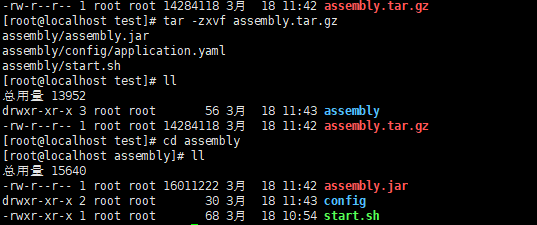
三、源码:https://github.com/lilin409546297/springboot-assembly
springboot之assembly的文件配置的更多相关文章
- SpringBoot入门-多环境文件配置(二)
pom.xml <name>springboot-application</name> <description>A project for Spring Boot ...
- SpringBoot中自定义properties文件配置参数并带有输入提示
1. 创建配置类 在项目中创建一个参数映射类如下 @ConfigurationProperties(prefix = "user.info") public class MyPro ...
- 【2.0】SpringBoot多环境yml文件配置
一.使用Spring Boot Profiles 1. 使用yml文件 首先,我们先创建一个名为 application.yml的属性文件,如下: server: port: 8080 my: nam ...
- Spring-Boot注入自定义properties文件配置
创建wzq.properties wzq.properties注入User实体类中 @PropertySource(value = "classpath:wzq.properties&quo ...
- SpringBoot 项目打包分开lib,配置和资源文件
原文地址:https://blog.csdn.net/u012811805/article/details/80878848 1 jar启动分离依赖lib和配置 先前发布boot项目的时候,改动一点东 ...
- ******可用 SpringBoot 项目打包分开lib,配置和资源文件
spring-boot多模块打包后,无法找到其他模块中的类https://blog.csdn.net/Can96/article/details/96172172 关于SpringBoot项目打包没有 ...
- 在springboot pom文件配置过程,`spring-boot-maven-plugin`配置出错的问题解决及配置过程出现问题的一些思考
在springboot pom文件配置过程,spring-boot-maven-plugin配置出错的问题解决及配置过程出现问题的一些思考 解决方法一: 也是最简单的方法,可能是maven没有来得及导 ...
- SpringBoot多重属性文件配置方案笔记
SpringBoot多重属性文件配置方案笔记 需要重写PropertyPlaceholderConfigurer 同时要忽略DataSourceAutoConfiguration @SpringBoo ...
- Springboot多属性文件配置
Springboot 多属性文件配置 配置文件后缀有两种: .properties和.yml 要完成多属性配置需要自定义PropertySourcesPlaceholderConfigurer 这个B ...
随机推荐
- 阿里云CentOS 7服务器挂载数据盘
本次使用的是centOS 7.4 64位操作系统 第一步:查看磁盘情况 我们发现,我总共有三个磁盘,分别为/dev/vda(100G)./dev/vdb(200G)./dev/vdc(100G),而被 ...
- java.lang.verifyerror:bad type on orerand stack
问题: junit测试的时候报这个错:java.lang.verifyerror:bad type on orerand stack 原因:(多种,自行逐个排查) 1.class not find 引 ...
- zabbix 监控wind登录状态
参考博文:http://blog.51cto.com/qicheng0211/1694583 需求:监控win 2008 的用户登录状态,无论用户登录成功与否都要告警(也可以刷选指定用户.指定时间内) ...
- saltstack-把执行结果存储到mysql服务内
saltstack把执行的结果保存到mysql中,以便进行命令安全审计 mysql负责存储数据,mysql-python负责收集数据 master需要安装mysql和MySQL-python,mini ...
- ZT 4.3 android bluetooth hfp分析
4.3 android bluetooth hfp分析 2013-08-20 20:16 592人阅读 评论(3) 收藏 举报 所有程序执行的代码都是有入口的,在这里我们暂时分析一种情景,蓝牙打开着, ...
- 为什么ConcurrentHashMap是弱一致的
为什么ConcurrentHashMap是弱一致的 本文将用到Java内存模型的happens-before偏序关系(下文将简称为hb)以及ConcurrentHashMap的底层模型相关的知识.ha ...
- Python的多线程理解,转自虫师https://www.cnblogs.com/fnng/p/3670789.html
多线程和多进程是什么自行google补脑 对于python 多线程的理解,我花了很长时间,搜索的大部份文章都不够通俗易懂.所以,这里力图用简单的例子,让你对多线程有个初步的认识. 单线程 在好些年前的 ...
- SQL触发器与CLR的使用
在数据库的日常操作中,面对复杂业务的情况下,总会有用sql语句或存储过程不是那么方便的时候,所以这时候就会想到在数据库中调用CLR,也就是调用程序集,此处用C#实现来讲解一个测试案例 测试案例的业务是 ...
- bzoj1808 [Ioi2007]training 训练路径
Description 马克(Mirko)和斯拉夫克(Slavko)正在为克罗地亚举办的每年一次的双人骑车马拉松赛而紧张训练.他们需要选择一条训练路径. 他们国家有N个城市和M条道路.每条道路连接两个 ...
- Spring Boot中使用EhCache实现缓存支持
SpringBoot提供数据缓存功能的支持,提供了一系列的自动化配置,使我们可以非常方便的使用缓存.,相信非常多人已经用过cache了.因为数据库的IO瓶颈.一般情况下我们都会引入非常多的缓存策略, ...