
Using QuickExec
Fiddler's QuickExec box allows you to launch script-commands quickly.
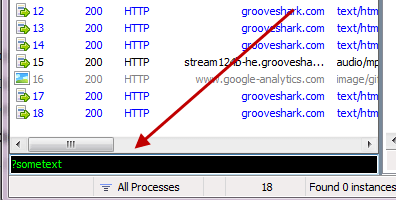
Keyboard Shortcuts
- Hit ALT+Q to quickly set focus to the QuickExec box. If Fiddler isn't active, hit CTRL+ALT+F first to activate Fiddler.
- In the QuickExec box, hit CTRL+I to insert the URL of the currently selected session in the session list.
Default commands
?sometext
As you type sometext, Fiddler will highlight sessions where the URL contains sometext. Hit Enter to set focus to the selected matches.
?searchtext>size
Select sessions where response size is greater than size bytes.
>40000 <-- Select responses over 40kbAlso:
<sizeSelect sessions where response size is less than size bytes.
<5k <-- Select responses under 5kb=status
=method
Select sessions where response status = status or request method = method.
=301 <-- Select 301 redirect responses

=POST <-- Select POST requests
@host
Select sessions where the request host contains host. Hit Enter to set focus to the selected matches.
@msn.com <-- Select www.msn.com, login.msn.com, etcbold
Mark any future sessions in bold if the url contains the target string
bold /bar.aspx

bold        <-- Call with no parameter to clear
bpafter
Break any response where the RequestURI contains the specified string
bpafter /favicon.ico

bpafter        <-- Call with no parameter to clear
bps
Break any response where the status code matches
bps 404

bps        <-- Call with no parameter to clear
bpv or bpm
Create a request breakpoint for the specified HTTP method. Setting this command will clear any previous value for the command; calling it with no parameter will disable the breakpoint.
bpv POST

bpv        <-- Call with no parameter to clear
bpu
Create a request breakpoint for URIs containing the specified string. Setting this command will clear any previous value for the command; calling it with no parameter will disable the breakpoint.
bpu /myservice.asmx

bpu        <-- Call with no parameter to clear
cls or clear
clear the session list
clsdump
dump all sessions to a zip archive in C:\
dumpg or go
Resume all breakpointed sessions
ghelp
Show this page
helphide Hide Fiddler in System tray
hideurlreplace
Replace any string in URLs with a different string. Setting this command will clear any previous value for the command; calling it with no parameter will cancel the replacement.
urlreplace SeekStr ReplaceWithStr

urlreplace        <-- Call with no parameters to clear
start
Register as the system proxy
startstop
Unregister as the system proxy
stopshow
Restore Fiddler from system tray -- more useful when triggering rules from ExecAction.exe (see below)
showselect MIME
Select any session where the response Content-Type header contains the specified string.
select image

select css

select htm
select HeaderOrFlag PartialValue
Select any session where the named Header or SessionFlag contains the specified string.
select ui-comments slow

select ui-bold *     <-- unless preceded by a slash, * means any value

select ui-comments \*     <-- Find comments with a *

select @Request.Accept html     <-- Find requests with Accept: html

select @Response.Set-Cookie domain <- Find responses that Set-Cookie on a domain
allbut or keeponly
Hide all sessions except those where Content-Type header contains the specified string.
allbut xml

allbut java
quit
Shutdown Fiddler.
quit!dns hostname
Perform a DNS lookup of the target host and show the results on the LOG tab
!dns www.example.com

!nslookup www.example.com
!listen PORT [CERTHOSTNAME]
Set up an additional listener on another port, optionally secured by a HTTPS certificate
!listen 8889

!listen 4443 localhost

!listen 444 secure.example.com
Using QuickExec的更多相关文章
- Fiddler抓包使用教程-QuickExec
转载请标明出处:http://blog.csdn.net/zhaoyanjun6/article/details/73468287 本文出自[赵彦军的博客] 在 Fiddler 中自带了一个 Quic ...
- 《吐血整理》保姆级系列教程-玩转Fiddler抓包教程(7)-Fiddler状态面板-QuickExec命令行
1.简介 Fiddler成了网页调试必备的工具,抓包看数据.Fiddler自带命令行控制,并提供以下用法.Fiddler的快捷命令框让你快速的输入脚本命令. 除了输入默认命令,也可以自定义命令,你可以 ...
- 用Fiddler模拟低速网络环境
有时候宽频网路用习惯了… 在开发的过程就比较少去考虑最佳化的问题… 但当有人反应说「你的网页好慢」甚至当网路速度慢,会造成你的网页跳出什么啊哩不哒的bug时要如何重现呢? 我们可以用Fiddler 这 ...
- Fiddler 常用文档
时间飞逝,已经俩月有余没写东西了(本来写的就不多,(^▽^)),最近俩月的苦闷,此处省略 1W 字.... 闲言碎语不多讲,使用 Fiddler 有一小段时间了,今天在这里总结下,一来做个笔记,二来可 ...
- Web利器---fidder使用
fiddler工具,主要看中其三点优势:1.功能强大,其他工具有的功能它也有,其他工具没有的功能它也有,支持http,https,ftp等协议:2.完全免费,长期免费.3.所有的浏览器可以使用,所有的 ...
- Fiddler (六) 最常用的快捷键
使用QuickExec Fiddler2成了网页调试必备的工具,抓包看数据.Fiddler2自带命令行控制,并提供以下用法. Fiddler的快捷命令框让你快速的输入脚本命令. 键盘快捷键 按ALT+ ...
- Fiddler的学习
以下内容转自:http://www.cnblogs.com/TankXiao/archive/2012/02/06/2337728.html 仅为查找方便而复制~~ Fiddler是最强大最好用的We ...
- Fiddler (二) Script 用法
通过前一篇博客 [Fiddler教程], 我们了解了Fiddler的基本用法, 现在我们来看看Fiddler的高级用法. Fiddler Script. Fiddler中的script 可以 ...
- Fiddler 教程
Fiddler是最强大最好用的Web调试工具之一,它能记录所有客户端和服务器的http和https请求,允许你监视,设置断点,甚至修改输入输出数据. 使用Fiddler无论对开发还是测试来说,都有 ...
随机推荐
- linux 文件处理大杂烩
1.对文件某行进行统计排序 awk '{ printf "%-40s \n",$4}' /var/log/yum.log | sort | uniq -c | sort -nk ...
- Git_期末总结
终于到了期末总结的时刻了! 经过几天的学习,相信你对Git已经初步掌握.一开始,可能觉得Git上手比较困难,尤其是已经熟悉SVN的童鞋,没关系,多操练几次,就会越用越顺手. Git虽然极其强大,命令繁 ...
- SPOJ 1811. Longest Common Substring (LCS,两个字符串的最长公共子串, 后缀自动机SAM)
1811. Longest Common Substring Problem code: LCS A string is finite sequence of characters over a no ...
- BZOJ 2002: [Hnoi2010]Bounce 弹飞绵羊 (动态树LCT)
2002: [Hnoi2010]Bounce 弹飞绵羊 Time Limit: 10 Sec Memory Limit: 259 MBSubmit: 2843 Solved: 1519[Submi ...
- Nucleus PLUS任务调度
概述 Nucleus Plus内核(Kernel)的主要目的是管理实时任务的竞争执行(共享CPU),为应用提供各种便利,高速响应外部事件.Nucleus Plus的系统结构如图1所看到的,能够看出线程 ...
- java.lang.ClassNotFoundException: com.mysql.jdbc.Driver解决方式
昨天整理桌面的时候将桌面的一堆文件移动到F盘去了,结果导致原来建的一些项目名称所有出现红色感叹号,打开一看,原来是由于我把hibernate的那些jar包移走了.导致user library里那些ja ...
- Windows Phone 7 开发环境的搭建
本节开始进行Windows Phone 开发环境的搭建,包括所需要的操作系统及硬件的介绍,开发工具的下载与安装,以及开发工具的介绍等.由于Jake Lin老师的视频中讲解的是早期的Windows Ph ...
- 2012年及之后的ImageNet比赛的冠军、亚军和季军ImageNet winners after 2012
2012 0.15 - Supervision (AlexNet) - ~ 60954656 params 0.26 - ISI (ensemble of features) 0.27 - LEAR ...
- Git 学习(六)分支管理
Git 学习(六)分支管理 几乎每一种版本控制系统都支持分支.使用分支意味着你可以从开发主线上分离开来,然后不影响主线的同时继续工作.在很多版本控制系统中,这是个昂贵的过程,常常需要创建一个源代码目录 ...
- 可操纵网页URL地址的js插件-url.js
url.js是一款能够很有用方便的操纵网页URL地址的js插件.通过url.js你能够设置和获取当前URL的參数,也能够对当前URL的參数进行更新.删除操作.还能够将当前URL的參数显示为json字符 ...