
Using QuickExec
Fiddler's QuickExec box allows you to launch script-commands quickly.
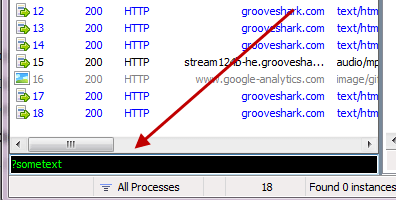
Keyboard Shortcuts
- Hit ALT+Q to quickly set focus to the QuickExec box. If Fiddler isn't active, hit CTRL+ALT+F first to activate Fiddler.
- In the QuickExec box, hit CTRL+I to insert the URL of the currently selected session in the session list.
Default commands
?sometext
As you type sometext, Fiddler will highlight sessions where the URL contains sometext. Hit Enter to set focus to the selected matches.
?searchtext>size
Select sessions where response size is greater than size bytes.
>40000 <-- Select responses over 40kbAlso:
<sizeSelect sessions where response size is less than size bytes.
<5k <-- Select responses under 5kb=status
=method
Select sessions where response status = status or request method = method.
=301 <-- Select 301 redirect responses

=POST <-- Select POST requests
@host
Select sessions where the request host contains host. Hit Enter to set focus to the selected matches.
@msn.com <-- Select www.msn.com, login.msn.com, etcbold
Mark any future sessions in bold if the url contains the target string
bold /bar.aspx

bold        <-- Call with no parameter to clear
bpafter
Break any response where the RequestURI contains the specified string
bpafter /favicon.ico

bpafter        <-- Call with no parameter to clear
bps
Break any response where the status code matches
bps 404

bps        <-- Call with no parameter to clear
bpv or bpm
Create a request breakpoint for the specified HTTP method. Setting this command will clear any previous value for the command; calling it with no parameter will disable the breakpoint.
bpv POST

bpv        <-- Call with no parameter to clear
bpu
Create a request breakpoint for URIs containing the specified string. Setting this command will clear any previous value for the command; calling it with no parameter will disable the breakpoint.
bpu /myservice.asmx

bpu        <-- Call with no parameter to clear
cls or clear
clear the session list
clsdump
dump all sessions to a zip archive in C:\
dumpg or go
Resume all breakpointed sessions
ghelp
Show this page
helphide Hide Fiddler in System tray
hideurlreplace
Replace any string in URLs with a different string. Setting this command will clear any previous value for the command; calling it with no parameter will cancel the replacement.
urlreplace SeekStr ReplaceWithStr

urlreplace        <-- Call with no parameters to clear
start
Register as the system proxy
startstop
Unregister as the system proxy
stopshow
Restore Fiddler from system tray -- more useful when triggering rules from ExecAction.exe (see below)
showselect MIME
Select any session where the response Content-Type header contains the specified string.
select image

select css

select htm
select HeaderOrFlag PartialValue
Select any session where the named Header or SessionFlag contains the specified string.
select ui-comments slow

select ui-bold *     <-- unless preceded by a slash, * means any value

select ui-comments \*     <-- Find comments with a *

select @Request.Accept html     <-- Find requests with Accept: html

select @Response.Set-Cookie domain <- Find responses that Set-Cookie on a domain
allbut or keeponly
Hide all sessions except those where Content-Type header contains the specified string.
allbut xml

allbut java
quit
Shutdown Fiddler.
quit!dns hostname
Perform a DNS lookup of the target host and show the results on the LOG tab
!dns www.example.com

!nslookup www.example.com
!listen PORT [CERTHOSTNAME]
Set up an additional listener on another port, optionally secured by a HTTPS certificate
!listen 8889

!listen 4443 localhost

!listen 444 secure.example.com
Using QuickExec的更多相关文章
- Fiddler抓包使用教程-QuickExec
转载请标明出处:http://blog.csdn.net/zhaoyanjun6/article/details/73468287 本文出自[赵彦军的博客] 在 Fiddler 中自带了一个 Quic ...
- 《吐血整理》保姆级系列教程-玩转Fiddler抓包教程(7)-Fiddler状态面板-QuickExec命令行
1.简介 Fiddler成了网页调试必备的工具,抓包看数据.Fiddler自带命令行控制,并提供以下用法.Fiddler的快捷命令框让你快速的输入脚本命令. 除了输入默认命令,也可以自定义命令,你可以 ...
- 用Fiddler模拟低速网络环境
有时候宽频网路用习惯了… 在开发的过程就比较少去考虑最佳化的问题… 但当有人反应说「你的网页好慢」甚至当网路速度慢,会造成你的网页跳出什么啊哩不哒的bug时要如何重现呢? 我们可以用Fiddler 这 ...
- Fiddler 常用文档
时间飞逝,已经俩月有余没写东西了(本来写的就不多,(^▽^)),最近俩月的苦闷,此处省略 1W 字.... 闲言碎语不多讲,使用 Fiddler 有一小段时间了,今天在这里总结下,一来做个笔记,二来可 ...
- Web利器---fidder使用
fiddler工具,主要看中其三点优势:1.功能强大,其他工具有的功能它也有,其他工具没有的功能它也有,支持http,https,ftp等协议:2.完全免费,长期免费.3.所有的浏览器可以使用,所有的 ...
- Fiddler (六) 最常用的快捷键
使用QuickExec Fiddler2成了网页调试必备的工具,抓包看数据.Fiddler2自带命令行控制,并提供以下用法. Fiddler的快捷命令框让你快速的输入脚本命令. 键盘快捷键 按ALT+ ...
- Fiddler的学习
以下内容转自:http://www.cnblogs.com/TankXiao/archive/2012/02/06/2337728.html 仅为查找方便而复制~~ Fiddler是最强大最好用的We ...
- Fiddler (二) Script 用法
通过前一篇博客 [Fiddler教程], 我们了解了Fiddler的基本用法, 现在我们来看看Fiddler的高级用法. Fiddler Script. Fiddler中的script 可以 ...
- Fiddler 教程
Fiddler是最强大最好用的Web调试工具之一,它能记录所有客户端和服务器的http和https请求,允许你监视,设置断点,甚至修改输入输出数据. 使用Fiddler无论对开发还是测试来说,都有 ...
随机推荐
- Android native层动态库注射
1.简单介绍 本文解说在Android native层.root权限下.注射动态库到目标进程,从而hook目标进程中动态库的函数的实现方式. 文中的源代码所有来源于网络.我仅仅是略微加以整理. 环境: ...
- C#值类型装箱后能改变其值吗
当把一个值类型赋值给引用类型,这个过程可以看作是"装箱". ; 以上,堆栈上的过程大致是:1.在栈上开辟空间给变量a2.在堆上开辟空间,习惯上把该空间看作是"箱子&quo ...
- MVC单元测试,使用Repository模式、Ninject、Moq
本篇使用Repository设计MVC项目,使用Ninject作为DI容器,借助Moq进行单元测试. 模型和EF上下文 模型很简单: public class Foo { public int Id ...
- Oracle rac架构和原理
Oracle RAC Oracle Real Application Cluster (RAC,实时应用集群)用来在集群环境下实现多机共享数据库,以保证应用的高可用性:同时可以自动实现并行处理 ...
- cocos2d-x动画加速与减速
动画是游戏的必定要素之中的一个,在整个游戏过程中,又有着加速.减速动画的需求.以塔防为样例,布塔的时候希望可以将游戏减速,布好塔后,则希望能将游戏加速:当某个怪被冰冻后,移动速度减缓,而其它怪的移动速 ...
- CAS工作流程
CAS3.0的工作流程: 0.app将用户转发到CAS处, 并将自己的url作为callback参数传给CAS. 1.CAS验证用户成功(authentication) 2.生成用户实体(princi ...
- Derby安装,创建数据库,在Java程序中使用Derby
1,下载并安装Derby: 下载地址:http://db.apache.org/derby /derby_downloads.html,下载最新版本. 我用的是10.5.3.0. 解压缩到任意文件夹, ...
- [Android Pro] 控制硬加速 hardwareAccelerated 在3.0才有的
从Android3.0 (API level11)开始,Android的2D显示管道被被设计得更加支持硬加速了.硬加速使用GPU承担了所有在View的canvas上执行的绘制操作. 启用硬加速最简单的 ...
- coursera课程Text Retrieval and Search Engines之Week 4 Overview
Week 4 OverviewHelp Center Week 4 On this page: Instructional Activities Time Goals and Objectives K ...
- 数学图形之将曲线(curve)转化成曲面管
在我关于数学图形的博客中,一开始讲曲线的生成算法.然后在最近的章节中介绍了圆环,还介绍了螺旋管以及海螺的生成算法.一类是曲线,一类是环面,为什么不将曲线变成环的图形,毕竟曲线看上去太单薄了,这一节我将 ...