
微信小程序基于swiper组件的tab切换
一、前期准备工作
软件环境:微信开发者工具
官方下载地址:https://mp.weixin.qq.com/debug/wxadoc/dev/devtools/download.html
1、基本需求。
- 基于swiper组件的tab切换
2、案例目录结构
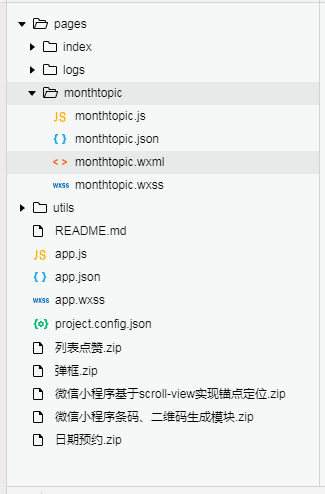
二、程序实现具体步骤
1.tab切换index.wxml代码
<view class="continer">

  <!--内容主体-->

  <swiper class="swiper" current="1" duration="200"  bindchange="swiperChange" previous-margin="20px" next-margin="20px"  style="height: {{winHeight}}px;">

        <swiper-item>

          <view class="user-box" style="height: {{winHeight-40}}px;">

            <view class="user-image">

              <image class="image" src="https://www.geekxz.com/public/uploads/huaqu/team/logo.jpg" />

            </view>

            <view class="user-info">

              <view class="user-job">未知</view>

              <view class="user-name">未知</view>

              <view class="user-introduce">如果你亦环抱着梦想,拥有着无限的才华,我们OkYoung 团队期待您的加入。</view>

              <view class="joinin" bindtap="joinIn">即刻创作</view>

            </view>

          </view>

        </swiper-item>

        <swiper-item>

          <view class="user-box" style="height: {{winHeight-40}}px;">

            <view class="user-image">

              <image class="image" src="https://www.geekxz.com/public/uploads/huaqu/team/logo.jpg" />

            </view>

            <view class="user-info">

              <view class="user-job">未知</view>

              <view class="user-name">未知</view>

              <view class="user-introduce">如果你亦环抱着梦想,拥有着无限的才华,我们OkYoung 团队期待您的加入。</view>

              <view class="joinin" bindtap="joinIn">即刻创作</view>

            </view>

          </view>

        </swiper-item>

        <swiper-item>

          <view class="user-box" style="height: {{winHeight-40}}px;">

            <view class="user-image">

              <image class="image" src="https://www.geekxz.com/public/uploads/huaqu/team/logo.jpg" />

            </view>

            <view class="user-info">

              <view class="user-job">未知</view>

              <view class="user-name">未知</view>

              <view class="user-introduce">如果你亦环抱着梦想,拥有着无限的才华,我们OkYoung 团队期待您的加入。</view>

              <view class="joinin" bindtap="joinIn">即刻创作</view>

            </view>

          </view>

        </swiper-item>

        <swiper-item>

          <view class="user-box" style="height: {{winHeight-40}}px;">

            <view class="user-image">

              <image class="image" src="https://www.geekxz.com/public/uploads/huaqu/team/logo.jpg" />

            </view>

            <view class="user-info">

              <view class="user-job">未知</view>

              <view class="user-name">未知</view>

              <view class="user-introduce">如果你亦环抱着梦想,拥有着无限的才华,我们OkYoung 团队期待您的加入。</view>

              <view class="joinin" bindtap="joinIn">即刻创作</view>

            </view>

          </view>

        </swiper-item>

  </swiper>

</view>
2.部分index.wxss代码
page {

  background-color: #0084ff;

}

.continer{

}

swiper-item .user-box{

  margin-top: 3%;

  margin-left: 20rpx;

  border-radius: 20rpx;

  border: 1rpx solid rgba(200, 200, 200, 0.1);

  box-shadow: 1px 1px 5px rgba(200, 200, 200, 0.4);

  background-color: #fff;

}

swiper-item .user-image image{

  width:350rpx;

  height:350rpx;

  border-radius: 350rpx;

  margin-top: 20%;

  border: 1rpx solid rgba(200, 200, 200, 0.4);

  box-shadow: 1px 1px 5px rgba(200, 200, 200, 0.8);

}

.user-image{

  margin: 0 25%;

}

.user-info {

  text-align: center;

  height: 240rpx;

}

.user-info view{

  text-align: center;

}

.user-info .user-name{

  margin-top: 80rpx;

  font-size: 40rpx;

  height: 80rpx;

  line-height: 80rpx;

  text-align: center;

  color: black;

  font-weight: 600;

}

.user-info .user-introduce{

  width: 80%;

  margin: 0 auto;

  height: 60rpx;

  line-height: 60rpx;

  font-size: 36rpx;

  color: #5d5d5b;

}

.joinin{

  width: 30%;

  margin: 0 auto;

  height: 60rpx;

  font-size: 32rpx;

  line-height: 60rpx;

  margin-top: 170rpx;

  color: #fff;

  border-radius: 60rpx;

  background-color: #118fff;

}
3.部分index.js逻辑代码
a.滑动切换的功能实现
swichNav: function (e) {

    console.log(e);

    var that = this;

    if (this.data.currentTab === e.target.dataset.current) {

      return false;

    } else {

      that.setData({

        currentTab: e.target.dataset.current,

      })

    }

  },
三、案例运行效果图

四、总结与备注
暂时没有微信小程序基于swiper组件的tab切换
注:本文著作权归作者,由demo大师代发,拒绝转载,转载需要作者授权
微信小程序基于swiper组件的tab切换的更多相关文章
- 微信小程序之swiper组件高度自适应
微信小程序之swiper组件高度自适应 要求: (顶部广告栏 ) 改变swiper组件的固定高度,使之随内部每张图片的高度做自适应 原理: 图片加载完之后,获取图片的原始宽高,根据宽高比,计算出适应后 ...
- 微信小程序-基于高德地图API实现天气组件(动态效果)
微信小程序-基于高德地图API实现天气组件(动态效果) 在社区翻腾了许久,没有找到合适的天气插件.迫不得已,只好借鉴互联网上的web项目,手动迁移到小程序中使用.现在分享到互联网社区中,帮助后续有 ...
- 微信小程序--基于ColorUI构建皮皮虾短视频去水印组件(仅供学习使用)
微信小程序--基于ColorUI构建皮皮虾短视频去水印组件(仅供学习使用) 没错,我是皮友,我想学习舞蹈(/doge)和瑜伽 ,要无水印的那种有助于我加深学习. 1.组件效果展示 2.组件引入准备 h ...
- 微信小程序横版日历,tab栏
代码地址如下:http://www.demodashi.com/demo/14243.html 一.前期准备工作 软件环境:微信开发者工具 官方下载地址:https://mp.weixin.qq.co ...
- 原创:WeZRender:微信小程序Canvas增强组件
WeZRender是一个微信小程序Canvas增强组件,基于HTML5 Canvas类库ZRender. 使用 WXML: <canvas style="width: 375px; h ...
- 微信小程序内置组件web-view的缓存问题探讨
前言:博客或者论坛上面,还有自习亲身经历,发现微信小程序的webview组件的页面缓存问题相当严重,对开发H5的小童鞋来说应该困扰了不少.很多小童鞋硬是抓破脑袋也没有办法解决这个问题,那我们今天就来探 ...
- 微信小程序 -- 基于 movable-view 实现拖拽排序
微信小程序 -- 基于 movable-view 实现拖拽排序 项目基于colorui样式组件 ColorUI组件库 (color-ui.com) 1.实现效果 2. 设计思路 movable-vie ...
- 微信小程序中的组件使用1
不管是vue还是react中,都在强调组件思想,同样,在微信小程序中也是使用组件思想来实现页面复用的,下面就简单介绍一下微信小程序中的组件思想. 组件定义与使用 要使用组件,首先需要有组件页面和使用组 ...
- 微信小程序-基于canvas画画涂鸦
代码地址如下:http://www.demodashi.com/demo/14461.html 一.前期准备工作 软件环境:微信开发者工具 官方下载地址:https://mp.weixin.qq.co ...
随机推荐
- Accepting PayPal in games(完整的Paypal在Unity的支付)
Hello and welcome back to my blog! In this article I’m going to talk about the process of acceptin ...
- 解决ElasticSearch5.x中@Field注解之IK分词不能用的问题
一.概述 环境:ElasticSearch版本5.6.3,SpringBoot 2.0.2.RELEASE,索引myIndex 问题描述:使用@Field注解给实体类指定ik分词解析器(ik_smar ...
- Java Web开发基础(2)-JSP
上一篇博我粗略的介绍了一下Servlet.粗略是由于博主也刚刚学习这部分的内容,还不是非常懂所以无法讲的非常精细.可是本着二八原则,我还是先继续学习.所以,这篇博客接着JSP的内容.由于.这两个内容关 ...
- [翻译] 5点建议,让iOS程序跑得更快
[文章原地址]http://mobile.tutsplus.com/tutorials/iphone/ios-quick-tip-5-tips-to-increase-app-performanc ...
- Android读取Excel文件
转:http://bigcat.easymorse.com/?p=1648 java可以读取Excel文件,android同样也行,效果如下: excel源文件: 读取日志如下: 首先需要引入jxl. ...
- OBjective-C:atomic和nonatomic的区别
atomic和nonatomic的区别: atomic: 设置成员变量的@property属性时,默认为atomic,提供多线程安全.因为多线程的缘故,所有的对象在操作成员变量时都是同步的,因此,为了 ...
- 第十一章 企业项目开发--消息队列activemq
注意:本章代码基于 第十章 企业项目开发--分布式缓存Redis(2) 代码的github地址:https://github.com/zhaojigang/ssmm0 消息队列是分布式系统中实现RPC ...
- 用js做一个简单的留言板效果
html部分: 1: <!DOCTYPE> 2: <html lang="zh-en"> 3: <head> 4: <title>j ...
- [Node.js]24. Level 5: Express, Express routes
Create an express route that responds to GET requests at the URL /tweets that responds with the file ...
- android 动画具体解释(二)
以下就開始学习属性动画的基本使用方法,我们来看属性动画的继承关系,例如以下如所看到的: 显然关注的焦点应该是ValueAnimator,ObjectAnimator这两个类啦,ObjectAnimat ...