
radioButon的使用
界面:
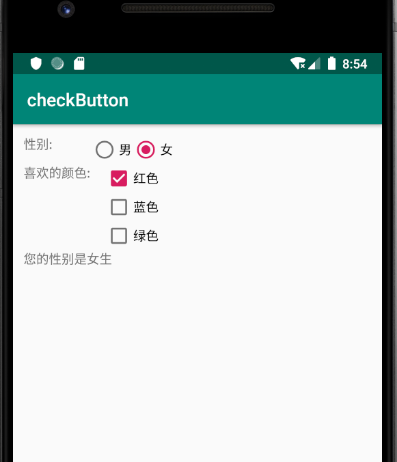
<?xml version="1.0" encoding="utf-8"?>

<TableLayout xmlns:android="http://schemas.android.com/apk/res/android"

             android:layout_width="match_parent"

             android:layout_height="match_parent"

             android:padding="12dp">

    <TableRow>

        <TextView

                android:layout_width="wrap_content"

                android:layout_height="wrap_content"

                android:text="性别:"/>

        <!-- 定义一组单选钮 -->

        <RadioGroup android:id="@+id/rg"

                    android:orientation="horizontal"

                    android:layout_gravity="center_horizontal">

            <!-- 定义两个单选钮 -->

            <RadioButton android:layout_width="wrap_content"

                         android:layout_height="wrap_content"

                         android:id="@+id/male"

                         android:text="男"

                         android:checked="true"/>

            <RadioButton android:layout_width="wrap_content"

                         android:layout_height="wrap_content"

                         android:id="@+id/female"

                         android:text="女"/>

        </RadioGroup>

    </TableRow>

    <TableRow>

        <TextView

                android:layout_width="wrap_content"

                android:layout_height="wrap_content"

                android:text="喜欢的颜色:" />

        <!-- 定义一个垂直的线性布局 -->

        <LinearLayout android:layout_gravity="center_horizontal"

                      android:orientation="vertical"

                      android:layout_width="wrap_content"

                      android:layout_height="wrap_content">

            <!-- 定义三个复选框 -->

            <CheckBox android:layout_width="wrap_content"

                      android:layout_height="wrap_content"

                      android:text="红色"

                      android:checked="true"/>

            <CheckBox android:layout_width="wrap_content"

                      android:layout_height="wrap_content"

                      android:text="蓝色"/>

            <CheckBox android:layout_width="wrap_content"

                      android:layout_height="wrap_content"

                      android:text="绿色"/>

        </LinearLayout>

    </TableRow>

    <TextView

            android:id="@+id/show"

            android:layout_width="wrap_content"

            android:layout_height="wrap_content"/>

</TableLayout>
我们对radioGrop绑定一个监听函数,当它的check值改变的时候触发:
val rg = findViewById<RadioGroup>(R.id.rg)

        val show = findViewById<TextView>(R.id.show)

        //对 radioGroup绑定一个监听函数

        rg.setOnCheckedChangeListener{group,checkId->

            val tip = if(checkId==R.id.female) "您的性别是女生"

                    else "您的性别是男生生"

            show.text=tip
radioButon的使用的更多相关文章
- Android 控件属性介绍
1.LinearLayout(线性布局): 可以分为水平线性:android:orientation= " horizontal " 和垂直线性:android:orientati ...
- WPF自定义控件与样式(4)-CheckBox/RadioButton自定义样式
一.前言 申明:WPF自定义控件与样式是一个系列文章,前后是有些关联的,但大多是按照由简到繁的顺序逐步发布的等,若有不明白的地方可以参考本系列前面的文章,文末附有部分文章链接. 本文主要内容: Che ...
- 单选按钮(RadioButton)与复选框(CheckBox)的功能与用法
单选按钮(RadioButton)和复选框(CheckBox).状态开关按钮(ToggleButton)与开关(Switch)是用户界面中最普通的UI组件,他们都继承了Button类,因此都可直接使用 ...
- 【转】WPF自定义控件与样式(4)-CheckBox/RadioButton自定义样式
一.前言 申明:WPF自定义控件与样式是一个系列文章,前后是有些关联的,但大多是按照由简到繁的顺序逐步发布的等 本文主要内容: CheckBox复选框的自定义样式,有两种不同的风格实现: RadioB ...
- Android中控件属性详细总结(转载)
转载地址:https://www.cnblogs.com/nanguojs/p/5950510.html 1.LinearLayout(线性布局): 可以分为水平线性:android:orientat ...
- Android布局属性与常用控件
一.Android常用布局属性 1. LinearLayout的特有属性 android:orientation:设置布局排列方式 android:layout_weight:设置所占布局的权重 ...
- Android常用布局和控件
一.Android常用布局属性 1. LinearLayout的特有属性 android:orientation:设置布局排列方式 android:layout_weight:设置所占布局的权重 ...
随机推荐
- h5中history实例
<!DOCTYPE html> <html lang="en"> <head> <meta charset="UTF-8&quo ...
- com.mysql.jdbc.Driver not loaded. Are you sure you've included the correct jdbc driver in :jdbc_driver_library?
把对应的jdbc jar包放到 /usr/share/logstash/logstash-core/lib/jars/路径 下即可.可以在配置文件不用配置驱动库.
- k8s安装之prometheus.yaml
这个系列的东东满多的.要另开系列说明. 这里为了内容连续完成,先贴一个吧,其它configmap,exporter就不展示. 为了保持统一,将prometheus也放到二级目录了. - '--web. ...
- P2756 飞行员配对方案问题[二分图最大匹配]
题目描述 英国皇家空军从沦陷国征募了大量外籍飞行员.由皇家空军派出的每一架飞机都需要配备在航行技能和语言上能互相配合的2 名飞行员,其中1 名是英国飞行员,另1名是外籍飞行员.在众多的飞行员中,每一名 ...
- Jquery的入门(一)
Jquery介绍 Jquery是一个快速,简洁的JavaScript框架,是继Prototype之后又一个优秀的JavaScript代码库(或者是JavaScirpt框架),Jquery设计的宗旨是: ...
- Java中使用BufferedReader的readLine()方法和read()方法来读取文件内容
目标:读文件 编程时,有很多时候需要读取本地文件,下面介绍一下读取方式: 读单行文件 package com; import java.io.*; import java.util.ArrayList ...
- java.security KeyPairGenerator
KeyPairGenerator 类用于生成公钥和私钥对.密钥对生成器是使用 getInstance 工厂方法(返回一个给定类的实例的静态方法)构造的. 特定算法的密钥对生成器可以创建能够与此算法一起 ...
- javaweb上传文件夹
我们平时经常做的是上传文件,上传文件夹与上传文件类似,但也有一些不同之处,这次做了上传文件夹就记录下以备后用. 首先我们需要了解的是上传文件三要素: 1.表单提交方式:post (get方式提交有大小 ...
- Linux 命令集合之进程查看命令-软件安装命令-文件查找命令-主机修改命令
1.dpkg 的使用 dpkg -s ssh 查看是否按装了ssh软件 dpkg -L ssh 查看ssh安装的关联目录结构和安装位置 dpkg -i vim.deb 本地离线安装vim编辑器 apt ...
- 力扣152,53题,最大子序列求和and积
本内容为最大子序列的求和和求积.采用DP的思路, 当前值加上小于之前值,则从该节点重新算起. 这个代码只能返回其结果值,但不能返回最后的子序列(待修改). class Solution: def ma ...