
tf.concat的用法
import numpy as np
import tensorflow as tf
sess=tf.Session()
a=np.zeros((1,2,3,4))
b=np.ones((1,2,3,4))
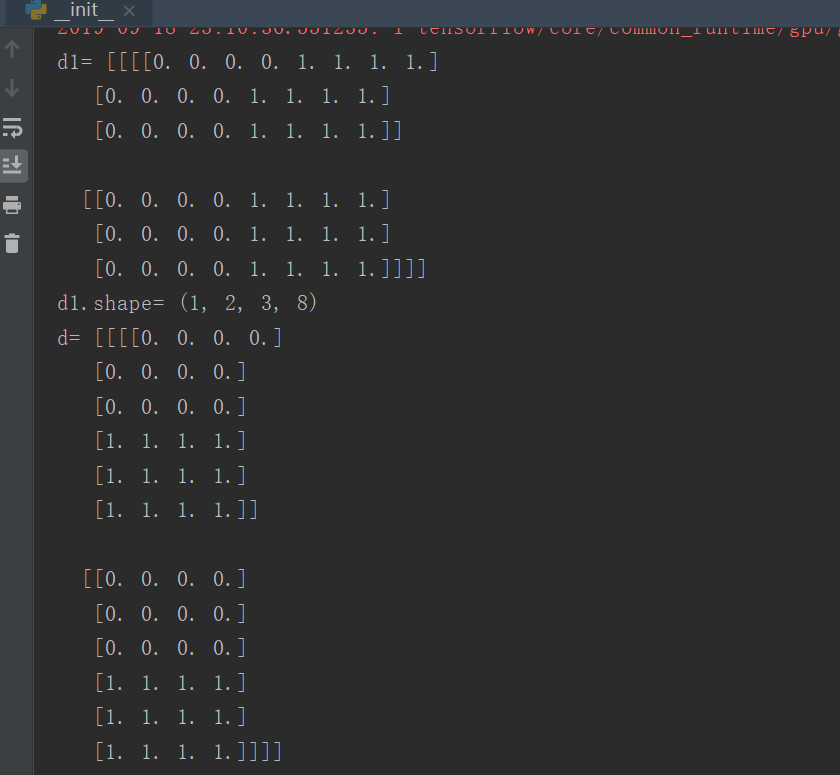
c1 = tf.concat([a, b], axis=-1)  # 倒数第一维度增加,其它不变
d1=sess.run(c1)
print('d1=',d1)
print('d1.shape=',d1.shape)
c = tf.concat([a, b], axis=-2)    #倒数第二维度增加,其它不变
d=sess.run(c)
print('d=',d)
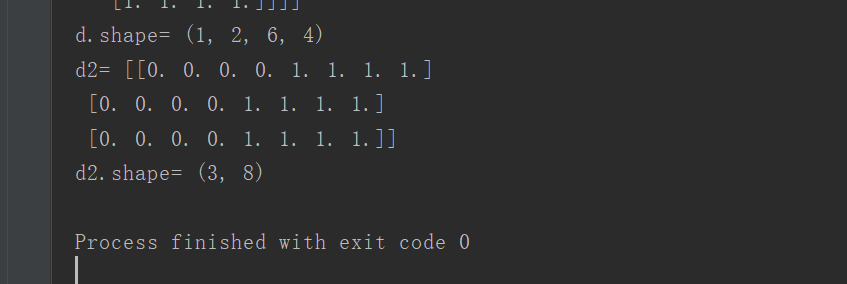
print('d.shape=',d.shape)
a1=np.zeros((3,4))
b1=np.ones((3,4))
c2 = tf.concat([a1, b1], axis=-1)   # 如果是二维就和axis=1一样,第2维坐标增加,就是行不变,列增加
d2=sess.run(c2)
print('d2=',d2)
print('d2.shape=',d2.shape)
tf.concat的用法的更多相关文章
- tf.concat, tf.stack和tf.unstack的用法
tf.concat, tf.stack和tf.unstack的用法 tf.concat相当于numpy中的np.concatenate函数,用于将两个张量在某一个维度(axis)合并起来,例如: a ...
- TensorFlow tf.app&tf.app.flags用法介绍
TensorFlow tf.app&tf.app.flags用法介绍 TensorFlow tf.app argparse tf.app.flags 下面介绍 tf.app.flags.FL ...
- 深度学习原理与框架-Alexnet(迁移学习代码) 1.sys.argv[1:](控制台输入的参数获取第二个参数开始) 2.tf.split(对数据进行切分操作) 3.tf.concat(对数据进行合并操作) 4.tf.variable_scope(指定w的使用范围) 5.tf.get_variable(构造和获得参数) 6.np.load(加载.npy文件)
1. sys.argv[1:] # 在控制台进行参数的输入时,只使用第二个参数以后的数据 参数说明:控制台的输入:python test.py what, 使用sys.argv[1:],那么将获得w ...
- tensorflow报错error,tf.concat Expected int32, got list containing Tensors of type '_Message' instead
参考:https://stackoverflow.com/questions/41813665/tensorflow-slim-typeerror-expected-int32-got-list-co ...
- tensorflow 笔记7:tf.concat 和 ops中的array_ops.concat
用于连接两个矩阵: mn = array_ops.concat([a, d], 1) # 按照第二维度相接,shape1 [m,a] shape2 [m,b] ,concat_done shape ...
- 学习TensorFlow的tf.concat使用
https://www.tensorflow.org/api_docs/python/tf/concat
- tensorflow 基本函数(1.tf.split, 2.tf.concat,3.tf.squeeze, 4.tf.less_equal, 5.tf.where, 6.tf.gather, 7.tf.cast, 8.tf.expand_dims, 9.tf.argmax, 10.tf.reshape, 11.tf.stack, 12tf.less, 13.tf.boolean_mask
1. tf.split(3, group, input) # 拆分函数 3 表示的是在第三个维度上, group表示拆分的次数, input 表示输入的值 import tensorflow ...
- MySQL中CONCAT()的用法
MySQL中CONCAT()的用法 在日常开发过程中,特别是在书写接口的时候,经常会遇到字符串拼接的情况,比如在返回图片数据时,数据库里往往存储的是相对路径,而接口里一般是存放绝对地址,这就需要字符串 ...
- 【转载】 TensorFlow tf.app&tf.app.flags用法介绍
作 者:marsggbo 出 处:https://www.cnblogs.com/marsggbo版权声明:署名 - 非商业性使用 - 禁止演绎,协议普通文本 | 协议法律文本. ---------- ...
随机推荐
- Flask纪要
flask学习过程 1框架基础 2redis高性能key-value数据库 3视图具有装饰器的路由函数 4模板html文件 面向对象操作数据库orm 5蓝图 6单元测试 7GitHub 8项目 学习的 ...
- MySQL百万级数据分页查询及优化
方法1: 直接使用数据库提供的SQL语句 语句样式: MySQL中,可用如下方法: SELECT * FROM 表名称 LIMIT M,N 适应场景: 适用于数据量较少的情况(元组百/千级) 原因/缺 ...
- 破解magento加密的密码算法
magento遇到丢掉密码的情况,其实很常见……比如我这记性,还好我比较暴力:-P 先看一段代码: /** * Hash a string * * @param s ...
- x86 linux 支持的系统调用参数至多6个
ebx ecx edx esi edi ebp
- C#实体类对应SQL数据库的自增长ID怎么设置?
/// <summary> /// 自增长ID /// </summary> [DatabaseGenerated(DatabaseGeneratedOption.Identi ...
- 阿里云mysql数据库恢复到本地
本地环境为win10,mysql引擎为InnoDB 第一步:服务里面停掉mysql 第二步:把my.ini 的 innodb_force_recovery 设置为0 第三步:把.frm和.idb文件 ...
- Windows上的那些效率神器,让你快到飞起
转自:https://zhuanlan.zhihu.com/p/41771626 本文为Windows上有哪些让你效率倍增的软件和小技巧系列第二篇,上一篇请点击蓝字查看:打造高逼格PC,让你的电脑好用 ...
- Java学习-059-Jsoup爬虫获取中国所有的三级行政区划数据(四),生成相应的 JSON 数据并输出
还是直接上马,对应的源码如下所示: 生成的三级行政区划部分 JSON 数据如下所示:
- 最好用的Redis Desktop Manager 0.9.3 版本下载
因为Redis Desktop Manager作者在 0.9.4 版本之后选择对所有的安装包收费,不再提供安装包下载,但是源码依旧公开. github 上有 redis destop manager ...
- spring boot 打包引入第三方jar
本文作者:@Ryan Miao 本文链接:https://www.cnblogs.com/woshimrf/p/springboot-package-3rdparty-lib.html 版权声明: 本 ...