
Nginx 核心配置-自定义错误页面
Nginx核心配置-自定义错误页面
作者:尹正杰
版权声明:原创作品,谢绝转载!否则将追究法律责任。
生产环境中错误页面一般都是UI或开发工程师提供的,他们已经在软件中定义好了,我们这里就简单写个html页面就好啦。
一.编辑nginx的配置文件
1>.查看nginx的主配置文件
[root@node101.yinzhengjie.org.cn ~]# cat /yinzhengjie/softwares/nginx/conf/nginx.conf

worker_processes  4;

worker_cpu_affinity 00000001 00000010 00000100 00001000;

events {

    worker_connections  100000;

    use epoll;

    accept_mutex on;

    multi_accept on;

}

http {

    include       mime.types;

    default_type  application/octet-stream;

    sendfile        on;

    gzip  on;

    charset utf-8;

    keepalive_timeout  65 65;

    #导入其他路径的配置文件

    include /yinzhengjie/softwares/nginx/conf.d/*.conf;

}

[root@node101.yinzhengjie.org.cn ~]#

[root@node101.yinzhengjie.org.cn ~]# nginx -t

nginx: the configuration file /yinzhengjie/softwares/nginx/conf/nginx.conf syntax is ok

nginx: configuration file /yinzhengjie/softwares/nginx/conf/nginx.conf test is successful

[root@node101.yinzhengjie.org.cn ~]#
2>.查看nginx的子配置文件
[root@node101.yinzhengjie.org.cn ~]# cat /yinzhengjie/softwares/nginx/conf.d/auth.conf

server {

    listen 80;

    server_name node101.yinzhengjie.org.cn;

    error_page 500 502 503 504 404 /error.html;

    location / {

        root /yinzhengjie/data/web/nginx/html;

        index index.html;

    }

    location /login {

        root /yinzhengjie/data/web/nginx;

        index index.html;

        deny 172.30.1.108;

        allow 172.30.1.0/24;

        allow 2001:0db8::/32;

        deny all;

    }

    location /error.html {

        root /yinzhengjie/data/web/nginx/html/404;

    }

}

[root@node101.yinzhengjie.org.cn ~]#

[root@node101.yinzhengjie.org.cn ~]#
3>.准备数据文件(只需要准备第二步的错误页面相关文件即可)
[root@node101.yinzhengjie.org.cn ~]# ll /yinzhengjie/data/web/nginx/html/ -R          #目前已经存在的文件,之所以让大家看看我的目录结构,是因为我第三步会专门访问web服务器中不存在的资源。

/yinzhengjie/data/web/nginx/html/:

total 608

-rw-r--r-- 1 root root 122026 Dec 16 19:35 01.jpg

drwxr-xr-x 2 root root     24 Dec 17 10:45 404

-rw-r--r-- 1 root root 248743 Dec 17 10:44 404.jpg

-rw-r--r-- 1 root root 122026 Dec 16 20:10 Fg.jpg

-rw-r--r-- 1 root root 122026 Dec 16 20:03 Fg.JPG

drwxr-xr-x 2 root root     38 Dec 16 19:35 image

-rw-r--r-- 1 root root     88 Dec 15 23:13 index.html

drwxr-xr-x 2 root root     34 Dec 16 20:40 static

/yinzhengjie/data/web/nginx/html/404:

total 4

-rw-r--r-- 1 root root 1717 Dec 17 10:44 error.html

/yinzhengjie/data/web/nginx/html/image:

total 248

-rw-r--r-- 1 root root 248743 Dec 16 19:35 01.jpg

-rw-r--r-- 1 root root     49 Dec 15 23:07 index.html

/yinzhengjie/data/web/nginx/html/static:

total 364

-rw-r--r-- 1 root root 248743 Dec 16 20:40 01.jpg

-rw-r--r-- 1 root root 122026 Dec 16 20:40 02.jpg

[root@node101.yinzhengjie.org.cn ~]#
4>.重新nginx服务
[root@node101.yinzhengjie.org.cn ~]# ps -ef | grep nginx | grep -v grep

root      2840     1  0 09:37 ?        00:00:00 nginx: master process nginx

nginx     3330  2840  0 10:35 ?        00:00:00 nginx: worker process

nginx     3331  2840  0 10:35 ?        00:00:00 nginx: worker process

nginx     3332  2840  0 10:35 ?        00:00:00 nginx: worker process

nginx     3333  2840  0 10:35 ?        00:00:00 nginx: worker process

[root@node101.yinzhengjie.org.cn ~]#

[root@node101.yinzhengjie.org.cn ~]# nginx -s reload

[root@node101.yinzhengjie.org.cn ~]#

[root@node101.yinzhengjie.org.cn ~]# ps -ef | grep nginx | grep -v grep

root      2840     1  0 09:37 ?        00:00:00 nginx: master process nginx

nginx     3566  2840  7 10:56 ?        00:00:00 nginx: worker process

nginx     3567  2840  6 10:56 ?        00:00:00 nginx: worker process

nginx     3568  2840  8 10:56 ?        00:00:00 nginx: worker process

nginx     3569  2840  8 10:56 ?        00:00:00 nginx: worker process

[root@node101.yinzhengjie.org.cn ~]#

[root@node101.yinzhengjie.org.cn ~]#
二.自定义错误页面
1>.编辑error.html文件的内容
[root@node101.yinzhengjie.org.cn ~]# ll /yinzhengjie/data/web/nginx/html/404/

total 4

-rw-r--r-- 1 root root 1717 Dec 17 10:44 error.html

[root@node101.yinzhengjie.org.cn ~]#

[root@node101.yinzhengjie.org.cn ~]# cat /yinzhengjie/data/web/nginx/html/404/error.html

<!DOCTYPE html PUBLIC "-//W3C//DTD XHTML 1.0 Transitional//EN" "http://www.w3.org/TR/xhtml1/DTD/xhtml1-transitional.dtd">

<html xmlns="http://www.w3.org/1999/xhtml">

<head>

<meta charset="UTF-8" http-equiv="Content-Type" content="text/html; charset=utf-8" />

<title>404-对不起!您访问的页面不存在</title>

<style type="text/css">

.head404{ width:580px; height:234px; margin:50px auto 0 auto; background:url(https://www.daixiaorui.com/Public/images/head404.png) no-repeat; }

.txtbg404{ width:499px; height:169px; margin:10px auto 0 auto; background:url(https://www.daixiaorui.com/Public/images/txtbg404.png) no-repeat;}

.txtbg404 .txtbox{ width:390px; position:relative; top:30px; left:60px;color:#eee; font-size:13px;}

.txtbg404 .txtbox p {margin:5px 0; line-height:18px;}

.txtbg404 .txtbox .paddingbox { padding-top:15px;}

.txtbg404 .txtbox p a { color:#eee; text-decoration:none;}

.txtbg404 .txtbox p a:hover { color:#FC9D1D; text-decoration:underline;}

body {

    background-image: url("/404.jpg");

}

</style>

</head>

<body bgcolor="#494949">

       <div class="head404"></div>

       <div class="txtbg404">

  <div class="txtbox">

      <p>对不起,您请求的页面不存在、或已被删除、或暂时不可用,请及时联系运维人员处理~</p>

      <p class="paddingbox">请点击以下链接继续浏览网页</p>

      <p>》<a href="https://www.cnblogs.com/yinzhengjie/">返回上一页面</a></p>

      <p>》<a href="https://www.cnblogs.com/yinzhengjie/">返回网站首页</a></p>

    </div>

  </div>

</body>

</html>

</html>

[root@node101.yinzhengjie.org.cn ~]#

[root@node101.yinzhengjie.org.cn ~]#
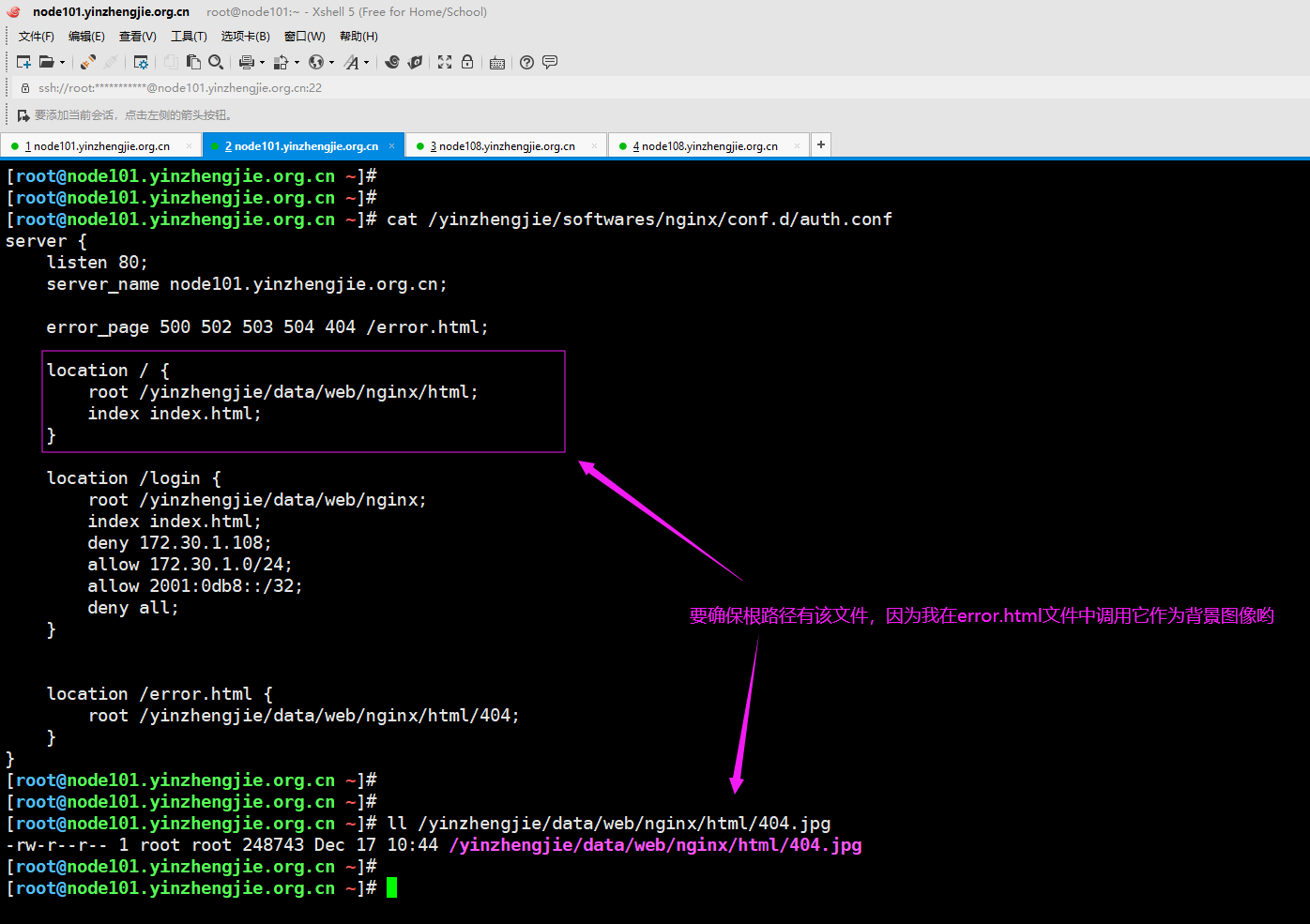
2>.上面的error.html的背景图像我换成了一张图片,在上面写的是"/404.jpg",因此我们得取匹配web服务器的"/"路径下是否有一个404文件哟~
三.客户端测试验证
1>.客户端访问正常存在的资源,如下图所示,可以正常显示

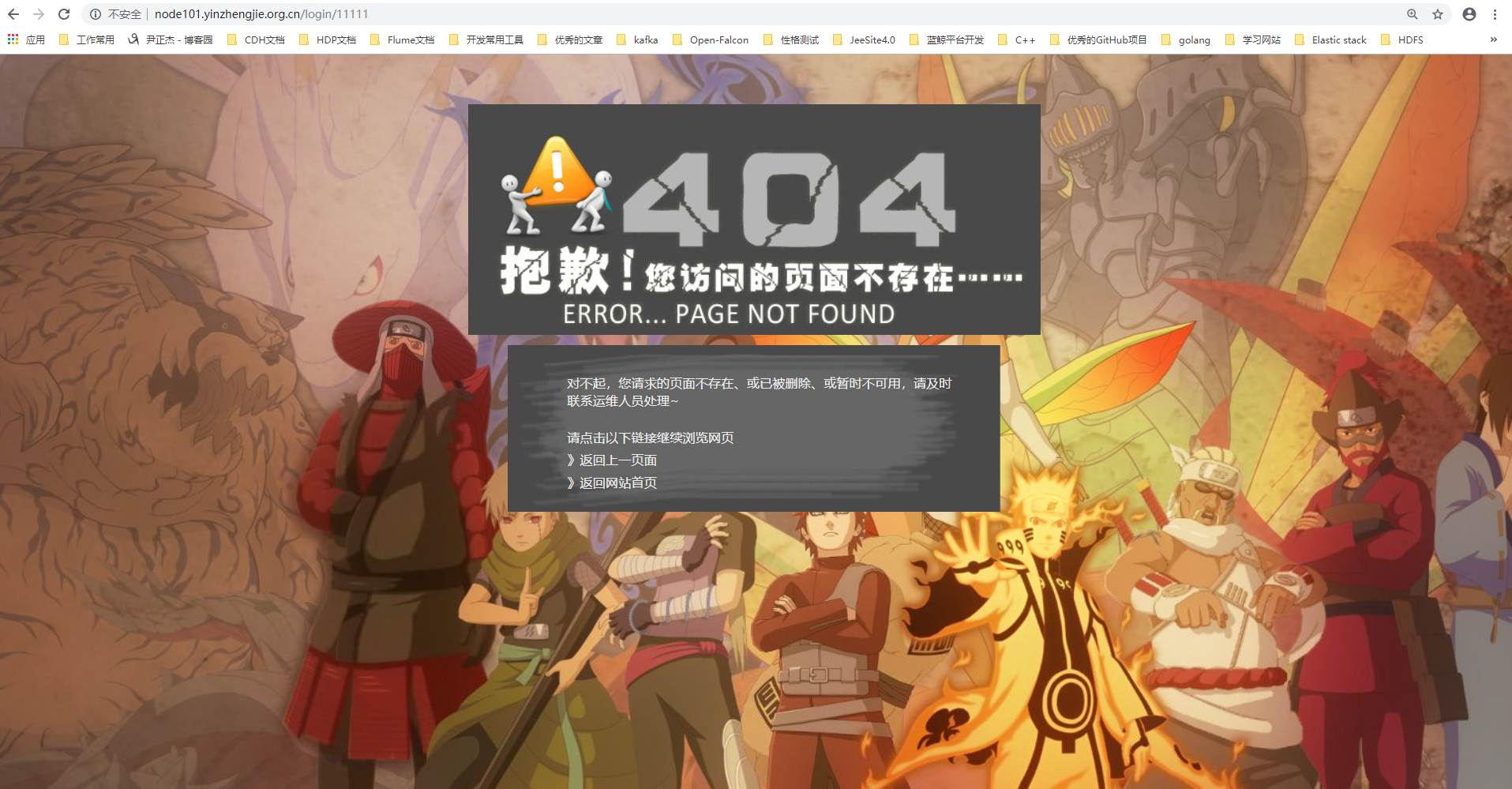
2>.客户端访问不存在的页面,如下图所示,显示的是咱们规定的内容
Nginx 核心配置-自定义错误页面的更多相关文章
- Nginx 核心配置-自定义日志路径及清空日志注意事项
Nginx 核心配置-自定义日志路径及清空日志注意事项 作者:尹正杰 版权声明:原创作品,谢绝转载!否则将追究法律责任. 一.关于日志清空注意事项 1>.nginx服务写访问日志是基于acces ...
- 【Azure 应用服务】App Service中,为Java应用配置自定义错误页面,禁用DELETE, PUT方法
问题定义 使用Azure应用服务(App Service),部署Java应用,使用Tomcat容器,如何自定义错误页面呢?同时禁用DELETE, PUT方法 解决办法 如何自定义错误页面呢?需要在 J ...
- NGINX下配置404错误页面的方法分享
NGINX下配置自定义的404页面是可行的,而且很简单,只需如下几步,需要的朋友可以参考下 1. 创建自己的404.html页面 2.更改nginx.conf在http定义区域加入: fastcg ...
- nginx中配置404错误页面的教程
什么是404页面如果网站出了问题,或者用户试图访问一个并不存在的页面时,此时服务器会返回代码为404的错误信息,此时对应页面就是404页面.404页面的默认内容和具体的服务器有关.如果后台用的是NGI ...
- ASP.NET全局错误处理和异常日志记录以及IIS配置自定义错误页面
应用场景和使用目的 很多时候,我们在访问页面的时候,由于程序异常.系统崩溃会导致出现黄页.在通常的情况下,黄页对于我们来说,帮助是极大的,因为它可以帮助我们知道问题根源,甚至是哪一行代码出现了错误.但 ...
- nginx下配置404错误页面
1.创建自己的404.html页面,并放于网站根目录. 2.更改nginx.conf在http定义区域加入: fastcgi_intercept_errors on; 3.更改nginx.conf(或 ...
- cdnbest独立主控配置自定义错误页面
注:自定义错误的域名最好配置ssl,不配碰到有使用ssl的域名,错误码显示就会有问题 (1)登陆管理后台点区域列表-->配置-->错误url 解析一个域名到你的cdn主控,然后输入这个ur ...
- nginx如何配置网页错误页面
首先要在http模块中加入 fastcgi_intercept_errors on; 其次要在server模块中加入 error_page 403 404 /40x.html; location = ...
- NGINX 配置404错误页面转向
什么是404页面 如果碰巧网站出了问题,或者用户试图访问一个并不存在的页面时,此时服务器会返回代码为404的错误信息,此时对应页面就是404页面.404页面的默认内容和具体的服务器有关.如果后台用的是 ...
随机推荐
- C——letterCounter
/* 一个统计字母(含大小写)出现次数的C程序 */ #include <stdio.h> int main() { ]; char ch; /* initialization */ ; ...
- java常量池-字符串常量池、class常量池和运行时常量池
原文链接:http://tangxman.github.io/2015/07/27/the-difference-of-java-string-pool/ 在java的内存分配中,经常听到很多关于常量 ...
- Linux查看系统基本信息,版本信息(最全版)
版权声明:本文为博主原创文章,遵循 CC 4.0 BY-SA 版权协议,转载请附上原文出处链接和本声明.本文链接:https://blog.csdn.net/qq_31278903/article/d ...
- hyper-v安装centos后配置网络
YPE="Ethernet" PROXY_METHOD="none" BROWSER_ONLY="no" BOOTPROTO="n ...
- 《Interest Rate Risk Modeling》阅读笔记——第二章:债券价格、久期与凸性
目录 第二章:债券价格.久期与凸性 思维导图 瞬时回报率-收益率的例子 第二章:债券价格.久期与凸性 思维导图 瞬时回报率-收益率的例子
- Windows环境安装PyQt5
目录 1. 安装Python 2. 安装Pycharm 3. 安装PyQt5 4. 安装PyQt5-tools 5. 可能出现的问题 1. Qt Designer 程序位置 2. Qt Designe ...
- ShellScript之变量
Shell脚本之变量学习 ##########################ShellScript初学者,文章摘自菜鸟教程################################ 1.She ...
- Java中json使用与问题汇总
一.JSON 解析类库 FastJson: 阿里巴巴开发的 JSON 库,性能十分优秀. 在maven项目的pom文件中以下依赖 <dependency> <groupId>c ...
- The multi-part request contained parameter data (excluding uploaded files) that exceeded the limit for maxPostSize set on the associated connector.
springboot 表单体积过大时报错: The multi-part request contained parameter data (excluding uploaded files) tha ...
- WPF 通过名称查找属性(DependencyProperty)
使用名称来查找DependencyProperty. 如果有这样的需求,则是需要通过DependencyPropertyDescriptor来查找. 通常是使用附加属性或者依赖属性的方法. 下面给出附 ...