
微服务架构下使用Spring Cloud Zuul作为网关将多个微服务整合到一个Swagger服务上
注意:
如果你正在研究微服务,那必然少不了服务之间的相互调用,哪么服务之间的接口以及api就必须生成系统的管理文档了。如果你希望更好的管理你的API,你希望有一个工具能一站式地解决API相关的所有事情,那么,swagger将是一个不错的选择,以下就为大家介绍swagger是使用方法,如有不对之处,还望指正!
1、项目结构
springBoot-user-zuul-swagger — zuul网关 端口 9501
ls-prevention-check — 服务1 端口 8091
microcloud-provider-company — 服务2 端口 8105
2、实现放法
一、添加依赖
分别在三个服务中添加Swagger需要依赖两个jar包,在pom.xml中添加如下坐标
     <dependency>

             <groupId>io.springfox</groupId>

             <artifactId>springfox-swagger2</artifactId>

             <version>2.7.0</version>

     </dependency>

     <dependency>

             <groupId>io.springfox</groupId>

             <artifactId>springfox-swagger-ui</artifactId>

             <version>2.7.0</version>

     </dependency>
二、创建配置类
分别在服务提供者项目中加入Swagger一个配置类来进行对swagger的基本配置,
 @Configuration

 @EnableSwagger2

 public class SwaggerConfig {

     @Bean

     public Docket createRestApi() {

         return new Docket(DocumentationType.SWAGGER_2)

                 .apiInfo(apiInfo())

                 .select()

                 .apis(RequestHandlerSelectors.basePackage("com.zyc.controller"))

                 .apis(RequestHandlerSelectors.withClassAnnotation(Api.class))

                 .apis(RequestHandlerSelectors.withMethodAnnotation(ApiOperation.class))

                 .paths(PathSelectors.any())

                 .build();

     }

     private ApiInfo apiInfo() {

         return new ApiInfoBuilder()

                 .title("Hello系统api")

                 .description("Hello系统接口文档说明")

                 .contact(new Contact("vker", "", "6492178@gmail.com"))

                 .version("1.0")

                 .build();

     }

     @Bean

     UiConfiguration uiConfig() {

         return new UiConfiguration(null, "list", "alpha", "schema",

                 UiConfiguration.Constants.DEFAULT_SUBMIT_METHODS, false, true, 60000L);

     }

 }
三、启动类加注解
@EnableSwagger2
四、在需要生成的类或方法上加具体注解
 @Api("Hello接口")

 @RestController

 @RequestMapping("/company")

 public class Hello {

     @ApiOperation(value="/get/hello方法")

     @GetMapping("/get/hello")

     public String hello() {

         return "Hello Zuul springBoot-microcloud-provider-company";

     }

 }
注意:这里只是一个小栗子:详细注解含义如下:
 @Api() 用于类;表示标识这个类是swagger的资源

 tags–表示说明

 value–也是说明,可以使用tags替代

 @ApiOperation() 用于方法;表示一个http请求的操作

 value用于方法描述

 notes用于提示内容

 @ApiParam() 用于方法,参数,字段说明;表示对参数的添加元数据(说明或是否必填等)

 name–参数名

 value–参数说明

 required–是否必填

 @ApiModel()用于类 ;表示对类进行说明,用于参数用实体类接收

 value–表示对象名

 @ApiModelProperty()用于方法,字段; 表示对model属性的说明或者数据操作更改

 value–字段说明

 name–重写属性名字

 dataType–重写属性类型

 required–是否必填

 example–举例说明

 hidden–隐藏

 @ApiImplicitParam() 用于方法

 表示单独的请求参数

 @ApiImplicitParams() 用于方法,包含多个 @ApiImplicitParam

 name–参数ming

 value–参数说明

 dataType–数据类型

 paramType–参数类型

 example–举例说明

 @ApiIgnore

 作用于方法上,使用这个注解swagger将忽略这个接口
五、重点:在springBoot-user-zuul-swagger项目中添加文档资源配置类DocumentationConfig
注意:springBoot-user-zuul-swagger必须集成Zuul作为路由访问
 @Component

 @Primary

 public class DocumentationConfig implements SwaggerResourcesProvider{

     @Override

     public List<SwaggerResource> get() {

          List resources = new ArrayList<>();

             resources.add(swaggerResource("Hello接口", "/study-proxy/company-proxy/v2/api-docs", "1.0"));

             resources.add(swaggerResource("检查系统接口", "/study-proxy/prevention-check/v2/api-docs", "1.0"));

             return resources;

     }

      private SwaggerResource swaggerResource(String name, String location, String version) {

             SwaggerResource swaggerResource = new SwaggerResource();

             swaggerResource.setName(name);

             swaggerResource.setLocation(location);

             swaggerResource.setSwaggerVersion(version);

             return swaggerResource;

      }

 }
六、在springBoot-user-zuul-swagger的application.yml中添加相关配置:
 spring:

   application:

     name: springBoot-user-zuul

 zuul:

   prefix: /study-proxy

   ignored-services: "*"

   routes:

     microcloud-provider-company: /company-proxy/**

     ls-prevention-check: /prevention-check/**
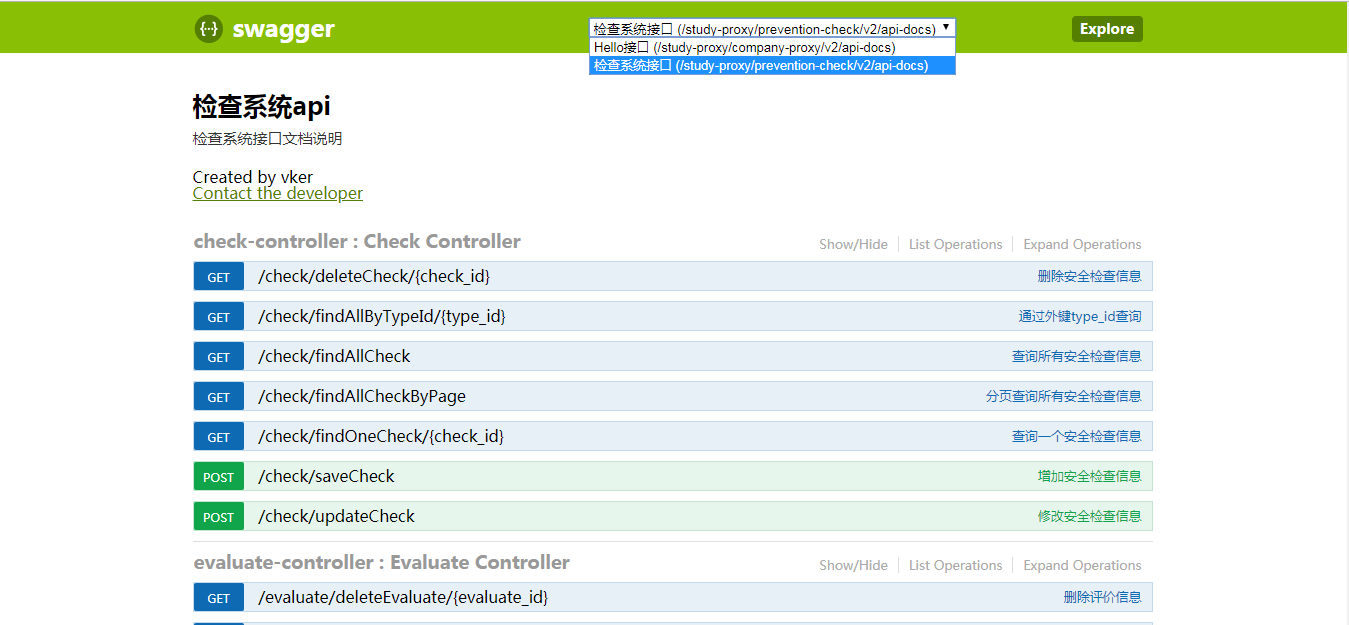
七、访问http://localhost:9501/swagger-ui.html
微服务架构下使用Spring Cloud Zuul作为网关将多个微服务整合到一个Swagger服务上的更多相关文章
- Spring Cloud Zuul与网关中间件
Spring Cloud Zuul与网关中间件_网易订阅 http://dy.163.com/v2/article/detail/DC7L8UV10511HSJK.html
- 浅谈服务架构“五脏六腑”之Spring Cloud
本文将从 Spring Cloud 出发,分两小节讲述微服务框架的「五脏六腑」: 第一小节「服务架构」旨在说明的包括两点,一服务架构是什么及其必要性:二是服务架构的基本组成.为什么第一节写服务架构而不 ...
- 微服务架构 | *2.3 Spring Cloud 启动及加载配置文件源码分析(以 Nacos 为例)
目录 前言 1. Spring Cloud 什么时候加载配置文件 2. 准备 Environment 配置环境 2.1 配置 Environment 环境 SpringApplication.prep ...
- 【spring cloud】spring cloud zuul 路由网关
GitHub源码地址:https://github.com/AngelSXD/springcloud 版本介绍: <properties> <project.build.source ...
- 如何Spring Cloud Zuul作为网关的分布式系统中整合Swagger文档在同一个页面上
本文不涉及技术,只是单纯的一个小技巧. 阅读本文前,你需要对spring-cloud-zuul.spring-cloud-eureka.以及swagger的配置和使用有所了解. 如果你的系统也是用zu ...
- 微服务架构下的API网关
顾名思义,是出现在系统边界上的一个面向API的.串行集中式的强管控服务,这里的边界是企业IT系统的边界,主要起到隔离外部访问与内部系统的作用.在微服务概念的流行之前,API网关的实体就已经诞生了,例如 ...
- Spring Cloud Zuul API服务网关之请求路由
目录 一.Zuul 介绍 二.构建Spring Cloud Zuul网关 构建网关 请求路由 请求过滤 三.路由详解 一.Zuul 介绍 通过前几篇文章的介绍,我们了解了Spring Cloud ...
- Spring Cloud Zuul性能调整
Spring Cloud 版本: Dalston.SR5 这两天通过JMeter测了一下Spring Cloud Zuul的性能,用的是两台虚机8核8G和4核8G,宿主机是10核逻辑20核,代理的服务 ...
- Spring Cloud 微服务二:API网关spring cloud zuul
前言:本章将继续上一章Spring Cloud微服务,本章主要内容是API 网关,相关代码将延续上一章,如需了解请参考:Spring Cloud 微服务一:Consul注册中心 Spring clou ...
随机推荐
- 性能:Transform层面
数据处理的并行度 1.BlockRDD的分区数 (1)通过Receiver接受数据的特点决定 (2)也可以自己通过repartition设置 2.ShuffleRDD的分区数 (1)默认的分区数为sp ...
- Java静态static关键字
static关键字既可以修饰成员变量,也可以修改成员方法,修饰的成员变量和成员方法可以直接通过类名调用,也可以通过对象调用(其实即使是通过对象调用,也会被翻译成类名调用),建议通过类名调用. 成员方法 ...
- webpack的loader的原理和实现
想要实现一个loader,需要首先了解loader的基本原理和用法. 1. 使用 loader是处理模块的解析器. module: { rules: [ { test: /\.css$/, use: ...
- dbt 集成presto试用
dbt 团队提供了presto 的adapter同时也是一个不错的的参考实现,可以学习 当前dbt presto 对于版本的要求是0.13.1 对于当前最新版本的还不支持,同时需要使用源码安装pip ...
- koa post提交数据,koa-bodyparser中间件来获取post提交数据
原生 Nodejs 获取 post 提交数据 首先创建并初始化一个node应用,根路由使用index.ejs模板 var Koa=require('koa') var router = require ...
- tomcat启动报错java.lang.OutOfMemoryError:PermGen space解决办法
tomcat启动错误提示: 严重: Error waiting for multi-thread deployment of WAR files to completejava.util.concur ...
- 为什么用ls和du显示出来的文件大小有差别?【转】
在使用Linux ls命令查看文件大小时,发现文件很大,足有100个G,而使用du命令查看则不超过10个G. [root@shanghai devicemapper]# ls -l 总用量 -rwxr ...
- F12修改html进行本地js操作页面元素
F12修改html进行本地js操作页面元素
- javascript submit() is not a function
<script> window.onload = function(){ document.getElementById('form').submit(); } </script&g ...
- 转载:Java对Base64处理的细节
https://baike.baidu.com/item/base64/8545775?fr=aladdin import java.util.Base64; 对于标准的Base64: 加密为字符串使 ...