
很酷的CSS3仿Facebook登录表单
今天看到一款很不错的CSS3登录表单,外观是仿Facebook的登录表单,还挺不错的,另外也支持简单的表单输入框验证。下图是表单的效果图:
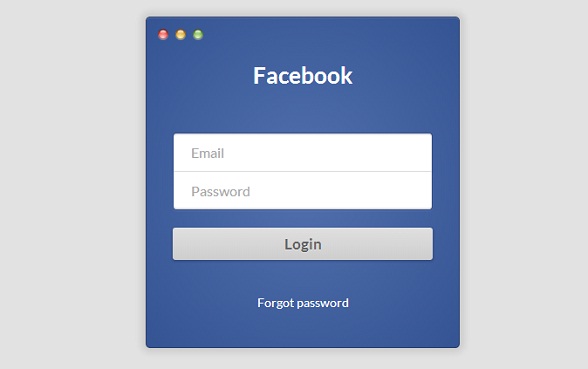
我们也可以在这里查看表单的DEMO演示。
接下来我们来分析一下这款表单的源代码,首先是HTML代码:
<section class="login-form-wrap">

        <h1>Facebook</h1>

        <form class="login-form" action="POST" action="#">

            <label>

                <input type="email" name="email" required placeholder="Email">

            </label>

            <label>

                <input type="password" name="password" required placeholder="Password">

            </label>

            <input type="submit" value="Login">

        </form>

        <h5><a href="#">Forgot password</a></h5>

    </section>
HTML代码很简单,就是构造了一个表单。
另外我们看到input元素中利用了required属性来便捷地验证输入的格式。
接下来是CSS3代码,这个漂亮的外观全靠它了:
.login-form-wrap {

  background: #5170ad;

  background: -moz-radial-gradient(center, ellipse cover, #5170ad 0%, #355493 100%);

  background: -webkit-gradient(radial, center center, 0px, center center, 100%, color-stop(0%, #5170ad), color-stop(100%, #355493));

  background: -webkit-radial-gradient(center, ellipse cover, #5170ad 0%, #355493 100%);

  background: -o-radial-gradient(center, ellipse cover, #5170ad 0%, #355493 100%);

  background: -ms-radial-gradient(center, ellipse cover, #5170ad 0%, #355493 100%);

  background: radial-gradient(ellipse at center, #5170ad 0%, #355493 100%);

  filter: progid:DXImageTransform.Microsoft.gradient(startColorstr='#5170ad', endColorstr='#355493',GradientType=1 );

  border: 1px solid #2d416d;

  box-shadow: 0 1px #5670a4 inset, 0 0 10px 5px rgba(0, 0, 0, 0.1);

  border-radius: 5px;

  position: relative;

  width: 360px;

  height: 380px;

  margin: 10px auto 20px auto;

  padding: 50px 30px 0 30px;

  text-align: center;

}

.login-form-wrap:before {

  background: url(http://i.imgur.com/0vLxyVB.png);

  display: block;

  content: '';

  width: 58px;

  height: 19px;

  top: 10px;

  left: 10px;

  position: absolute;

}

.login-form-wrap > h1 {

  margin: 0 0 50px 0;

  padding:;

  font-size: 26px;

  color: #fff;

}

.login-form-wrap > h5 {

  margin-top: 40px;

}

.login-form-wrap > h5 > a {

  font-size: 14px;

  color: #fff;

  text-decoration: none;

  font-weight:;

}

.login-form input[type="email"], .login-form input[type="password"] {

  width: 100%;

  border: 1px solid #314d89;

  outline: none;

  padding: 12px 20px;

  color: #afafaf;

  font-weight:;

  font-family: 'Lato', sans-serif;

  cursor: pointer;

}

.login-form input[type="email"] {

  border-bottom: none;

  border-radius: 4px 4px 0 0;

  padding-bottom: 13px;

  box-shadow: 0 -1px 0 #e0e0e0 inset, 0 1px 2px rgba(0, 0, 0, 0.23) inset;

}

.login-form input[type="password"] {

  border-top: none;

  border-radius: 0 0 4px 4px;

  box-shadow: 0 -1px 2px rgba(0, 0, 0, 0.23) inset, 0 1px 2px rgba(255, 255, 255, 0.1);

}

.login-form input[type="submit"] {

  font-family: 'Lato', sans-serif;

  font-weight:;

  background: #e0e0e0;

  background: -moz-linear-gradient(top, #e0e0e0 0%, #cecece 100%);

  background: -webkit-gradient(linear, left top, left bottom, color-stop(0%, #e0e0e0), color-stop(100%, #cecece));

  background: -webkit-linear-gradient(top, #e0e0e0 0%, #cecece 100%);

  background: -o-linear-gradient(top, #e0e0e0 0%, #cecece 100%);

  background: -ms-linear-gradient(top, #e0e0e0 0%, #cecece 100%);

  background: linear-gradient(to bottom, #e0e0e0 0%, #cecece 100%);

  filter: progid:DXImageTransform.Microsoft.gradient(startColorstr='#e0e0e0', endColorstr='#cecece',GradientType=0 );

  display: block;

  margin: 20px auto 0 auto;

  width: 100%;

  border: none;

  border-radius: 3px;

  padding: 8px;

  font-size: 17px;

  color: #636363;

  text-shadow: 0 1px 0 rgba(255, 255, 255, 0.45);

  font-weight:;

  box-shadow: 0 1px 3px 1px rgba(0, 0, 0, 0.17), 0 1px 0 rgba(255, 255, 255, 0.36) inset;

}

.login-form input[type="submit"]:hover {

  background: #DDD;

}

.login-form input[type="submit"]:active {

  padding-top: 9px;

  padding-bottom: 7px;

  background: #C9C9C9;

}
都是很普通的样式属性,也没什么可以解说的,就这样好了。
最后附上源代码,下载地址>>
很酷的CSS3仿Facebook登录表单的更多相关文章
- 仿Facebook登录表单
在线演示 本地下载
- 纯CSS3个性化圆形按钮登录表单
在线演示 本地下载
- 9款大气实用的HTML5/CSS3注册登录表单
1.HTML5/CSS3仿Facebook登录表单 利用CSS3制作的登录表单的确很漂亮,我们在html5tricks网站上也分享过几款了,比如CSS3密码强度验证表单可以显示密码的强度,这款纯CSS ...
- CSS3/HTML5实现漂亮的分步骤注册登录表单
分步骤的登录注册表单现在也比较多,主要是能提高用户体验,用户可以有选择性的填写相应的表单信息,不至于让用户看到一堆表单望而却步.今天和大家分享的就是一款基于HTML5和CSS3的分步骤注册登录表单,外 ...
- wordpress 自定义登录表单
wordpress 有很多插件支持自定义登录表单,本文讨论无插件形式. 自定义登录表单又分为两种 自定义登录表单 在前端创建一个登录页面
- Html登录表单阻止自动填充
设置属性 autocomplete="off" 阻止浏览器从cache获取数据填充登录表单. <input type="text" name=" ...
- 圆角卖萌式登录表单和width的百分比值
1.圆角恶意卖萌登录表单 小组要做一个网站,大学生社区那种,然后要做登陆界面然后还要做好看的登录界面,然后在书上看到了一个很漂亮的登陆界面,说来和一般的登陆界面没什么不同只是登录表单的边角被柔化了,变 ...
- 用JS动态创建登录表单,报了个小错误
后来发现原来是: dvObj.style.border='#Red 1px sold'; 其中的Red多谢了一个‘#’, 但是奇怪的是在chrome和firefox都备有报错,但是在ie中报错了. 各 ...
- yii YII小部件 创建登录表单表单 Login表单
YII框架必须遵循其表单的创建方法 登录模型错做与数据库操作模型是一致的,不同的是不跟数据库交互 ,用的是小部件,在创建表单之前,要在用户控制模块完成以下代码 protected --models - ...
随机推荐
- IntelliJ IDEA常见问题解决办法汇总
(1)SVN相关的操作: 启用:方法1:VCS菜单下Enable Version Control Integration,点击之后选择相应的版本控制工具方法2:Setting中Version Cont ...
- java web开发人员经常使用标签
struts标签库 国际化配置 配置国际化 1.国际化配置 在struts自带的app中的struts-config.xml中的<message-resources parameter=&quo ...
- With As 获取 id parentId 递归获取所有
Declare @Id Int Set @Id = 5; ---在此修改父节点 With RootNodeCTE(Id,ParentId) As ( Select Id,Paren ...
- C++习题 商品销售
Description 商店销售某一商品,每天公布统一的折扣(discount).同时允许销售人员在销售时灵活掌握售价(price),在此基础上,一次购10件以上者,还可以享受9.8折优惠.现已知当天 ...
- HTC M7日文版HTL22刷机包 毒蛇2.5.0 ART NFC Sense6.0
ROM介绍 日文版的蝰蛇2.5.0简短的介绍: *根据最新的M8蝰蛇版本号2.5.0 *经过我的朋友和机器测试.功能是否正常,当然,并非所有的功能进行测试,以,假设遇到BUG请反馈 *删除国外社会.谷 ...
- 【Java GUI】Java面板基础:JPanel
有两个面板,常见的面板(JPanel)和滚动面板(JScrollPane) Jpanel 面板是一种常见的容器,JPanel的作用是实现接口层次结构,面放入一些组件.也能够在上面绘画,将放有组件和有画 ...
- redis源代码解读之内存管理————zmalloc文件
本文章主要记录本人在看redis源代码的一些理解和想法.由于功力有限,肯定会出现故障,所以.希望高手给出指正. 第一篇就是内存相关的介绍.由于我喜欢先看一些组件的东西,再看总体的流程. 先上一下代码吧 ...
- IOS使用Jenkins持续集成
本文详细介绍了开发过程,提高效率进行IOS-Jenkins持续集成. 第二http://blog.csdn.net/monkey_cool/article/details/43270885 背景 平时 ...
- 旧Mj下拉刷新 An instance 0xca90200 of class UITableView was deallocated while key value observers were s
An instance 0xca90200 of class UITableView was deallocated while key value observers were still regi ...
- SELECT 场 FROM 表 WHERE 字段 Like 条件
间有关的条件,SQL它提供了四种匹配模式: 1.%: 表示随意0个或多个字符.可匹配随意类型和长度的字符.有些情况下若是中文,请使用两个百分号(%%)表示. 比方 SELECT * FROM [use ...