
kendo ui - DatePicker 日期时间系列
kendo-ui 官网:https://www.telerik.com/documentation
初始化 grid:
引入文件:
    <link rel="stylesheet" href="https://kendo.cdn.telerik.com/2018.2.516/styles/kendo.common.min.css"/>

    <link rel="stylesheet" href="https://kendo.cdn.telerik.com/2018.2.516/styles/kendo.rtl.min.css"/>

    <link rel="stylesheet" href="https://kendo.cdn.telerik.com/2018.2.516/styles/kendo.silver.min.css"/>

    <link rel="stylesheet" href="https://kendo.cdn.telerik.com/2018.2.516/styles/kendo.mobile.all.min.css"/>

    <script src="https://code.jquery.com/jquery-1.12.4.min.js"></script>

    <script src="https://kendo.cdn.telerik.com/2018.2.516/js/kendo.all.min.js"></script>

    <script src="https://kendo.cdn.telerik.com/2018.2.516/js/kendo.culture.zh-CN.min.js"></script>    <!-- 汉化日期 -->
1. 定义日期时间:
创建时间盒子:
<div class="content" style="width: 400px;margin: 50px auto;border: 1px solid #ccc;padding: 20px;">
<h4>开始时间:</h4>
<input id="start" style="width: 100%;" value="2018/01/01" />
<h4 style="margin-top: 2em">结束时间:</h4>
<input id="end" style="width: 100%;" value="2018/01/01"/>
</div>
定义js:
$(document).ready(function() {

            kendo.culture("zh-CN");    //需声明汉化

            function startChange() {

                var startDate = start.value(),

                endDate = end.value();

                if (startDate) {

                    startDate = new Date(startDate);

                    startDate.setDate(startDate.getDate());

                    end.min(startDate);

                } else if (endDate) {

                    start.max(new Date(endDate));

                } else {

                    endDate = new Date();

                    start.max(endDate);

                    end.min(endDate);

                }

            }

            function endChange() {

                var endDate = end.value(),

                startDate = start.value();

                if (endDate) {

                    endDate = new Date(endDate);

                    endDate.setDate(endDate.getDate());

                    start.max(endDate);

                } else if (startDate) {

                    end.min(new Date(startDate));

                } else {

                    endDate = new Date();

                    start.max(endDate);

                    end.min(endDate);

                }

            }

            var start = $("#start").kendoDatePicker({

                change: startChange,

                format: "yyyy/MM/dd" //定义时间格式 例如yyyy-MM-dd , dd/mm/yyyy , MMMM yyyy等

            }).data("kendoDatePicker");

            var end = $("#end").kendoDatePicker({

                change: endChange,

                format: "yyyy/MM/dd"

            }).data("kendoDatePicker");

            start.max(end.value());

            end.min(start.value());

        });

2.定义详细时间:
创建时间盒子:
<div class="content" style="width: 400px;margin: 50px auto;border: 1px solid #ccc;padding: 20px;">
<h4>开始时间:</h4>
<input id="start" style="width: 100%;" />
<h4 style="margin-top: 2em;">结束时间:</h4>
<input id="end" style="width: 100%;" />
</div>
定义js:
$(document).ready(function() {

            function startChange() {

                var startDate = start.value(),

                endDate = end.value();

                if (startDate) {

                    startDate = new Date(startDate);

                    startDate.setDate(startDate.getDate());

                    end.min(startDate);

                } else if (endDate) {

                    start.max(new Date(endDate));

                } else {

                    endDate = new Date();

                    start.max(endDate);

                    end.min(endDate);

                }

            }

            function endChange() {

                var endDate = end.value(),

                startDate = start.value();

                if (endDate) {

                    endDate = new Date(endDate);

                    endDate.setDate(endDate.getDate());

                    start.max(endDate);

                } else if (startDate) {

                    end.min(new Date(startDate));

                } else {

                    endDate = new Date();

                    start.max(endDate);

                    end.min(endDate);

                }

            }

            var today = kendo.date.today();

            var start = $("#start").kendoDateTimePicker({

                value: today,

                change: startChange,

                format: "yyyy-MM-dd hh:mm tt"  //定义时间格式

            }).data("kendoDateTimePicker");

            var end = $("#end").kendoDateTimePicker({

                value: today,

                change: endChange,

                format: "yyyy-MM-dd hh:mm tt"

            }).data("kendoDateTimePicker");

            start.max(end.value());

            end.min(start.value());

        });
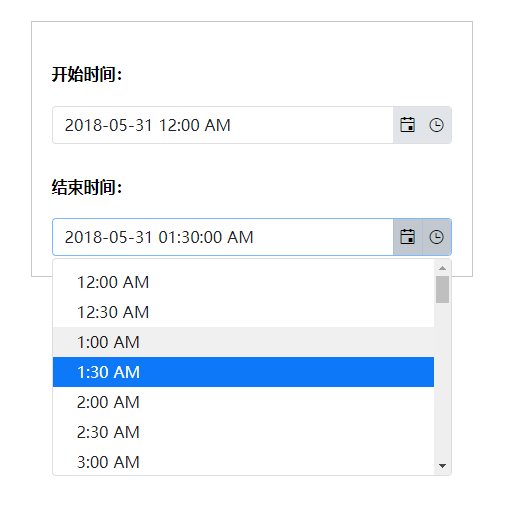
关于时间格式 详细参考:
https://docs.telerik.com/kendo-ui/framework/globalization/dateformatting
kendo ui - DatePicker 日期时间系列的更多相关文章
- layDate/DatePicker日期时间空间
真心不错,果断收藏了. 1.示例与效果 2.更多示例与皮肤 补充说明:My97DatePicker日期时间插件 的使用 1.示例与效果 2. 更多 常用的实例:WdatePicker下载 http:/ ...
- kendo ui - grid 数据表格系列
kendo-ui 官网:https://www.telerik.com/documentation 初始化 grid: 引入文件: <link rel="stylesheet" ...
- kendo ui - MultiSelect 多选系列
kendo-ui 官网:https://www.telerik.com/documentation 初始化 grid: 引入文件: <link rel="stylesheet" ...
- kendo ui DatePicker 时区转换
http://blog.darkthread.net/post-2013-06-25-json-date-timezone-issue.aspx
- Kendo UI使用笔记
1.Grid中的列字段绑定模板字段方法参数传值字符串加双引号: 上图就是个典型的例子,openSendWin方法里Id,EmergencyTitle,EmergencyDetail 三个参数,后两个参 ...
- 构建的Web应用界面不够好看?快试试最新的Kendo UI R3 2019
通过70多个可自定义的UI组件,Kendo UI可以创建数据丰富的桌面.平板和移动Web应用程序.通过响应式的布局.强大的数据绑定.跨浏览器兼容性和即时使用的主题,Kendo UI将开发时间加快了50 ...
- Kendo UI for jQuery使用教程:入门指南
[Kendo UI for jQuery最新试用版下载] Kendo UI目前最新提供Kendo UI for jQuery.Kendo UI for Angular.Kendo UI Support ...
- Kendo UI使用教程:入门指南
[Kendo UI最新试用版下载] Kendo UI目前最新提供Kendo UI for jQuery.Kendo UI for Angular.Kendo UI Support for React和 ...
- 「版本升级」界面控件Kendo UI正式发布R2 2019|附下载
通过70多个可自定义的UI组件,Kendo UI可以创建数据丰富的桌面.平板和移动Web应用程序.通过响应式的布局.强大的数据绑定.跨浏览器兼容性和即时使用的主题,Kendo UI将开发时间加快了50 ...
随机推荐
- 解决:jsp 页面不全,response 内容不完整
前言:今天 jsp 页面输出不完整这个问题困扰了我几个小时,终于发现问题并解决了. 环境: tomcat 8.0.17 x64 jsp springmvc vue 问题: 本来页面正常,但加了几行代码 ...
- 《JavaWeb从入门到改行》JDBC经典秘方QueryRunner
目录: 基础篇_功能各自回顾 JDBC基础代码回顾(使用JdbcUtils工具简化) c3p0数据库连接池的使用(使用JdbcUtils工具简化) 大数据的插入(使用c3p0+JdbcUtils工具简 ...
- bootstrap前端框架使用总结分享
1.bootstrap 排版 全局样式style.css: 1.移除body的margin声明 2.设置body的背景色为白色 3.为排版设置了基本的字体.字号和行高 4.设置全局链接颜色,且当链接处 ...
- ArcGIS10+:ArcGIS version not specified. You must call RuntimeManager.Bind before creating any ArcGIS
ArcGIS10+版本,使用VS创建一个简单的AE应用程序,然后拖放一个toolbar.LicenseControl以及MapControl控件. 接着编译应用程序,编译成功. 然后单击F5运行程序, ...
- <Android 基础(二十八)> Fragment (1)
简介 Fragment,碎片,常用的内容,但是一直没有系统的学习下它的使用方法,花几天抽空看看随便记录一下. 生命周期 来自官网的图片一目了然. 自测试结果: 基本使用 1.自定义一个Fragment ...
- Elixir木蚂蚁支付服务器验签名方法
官方范例为java public boolean verify(String sign , String appKey , String orderId) throws UnsupportedEnco ...
- AR中的SLAM(二)
写在前面 本文想讨论一下AR的架构和SLAM在其中的作用. AR AR的框架可以简单划分为感知和交互两部分. 感知部分主要负责信息的收集和处理.信息主要通过不同的传感器收集,包括图像.设备加速度.距离 ...
- 2018-10-15 21:07:38 c language
2018-10-15 21:07:38 c language C语言编译器,神奇的魔法师 在类 UNIX 系统(Linux.Mac OS 等)下,可执行程序没有特定的后缀,系统根据文件的头部信息来判断 ...
- gitlab上如何添加二进制文件(设计文档)
想将设计文档(原型设计图,UML设计图等)放到gitlab上,以供团队其他成员查看.将这些二进制文件跟源码一样纳入git管控显然是不合适的.经过一番摸索,找到了如何管理项目文档的方法. 根据Stack ...
- [WinCE] Can't find P/Invoke DLL sqlceme35.dll
找到目录: C:\Program Files (x86)\Microsoft SQL Server Compact Edition\v3.5\Devices\wce500\armv4i 将 sqlce ...