
Java 复制大文件方式(nio2 FileChannel 拷贝文件能力测试)
目前为止,我们已经学习了很多 Java 拷贝文件的方式,除了 FileChannel 提供的方法外,还包括使用 Files.copy() 或使用字节数组的缓冲/非缓冲流。那个才是最好的选择呢?这个问题很难回答,因为答案基于很多因素。本文将目光集中到一个因素,那就是速度,因为拷贝任务 越快将会提高效率,在有些情况下,这是成功的关键。因此,本文将使用一个应用程序来比较下面这些拷贝方式的具体时间:
- FileChannel 和非直接模式的 ByteBuffer
- FileChannel 和直接模式的 ByteBuffer
- FileChannel.transferTo()
- FileChannel.transferFrom()
- FileChannel.map()
- 使用字节数组和缓冲流
- 使用字节数组和非缓冲流
- File.copy()(Path 到 Path,InputStream 到 Path 和 Path 到 OutputStream)
应用程序基于下面的条件:
- 拷贝文件类型 MP4 视频(文件名为 Rafa Best Shots.mp4,所在目录为 C:\rafaelnadal\tournaments\2009\videos)
- 文件大小:58.3MB
- 测试的缓冲区大小:4KB, 16KB, 32KB, 64KB, 128KB, 256KB, and 1024KB
- 机器配置:Mobile AMD Sempron Processor 3400 + 1.80 GHz, 1.00GB RAM, 32-bit
OS, Windows 7 Ultimate - 测量类型:使用 System.nanoTime() 方法
- 连续运行三次后再获取时间;前三次运行将会被忽略。开始运行的时间总会比后面运行的时间要长一些。
下面将列出完整的应用程序:
import java.nio.MappedByteBuffer;

import java.io.OutputStream;

import java.io.InputStream;

import java.io.BufferedInputStream;

import java.io.BufferedOutputStream;

import java.io.File;

import java.io.FileInputStream;

import java.io.FileOutputStream;

import java.io.IOException;

import java.nio.ByteBuffer;

import java.nio.channels.FileChannel;

import java.nio.file.Files;

import java.nio.file.Path;

import java.nio.file.Paths;

import java.nio.file.StandardOpenOption;

import java.util.EnumSet;

import static java.nio.file.LinkOption.NOFOLLOW_LINKS;

public class Main {

 public static void deleteCopied(Path path){

  try {

      Files.deleteIfExists(path);

  } catch (IOException ex) {

    System.err.println(ex);

  }

 }

 public static void main(String[] args) {

 final Path copy_from = Paths.get("C:/rafaelnadal/tournaments/2009/videos/

                                                                        Rafa Best Shots.mp4");

 final Path copy_to = Paths.get("C:/Rafa Best Shots.mp4");

 long startTime, elapsedTime;

 int bufferSizeKB = 4; //also tested for 16, 32, 64, 128, 256 and 1024

 int bufferSize = bufferSizeKB * 1024;

 deleteCopied(copy_to);

 //FileChannel and non-direct buffer

 System.out.println("Using FileChannel and non-direct buffer ...");

 try (FileChannel fileChannel_from = (FileChannel.open(copy_from,

                      EnumSet.of(StandardOpenOption.READ)));

      FileChannel fileChannel_to = (FileChannel.open(copy_to,

                      EnumSet.of(StandardOpenOption.CREATE_NEW, StandardOpenOption.WRITE)))) {

      startTime = System.nanoTime();

      // Allocate a non-direct ByteBuffer

      ByteBuffer bytebuffer = ByteBuffer.allocate(bufferSize);

      // Read data from file into ByteBuffer

      int bytesCount;

      while ((bytesCount = fileChannel_from.read(bytebuffer)) > 0) {

       //flip the buffer which set the limit to current position, and position to 0

       bytebuffer.flip();

       //write data from ByteBuffer to file

       fileChannel_to.write(bytebuffer);

       //for the next read

       bytebuffer.clear();

      }

      elapsedTime = System.nanoTime() - startTime;

      System.out.println("Elapsed Time is " + (elapsedTime / 1000000000.0) + " seconds");

 } catch (IOException ex) {

   System.err.println(ex);

 }

 deleteCopied(copy_to);

 //FileChannel and direct buffer

 System.out.println("Using FileChannel and direct buffer ...");

 try (FileChannel fileChannel_from = (FileChannel.open(copy_from,

                      EnumSet.of(StandardOpenOption.READ)));

      FileChannel fileChannel_to = (FileChannel.open(copy_to,

                      EnumSet.of(StandardOpenOption.CREATE_NEW, StandardOpenOption.WRITE)))) {

      startTime = System.nanoTime();

      // Allocate a direct ByteBuffer

      ByteBuffer bytebuffer = ByteBuffer.allocateDirect(bufferSize);

      // Read data from file into ByteBuffer

      int bytesCount;

      while ((bytesCount = fileChannel_from.read(bytebuffer)) > 0) {

       //flip the buffer which set the limit to current position, and position to 0

       bytebuffer.flip();

       //write data from ByteBuffer to file

       fileChannel_to.write(bytebuffer);

       //for the next read

       bytebuffer.clear();

      }

      elapsedTime = System.nanoTime() - startTime;

      System.out.println("Elapsed Time is " + (elapsedTime / 1000000000.0) + " seconds");

 } catch (IOException ex) {

   System.err.println(ex);

 }

 deleteCopied(copy_to);

 //FileChannel.transferTo()

 System.out.println("Using FileChannel.transferTo method ...");

 try (FileChannel fileChannel_from = (FileChannel.open(copy_from,

                      EnumSet.of(StandardOpenOption.READ)));

      FileChannel fileChannel_to = (FileChannel.open(copy_to,

                      EnumSet.of(StandardOpenOption.CREATE_NEW, StandardOpenOption.WRITE)))) {

      startTime = System.nanoTime();

      fileChannel_from.transferTo(0L, fileChannel_from.size(), fileChannel_to);

      elapsedTime = System.nanoTime() - startTime;

      System.out.println("Elapsed Time is " + (elapsedTime / 1000000000.0) + " seconds");

 } catch (IOException ex) {

   System.err.println(ex);

 }

 deleteCopied(copy_to);

 //FileChannel.transferFrom()

 System.out.println("Using FileChannel.transferFrom method ...");

 try (FileChannel fileChannel_from = (FileChannel.open(copy_from,

                      EnumSet.of(StandardOpenOption.READ)));

      FileChannel fileChannel_to = (FileChannel.open(copy_to,

                      EnumSet.of(StandardOpenOption.CREATE_NEW, StandardOpenOption.WRITE)))) {

      startTime = System.nanoTime();

      fileChannel_to.transferFrom(fileChannel_from, 0L, (int) fileChannel_from.size());

      elapsedTime = System.nanoTime() - startTime;

      System.out.println("Elapsed Time is " + (elapsedTime / 1000000000.0) + " seconds");

 } catch (IOException ex) {

   System.err.println(ex);

 }

 deleteCopied(copy_to);

 //FileChannel.map

 System.out.println("Using FileChannel.map method ...");

 try (FileChannel fileChannel_from = (FileChannel.open(copy_from,

                      EnumSet.of(StandardOpenOption.READ)));

      FileChannel fileChannel_to = (FileChannel.open(copy_to,

                      EnumSet.of(StandardOpenOption.CREATE_NEW, StandardOpenOption.WRITE)))) {

      startTime = System.nanoTime();

      MappedByteBuffer buffer = fileChannel_from.map(FileChannel.MapMode.READ_ONLY,

                                                                  0, fileChannel_from.size());

      fileChannel_to.write(buffer);

      buffer.clear();

      elapsedTime = System.nanoTime() - startTime;

      System.out.println("Elapsed Time is " + (elapsedTime / 1000000000.0) + " seconds");

} catch (IOException ex) {

  System.err.println(ex);

}

deleteCopied(copy_to);

//Buffered Stream I/O

System.out.println("Using buffered streams and byte array ...");

File inFileStr = copy_from.toFile();

File outFileStr = copy_to.toFile();

try (BufferedInputStream in = new BufferedInputStream(new FileInputStream(inFileStr));

     BufferedOutputStream out = new BufferedOutputStream(new FileOutputStream(outFileStr))) {

     startTime = System.nanoTime();

     byte[] byteArray = new byte[bufferSize];

     int bytesCount;

     while ((bytesCount = in.read(byteArray)) != -1) {

             out.write(byteArray, 0, bytesCount);

     }

     elapsedTime = System.nanoTime() - startTime;

     System.out.println("Elapsed Time is " + (elapsedTime / 1000000000.0) + " seconds");

} catch (IOException ex) {

  System.err.println(ex);

}

deleteCopied(copy_to);

System.out.println("Using un-buffered streams and byte array ...");

try (FileInputStream in = new FileInputStream(inFileStr);

     FileOutputStream out = new FileOutputStream(outFileStr)) {

     startTime = System.nanoTime();

     byte[] byteArray = new byte[bufferSize];

     int bytesCount;

     while ((bytesCount = in.read(byteArray)) != -1) {

             out.write(byteArray, 0, bytesCount);

     }

     elapsedTime = System.nanoTime() - startTime;

     System.out.println("Elapsed Time is " + (elapsedTime / 1000000000.0) + " seconds");

} catch (IOException ex) {

  System.err.println(ex);

}

deleteCopied(copy_to);

System.out.println("Using Files.copy (Path to Path) method ...");

try {

    startTime = System.nanoTime();

    Files.copy(copy_from, copy_to, NOFOLLOW_LINKS);

    elapsedTime = System.nanoTime() - startTime;

    System.out.println("Elapsed Time is " + (elapsedTime / 1000000000.0) + " seconds");

} catch (IOException e) {

  System.err.println(e);

}

deleteCopied(copy_to);

System.out.println("Using Files.copy (InputStream to Path) ...");

try (InputStream is = new FileInputStream(copy_from.toFile())) {

    startTime = System.nanoTime();

    Files.copy(is, copy_to);

    elapsedTime = System.nanoTime() - startTime;

    System.out.println("Elapsed Time is " + (elapsedTime / 1000000000.0) + " seconds");

} catch (IOException e) {

  System.err.println(e);

}

deleteCopied(copy_to);

System.out.println("Using Files.copy (Path to OutputStream) ...");

try (OutputStream os = new FileOutputStream(copy_to.toFile())) {

     startTime = System.nanoTime();

     Files.copy(copy_from, os);

     elapsedTime = System.nanoTime() - startTime;

     System.out.println("Elapsed Time is " + (elapsedTime / 1000000000.0) + " seconds");

 } catch (IOException e) {

   System.err.println(e);

 }

 }

}
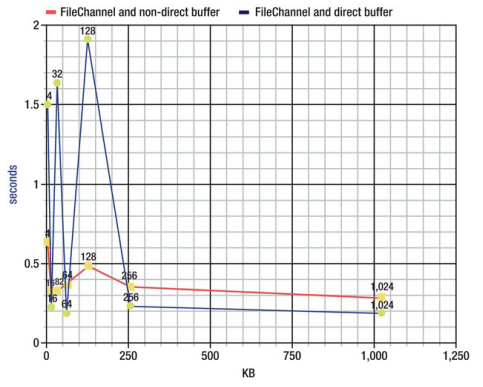
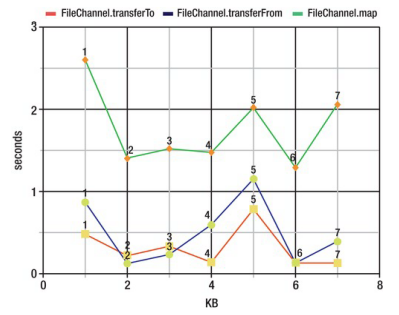
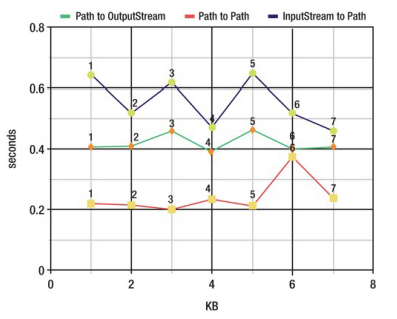
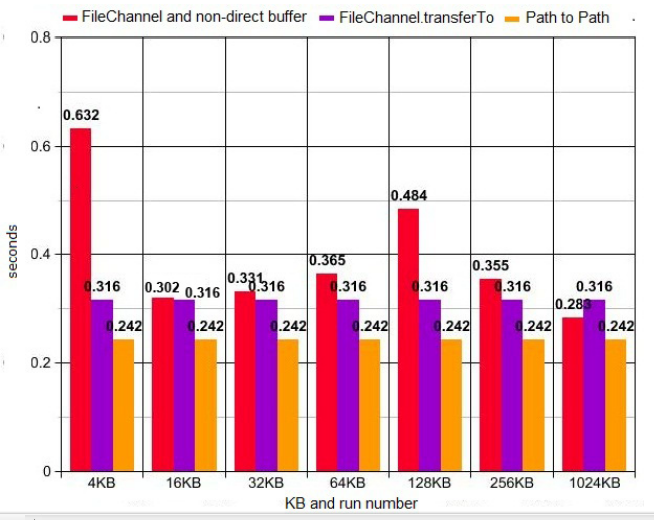
输出结果排序比较复杂,其中包含了很多数据。下面我将主要的对比用图形的方式展示出来。图形中 Y 坐标表示消耗的时间(单位:秒),X 坐标表示缓冲的大小(或运行次数,跳过了前三次运行)。
FileChannel 和非直接模式 Buffer vs. FileChannel 和直接模式 Buffer
从下图看来,如果缓存小于 256KB,那么非直接模式的 Buffer 快一点,而缓存大于 256KB 后,直接模式的 Buffer 快一点:
FileChannel.transferTo() vs. FileChannel.transferFrom() vs. FileChannel.map()
从下图看来,FileChannel.transferTo() 和 FileChannel.transferFrom 运行七次的速度都差不多,而 FileChannel.map 的速度就要差很多:
三种 Files.copy() 方法
从下图看来,最快的是 Path 到 Path,其次是 Path 到 OutputStream,最慢的是 InputStream 到 Path:
FileChannel 和非直接模式 Buffer vs. FileChannel.transferTo() vs. Path 到 Path
最后,我们将前面最快的三种方式综合起来比较。从比较的结果来看,似乎 Path 到 Path 是最快的解决方案:
Java 复制大文件方式(nio2 FileChannel 拷贝文件能力测试)的更多相关文章
- AWS S3 递归上传文件和递归下载文件, 以及S3之间拷贝文件夹
1. 递归上传文件: aws s3 cp 本地文件夹 s3://bucket-name -- recursive --region us-east-1 2. 递归下载S3上的文件夹: cd 本地下载 ...
- cmake指定程序输出目录和库文件输出目录和拷贝文件
概述 本文样式环境: win10+cmake 3.18 本文将介绍使用CMAKE配置项目输出目录和 LIbrary项目的输出目录 本文将介绍 cmake的file函数的基础用法之拷贝文件 重点, 这些 ...
- java 模拟表单方式提交上传文件
/** * 模拟form表单的形式 ,上传文件 以输出流的形式把文件写入到url中,然后用输入流来获取url的响应 * * @param url 请求地址 form表单url地址 * @param f ...
- 从source folder 下将其所有子文件夹的*.* 文件拷贝到 target folder (不拷贝文件夹名仅拷贝文件)
因本人较懒,一直认为电脑能做的就让电脑来做,所以写下这个批处理的小脚本方便工作. 场景:碰到要拷贝一个文件夹(source folder)下的多个子文件夹(sub-folder)的文件到指定文件夹下( ...
- java中的拷贝文件FileChannel
以前用Java拷贝文件,只知道写byte数组循环拷贝,今天知道了可以用FileChannel进行拷贝,上代码: 下边是传统的byte数组拷贝方法 </pre><pre name=&q ...
- pythonl练习笔记——multiprocessing 多进程拷贝文件
分两份拷贝文件,父进程拷贝文件的前半部分,子进程拷贝文件的后半部分. import os import time #获取文件大小 size = os.path.getsize('wait.py') # ...
- 微软BI 之SSIS 系列 - 在 SSIS 中将指定目录下的所有文件分类输出到不同文件夹
开篇介绍 比如有这样的一个需求,旧的一个业务系统通常将产出的文件输出到同一个指定的目录下的不同子目录,输出的文件类型有 XML,EXCEL, TXT 这些不同后缀的文件.现在需要在 SSIS 中将它们 ...
- BAT文件语法和技巧(bat文件的编写及使用)
比较有用的东西 首先,批处理文件是一个文本文件,这个文件的每一行都是一条DOS命令(大部分时候就好象我们在DOS提示符下执行的命令行一样),你可以使用DOS下的Edit或者Windows的记事本(no ...
- java复制文件的4种方式
尽管Java提供了一个可以处理文件的IO操作类.但是没有一个复制文件的方法.复制文件是一个重要的操作,当你的程序必须处理很多文件相关的时候.然而有几种方法可以进行Java文件复制操作,下面列举出4中最 ...
随机推荐
- Struts DispatchAction Example
The DispatchAction class (org.apache.struts.actions.DispatchAction) provides a way to group all rela ...
- ef查询mysql数据库数据支持DbFunctions函数
1.缘由 快下班的时候,一同事说在写linq查询语句时where条件中写两时间相减大于某具体天数报错:后来仔细一问,经抽象简化,可以总结为下面的公式: a.当前时间 减去 某表时间字段 大于 某具体天 ...
- day5模块学习--configparser模块
使用ConfigParser模块读写ini文件(http://blog.csdn.net/linda1000/article/details/11729561) ConfigParserPyth ...
- mongodb导入导出
导出 mongoexport -d 数据库 -c 表名 -o 输出文件名 例:mongoexport -d Mongodb_DataManager -c Kujiale_Users -o Kujial ...
- echarts3.0 本期累计堆叠
@{ ViewBag.Title = "barlj"; } <h2>barlj</h2> <div id="main" style ...
- hdoj2191 珍惜现在,感恩生活(01背包 || 多重背包)
题目链接 http://acm.hdu.edu.cn/showproblem.php?pid=2191 思路 由于每种大米可能不止一袋,所以是多重背包问题,可以直接使用解决多重背包问题的方法,也可以将 ...
- Ionic实战八:ionic登陆页面源码
onic登陆页面模板源码,可以用于ionic开发中登陆页面制作或者参考 下面是此模板的一些页面 此模板免费提供给大家 登陆用户名和密码都是 phonegap100     
- 《JAVA软件结构与数据结构》第一周学习总结
学号 20172326 <JAVA软件结构与数据结构>第一周学习总结 教材学习内容总结 软件质量的几大特性 增长函数与大O记法 大O记法用来表示表示增长函数,从而来表示算法的复杂度 算法的 ...
- 跟厂长学PHP7内核(一):发展史
PHP1 1994年,一位名叫Rasmus lerdorf的兄台为了在网上展示自己的履历和网页流量的统计,用Perl开发了一套脚本,后来因与日俱增的需求无法得到满足,lerdorf便使用c语言进行了重 ...
- JAVAEE——宜立方商城06:Redis安装、数据类型和持久化方案、Redis集群分析与搭建、实现缓存和同步
1. 学习计划 1.首页轮播图展示 2.Redis服务器搭建 3.向业务逻辑中添加缓存. 4.使用redis做缓存 5.缓存同步. 2. 首页轮播图动态展示 2.1. 功能分析 根据分类id查询内容列 ...