
富文本处理NSMutableAttributedString
概述
详细
目前富文本处理在项目中使用率越来越高.比如像颜色改变突出, 大字号突出处理, 下划线处理, 中划线(删除线)处理等等.
一、相关属性
1. NSFontAttributeName 设置字体属性,默认值:字体:Helvetica(Neue) 字号12
2. NSForegroundColorAttributeName 设置字体颜色,取值为 UIColor对象,默认值为黑色
3. NSBackgroundColorAttributeName 设置字体所在区域背景颜色,取值为 UIColor对象,默认值为nil, 透明
4. NSLigatureAttributeName 设置连体属性,取值为NSNumber 对象(整数),0 表示没有连体字符,1 表示使用默认的连体字符
5. NSKernAttributeName 设定字符间距,取值为 NSNumber 对象(整数),正值间距加宽,负值间距变窄
6. NSStrikethroughStyleAttributeName 设置删除线,取值为 NSNumber 对象(整数)
7. NSStrikethroughColorAttributeName 设置删除线颜色,取值为 UIColor 对象,默认值为黑色
8. NSUnderlineStyleAttributeName 设置下划线,取值为 NSNumber 对象(整数),枚举常量 NSUnderlineStyle中的值,与删除线类似NSUnderlineColorAttributeName 设置下划线颜色,取值为 UIColor 对象,默认值为黑色
9. NSStrokeWidthAttributeName 设置笔画宽度,取值为 NSNumber 对象(整数),负值填充效果,正值中空效果
10. NSStrokeColorAttributeName 填充部分颜色,不是字体颜色,取值为 UIColor 对象NSShadowAttributeName 设置阴影属性,取值为 NSShadow 对象
11. NSTextEffectAttributeName 设置文本特殊效果,取值为 NSString 对象,目前只有图版印刷效果可用:
12. NSBaselineOffsetAttributeName 设置基线偏移值,取值为 NSNumber (float),正值上偏,负值下偏
13. NSObliquenessAttributeName 设置字形倾斜度,取值为 NSNumber (float),正值右倾,负值左倾
14. NSExpansionAttributeName 设置文本横向拉伸属性,取值为 NSNumber (float),正值横向拉伸文本,负值横向压缩文本
15. NSWritingDirectionAttributeName 设置文字书写方向,从左向右书写或者从右向左书写
16. NSVerticalGlyphFormAttributeName 设置文字排版方向,取值为 NSNumber 对象(整数),0 表示横排文本,1 表示竖排文本
17. NSLinkAttributeName 设置链接属性,点击后调用浏览器打开指定URL地址
18. NSAttachmentAttributeName 设置文本附件,取值为NSTextAttachment对象,常用于文字图片混排 // NSTextAttachment, default nil
19. NSParagraphStyleAttributeName 设置文本段落排版格式,取值为 NSParagraphStyle 对象
二、程序实现
现举四个小栗子:
1、颜色字号突出区别展现
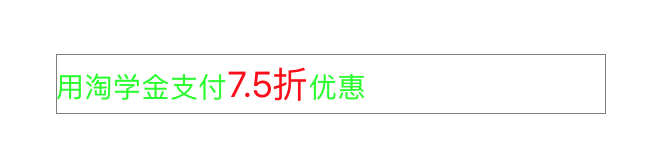
 NSString *str = [NSString stringWithFormat:@"用淘学金支付7.5折优惠"];

        NSMutableAttributedString *attStr = [[NSMutableAttributedString alloc] initWithString:str];

        NSDictionary *dic = @{

                              NSFontAttributeName : [UIFont systemFontOfSize:14],

                              NSForegroundColorAttributeName : [UIColor greenColor]

                              };

        [attStr addAttributes:dic range:NSMakeRange(0, str.length)];

        dic = @{

                NSFontAttributeName : [UIFont systemFontOfSize:18],

                NSForegroundColorAttributeName : [UIColor redColor]

                };

        [attStr addAttributes:dic range:[str rangeOfString:@"7.5折"]];
2、下划线及颜色突出处理

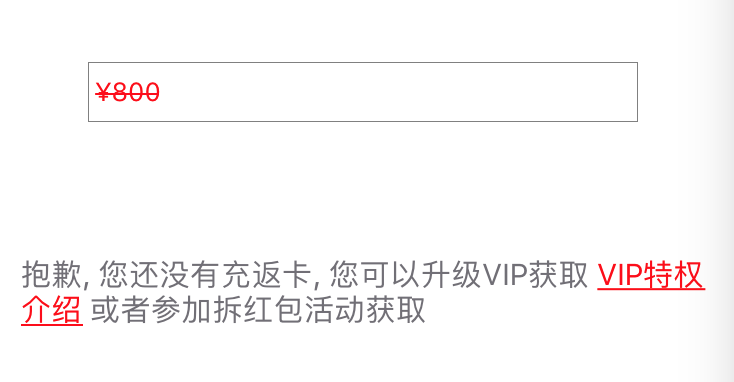
  NSString *title = @"抱歉, 您还没有充返卡, 您可以升级VIP获取 VIP特权介绍 或者参加拆红包活动获取";

    //设置按钮文字有下划线及其颜色

    NSMutableAttributedString *str = [[NSMutableAttributedString alloc] initWithString:title];

    // 查找字符串里的VIP特权介绍

    NSRange vipRange = [title rangeOfString:@"VIP特权介绍"];

    // 添加下划线

    [str addAttribute:NSUnderlineStyleAttributeName value:[NSNumber numberWithInteger:NSUnderlineStyleSingle] range:vipRange];

    [vipButton setAttributedTitle:str forState:UIControlStateNormal];

    //文字颜色的区分

    [str addAttribute:NSForegroundColorAttributeName

                value:[UIColor redColor]

                range:vipRange];

    vipButton.titleLabel.numberOfLines = 0;

    vipButton.titleLabel.textAlignment = NSTextAlignmentLeft;

    vipButton.titleLabel.textColor = [UIColor blueColor];

    vipButton.titleLabel.font = [UIFont systemFontOfSize:14];

    [vipButton addTarget:self action:@selector(vipTap) forControlEvents:UIControlEventTouchUpInside];

    [vipView addSubview:vipButton];
3、中划删除线处理

- (NSMutableAttributedString *)setupAttriLabelWithLinethrough:(NSString *)title {

    NSString *textStr = [NSString stringWithFormat:@" ¥%@", title];

    // 添加中划线

    NSDictionary *attribtDic = @{NSStrikethroughStyleAttributeName : [NSNumber numberWithInteger:NSUnderlineStyleSingle]};

    NSMutableAttributedString *attribtStr = [[NSMutableAttributedString alloc]initWithString:textStr attributes:attribtDic];

    return attribtStr;

}
4、下划线突出处理
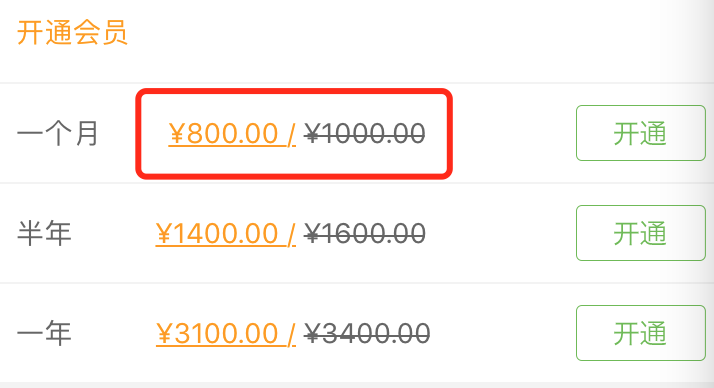
- (NSMutableAttributedString *)setupAttriLabelWithUnderline:(NSString *)title {

    NSString *textStr = [NSString stringWithFormat:@"¥%@ / ", title];

    // 下划线

    NSDictionary *attribtDic = @{NSUnderlineStyleAttributeName: [NSNumber numberWithInteger:NSUnderlineStyleSingle]};

    NSMutableAttributedString *attribtStr = [[NSMutableAttributedString alloc]initWithString:textStr attributes:attribtDic];

    return attribtStr;

}
5.标题与值分行
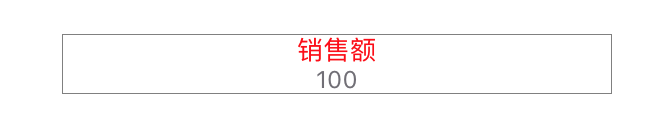
/**

 * label 的富文本布局 标题与值分行

 *

 * titleStr 标题

 * ValueStr 值

 */

- (NSMutableAttributedString *)setupAttriLabelWithTitleStr:(NSString *)titleStr ValueStr:(NSString *)valueStr {

    NSMutableAttributedString *string = [[NSMutableAttributedString alloc]initWithString:[NSString stringWithFormat:@"%@\n%@", titleStr, valueStr]];

    [string addAttribute:NSFontAttributeName value:[UIFont systemFontOfSize:12] range:NSMakeRange(titleStr.length+1, valueStr.length)];

    [string addAttribute:NSForegroundColorAttributeName value:ZLColor(113, 111, 118) range:NSMakeRange(titleStr.length+1, valueStr.length)];

    NSMutableParagraphStyle *paragraphStyle = [[NSMutableParagraphStyle alloc] init];

    paragraphStyle.alignment = NSTextAlignmentCenter; // 居中

    paragraphStyle.lineSpacing = 0; // 调整行间距

    [string addAttribute:NSParagraphStyleAttributeName value:paragraphStyle range:NSMakeRange(0, [string length])];

    return string;

}
三、其他补充
1、压缩文件截图
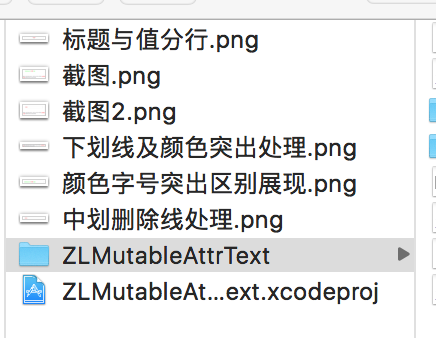
界面性问题可以根据自己项目需求调整即可, 具体可参考代码, 项目则能够直接运行!
注:本文著作权归作者,由demo大师发表,拒绝转载,转载需要作者授权
富文本处理NSMutableAttributedString的更多相关文章
- 【改】iOS学习之NSAttributedString(富文本)
NSAttributedString 叫做富文本,是一种带有属性的字符串,通过它可以轻松的在一个字符串中表现出多种字体.字号.字体大小等各不相同的风格,还可以对段落进行格式化,一般都是对可变富文本(N ...
- iOS学习之NSAttributedString(富文本)
NSAttributedString 叫做富文本,是一种带有属性的字符串,通过它可以轻松的在一个字符串中表现出多种字体.字号.字体大小等各不相同的风格,还可以对段落进行格式化,一般都是对可变富文本(N ...
- [OC] 富文本 AttributedString 以及 用富文本解析html文本
AttributedString 为了便于添加新属性,我们一般初始化 NSMutableAttributedString 类型的富文本. NSMutableAttributedString *a ...
- iOS之富文本(一)
NSAttributedString叫做富文本,是一种带有属性的字符串,通过它可以轻松的在一个字符串中表现出多种字体.字号.字体大小等各不相同的风格,还可以对段落进行格式化. 通过以下代码即可实现上面 ...
- iOS - NSMutableAttributedString富文本的实现
NSMutableAttributedString继承于NSAttributedString(带属性的字符串)能够简单快速实现富文本的效果;不多说直接上效果图和代码,通俗易懂: (一)效果图: (二) ...
- NSMutableAttributedString 富文本的使用
//富文本的使用 UILabel *testLabel = [[UILabel alloc]initWithFrame:CGRectMake(, , , )]; testLabel.backgroun ...
- 【转】iOS使用NSMutableAttributedString实现富文本
iOS使用NSMutableAttributedString实现富文本 在iOS开发中,常常会有一段文字显示不同的颜色和字体,或者给某几个文字加删除线或下划线的需求.之前在网上找了一些资料,有的是重绘 ...
- iOS开发富文本制作 图片和文字/NSMutableParagraphStyle/NSMutableAttributedString
/NSMutableParagraphStyle/NSMutableAttributedString 组合使 NSString * titlestr=@"日产GT-R"; NSMu ...
- (转)解决NSMutableAttributedString富文本,不同文字大小水平轴对齐问题(默认底部对齐)
默认是底部对齐,其实对的也不齐, 目标效果: 代码: NSBaselineOffsetAttributeName 基线偏移量: 调整: NSBaselineOffsetAttributeName的值 ...
随机推荐
- 分析oracle索引空间使用情况,以及索引是否须要重建
分析索引空间使用情况.以及索引是否须要重建 分析其它用户下的索引须要 analyze any的权限 分析索引前先查看表的大小和索引的大小,假设索引大小和表大小一样大或者大于表的大小,那么能够推断索引可 ...
- Hadoop 组成
这里介绍一下hadoop的组成, hadoop主要由两部分组成,,一个是hdfs,还有一个是mapreduce 这两个部分在hadoop 2.2.0中分别用start-dfs.sh和start-yar ...
- Web项目中获取SpringBean——在非Spring组件中获取SpringBean
最近在做项目的时候我发现一个问题:Spring的IOC容器不能在Web中被引用(或者说不能被任意地引用).我们在配置文件中让Spring自 动装配,但并没有留住ApplicationContext的实 ...
- SQLAlchemy 操作方法汇总
参考 1.查询: #简单查询 print(session.query(User).all()) print(session.query(User.name, User.fullname).all()) ...
- 【六】注入框架RoboGuice使用:(Singletons And ContextSingletons)
上一篇我们简单的介绍了一下RoboGuice的使用([五]注入框架RoboGuice使用:(Your First POJO Injection)),今天我们来看下单例以及上下文单例(ContextSi ...
- go语言基础之数组比较和赋值
1.go语音基础之数组比较和赋值 示例: package main //必须有个main包 import "fmt" func main() { //支持比较,只支持 == 或 ! ...
- 用VLC读取摄像头产生RTSP流,DSS主动取流转发(一)(二) 【转】
http://blog.csdn.net/fm0517/article/details/38110633 http://blog.csdn.net/fm0517/article/details/381 ...
- [转贴]SSL工作原理
SSL协议使用不对称加密技术实现会话双方之间信息的安全传递.可以实现信息传递的保密性.完整性,并且会话双方能鉴别对方身份.不同于常用的http协议,我们在与网站建立SSL安全连接时使用https协议, ...
- java 中的resultset的类型
结果集(ResultSet)是数据中查询结果返回的一种对象,可以说结果集是一个存储查询结果的对象,但是结果集并不仅仅具有存储的功能,他同时还具有操纵数据的功能,可能完成对数据的更新等. 结果集读取数据 ...
- Android -- SDcard文件读取和保存
背景 一些东西可以 ...