
vue实现分页
效果图:

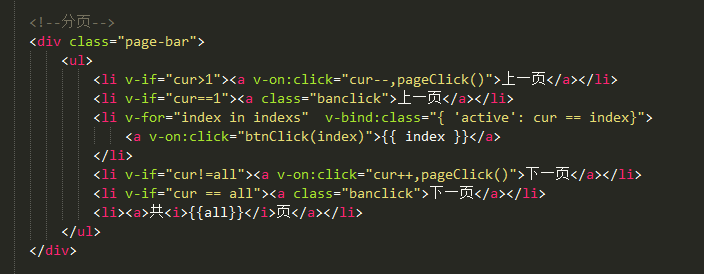
html页面:
data数据:
方法:

计算属性:

样式:
html代码:
<!--分页-->
<div class="page-bar">
<ul>
<li v-if="cur>1"><a v-on:click="cur--,pageClick()">上一页</a></li>
<li v-if="cur==1"><a class="banclick">上一页</a></li>
<li v-for="index in indexs" v-bind:class="{ 'active': cur == index}">
<a v-on:click="btnClick(index)">{{ index }}</a>
</li>
<li v-if="cur!=all"><a v-on:click="cur++,pageClick()">下一页</a></li>
<li v-if="cur == all"><a class="banclick">下一页</a></li>
<li><a>共<i>{{all}}</i>页</a></li>
</ul>
</div>
===========================================================================
js代码:
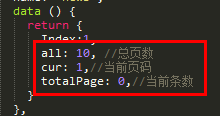
data () {
return {
all: 10, //总页数
cur: 1,//当前页码
totalPage: 0,//当前条数
}
},
methods: {
//请求数据
dataListFn: function(index){
this.$axios.get("http://127.0.0.1:8090/demand/selectListByPage",
{
params:{
page: index,
limit:'10',
state: 0
}
}).then((res) => {
if(res.data.message == "success"){
this.dataList=[];
for(let i=0;i<res.data.data.length;i++){
this.dataList.push(res.data.data[i])
}
this.all = res.data.totalPage;//总页数
this.cur = res.data.pageNum;
this.totalPage = res.data.totalPage;
}
});
},
//分页
btnClick: function(data){//页码点击事件
if(data != this.cur){
this.cur = data
}
//根据点击页数请求数据
this.dataListFn(this.cur.toString());
},
pageClick: function(){
//根据点击页数请求数据
this.dataListFn(this.cur.toString());
}
},
computed: {
//分页
indexs: function(){
var left = 1;
var right = this.all;
var ar = [];
if(this.all>= 5){
if(this.cur > 3 && this.cur < this.all-2){
left = this.cur - 2
right = this.cur + 2
}else{
if(this.cur<=3){
left = 1
right = 5
}else{
right = this.all
left = this.all -4
}
}
}
while (left <= right){
ar.push(left)
left ++
}
return ar
}
}
================================================================================
css代码:
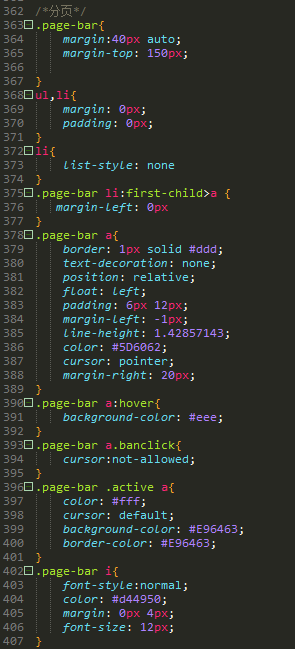
/*分页*/
.page-bar{
margin:40px auto;
margin-top: 150px;
}
ul,li{
margin: 0px;
padding: 0px;
}
li{
list-style: none
}
.page-bar li:first-child>a {
margin-left: 0px
}
.page-bar a{
border: 1px solid #ddd;
text-decoration: none;
position: relative;
float: left;
padding: 6px 12px;
margin-left: -1px;
line-height: 1.42857143;
color: #5D6062;
cursor: pointer;
margin-right: 20px;
}
.page-bar a:hover{
background-color: #eee;
}
.page-bar a.banclick{
cursor:not-allowed;
}
.page-bar .active a{
color: #fff;
cursor: default;
background-color: #E96463;
border-color: #E96463;
}
.page-bar i{
font-style:normal;
color: #d44950;
margin: 0px 4px;
font-size: 12px;
}
vue实现分页的更多相关文章
- 基于Vue封装分页组件
使用Vue做双向绑定的时候,可能经常会用到分页功能 接下来我们来封装一个分页组件 先定义样式文件 pagination.css ul, li { margin: 0px; padding: 0px;} ...
- JS(vue iview)分页解决方案
JS(vue iview)分页解决方案 一.解决思路 使用分页组件 使用组件API使组件自动生成页面数量 调用组件on-change事件的返回值page 将交互获得的数组存在一个数组list中 通过p ...
- 基于vue的分页插件
相信大家用过很多jquery的分页插件,那这次就用一用基于vue的分页插件. 这里的环境用的是springboot 首先要引入pagehelper的jar文件,版本是1.2.3,配置文件也需要配置一下 ...
- 基于iview 封装一个vue 表格分页组件
iview 是一个支持中大型项目的后台管理系统ui组件库,相对于一个后台管理系统的表格来说分页十分常见的 iview是一个基于vue的ui组件库,其中的iview-admin是一个已经为我们搭好的后天 ...
- vue day5 分页控件 更新 PagedList.mvc 仿
<!DOCTYPE html> <html> <head> <meta http-equiv="Content-Type" content ...
- vue day6 分页显示
@{ ViewBag.Title = "Home Page"; Layout = null; } <!DOCTYPE html> <html> <he ...
- vue day5 分页控件
<!DOCTYPE html> <html> <head> <meta http-equiv="Content-Type" content ...
- Vue element 分页
Vue单页面,有一个带分页的表格,表格内数据关联页码,套路如下: 代码如下: <div class="c-table-list auth-list m-bottom-20"& ...
- 使用Layui和Vue实现分页
原理就是利用Layui的分页组件和Vue组件的模板渲染功能. 我下面直接贴代码,比较直观. index.html <!DOCTYPE html> <html> <head ...
- vue 封装分页组件
分页 一般都是调接口, 接口为这种格式 {code: 0, msg: "success",…} code:0 data:{ content:[{content: "11& ...
随机推荐
- vmware参数详解
config.ini - 设置 VMX文件参数 文件configs.ini或config(在Linux中)为所有用户设置参数,或者如果您喜欢 - 为主机设置参数. 如果要为所创建的所有虚拟机使用某些设 ...
- 活字格企业 Web 应用生成器新手上路指南
活字格是一款企业 Web 应用生成器,使用了类 Excel 的设计界面,通过简单的拖拽操作,就能快速制作出一个 Web 信息管理系统.在整个使用过程中无需专业软件知识,没有任何技术门槛,能轻松实现各行 ...
- ubuntu 命令、linux环境变量设置
解压与压缩: tar.gz格式tar -xzvf xxx jar格式jar -xvf xxx.jar zip格式unzip xxx.zip zip -r xxx.zip xxx unarunar -e ...
- Django Redis存储session会话
通常redis都是用来保存session.短信验证码.图片验证码等数据. 在django上使用redis,先要安装一个包: pip install django-redis==4.8.0(我用的dja ...
- CSS 小结笔记之盒子模型
网页标签可以看成是一个个盒子,页面设计就像垒积木一样,在网页中将盒子摆好显示出来.在浏览器中可以很清楚的去看到一个标签的盒子,具体方法如下: 打开浏览器的开发人员工具,在Elements中选中一个标签 ...
- Angular常用语句
循环执行 )* ))))); //重点 : 返回deferred.promise才能链式执行then方法 return def.promise;} log : function (msg) { con ...
- 使用 Azure CLI 创建和管理 Linux VM
Azure 虚拟机提供完全可配置的灵活计算环境. 本教程介绍 Azure 虚拟机的基本部署项目,例如选择 VM 大小.选择 VM 映像和部署 VM. 你将学习如何执行以下操作: 创建并连接到 VM 选 ...
- Oracle EBS AP 供应商地点失效
/* 供应商地点失效 creation: created by jenrry 20161108 1.00 */ DECLARE lv_return_status ) := NULL; ln_msg_c ...
- css中padding与margin
CSS padding margin border属性详解 图解CSS padding.margin.border属性W3C组织建议把所有网页上的对像都放在一个盒(box)中,设计师可以通过创建定义来 ...
- spider-抓取页面内容
# -*- coding: UTF-8 -*- from HTMLParser import HTMLParser import sys,urllib2,string,re,json reload(s ...