
默认网关和默认路由 —— Cisco CCNA – Default Gateway & Default Routes
网关实质上是一个网络通向其他网络的IP地址。
比如有网络A和网络B,
网络A的IP地址范围为“192.168.1.1~192. 168.1.254”,子网掩码为255.255.255.0;
网络B的IP地址范围为“192.168.2.1~192.168.2.254”,子网掩码为255.255.255.0。
在没有路由器的情况下,两个网络之间是不能进行TCP/IP通信的,即使是两个网络连接在同一台交换机(或集线器)上,TCP/IP协议也会根据子网掩码(255.255.255.0)判定两个网络中的主机处在不同的网络里。而要实现这两个网络之间的通信,则必须通过网关。
如果网络A中的主机发现数据包的目的主机不在本地网络中,就把数据包转发给它自己的网关,再由网关转发给网络B的网关,网络B的网关再转发给网络B的某个主机。网络B向网络A转发数据包的过程也是如此。
只有设置好网关的IP地址,TCP/IP协议才能实现不同网络之间的相互通信。那么这个IP地址是哪台机器的IP地址呢?
网关的IP地址是具有路由功能的设备的IP地址,具有路由功能的设备有路由器、启用了路由协议的服务器(实质上相当于一台路由器)、代理服务器(也相当于一台路由器)。
-----默认网关
如果搞清了什么是网关,默认网关也就好理解了。就好像一个房间可以有多扇门一样,一台主机可以有多个网关。默认网关的意思是一台主机如果找不到可用的网关,就把数据包发给默认指定的网关,由这个网关来处理数据包。现在主机使用的网关,一般指的是默认网关。
默认网关必须是电脑自己所在的网段(将IP地址和子网掩码作与运算,得到网段)中的IP地址,而不能填写其他网段中的IP地址。
--------------------------------------------------------------------------------------
Default route which is also known as the gateway of last resort, is used in forwarding packets whose destination address does not match any route in the routing table. In IPv4 the CIDR notation for a default route is 0.0.0.0/0 and ::/0 in IPv6. Now since the both the host/network portion and the prefix length is zero a default route is the shortest possible match. In previous lessons in which we discussed basics of IP Routing we know that a router when performing a route lookup will select a route with longest possible match based on CIDR specifications, however if packet does not match any route in the routing table it will match a default route, the shortest possible route, if it exists in the routing table. A default route is very useful in network where learning all the more specific routes is not desirable such as in case of stub networks. A default is immensely useful when a router is connected to the Internet as without a default route the router must have the routing entry for all networks on the Internet which are in numbers of several hundred thousand, however with single route configured as the default the router will only need to know the destinations internal to the administrative domain and will forward IP packets for any other address towards the Internet using the default route.
The default gateway is a device such as a router that serves as the edge devices providing an access point to other networks and is used to forward IP packets which does not match any routes in the routing table. We usually encounter the concept of default gateways in our daily computer life. The LAN configuration in our windows requires us to specify the IP address, Subnet Mask and the Default Gateway to access the Internet. The default gateway IP address is the IP address of the CPE or Internet modems which provide the connectivity to the Internet, now since the Internet has several hundred thousand routes which we cannot install in our table, we simply tell our computer to forward all packets destined to the Internet to this device. Again the CPE will itself have a default route and gateway configured which will point to the ISP access device.
Figure below illustrates the concept of default routes and gateways.
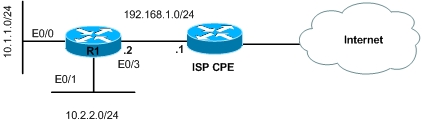
Router R1 connects two internal networks of an organization and provides connectivity between them, it also connects to the Internet via an ISP CPE device to provide Internet access to the users. On R1 a default route is only needed to provide Internet connectivity which is configured as shown below.
Router(config)#ip route 0.0.0.0 0.0.0.0 192.168.1.1
All packets not matching a specific match in the routing table will be matched using the default route and forwarded to 192.168.1.2 which is the default gateway for R1. Similarly on every computer connected to either of the organization’s LAN will have the IP address of the router configured as the default gateway.
Now at the packet level what happens is that when a device attached to the network needs to communicate with another device it will first check whether the other device is on the same network or another network by comparing the IP address of the other device with subnet mask assigned to itself. If it is on another network the it will create a packet with the source IP of itself and destination of of the other device. However the layer 2 frame will have the source of address of the device itself while the destination address will be the layer 2 address of the gateway. As the packet is routed by intermediate routers the packet will remain the same i.e no change in source and destination IP addresses while the layer 2 frame will change as it crosses networks i.e the source and destination mac addresses will be changed after every layer 3 hop.
This brings us to end of this lesson in which we discussed the concept of default routes and default gateways. Both of these concepts are very essential as network administrator you will encounter both of these in the daily job life.
默认网关和默认路由 —— Cisco CCNA – Default Gateway & Default Routes的更多相关文章
- 理解Windows中的路由表和默认网关
每一个Windows系统中都具有IP路由表,它存储了本地计算机可以到达的网络目的地址范围和如何到达的路由信息.路由表是TCP/IP通信的基础,本地计算机上的任何TCP/IP通信都受到路由表的控制. 理 ...
- Linux学习笔记(11)linux网络管理与配置之一——配置路由与默认网关,双网卡绑定(5-6)
Linux学习笔记(11)linux网络管理与配置之一——配置路由与默认网关,双网卡绑定(5-6) 大纲目录 0.常用linux基础网络命令 1.配置主机名 2.配置网卡信息与IP地址 3.配置DNS ...
- IP地址,子网掩码,默认网关,路由,形象生动阐述
自己的Linux虚拟机已经分配了固定的IP地址(使用无线路由,用的是192.168.1.XX网段),公司的无线网络分配的IP地址是(10.51.174.XX网段) 所以当自己的电脑拿到公司,还想使用桥 ...
- linux默认网关的设置
linux装系统设IP,这应该是系统管理员的基本功,可是不同的网络结构有不同的ip设法,您知道吗? 1.一块网卡的情况 这个没啥好说的,估计地球人都知道:address,netmask,gatew ...
- CENTOS 7 下配置默认网关
1. ip route 显示和设定路由 1.1 显示路由表 [root@linux-node1 ~]# ip route show default via 192.168.56.2 dev eth0 ...
- IP地址,子网掩码,默认网关,DNS服务器知识详解(转)
转自:http://www.cnblogs.com/JuneWang/p/3917697.html 为了更深入的学习TCP/IP协议,最近看了不少有关资料,收集整理记录如下,以备后面的使用和方便各位学 ...
- IP地址,子网掩码,默认网关,DNS服务器详解
为了更深入的学习TCP/IP协议,最近看了不少有关资料,收集整理记录如下,以备后面的使用和方便各位学习: IP地址,子网掩码,默认网关,DNS服务器是什么意思? (一) 问题解析 001. 问: ...
- mac地址和ip地址、子网掩码和默认网关
MAC地址 MAC(Media Access Control或者Medium Access Control)地址,意译为媒体访问控制,或称为物理地址.硬件地址,用来定义网络设备的位置.在OSI模型中, ...
- IP地址,子网掩码,默认网关
IP地址: 是给每个连接在Internet上的主机分配的一个32bit地址. 地址有两部分组成,一部分为网络地址,另一部分为主机地址. IP地址分为A.B.C.D.E 5类.常用的是B和C两类. 网络 ...
随机推荐
- web计时机制
前面的话 页面性能一直都是Web开发人员比较关注的领域.但在实际应用中,度量页面性能的指标,是javascript的Date对象.Web Timing API改变了这个局面,让开发人员通过javasc ...
- python opencv3 矩形 圆形边框
git:https://github.com/linyi0604/Computer-Vision # coding:utf8 import cv2 import numpy as np # 读入图像 ...
- thinkphp5使用redis
1.设置应用配置文件config.php type可以是很多分类File.Redis等等 2.thinkphp5使用redis新建application/index/controller/index. ...
- php 简单计算权重的方法(适合抽奖类的应用)
//简单权重计算器 $data222=array( 0=>array('id'=>1,'name'=>'一等奖','weight'=>'3'), 1=>a ...
- android studio 添加有趣的注释模板 佛祖保佑无bug等
韩梦飞沙 韩亚飞 313134555@qq.com yue31313 han_meng_fei_sha 汉化包 百度云盘 下载地址:https://pan.baidu.com/s/1pLjwy ...
- weighttp 使用
Weighttp 地址 http://redmine.lighttpd.net/projects/weighttp/wiki Weighttp的介绍:weighttp is a lightweigh ...
- TortoiseGit + msysgit 记住帐号密码方法及使用密匙的方法
Windows 重度用户只能用 for windows 的软件了,所以虽然使用 Git,但还是要找专门的 windows 版本. 最近开始使用 GitHub 来托管一些小项目/兴趣,而自己是重度 wi ...
- Yii together
一对多,多对多的关联时最后的参数 together说明 如果为false,分开查多个语句 如果为true,强制生成一个语句 如果没有设置,分页页生成多个语句,不分页时生成一个语句 多对多时,查询时,中 ...
- Java_基础知识回顾
1.ByteArrayInputStream. ByteArrayOutputStream String str = "ZHANGSAN"; //System.out.printl ...
- 使用Chrome快速实现数据的抓取(三)——JQuery
使用Chrome抓取页面一个非常方便的地方就是它可以执行JS,也就是说我们可以通过JS函数获取我们想要的数据.一个非常强大易用的库就是Jquery,本文就简单的介绍一下使用Chrome获取数据时Jqu ...