
ubuntu16.04LTS安装软件
1、安装chrome
下载源加入到系统的源列表
sudo wget http://www.linuxidc.com/files/repo/google-chrome.list -P /etc/apt/sources.list.d/
导入谷歌软件的公钥
wget -q -O - https://dl.google.com/linux/linux_signing_key.pub | sudo apt-key add -
更新软件
sudo apt-get update
安装
sudo apt-get install google-chrome-stable
启动
/usr/bin/google-chrome-stable
或者
对于谷歌Chrome32位版本,使用如下链接:
wget https://dl.google.com/linux/direct/google-chrome-stable_current_i386.deb
对于64位版本可以使用如下链接下载:
wget https://dl.google.com/linux/direct/google-chrome-stable_current_amd64.deb
下载完后,运行如下命令安装。
sudo dpkg -i google-chrome*; sudo apt-get -f install
2、更改root默认密码
在终端输入命令 sudo passwd,输入当前用户的密码然后回车
3、安装虚拟工具VMware Tools
在VM的菜单选项中选择“虚拟机(M)”——>"安装VMwate Tools(T)"
4、安装搜狗输入法
添加下载源
sudo add-apt-repository ppa:fcitx-team/nightly
更新一下系统
sudo apt-get update
开始安装fcitx
sudo apt-get install fcitx
安装fcitx的配置工具
sudo apt-get install fcitx-config.gtk
安装fcitx的table-all软件包
sudo apt-get install fcitx-table-all
安装im-switch切换工具
sudo apt-get install im-switch
下载搜狗安装包:https://pinyin.sogou.com/linux/
安装
sudo dpkg -i sogoupinyin_2.2.0.0102_amd64.deb
会出现下面的错误可以不管:
Preparing to unpack sogoupinyin_2.1.0.0082_amd64.deb ...

Unpacking sogoupinyin (2.1.0.0082) ...

Setting up sogoupinyin (2.1.0.0082) ...

Processing triggers for mime-support (.59ubuntu1) ...

Processing triggers for gnome-menus (3.13.-6ubuntu3) ...

Processing triggers for desktop-file-utils (0.22-1ubuntu5) ...

Processing triggers for bamfdaemon (0.5.~bzr0+16.04.-0ubuntu1) ...

Rebuilding /usr/share/applications/bamf-.index...

Processing triggers for shared-mime-info (1.5-) ...

Processing triggers for hicolor-icon-theme (0.15-0ubuntu1) ...

Processing triggers for libglib2.-:amd64 (2.48.-1ubuntu4) ...

No such key 'Gtk/IMModule' in schema 'org.gnome.settings-daemon.plugins.xsettings' as specified in override file '/usr/share/glib-2.0/schemas/50_sogoupinyin.gschema.override'; ignoring override for this key.
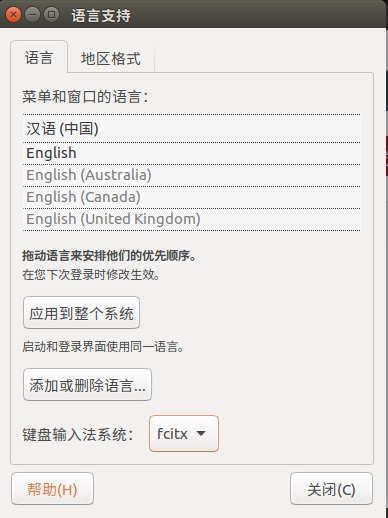
如果还是切换不出输入法,那么执行下面的操作:
配置Fcitx的环境:在~/.bashrc中加入一下内容
export GTK_IM_MODULE=fcitx

export QT_IM_MODULE=fcitx

export XMODIFIERS="@im=fcitx"
如果依赖包报错,重新安装
首先卸载已安装搜狗
sudo apt remove sogoupinyin
正确的包安装
sudo apt install libopencc1 fcitx-libs fcitx-libs-qt fonts-droid-fallback libqtwebkit4
重新安装
sudo dpkg -i sogoupinyin_2.2.0.0102_amd64.deb
5、安装Guake
sudo add-apt-repository ppa:webupd8team/unstable

sudo apt-get update

sudo apt-get install guake
6、安装PyCharm
sudo add-apt-repository ppa:mystic-mirage/pycharm
$ sudo apt update

$ sudo apt install pycharm
$ sudo apt update

$ sudo apt install pycharm-community
一、安装pycharm

.官网选择linux下载 免费社区版 默认Download

.安装

$ cd Downloads/

$ tar xfz pycharm-*.tar.gz

$ cd pycharm*/

$ cd bin/

$ ./pycharm.sh

开始界面默认会在桌面产生快捷方式

二、安装anaconda

.官网下载

.bash Anaconda2-4.0.-Linux-x86.sh

.在Pycharm的Files>>settings>>Project Interpreter中添加anaconda/python路径
ubuntu16.04LTS安装软件的更多相关文章
- Ubuntu16.04LTS安装
1. 制作u盘启动盘 下载ubuntu-16.04-desktop-amd64.iso文件后,使用u盘启动盘制作工具:Win32DiskImager(14.04LTS后都需要用到这工具制作:https ...
- Ubuntu16.04LTS卸载软件的命令
写在前面:本博客为本人原创,严禁任何形式的转载!本博客只允许放在博客园(.cnblogs.com),如果您在其他网站看到这篇博文,请通过下面这个唯一的合法链接转到原文! 本博客全网唯一合法URL:ht ...
- Ubuntu16.04LTS安装集成开发工具IDE: CodeBlocks 和Eclipse-cdt
上文中,我们已经介绍了QT5.10.0在Ubuntu下的安装 https://www.cnblogs.com/si-lei/p/9240230.html, 接下来我们介绍CodeBlocks以及Ecl ...
- Linux Ubuntu16.04LTS安装TensorFlow(CPU-only,python3.7)——使用Anaconda安装
1.安装Anaconda(在此不再赘述) 2.用Conda安装TensorFlow 1)建立TensorFlow运行环境并激活 conda create -n tensorflow pip pytho ...
- Ubuntu16.04安装后开发环境配置和常用软件安装
Ubuntu16.04安装后1.安装常用软件搜狗输入法+编辑器Atom+浏览器Chome+视频播放器vlc+图像编辑器GIMP Image Editor安装+视频录制软件RcordMyDesktop安 ...
- 记一次 在 HP zbook G3 笔记本上安装Ubuntu16.04LTS 的 心(填)路(坑)旅程
背景 同事MM申请的新笔记本暂时没有用,问我需不需要用. 本着 “宇宙都是xx的”(厚颜无耻~~)思想就接受了. 拿到本本一看,HP zbook G3, 配置还不错(500G SSD, 16G mem ...
- Ubuntu 16.04LTS 常用软件安装
一.遇到的问题 1.su认证失败 sudo passwd //输入命令,然后修改密码即可 2.移动启动器 gsettings set com.canonical.Unity.Launcher laun ...
- Ubuntu18.04LTS安装docker报错:Command 'lsb_release' not found
Ubuntu18.04LTS安装docker在执行sudo add-apt-repository "deb [arch=amd64] https://download.docker.com/ ...
- ubuntu16.04安装virtualbox5.1失败 gcc:error:unrecognized command line option ‘-fstack-protector-strong’
系统:ubuntu16.04.1 软件:Virtualbox-5.1 编译器:GCC 4.7.4 在如上环境下安装Vbx5.1提示我在终端执行/sbin/vboxconfig命令 照做 出现如下err ...
随机推荐
- JOIN和UNION的区别
join 是两张表根据条件相同的部分合并生成一个记录集. SELECT Websites.id, Websites.name, access_log.count, access_log.dateFRO ...
- ADB相关指令实例详解
1.获取物理设备相关信息: adb devices 2.apk安装 2.1 新的应用(该应用未安装) adb -s 设备序列号 install apk路径 2.2 应用已安装,重安装覆盖 adb -s ...
- postman使用--发送请求
概述 上节讲了下接口的基础,从现在来学习怎么测接口.当然,测试接口有很多的工具,比如postman,jmeter等等,或者用代码测试,如果是做接口自动化我当然会选python,如果是调试接口,我特别喜 ...
- Maven实战读书笔记(二):Maven坐标与仓库
2.1 Maven坐标 Maven坐标是Maven用来表示一个组件依赖的标示. Maven通过下面几个元素定义坐标:groupId.artifactId.version.packaging.class ...
- Maven实战读书笔记(三):Maven依赖
3.1 依赖的配置 一个依赖声明可以包含下面元素: <dependencies> <dependency> <groupId></groupId> &l ...
- 使用iframe引入公共模块
新建一个公共文件head.html <!DOCTYPE html><html lang="en"><head> <meta charset ...
- 20. Valid Parentheses (python版)
Given a string containing just the characters '(', ')', '{', '}', '[' and ']', determine if the inpu ...
- Django框架基础知识13-auth系统
我们昨天登录admin时创建的用户信息是存放在哪里了呢? auth系统的数据表: 从表的名称我们就能看出, auth_user,auth_group,auth_permission分别存放了用户,用户 ...
- (二十二)python 3 sort()与sorted()
Python list内置sort()方法用来排序,也可以用python内置的全局sorted()方法来对可迭代的序列排序生成新的序列 一,最简单的排序 1.使用sort排序 my_list = [3 ...
- 集合框架学习之List接口
Java语言的java.util包中提供了一些集合类,这些集合类又被称为容器.用来完善数组的不足之处.集合类与数组的不同之处是,数组的长度是固定的,集合的长度是可变的:数组用来存放基本类型的数据,集合 ...