
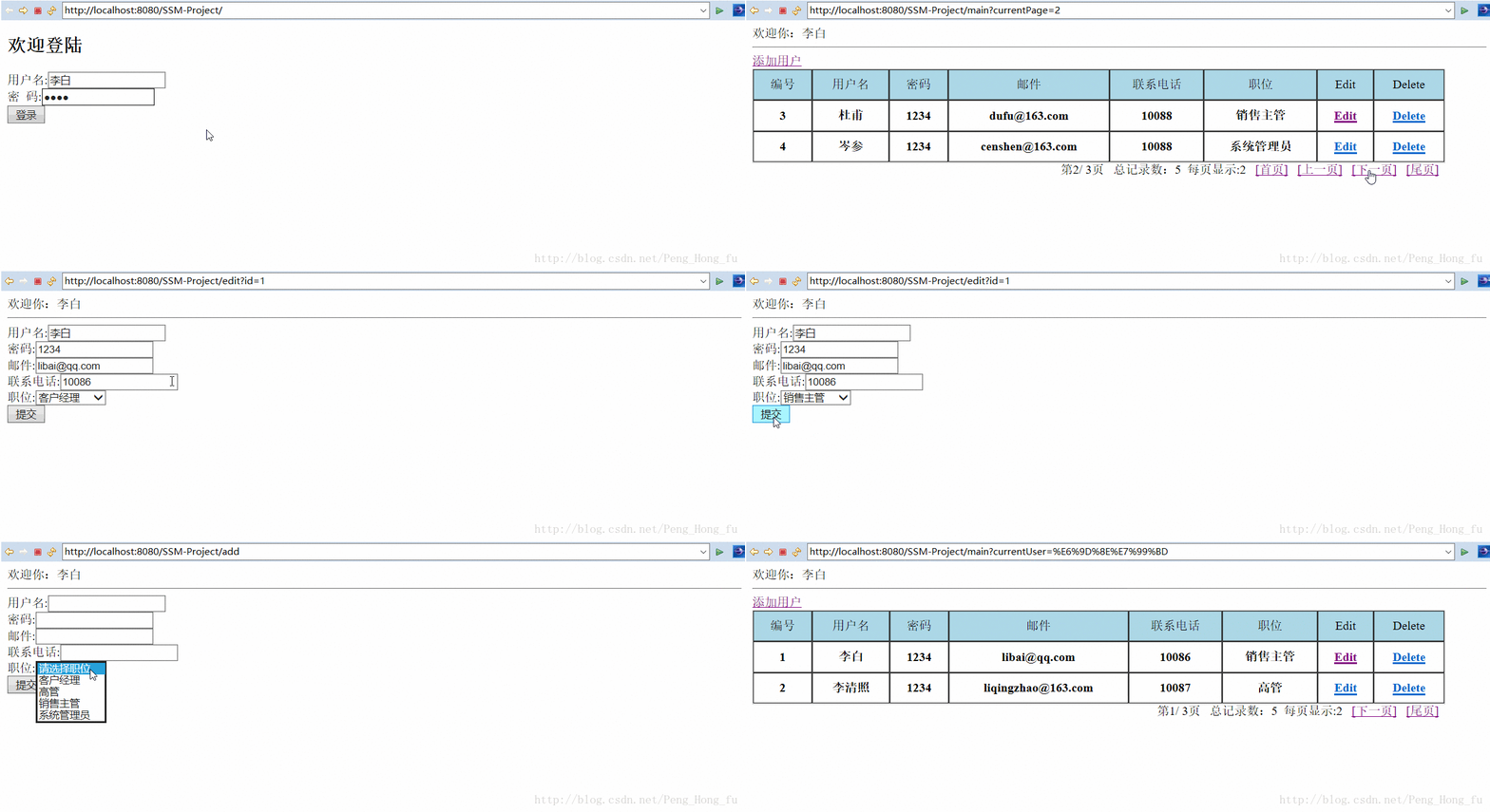
idea+Maven+SSM框架增删改查
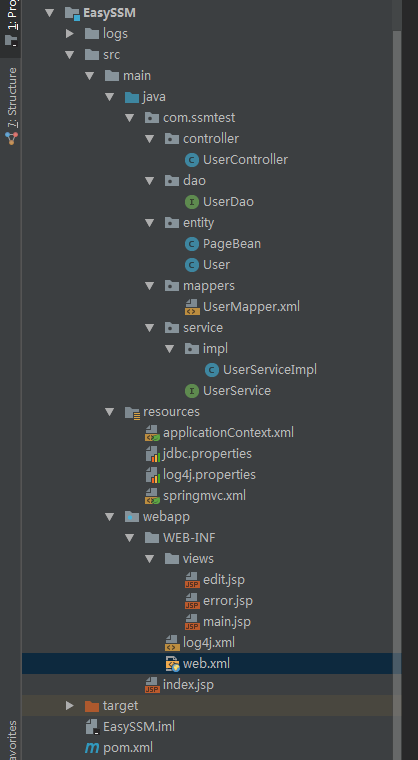
完整项目结构
1.maven配置文件pom.xml
<?xml version="1.0" encoding="UTF-8"?>

<!--

  Licensed to the Apache Software Foundation (ASF) under one

  or more contributor license agreements.  See the NOTICE file

  distributed with this work for additional information

  regarding copyright ownership.  The ASF licenses this file

  to you under the Apache License, Version 2.0 (the

  "License"); you may not use this file except in compliance

  with the License.  You may obtain a copy of the License at

   http://www.apache.org/licenses/LICENSE-2.0

  Unless required by applicable law or agreed to in writing,

  software distributed under the License is distributed on an

  "AS IS" BASIS, WITHOUT WARRANTIES OR CONDITIONS OF ANY

  KIND, either express or implied.  See the License for the

  specific language governing permissions and limitations

  under the License.

-->

<!-- $Id: pom.xml 642118 2008-03-28 08:04:16Z reinhard $ -->

<project xmlns="http://maven.apache.org/POM/4.0.0" xmlns:xsi="http://www.w3.org/2001/XMLSchema-instance" xsi:schemaLocation="http://maven.apache.org/POM/4.0.0 http://maven.apache.org/maven-v4_0_0.xsd">

  <modelVersion>4.0.0</modelVersion>

  <packaging>war</packaging>

  <name>EasySSM</name>

  <groupId>com.cyf</groupId>

  <artifactId>EasySSM</artifactId>

  <version>1.0-SNAPSHOT</version>

  <properties>

    <!-- spring版本号 -->

    <spring.version>4.3.3.RELEASE</spring.version>

    <!-- mybatis版本号 -->

    <mybatis.version>3.4.0</mybatis.version>

    <!-- log4j日志文件管理包版本 -->

    <slf4j.version>1.7.7</slf4j.version>

    <log4j.version>1.2.17</log4j.version>

  </properties>

  <build>

    <plugins>

      <plugin>

        <groupId>org.mortbay.jetty</groupId>

        <artifactId>maven-jetty-plugin</artifactId>

        <version>6.1.7</version>

        <configuration>

          <connectors>

            <connector implementation="org.mortbay.jetty.nio.SelectChannelConnector">

              <port>8180</port>

              <maxIdleTime>30000</maxIdleTime>

            </connector>

          </connectors>

          <webAppSourceDirectory>${project.build.directory}/${pom.artifactId}-${pom.version}</webAppSourceDirectory>

          <contextPath>/</contextPath>

        </configuration>

      </plugin>

      <plugin>

        <artifactId>maven-resources-plugin</artifactId>

        <version>2.6</version>

        <executions>

          <execution>

            <id>copy-xmls</id>

            <phase>process-resources</phase>

            <goals>

              <goal>copy-resources</goal>

            </goals>

            <configuration>

              <outputDirectory>${basedir}/target/classes</outputDirectory>

              <resources>

                <resource>

                  <directory>${basedir}/src/main/java</directory>

                  <includes>

                    <include>**/*.xml</include>

                  </includes>

                </resource>

              </resources>

            </configuration>

          </execution>

        </executions>

      </plugin>

    </plugins>

  </build>

  <dependencies>

    <dependency>

      <groupId>junit</groupId>

      <artifactId>junit</artifactId>

      <version>4.12</version>

      <!-- 表示开发的时候引入,发布的时候不会加载此包 -->

      <scope>test</scope>

    </dependency>

    <!-- spring核心包 -->

    <dependency>

      <groupId>org.springframework</groupId>

      <artifactId>spring-core</artifactId>

      <version>${spring.version}</version>

    </dependency>

    <dependency>

      <groupId>org.springframework</groupId>

      <artifactId>spring-web</artifactId>

      <version>${spring.version}</version>

    </dependency>

    <dependency>

      <groupId>org.springframework</groupId>

      <artifactId>spring-oxm</artifactId>

      <version>${spring.version}</version>

    </dependency>

    <dependency>

      <groupId>org.springframework</groupId>

      <artifactId>spring-tx</artifactId>

      <version>${spring.version}</version>

    </dependency>

    <dependency>

      <groupId>org.springframework</groupId>

      <artifactId>spring-jdbc</artifactId>

      <version>${spring.version}</version>

    </dependency>

    <dependency>

      <groupId>org.springframework</groupId>

      <artifactId>spring-webmvc</artifactId>

      <version>${spring.version}</version>

    </dependency>

    <dependency>

      <groupId>org.springframework</groupId>

      <artifactId>spring-aop</artifactId>

      <version>${spring.version}</version>

    </dependency>

    <dependency>

      <groupId>org.springframework</groupId>

      <artifactId>spring-context-support</artifactId>

      <version>${spring.version}</version>

    </dependency>

    <dependency>

      <groupId>org.springframework</groupId>

      <artifactId>spring-test</artifactId>

      <version>${spring.version}</version>

    </dependency>

    <!-- mybatis核心包 -->

    <dependency>

      <groupId>org.mybatis</groupId>

      <artifactId>mybatis</artifactId>

      <version>${mybatis.version}</version>

    </dependency>

    <!--mybatis spring 插件 -->

    <dependency>

      <groupId>org.mybatis</groupId>

      <artifactId>mybatis-spring</artifactId>

      <version>1.3.0</version>

    </dependency>

    <!-- 导入java ee jar 包 -->

    <dependency>

      <groupId>javax</groupId>

      <artifactId>javaee-api</artifactId>

      <version>7.0</version>

      <scope>provided</scope>

    </dependency>

    <!-- 导入Mysql数据库链接jar包 -->

    <dependency>

      <groupId>mysql</groupId>

      <artifactId>mysql-connector-java</artifactId>

      <version>5.1.25</version>

    </dependency>

    <!-- 导入dbcp的jar包,用来在applicationContext.xml中配置数据库 -->

    <dependency>

      <groupId>commons-dbcp</groupId>

      <artifactId>commons-dbcp</artifactId>

      <version>1.2.2</version>

    </dependency>

    <!-- JSTL标签类 -->

    <dependency>

      <groupId>jstl</groupId>

      <artifactId>jstl</artifactId>

      <version>1.2</version>

    </dependency>

    <!-- 日志文件管理包 -->

    <!-- log start -->

    <dependency>

      <groupId>log4j</groupId>

      <artifactId>log4j</artifactId>

      <version>${log4j.version}</version>

    </dependency>

    <!-- 格式化对象,方便输出日志 -->

    <dependency>

      <groupId>com.alibaba</groupId>

      <artifactId>fastjson</artifactId>

      <version>1.1.41</version>

    </dependency>

    <dependency>

      <groupId>org.slf4j</groupId>

      <artifactId>slf4j-api</artifactId>

      <version>${slf4j.version}</version>

    </dependency>

    <dependency>

      <groupId>org.slf4j</groupId>

      <artifactId>slf4j-log4j12</artifactId>

      <version>${slf4j.version}</version>

    </dependency>

    <!-- log end -->

    <!-- 引入JSON -->

    <dependency>

      <groupId>com.fasterxml.jackson.core</groupId>

      <artifactId>jackson-databind</artifactId>

      <version>2.7.5</version>

    </dependency>

    <!-- 上传组件包 -->

    <dependency>

      <groupId>commons-fileupload</groupId>

      <artifactId>commons-fileupload</artifactId>

      <version>1.3.1</version>

    </dependency>

    <dependency>

      <groupId>commons-io</groupId>

      <artifactId>commons-io</artifactId>

      <version>2.4</version>

    </dependency>

    <dependency>

      <groupId>commons-codec</groupId>

      <artifactId>commons-codec</artifactId>

      <version>1.9</version>

    </dependency>

    <!--aspectj -->

    <dependency>

      <groupId>aspectj</groupId>

      <artifactId>aspectjweaver</artifactId>

      <version>1.5.4</version>

    </dependency>

  </dependencies>

</project>
2.web工程配置文件web.xml
<?xml version="1.0" encoding="UTF-8"?>

<web-app version="2.4"

         xmlns="http://java.sun.com/xml/ns/j2ee"

         xmlns:xsi="http://www.w3.org/2001/XMLSchema-instance"

         xsi:schemaLocation="http://java.sun.com/xml/ns/j2ee http://java.sun.com/xml/ns/j2ee/web-app_2_4.xsd">

    <!-- 编码过滤器 -->

    <filter>

        <filter-name>encodingFilter</filter-name>

        <filter-class>org.springframework.web.filter.CharacterEncodingFilter</filter-class>

        <async-supported>true</async-supported>

        <init-param>

            <param-name>encoding</param-name>

            <param-value>UTF-8</param-value>

        </init-param>

    </filter>

    <filter-mapping>

        <filter-name>encodingFilter</filter-name>

        <url-pattern>/*</url-pattern>

    </filter-mapping>

    <!-- Spring配置文件 -->

    <!-- needed for ContextLoaderListener -->

    <context-param>

        <param-name>contextConfigLocation</param-name>

        <param-value>classpath:applicationContext.xml</param-value>

    </context-param>

    <!-- Bootstraps the root web application context before servlet initialization -->

    <listener>

        <listener-class>org.springframework.web.context.ContextLoaderListener</listener-class>

    </listener>

    <!-- SpringMVC DispatcherServlet -->

    <!-- The front controller of this Spring Web application, responsible for

        handling all application requests -->

    <servlet>

        <servlet-name>springDispatcherServlet</servlet-name>

        <servlet-class>org.springframework.web.servlet.DispatcherServlet</servlet-class>

        <init-param>

            <param-name>contextConfigLocation</param-name>

            <param-value>classpath:springmvc.xml</param-value>

        </init-param>

        <load-on-startup>1</load-on-startup>

    </servlet>

    <!-- Map all requests to the DispatcherServlet for handling -->

    <servlet-mapping>

        <servlet-name>springDispatcherServlet</servlet-name>

        <url-pattern>/</url-pattern>

    </servlet-mapping>

</web-app>
3.创建MySQL数据表
DROP TABLE IF EXISTS tb_user;

CREATE TABLE tb_user (

    id INT NOT NULL AUTO_INCREMENT,

    userName VARCHAR(40),

    password VARCHAR(100),

    email VARCHAR(40),

    phone VARCHAR(40),

    roleName VARCHAR(40),

    PRIMARY KEY(id)

)ENGINE=InnoDB AUTO_INCREMENT=1 DEFAULT CHARSET=utf8;

-----------------------------------------

mysql> use db_ssm2;

Database changed

mysql> desc tb_user;

+----------+--------------+------+-----+---------+----------------+

| Field    | Type         | Null | Key | Default | Extra          |

+----------+--------------+------+-----+---------+----------------+

| id       | int(11)      | NO   | PRI | NULL    | auto_increment |

| userName | varchar(40)  | YES  |     | NULL    |                |

| password | varchar(100) | YES  |     | NULL    |                |

| email    | varchar(40)  | YES  |     | NULL    |                |

| phone    | varchar(40)  | YES  |     | NULL    |                |

| roleName | varchar(40)  | YES  |     | NULL    |                |

+----------+--------------+------+-----+---------+----------------+

6 rows in set (0.03 sec)

mysql> select *from tb_user;

+----+----------+----------+--------------------+-------+------------+

| id | userName | password | email              | phone | roleName   |

+----+----------+----------+--------------------+-------+------------+

|  1 | 李白     | 1234     | libai@qq.com       | 10086 | 客户经理   |

|  2 | 李清照   | 1234     | liqingzhao@163.com | 10087 | 高管       |

|  3 | 杜甫     | 1234     | dufu@163.com       | 10088 | 销售主管   |

|  4 | 岑参     | 1234     | censhen@163.com    | 10088 | 系统管理员 |

|  5 | 陈子昂   | 1234     | chenziang@qq.com   | 10099 | 高管       |

+----+----------+----------+--------------------+-------+------------+

5 rows in set (0.05 sec)
4.数据库配置文件
jdbc.properties
driverClassName:com.mysql.jdbc.Driver

url:jdbc:mysql://localhost:3306/test

username=root

password=root

initialSize=0

maxActive=20

maxIdle=20

minIdle=1

maxWait=60000
5.日志输出格式配置
log4j.properties
log4j.rootLogger=INFO,Console,File

#\u5B9A\u4E49\u65E5\u5FD7\u8F93\u51FA\u76EE\u7684\u5730\u4E3A\u63A7\u5236\u53F0

log4j.appender.Console=org.apache.log4j.ConsoleAppender

log4j.appender.Console.Target=System.out

#\u53EF\u4EE5\u7075\u6D3B\u5730\u6307\u5B9A\u65E5\u5FD7\u8F93\u51FA\u683C\u5F0F\uFF0C\u4E0B\u9762\u4E00\u884C\u662F\u6307\u5B9A\u5177\u4F53\u7684\u683C\u5F0F

log4j.appender.Console.layout = org.apache.log4j.PatternLayout

log4j.appender.Console.layout.ConversionPattern=[%c] - %m%n

#\u6587\u4EF6\u5927\u5C0F\u5230\u8FBE\u6307\u5B9A\u5C3A\u5BF8\u7684\u65F6\u5019\u4EA7\u751F\u4E00\u4E2A\u65B0\u7684\u6587\u4EF6

log4j.appender.File = org.apache.log4j.RollingFileAppender

#\u6307\u5B9A\u8F93\u51FA\u76EE\u5F55

log4j.appender.File.File = logs/ssm.log

#\u5B9A\u4E49\u6587\u4EF6\u6700\u5927\u5927\u5C0F

log4j.appender.File.MaxFileSize = 10MB

# \u8F93\u51FA\u6240\u4EE5\u65E5\u5FD7\uFF0C\u5982\u679C\u6362\u6210DEBUG\u8868\u793A\u8F93\u51FADEBUG\u4EE5\u4E0A\u7EA7\u522B\u65E5\u5FD7

log4j.appender.File.Threshold = ALL

log4j.appender.File.layout = org.apache.log4j.PatternLayout

log4j.appender.File.layout.ConversionPattern =[%p] [%d{yyyy-MM-dd HH\:mm\:ss}][%c]%m%n
6.Spring 配置文件
applicationContext.xml
<?xml version="1.0" encoding="UTF-8"?>

<beans xmlns="http://www.springframework.org/schema/beans"

       xmlns:xsi="http://www.w3.org/2001/XMLSchema-instance"

       xmlns:aop="http://www.springframework.org/schema/aop"

       xmlns:context="http://www.springframework.org/schema/context"

       xmlns:mvc="http://www.springframework.org/schema/mvc"

       xmlns:tx="http://www.springframework.org/schema/tx"

       xsi:schemaLocation="http://www.springframework.org/schema/beans http://www.springframework.org/schema/beans/spring-beans.xsd

        http://www.springframework.org/schema/context http://www.springframework.org/schema/context/spring-context-4.3.xsd

        http://www.springframework.org/schema/mvc http://www.springframework.org/schema/mvc/spring-mvc-4.3.xsd

        http://www.springframework.org/schema/aop http://www.springframework.org/schema/aop/spring-aop-4.3.xsd

        http://www.springframework.org/schema/tx http://www.springframework.org/schema/tx/spring-tx-4.3.xsd">

    <context:component-scan base-package="com.ssmtest">

        <!--不扫描 @Controller注解的类  -->

        <context:exclude-filter type="annotation"

                                expression="org.springframework.stereotype.Controller"/>

    </context:component-scan>

    <bean id="dataSource" class="org.springframework.jdbc.datasource.DriverManagerDataSource">

        <!-- <property name="driverClassName" value="com.microsoft.sqlserver.jdbc.SQLServerDriver"/> -->

        <property name="driverClassName" value="com.mysql.jdbc.Driver"/>

        <property name="url" value="jdbc:mysql://localhost:3306/test"/>

        <property name="username" value="root"/>

        <property name="password" value="root"/>

    </bean>

    <!-- 配置MyBatis的sqlSessionFactory -->

    <bean id="sqlSessionFactory" class="org.mybatis.spring.SqlSessionFactoryBean">

        <property name="dataSource" ref="dataSource"></property>

        <property name="mapperLocations" value="classpath:com/ssmtest/mappers/*.xml"></property>

    </bean>

    <!-- Mapper接口所在包名,Spring会自动查找其下的Mapper  -->

    <bean class="org.mybatis.spring.mapper.MapperScannerConfigurer">

        <property name="basePackage" value="com.ssmtest.dao"></property>

        <property name="sqlSessionFactoryBeanName" value="sqlSessionFactory"></property>

    </bean>

    <!-- 配置transactionManager事务管理器 -->

    <bean id="transactionManager" class="org.springframework.jdbc.datasource.DataSourceTransactionManager">

        <property name="dataSource" ref="dataSource"></property>

    </bean>

    <!-- 配置事物通知属性 -->

    <tx:advice id="txAdvice" transaction-manager="transactionManager">

        <!-- 定义事物传播特性 -->

        <tx:attributes>

            <tx:method name="insert*" propagation="REQUIRED"/>

            <tx:method name="update*" propagation="REQUIRED" />

            <tx:method name="edit*" propagation="REQUIRED" />

            <tx:method name="save*" propagation="REQUIRED" />

            <tx:method name="add*" propagation="REQUIRED" />

            <tx:method name="new*" propagation="REQUIRED" />

            <tx:method name="set*" propagation="REQUIRED" />

            <tx:method name="remove*" propagation="REQUIRED" />

            <tx:method name="delete*" propagation="REQUIRED" />

            <tx:method name="change*" propagation="REQUIRED" />

            <tx:method name="check*" propagation="REQUIRED" />

            <tx:method name="get*" propagation="REQUIRED" read-only="true" />

            <tx:method name="find*" propagation="REQUIRED" read-only="true" />

            <tx:method name="load*" propagation="REQUIRED" read-only="true" />

            <tx:method name="*" propagation="REQUIRED" read-only="true" />

        </tx:attributes>

    </tx:advice>

    <!-- 配置事物切面 需要aspectjweaver.jar-->

    <aop:config>

        <aop:pointcut id="serviceOperation" expression="execution(* com.ssmtest.service.*.*(..))" />

        <aop:advisor advice-ref="txAdvice" pointcut-ref="serviceOperation"/>

    </aop:config>

</beans>
7.SpringMVC 配置文件
springmvc.xml
<?xml version="1.0" encoding="UTF-8"?>

<beans xmlns="http://www.springframework.org/schema/beans"

       xmlns:xsi="http://www.w3.org/2001/XMLSchema-instance"

       xmlns:context="http://www.springframework.org/schema/context"

       xmlns:mvc="http://www.springframework.org/schema/mvc"

       xmlns:tx="http://www.springframework.org/schema/tx"

       xsi:schemaLocation="http://www.springframework.org/schema/beans http://www.springframework.org/schema/beans/spring-beans.xsd

        http://www.springframework.org/schema/context http://www.springframework.org/schema/context/spring-context-4.3.xsd

        http://www.springframework.org/schema/mvc http://www.springframework.org/schema/mvc/spring-mvc-4.3.xsd

        http://www.springframework.org/schema/tx http://www.springframework.org/schema/tx/spring-tx-4.3.xsd">

    <!-- 自动扫描包 -->

    <context:component-scan base-package="com.ssmtest.controller"></context:component-scan>

    <!-- 视图解析器 -->

    <bean id="viewResolver"

          class="org.springframework.web.servlet.view.InternalResourceViewResolver">

        <property name="prefix" value="WEB-INF/views/"></property>

        <property name="suffix" value=".jsp"></property>

    </bean>

    <mvc:default-servlet-handler/>

    <mvc:annotation-driven></mvc:annotation-driven>

</beans>
7.Java 文件
7.1实体类User和PageBean
User.java
package com.ssmtest.entity;

/**

 * 用户实体类

 * 对应数据表tb_user

 * @author Peng

 * @Date2016年12月13日上午9:36:23

 */

public class User {

    private Integer id;

    private String username;

    private String password;

    private String email;

    private String phone;

    private String rolename;

    //角色名称 系统管理员、销售主管、客户经理、高管

    public Integer getId() {

        return id;

    }

    public User() {

        super();

    }

    public User(String username, String password, String email, String phone, String rolename) {

        super();

        this.username = username;

        this.password = password;

        this.email = email;

        this.phone = phone;

        this.rolename = rolename;

    }

    public void setId(Integer id) {

        this.id = id;

    }

    public String getUsername() {

        return username;

    }

    public void setUsername(String username) {

        this.username = username == null ? null : username.trim();

    }

    public String getPassword() {

        return password;

    }

    public void setPassword(String password) {

        this.password = password == null ? null : password.trim();

    }

    public String getEmail() {

        return email;

    }

    public void setEmail(String email) {

        this.email = email == null ? null : email.trim();

    }

    public String getPhone() {

        return phone;

    }

    public void setPhone(String phone) {

        this.phone = phone == null ? null : phone.trim();

    }

    public String getRolename() {

        return rolename;

    }

    public void setRolename(String rolename) {

        this.rolename = rolename == null ? null : rolename.trim();

    }

    @Override

    public String toString() {

        return "User [id=" + id + ", username=" + username + ", password=" + password + ", email=" + email + ", phone="

                + phone + ", rolename=" + rolename + "]";

    }

}
PageBean.java
package com.ssmtest.entity;

import java.util.List;

/**

 * 分页实体类

 * @author Peng

 * @Date2016年12月13日 上午9:40:10

 */

public class PageBean<T> {

    private int currPage;//当前页数

    private int pageSize;//每页显示的记录数

    private int totalCount;//总记录数

    private int totalPage;//总页数

    private List<T> lists;//每页的显示的数据

    public PageBean() {

        super();

    }

    public int getCurrPage() {

        return currPage;

    }

    public void setCurrPage(int currPage) {

        this.currPage = currPage;

    }

    public int getPageSize() {

        return pageSize;

    }

    public void setPageSize(int pageSize) {

        this.pageSize = pageSize;

    }

    public int getTotalCount() {

        return totalCount;

    }

    public void setTotalCount(int totalCount) {

        this.totalCount = totalCount;

    }

    public int getTotalPage() {

        return totalPage;

    }

    public void setTotalPage(int totalPage) {

        this.totalPage = totalPage;

    }

    public List<T> getLists() {

        return lists;

    }

    public void setLists(List<T> lists) {

        this.lists = lists;

    }

}
7.2 User实体类映射文件
UserMapper.xml
<?xml version="1.0" encoding="UTF-8" ?>

<!DOCTYPE mapper PUBLIC "-//mybatis.org//DTD Mapper 3.0//EN" "http://mybatis.org/dtd/mybatis-3-mapper.dtd" >

<mapper namespace="com.ssmtest.dao.UserDao">

    <!-- 先定义一个Interface,UserMapper,然后Mapper文件的namespace指向的就是这个Interface, UserInterface里定义的方法和UserMapper.xml文件中的一样,

        然后代码里直接使用接口 -->

    <resultMap id="BaseResultMap" type="com.ssmtest.entity.User">

        <id column="id" property="id" jdbcType="INTEGER"/>

        <result column="userName" property="username" jdbcType="VARCHAR"/>

        <result column="password" property="password" jdbcType="VARCHAR"/>

        <result column="email" property="email" jdbcType="VARCHAR"/>

        <result column="phone" property="phone" jdbcType="VARCHAR"/>

        <result column="roleName" property="rolename" jdbcType="VARCHAR"/>

    </resultMap>

    <sql id="Base_Column_List">

        id, userName, password, email, phone, roleName

    </sql>

    <!--根据主键查询一条用户数据 -->

    <select id="selectByPrimaryKey" resultMap="BaseResultMap"

            parameterType="java.lang.Integer">

        select

        <include refid="Base_Column_List"/>

        from tb_user

        where id = #{id,jdbcType=INTEGER}

    </select>

    <!--用户登录 -->

    <select id="loginByUserNameAndPassword" resultMap="BaseResultMap" parameterType="com.ssmtest.entity.User">

        select

        <include refid="Base_Column_List"/>

        from tb_user

        where

        userName = #{username}

        and password = #{password}

    </select>

    <!-- 根据分页数据start 和size查询数据 -->

    <select id="findByPage" parameterType="Map" resultMap="BaseResultMap">

        select

        <include refid="Base_Column_List"/>

        from tb_user

        <if test="start!=null and size!=null">

            limit #{start},#{size}

        </if>

    </select>

    <!--查询所有用户数据 -->

    <select id="selectUserList" resultType="com.ssmtest.entity.User">

        select

        <include refid="Base_Column_List"/>

        from tb_user

    </select>

    <!-- 查询用户记录总数 -->

    <select id="selectCount" resultType="int">

        select count(*) from tb_user

    </select>

    <!--根据主键删除一条用户数据 -->

    <delete id="deleteByPrimaryKey" parameterType="java.lang.Integer">

        delete from tb_user

        where id = #{id,jdbcType=INTEGER}

    </delete>

    <!--插入一条完整用户数据 -->

    <insert id="insert" parameterType="com.ssmtest.entity.User">

        insert into tb_user (id, userName, password,

        email, phone, roleName

        )

        values (#{id,jdbcType=INTEGER}, #{username,jdbcType=VARCHAR},

        #{password,jdbcType=VARCHAR},

        #{email,jdbcType=VARCHAR}, #{phone,jdbcType=VARCHAR}, #{rolename,jdbcType=VARCHAR}

        )

    </insert>

    <!--插入一条用户数据 ,可以不完整 -->

    <insert id="insertSelective" parameterType="com.ssmtest.entity.User">

        insert into tb_user

        <trim prefix="(" suffix=")" suffixOverrides=",">

            <if test="id != null">

                id,

            </if>

            <if test="username != null">

                userName,

            </if>

            <if test="password != null">

                password,

            </if>

            <if test="email != null">

                email,

            </if>

            <if test="phone != null">

                phone,

            </if>

            <if test="rolename != null">

                roleName,

            </if>

        </trim>

        <trim prefix="values (" suffix=")" suffixOverrides=",">

            <if test="id != null">

                #{id,jdbcType=INTEGER},

            </if>

            <if test="username != null">

                #{username,jdbcType=VARCHAR},

            </if>

            <if test="password != null">

                #{password,jdbcType=VARCHAR},

            </if>

            <if test="email != null">

                #{email,jdbcType=VARCHAR},

            </if>

            <if test="phone != null">

                #{phone,jdbcType=VARCHAR},

            </if>

            <if test="rolename != null">

                #{rolename,jdbcType=VARCHAR},

            </if>

        </trim>

    </insert>

    <!--根据主键更新一条用户数据,可以不完整 -->

    <update id="updateByPrimaryKeySelective" parameterType="com.ssmtest.entity.User">

        update tb_user

        <set>

            <if test="username != null">

                userName = #{username,jdbcType=VARCHAR},

            </if>

            <if test="password != null">

                password = #{password,jdbcType=VARCHAR},

            </if>

            <if test="email != null">

                email = #{email,jdbcType=VARCHAR},

            </if>

            <if test="phone != null">

                phone = #{phone,jdbcType=VARCHAR},

            </if>

            <if test="rolename != null">

                roleName = #{rolename,jdbcType=VARCHAR},

            </if>

        </set>

        where id = #{id,jdbcType=INTEGER}

    </update>

    <!--根据主键更新一条用户数据 -->

    <update id="updateByPrimaryKey" parameterType="com.ssmtest.entity.User">

        update tb_user

        set userName = #{username,jdbcType=VARCHAR},

        password = #{password,jdbcType=VARCHAR},

        email = #{email,jdbcType=VARCHAR},

        phone = #{phone,jdbcType=VARCHAR},

        roleName = #{rolename,jdbcType=VARCHAR}

        where id = #{id,jdbcType=INTEGER}

    </update>

</mapper>
7.3 Dao层接口
UserDao.java
package com.ssmtest.dao;

import com.ssmtest.entity.User;

import java.util.HashMap;

import java.util.List;

public interface UserDao {

    /**

     * 根据主键删除一条用户数据

     * @param id

     * @return

     */

    int deleteByPrimaryKey(Integer id);

    /**

     * 插入一条用户数据 ,可以不完整

     * @param record

     * @return

     */

    int insertSelective(User record);

    /**

     * 根据主键查询一条用户数据

     * @param id

     * @return

     */

    User selectByPrimaryKey(Integer id);

    /**

     * 用户登录

     * @param record

     * @return

     */

    User loginByUserNameAndPassword(User record);

    /**

     * 根据主键更新一条用户数据,可以不完整 -

     * @param record

     * @return

     */

    int updateByPrimaryKeySelective(User record);

    /**

     * 查询所有用户数据

     * @return

     */

    List<User> selectUserList();

    /**

     * 查询用户记录总数

     * @return

     */

    int selectCount();

    /**

     * 分页操作,调用findByPage limit分页方法

     * @param map

     * @return

     */

    List<User> findByPage(HashMap<String,Object> map);

}
7.4 Service层
UserService.java
package com.ssmtest.service;

import com.ssmtest.entity.PageBean;

import com.ssmtest.entity.User;

import java.util.List;

/**

 * User类业务层接口

 * @author Peng

 * @Date2016年12月13日上午9:54:40

 */

public interface UserService {

    int deleteByPrimaryKey(Integer id);

    int insertSelective(User record);

    User selectByPrimaryKey(Integer id);

    User loginByUserNameAndPassword(User record);

    List<User> selectUserList();

    int selectCount();

    int updateByPrimaryKeySelective(User record);

    PageBean<User> findByPage(int currentPage);

}
UserServiceImpl.java
package com.ssmtest.service.impl;

import com.ssmtest.dao.UserDao;

import com.ssmtest.entity.PageBean;

import com.ssmtest.entity.User;

import com.ssmtest.service.UserService;

import org.springframework.stereotype.Service;

import javax.annotation.Resource;

import java.util.HashMap;

import java.util.List;

/**

 * User类业务层实现类

 * @author Peng

 * @Date2016年12月13日上午9:54:56

 */

@Service("userService")

public class UserServiceImpl implements UserService {

    @Resource

    private UserDao userDao;

    public int deleteByPrimaryKey(Integer id) {

        return userDao.deleteByPrimaryKey(id);

    }

    public int insertSelective(User record) {

        return userDao.insertSelective(record);

    }

    public User selectByPrimaryKey(Integer id) {

        return userDao.selectByPrimaryKey(id);

    }

    public int updateByPrimaryKeySelective(User record) {

        return userDao.updateByPrimaryKeySelective(record);

    }

    public List<User> selectUserList() {

        return userDao.selectUserList();

    }

    public int selectCount() {

        return userDao.selectCount();

    }

    public User loginByUserNameAndPassword(User record) {

        return userDao.loginByUserNameAndPassword(record);

    }

    public PageBean<User> findByPage(int currentPage) {

        HashMap<String,Object> map = new HashMap<String,Object>();

        PageBean<User> pageBean = new PageBean<User>();

        //封装当前页数

        pageBean.setCurrPage(currentPage);

        //每页显示的数据

        int pageSize=2;

        pageBean.setPageSize(pageSize);

        //封装总记录数

        int totalCount = userDao.selectCount();

        pageBean.setTotalCount(totalCount);

        //封装总页数

        double tc = totalCount;

        Double num =Math.ceil(tc/pageSize);//向上取整

        pageBean.setTotalPage(num.intValue());

        map.put("start",(currentPage-1)*pageSize);

        map.put("size", pageBean.getPageSize());

        //封装每页显示的数据

        List<User> lists = userDao.findByPage(map);

        pageBean.setLists(lists);

        return pageBean;

    }

}
7.5 SpirngMVC 控制器
package com.ssmtest.controller;

import java.util.List;

import javax.annotation.Resource;

import org.springframework.stereotype.Controller;

import org.springframework.ui.Model;

import org.springframework.web.bind.annotation.RequestMapping;

import org.springframework.web.bind.annotation.RequestParam;

import org.springframework.web.bind.annotation.SessionAttributes;

import com.ssmtest.entity.User;

import com.ssmtest.service.UserService;

@SessionAttributes("currentUser")

@Controller

public class UserController {

    @Resource

    private UserService userService;

    /**

     * 用户登录

     * @param user

     * @param request

     * @return

     * @throws Exception

     */

    @RequestMapping("/login")

    public String login(@RequestParam("userName")String userName,

                        @RequestParam("password")String password,Model model) throws Exception{

        User user = new User();

        user.setUsername(userName);

        user.setPassword(password);

        User userresult = userService.loginByUserNameAndPassword(user);

        if(userresult!=null){

            //登录成功

            List<User> lists = userService.selectUserList();

            model.addAttribute("userLists", lists);//回显用户信息

            model.addAttribute("currentUser", userresult.getUsername());

            return "redirect:main";

        }

        return "error";

    }

    @RequestMapping("/main")

    public String  main(@RequestParam(value="currentPage",defaultValue="1",required=false)int currentPage,Model model){

        model.addAttribute("pagemsg", userService.findByPage(currentPage));//回显分页数据

        return "main";

    }

    /**

     * 跳到编辑页面

     * @param currentPage

     * @param model

     * @return

     */

    @RequestMapping("/edit")

    public String editpage(@RequestParam("id") int id,

                           Model model){

        User user =userService.selectByPrimaryKey(id);

        model.addAttribute("returnUser", user);

        return "edit";

    }

    /**

     * 保存用户数据

     * @return

     */

    @RequestMapping("/save")

    public String save(User user){

        System.out.println(user.toString());

        if(user.getId()==null){

            //id为null是保存

            userService.insertSelective(user);

        }else{

            //有id值为修改

            userService.updateByPrimaryKeySelective(user);

        }

        return "redirect:main";

    }

    /**

     * 删除用户数据

     * @param id

     * @return

     */

    @RequestMapping("/delete")

    public String delete(@RequestParam("id") int id){

        userService.deleteByPrimaryKey(id);

        return "redirect:main";

    }

    /**

     * 添加一个用户数据

     * @return

     */

    @RequestMapping("/add")

    public String add(Model model){

        model.addAttribute("returnUser", new User());

        return "edit";

    }

}
8.JSP 页面
index.jsp
<%@ page language="java" import="java.util.*" contentType="text/html; charset=UTF-8"
pageEncoding="UTF-8" %>
<%@taglib uri="http://java.sun.com/jsp/jstl/core" prefix="c" %>
<!DOCTYPE html PUBLIC "-//W3C//DTD HTML 4.01 Transitional//EN" "http://www.w3.org/TR/html4/loose.dtd">
<html>
<head>
<meta http-equiv="Content-Type" content="text/html; charset=UTF-8"> <title>Index.jsp</title>
<body> <h2>欢迎登陆</h2> <form action="login" method="post">
用户名:<input type="text" name="userName"/><br>
密 码:<input type="password" name="password"/><br>
<input type="submit" value="登录"/>
</form> </body>
</html>
mian.jsp
<%@ page language="java" contentType="text/html; charset=UTF-8"
pageEncoding="UTF-8" %>
<%@taglib uri="http://java.sun.com/jsp/jstl/core" prefix="c" %>
<!DOCTYPE html PUBLIC "-//W3C//DTD HTML 4.01 Transitional//EN" "http://www.w3.org/TR/html4/loose.dtd">
<html>
<head>
<meta http-equiv="Content-Type" content="text/html; charset=UTF-8">
<title>主页</title>
<style type="text/css">
td {
text-align: center;
} .td2 {
text-align: right;
} .table1 {
border: 1px solid #ddd;
width: 900px;
} thead {
background-color: lightblue;
}
</style>
</head>
<body>
欢迎你:${currentUser}
<br>
<%-- 当前用户:${pageScope.currentUser}<!-- (只能在同一个页面中使用) --> <br>
当前用户:${requestScope.currentUser}-${roleName} 有重定向数据就访问不到<br>
当前用户:${sessionScope.currentUser}-${roleName} 可以使用<br> --%>
<hr>
<a href="add"> 添加用户</a><br>
<c:if test="${empty requestScope.pagemsg}">
没有任何用户信息!
</c:if>
<c:if test="${!empty requestScope.pagemsg}">
<table border="1" cellpadding="10" cellspacing="0" class="table1">
<thead>
<tr>
<td>编号</td>
<td>用户名</td>
<td>密码</td>
<td>邮件</td>
<td>联系电话</td>
<td>职位</td>
<td>Edit</td>
<td>Delete</td>
</tr>
</thead>
<c:forEach items="${requestScope.pagemsg.lists}" var="u">
<tr>
<th>${u.id }</th>
<th>${u.username }</th>
<th>${u.password }</th>
<th>${u.email }</th>
<th>${u.phone }</th>
<th>${u.rolename }</th>
<th><a href="edit?id=${u.id}">Edit</a></th>
<th><a href="delete?id=${u.id}" onclick="return confirm('确定要删除吗')">Delete</a></th>
</tr>
</c:forEach>
</table>
</c:if> <table border="0" cellspacing="0" cellpadding="0" width="900px">
<tr>
<td class="td2">
<span>第${requestScope.pagemsg.currPage }/ ${requestScope.pagemsg.totalPage}页</span>
<span>总记录数:${requestScope.pagemsg.totalCount } 每页显示:${requestScope.pagemsg.pageSize}</span>
<span>
<c:if test="${requestScope.pagemsg.currPage != 1}">
<a href="${pageContext.request.contextPath }/main?currentPage=1">[首页]</a>
<a href="${pageContext.request.contextPath }/main?currentPage=${requestScope.pagemsg.currPage-1}">[上一页]</a>
</c:if> <c:if test="${requestScope.pagemsg.currPage != requestScope.pagemsg.totalPage}">
<a href="${pageContext.request.contextPath }/main?currentPage=${requestScope.pagemsg.currPage+1}">[下一页]</a>
<a href="${pageContext.request.contextPath }/main?currentPage=${requestScope.pagemsg.totalPage}">[尾页]</a>
</c:if>
</span>
</td>
</tr>
</table>
</body>
</html>
edit.jsp
<%@ page language="java" contentType="text/html; charset=UTF-8"

         pageEncoding="UTF-8" %>

<%@taglib uri="http://java.sun.com/jsp/jstl/core" prefix="c" %>

<%@ taglib uri="http://www.springframework.org/tags/form" prefix="form" %>

<!DOCTYPE html PUBLIC "-//W3C//DTD HTML 4.01 Transitional//EN" "http://www.w3.org/TR/html4/loose.dtd">

<html>

<head>

    <meta http-equiv="Content-Type" content="text/html; charset=UTF-8">

    <title>编辑页面</title>

</head>

<body>

欢迎你:${currentUser}

<hr>

<form:form action="save" method="post" modelAttribute="returnUser">

    <form:hidden path="id"/>

    用户名:<form:input path="username"/><br>

    密码:<form:input path="password"/><br>

    邮件:<form:input path="email"/><br>

    联系电话:<form:input path="phone"/><br>

    职位:<form:select path="rolename">

    <form:option value="">请选择职位</form:option>

    <form:option value="客户经理">客户经理</form:option>

    <form:option value="高管">高管</form:option>

    <form:option value="销售主管">销售主管</form:option>

    <form:option value="系统管理员">系统管理员</form:option>

</form:select><br>

    <input type="submit" value="提交"/>

</form:form>

</body>

</html>
error.jsp
<%@ page language="java" contentType="text/html; charset=UTF-8"

         pageEncoding="UTF-8"%>

<!DOCTYPE html PUBLIC "-//W3C//DTD HTML 4.01 Transitional//EN" "http://www.w3.org/TR/html4/loose.dtd">

<html>

<head>

    <meta http-equiv="Content-Type" content="text/html; charset=UTF-8">

    <title>Insert title here</title>

</head>

<body>

<a href="${pageContext.request.contextPath }/index.jsp">登录发生错误,请重新登录</a>

</body>

</html>
以上就是源码了,复制一遍就可以跑起来啦
访问地址:http://localhost:8080/EasySSM/
参考https://blog.csdn.net/peng_hong_fu/article/details/53645924
idea+Maven+SSM框架增删改查的更多相关文章
- bootstrap+Ajax+SSM(maven搭建)实现增删改查
https://www.jianshu.com/p/d76316b48e3e 源码: https://github.com/Ching-Lee/crud 功能点: 分页 数据校验 ajax Rest风 ...
- idea+spring4+springmvc+mybatis+maven实现简单增删改查CRUD
在学习spring4+springmvc+mybatis的ssm框架,idea整合简单实现增删改查功能,在这里记录一下. 原文在这里:https://my.oschina.net/finchxu/bl ...
- Laravel框架——增删改查
增: //save返回true false $res = new member(); res->username = 'a'; $res->password = 'b'; dd($res- ...
- SSM+BootStrap增删改查,以及头像上传
先看界面 点击编辑之后 具体代码请往下看 一.jsp界面 <%@ page language="java" contentType="text/html; char ...
- 【SSM】---增删改查
20:43:06 package com.chinasofti.dao; import java.util.List; import com.chinasofti.entity.User; publi ...
- yii2框架增删改查案例
//解除绑定蓝牙 //http://www.520m.com.cn/api/pet/remove-binding?healthy_id=72&pet_id=100477&access- ...
- Hibernate框架增删改查测试类归为一个类
package cn.happy.test; import org.hibernate.Session; import org.hibernate.SessionFactory; import org ...
- Hibernate框架增删改查
package cn.happy.util; import org.hibernate.Session; import org.hibernate.SessionFactory; import org ...
- YII框架增删改查常用语句
//实例化db $db = new \yii\db\Query(); //插入 $db->createCommand()->insert('user', [ 'name' => 't ...
随机推荐
- Python variable 作用域和初始化
Python 根据LEGB rule在不同的namespace中找变量 在def的函数中对global 变量做修改还是不推荐的,应该将其作为参数传入函数 try: do_something() cnt ...
- 图形化unix/linux 工具 mobarxterm
1.使用 mobarxterm 图形化登录工具 2. 如果服务器是图形化界面启动的,xhost +命令可以不用执行 [root@test ~]# xhost +xhost: unable to o ...
- UML 活动图(转载)
活动图:用于表示系统中各种活动的次序,它的应用非常广泛,即可用来描述用例的工作流程,也可用来描述类中某个方法的操作行为.常用于表示业务流程,对系统功能建模,强调对象之间的控制流.活动图是由状态图变化而 ...
- [转]Getting Started with ASP.NET Web API 2 (C#)
http://www.asp.net/web-api 本文转自:http://www.asp.net/web-api/overview/getting-started-with-aspnet-web- ...
- hibernate对象状态 的小问题
Class classA{ List a; public void setA(List a) { this.a =a; } public List getA() { return this.a; } ...
- webpack2版本四个核心概念
webpack 是一个现代的 JavaScript 应用程序的模块打包器(module bundler) 四个核心概念: --------------------------------------- ...
- Zed Shaw:程序员的常见健康问题
Zed Shaw:程序员的常见健康问题 原文作者Zed Shaws是一位作家.软件开发人员.音乐人(下文中提到吉他手),于2010年发布<Learn Python The Hard Way> ...
- laravel学习:php写一个简单的ioc服务管理容器
php写一个简单的ioc服务管理容器 原创: 陈晨 CoderStory 2018-01-14 最近学习laravel框架,了解到laravel核心是一个大容器,这个容器负责几乎所有服务组件的实例化以 ...
- Java SE、Java EE、Java ME 三者区别
现在一个个来分析 1. Java SE(Java Platform,Standard Edition).Java SE 以前称为 J2SE.它允许开发和部署在桌面.服务器.嵌入式环境和实时环境中使用的 ...
- iphone X 的适配
<!DOCTYPE html> <html> <head> <meta charset="UTF-8"> <title> ...