
JSP的文件上传
以下内容引用自http://wiki.jikexueyuan.com/project/jsp/file-uploading.html:
一个JSP可以用一个HTML表单标签,它允许用户上传文件到服务器。上传的文件是一个文本文件或二进制文件,图像文件或任何文件。
一、创建文件上传形式
用下面的HTM代码创建一个上传表单。以下的要点应该记下来:
- 表单method的属性应该设置为POST方法,不能使用GET方法。
表单enctype的属性应该设置为multipart/formdata。
表单action的属性应该设置为一个把文件上传到后台服务器的JSP文件。下面的例子是使用程序uploadFile.jsp来上传文件。
- 为了上传一个单一的文件,应该使用一个带有属性type="file"的<input .../>标签。为了允许多个文件上传,包含多个输入标签,它们带有不同的name属性的值。浏览器将浏览按钮与每个输入标签进行关联。
示例:
前台main.html
<html>

<head>

<title>File Uploading Form</title>

</head>

<body>

<h3>File Upload:</h3>

Select a file to upload: <br />

<form action="UploadFile.jsp" method="post" enctype="multipart/form-data">

  <input type="file" name="file" size="50" />

  <br />

  <input type="submit" value="Upload File" />

</form>

</body>

</html>
后台UploadFile.jsp
首先,定义一个上传文件要存储的位置。可以在程序中进行硬编码或该目录名称也可以使用外部配置来添加,如在web.xml的context-param元素中,如下所示:
<web-app>

....

<context-param>

    <description>Location to store uploaded file</description>

    <param-name>file-upload</param-name>

    <param-value>

         c:\apache-tomcat-5.5.29\webapps\data\

     </param-value>

</context-param>

....

</web-app>
下面是UploadFile.jsp的源代码,它可以一次上传多个文件。处理开始之前,应该确保下列事项:
下面的例子取决于FileUpload,所以确保在classpath中有最新的版本commons-fileupload.x.x.jar文件。可以从http://commons.apache.org/fileupload/中下载它。
FileUpload取决于Commons IO,所以确保在classpath中有最新的版本commons-io-x.x.jar文件。可以从http://commons.apache.org/io/中下载它。
当测试下面的例子时,应该上传小于maxFileSize的文件,否则文件不能上传。
- 确保提前创建好目录c:\temp和c:\apache-tomcat-5.5.29\webapps\data。
<%@ page import="java.io.*,java.util.*, javax.servlet.*" %>

<%@ page import="javax.servlet.http.*" %>

<%@ page import="org.apache.commons.fileupload.*" %>

<%@ page import="org.apache.commons.fileupload.disk.*" %>

<%@ page import="org.apache.commons.fileupload.servlet.*" %>

<%@ page import="org.apache.commons.io.output.*" %>

<%

   File file ;

   int maxFileSize = 5000 * 1024;

   int maxMemSize = 5000 * 1024;

   ServletContext context = pageContext.getServletContext();

   String filePath = context.getInitParameter("file-upload");

   // Verify the content type

   String contentType = request.getContentType();

   if ((contentType.indexOf("multipart/form-data") >= 0)) {

      DiskFileItemFactory factory = new DiskFileItemFactory();

      // maximum size that will be stored in memory

      factory.setSizeThreshold(maxMemSize);

      // Location to save data that is larger than maxMemSize.

      factory.setRepository(new File("c:\\temp"));

      // Create a new file upload handler

      ServletFileUpload upload = new ServletFileUpload(factory);

      // maximum file size to be uploaded.

      upload.setSizeMax( maxFileSize );

      try{

         // Parse the request to get file items.

         List fileItems = upload.parseRequest(request);

         // Process the uploaded file items

         Iterator i = fileItems.iterator();

         out.println("<html>");

         out.println("<head>");

         out.println("<title>JSP File upload</title>");

         out.println("</head>");

         out.println("<body>");

         while ( i.hasNext () )

         {

            FileItem fi = (FileItem)i.next();

            if ( !fi.isFormField () )

            {

            // Get the uploaded file parameters

            String fieldName = fi.getFieldName();

            String fileName = fi.getName();

            boolean isInMemory = fi.isInMemory();

            long sizeInBytes = fi.getSize();

            // Write the file

            if( fileName.lastIndexOf("\\") >= 0 ){

            file = new File( filePath +

            fileName.substring( fileName.lastIndexOf("\\"))) ;

            }else{

            file = new File( filePath +

            fileName.substring(fileName.lastIndexOf("\\")+1)) ;

            }

            fi.write( file ) ;

            out.println("Uploaded Filename: " + filePath +

            fileName + "<br>");

            }

         }

         out.println("</body>");

         out.println("</html>");

      }catch(Exception ex) {

         System.out.println(ex);

      }

   }else{

      out.println("<html>");

      out.println("<head>");

      out.println("<title>Servlet upload</title>");

      out.println("</head>");

      out.println("<body>");

      out.println("<p>No file uploaded</p>");

      out.println("</body>");

      out.println("</html>");

   }

%>
现在尝试用上面创建的HTML表单来上传文件。当运行http://localhost:8080/main.htm,它将显示如下结果:
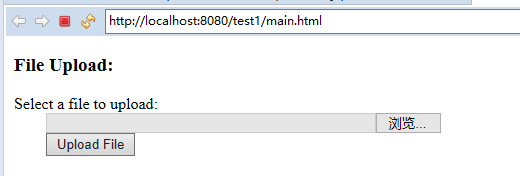
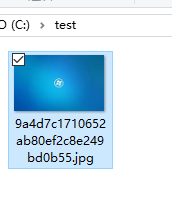
如果JSP script运行良好,文件应该上传到c:\apache-tomcat-5.5.29\webapps\data\directory 中。

测试工程:https://github.com/easonjim/5_java_example/tree/master/jspbasics/test11
JSP的文件上传的更多相关文章
- JSP多文件上传到服务器
问题描述: 作为一个Java开发Web方向的程序员,很重要的一个功能,就是上传文件功能是一定要掌握的,今天整理了一下代码. 1.JSP显示界面代码和动态添加上传文件个数. <%@ page la ...
- Android+jsp +html 文件上传案例 已测试 成功通过
我文件上传一直是广大读者一个问题 今天就把成功案例写下 javaweb 网页前段 <%@ page language="java" import="java.uti ...
- 基于jsp的文件上传和下载
参考: 一.JavaWeb学习总结(五十)--文件上传和下载 此文极好,不过有几点要注意: 1.直接按照作者的代码极有可能listfile.jsp文件中 <%@taglib prefix=&qu ...
- jsp简易文件上传(common.fileupload)
昨天开始重新架构我的V&View(维视),之前写文章使用的是一个kindediter的插件,挺好用的.最近不知道咋了,出现了些小问题.早在写V&View的时候就想用以下两种方法实现文章 ...
- jsp Servlet 文件上传
<%@ page language="java" contentType="text/html; charset=UTF-8" pageEncoding= ...
- jsp实现文件上传下载
文件上传: upload.jsp <form action="uploadServlet" method="post" enctype="mul ...
- 使用jsp实现文件上传的功能
首先是表单的jsp文件:upload.jsp <%@ page contentType="text/html;charset=UTF-8" language="ja ...
- jsp实现文件上传(二)用cos组件实现文件上传
jsp表单 <%@ page language="java" pageEncoding="utf-8"%> <html> <hea ...
- JSP入门 文件上传
commons-fileupload public void save(HttpServletRequest request,HttpServletResponse response) throws ...
随机推荐
- Apache Tomcat 之路(一 基本概念)
关于apache tomcat 基本概念(https://tomcat.apache.org/tomcat-7.0-doc/index.html) 1.tomcat 是servlet/jsp 容器,对 ...
- vue热重载
依据官网使用 webpack 的 Hot Module Replacement API,Vuex 支持在开发过程中热重载 mutation.module.action 和 getter.你也可以在 B ...
- leetcode_894. All Possible Full Binary Trees
https://leetcode.com/problems/all-possible-full-binary-trees/ 给定节点个数,求所有可能二叉树,该二叉树所有节点要么有0个子节点要么有两个子 ...
- HDU_1542_(树状数组)
Stars Time Limit: 2000/1000 MS (Java/Others) Memory Limit: 65536/32768 K (Java/Others)Total Submi ...
- linux 后台进程
1.进程放入后台 ctrl+z 进程放入后台 暂停执行 2.进程放入后台执行 bg % n 或者 bg n 进程放入后台执行 3.进程取出前台执行 fg % n 或者 fg n 进程取出前台执行 4. ...
- vue2.0学习——使用webstorm创建一个vue项目
https://blog.csdn.net/weixin_40877388/article/details/80911934
- Vue之x-template(1)
今天,我们来讲一个比较有趣的一个功能吧 先来看一段代码示例: <html> <head> <meta charset="utf-8"> < ...
- 【原】tcpdump命令
1.常用参数总结 tcpdump tcpdump -i (网卡) tcpdump -nn (数字的方式显示IP和端口.一个n是ip) tcpdump -c x (抓包数量,x为数字) tcpd ...
- wpf Command 携带当前窗口
Command="{Binding GoPayCommand}" CommandParameter="{Binding RelativeSource={RelativeS ...
- 2018湖南省第14届大学生计算机程序设计竞赛 C: 时间旅行
Description 假设 Bobo 位于时间轴(数轴)上 t0 点,他要使用时间机器回到区间 (0, h] 中. 当 Bobo 位于时间轴上 t 点,同时时间机器有 c 单位燃料时,他可以选择一个 ...