
webAssmebly实现js数组排序 使用custom elements和Shadow DOM自定义组件
直接上码了………………
.wat源码
(module

  (type $t0 (func (param i32 i32)))

  (type $t1 (func (result i32)))

  (type $t2 (func (param i32 i32 i32 i32)))

  (type $t3 (func))

  (import "env" "returnArr" (func $env.returnArr (type $t0)))

  (func $getArrayOffset (type $t1) (result i32)

    i32.const )

  (func $swap (type $t0) (param $p0 i32) (param $p1 i32)

    (local $l0 i32)

    get_local $p0

    i32.load

    set_local $l0

    get_local $p0

    get_local $p1

    i32.load

    i32.store

    get_local $p1

    get_local $l0

    i32.store)

  (func $mainSrot (type $t2) (param $p0 i32) (param $p1 i32) (param $p2 i32) (param $p3 i32)

    (local $l0 i32) (local $l1 i32) (local $l2 i32) (local $l3 i32) (local $l4 i32) (local $l5 i32) (local $l6 i32)

    block $B0

      get_local $p2

      get_local $p3

      i32.ge_s

      br_if $B0

      loop $L1

        get_local $p0

        get_local $p2

        tee_local $l0

        i32.const

        i32.shl

        i32.add

        tee_local $l1

        i32.load

        set_local $l4

        get_local $p0

        get_local $l0

        i32.const

        i32.add

        tee_local $l6

        i32.const

        i32.shl

        i32.add

        tee_local $l2

        i32.load

        set_local $l5

        block $B2

          block $B3

            get_local $l6

            get_local $p3

            i32.ge_s

            br_if $B3

            get_local $p3

            set_local $p2

            loop $L4

              get_local $p0

              get_local $p2

              i32.const

              i32.shl

              i32.add

              set_local $l3

              block $B5

                loop $L6

                  get_local $l5

                  get_local $l4

                  i32.le_s

                  br_if $B5

                  get_local $l2

                  get_local $l3

                  i32.load

                  i32.store

                  get_local $l3

                  get_local $l5

                  i32.store

                  get_local $l3

                  i32.const -

                  i32.add

                  set_local $l3

                  get_local $l1

                  i32.load

                  set_local $l4

                  get_local $l2

                  i32.load

                  set_local $l5

                  get_local $l6

                  get_local $p2

                  i32.const -

                  i32.add

                  tee_local $p2

                  i32.lt_s

                  br_if $L6

                  br $B2

                end

              end

              get_local $p0

              get_local $l6

              i32.const

              i32.add

              tee_local $l6

              i32.const

              i32.shl

              i32.add

              tee_local $l2

              i32.load

              set_local $l5

              get_local $l6

              get_local $p2

              i32.lt_s

              br_if $L4

              br $B2

            end

          end

          get_local $p3

          set_local $p2

        end

        get_local $l1

        get_local $p0

        get_local $l6

        get_local $l5

        get_local $l4

        i32.ge_s

        i32.sub

        tee_local $l3

        i32.const

        i32.shl

        i32.add

        tee_local $l5

        i32.load

        i32.store

        get_local $l5

        get_local $l4

        i32.store

        get_local $p0

        get_local $p1

        get_local $l0

        get_local $l3

        call $mainSrot

        get_local $p2

        get_local $p3

        i32.lt_s

        br_if $L1

      end

    end)

  (func $sort (type $t3)

    i32.const

    i32.const

    i32.const

    i32.const

    call $mainSrot

    i32.const

    i32.const

    call $env.returnArr)

  (table $T0  anyfunc)

  (memory $memory )

  (export "memory" (memory ))

  (export "getArrayOffset" (func $getArrayOffset))

  (export "swap" (func $swap))

  (export "mainSrot" (func $mainSrot))

  (export "sort" (func $sort)))
c源码:
#define N 20

//外部导入javascript函数

extern void returnArr(int * offset, int length);

int array[N];

//定义数组并且取到数组首地址

int * getArrayOffset(){

  return array;

}

//交换2个数的值

void swap(int *a , int *b){

  int temp;

  temp = *a;

  *a = *b;

  *b = temp;

}

// 主排序方法

void mainSrot(int array[], int maxlen, int begin, int end){

  int i,j;

  if(begin < end){

    i = begin+;

    j = end;

    while (i < j){

      if(array[i] > array[begin]){

          swap(&array[i],&array[j]);

          j--;

      }else{

        i++;

      }

    }

    if(array[i] >= array[begin]){

      i--;

    }

    swap(&array[begin],&array[i]);

    mainSrot(array,maxlen,begin,i);

    mainSrot(array,maxlen,j,end);

  }

}

//JavaScript调用方法

void sort(){

  mainSrot(array,N,,N-);

  //调用JavaScript中的函数

  returnArr(array,N);

}
html和js源码:
<!DOCTYPE html>

<html lang="en">

<head>

    <meta charset="UTF-8">

    <meta name="viewport" content="width=device-width, initial-scale=1.0">

    <meta http-equiv="X-UA-Compatible" content="ie=edge">

    <title>Document</title>

    <style>

    </style>

</head>

<body>

    <div class="box">

        <label>请输入排序前的数组:</label>

        <input type="text" class="beforeArr">

        <button class="btn">点击排序</button>

    </div>

    <script>

        //继承自HTMLElement

        class sortArray extends HTMLElement{

            constructor(){

                super();

                let textBore = document.querySelector(".beforeArr");

                //事件添加

                document.querySelector('.btn').onclick = ()=>{

                    let beforeArr = this.strArr(textBore.value);

                    //调用webassembly

                    arrSort(beforeArr);

                }

                //调用影子dom 添加自定义html模板

                let shadow = this.attachShadow({mode:'open'});

                let vnode = this.nodeTowfragment('.box');

                shadow.appendChild(vnode);

            }

            //把dom放入内存中

            nodeTowfragment(str){

                let el = document.querySelector(str);

                let fragment = document.createDocumentFragment();

                let firstChild;

                while(firstChild = el.firstChild){

                    fragment.appendChild(firstChild);

                }

                return fragment;

            }

            //便利push确保是数字

            strArr(el){
          let arr = [];

                for(let i = ; i < el.length; i++){

                    arr.push(parseInt(el[i]));

                }

                return arr;

            }

        }

        //实例化

        customElements.define('sort-array',sortArray);

    </script>

    <sort-array></sort-array>

    <script>

        function arrSort(arr){

            /**

                调用浏览器网络下载访问

                编译后的wasm文件

            */

            fetch('program.wasm')

            //转换为arrayBffer也就是二进制数据

            .then(response => response.arrayBuffer())

            .then((bytes) => {

                let memory;

                //通过浏览器的WebAssembly接口编译初始化wasm模块

                WebAssembly.compile(bytes)

                .then(module => WebAssembly.instantiate(module,{

                    env:{

                        /**

                            JavaScript中实现c中调用的函数

                            能取到排序后的数组

                        */

                        returnArr(offset,len){

                            let arrBuffer = new Uint32Array(memory.buffer,offset,len);

                            //转换为数组

                            let arr = Array.from(arrBuffer);

                            alert('排序完成:'+arr) ;

                        }

                    }

                }))

                .then(instance => {

                    //取出wasm中导出的c函数

                    let exports = instance.exports;

                    //获得wasm模块中的实例堆内存对象

                     memory = exports.memory;

                    /**

                        调用从JavaScript环境向指定的c数组地址填充数据的方法并且传入参数

                        @param memory //要操作的内存

                        @param beforeArr //要操作的数组

                        @param arrOffset //定义c中数组的长度与初始化数组,并且返回该数组的首地址

                    */

                    importArrayToBuffer(memory,arr,exports.getArrayOffset());

                    /**

                        调用排序方法

                        @param len //数组的长度 必须与wasm模块导出的getArrayOffset传入的值一样

                    */

                    exports.sort();

                })

            })

        }

        /**

            该方法用于从JavaScript环境向指定的c数组地址填充数据

        */

        function importArrayToBuffer(memory,array,offset){

            const importBuffer = new Uint32Array(memory.buffer,offset,array.length);

            for(let n = ; n < array.length; n++){

                importBuffer[n] = array[n];

            }

        }

    </script>

</body>

</html>
输入:

输出:
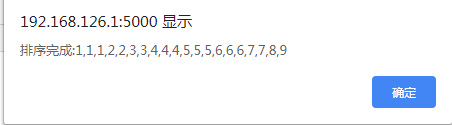
结束……
webAssmebly实现js数组排序 使用custom elements和Shadow DOM自定义组件的更多相关文章
- 使用custom elements和Shadow DOM自定义标签
具体的api我就不写 官网上面多 如果不知道这个的话也可以搜索一下 目前感觉这个还是相当好用的直接上码. <!DOCTYPE html> <html lang="en&q ...
- Web Components之Custom Elements
什么是Web Component? Web Components 包含了多种不同的技术.你可以把Web Components当做是用一系列的Web技术创建的.可重用的用户界面组件的统称.Web Com ...
- [HTML5] Render Hello World Text with Custom Elements
Custom elements are fun technology. In this video, you will learn how to set one up and running in l ...
- JS数组排序技巧汇总(冒泡、sort、快速、希尔等排序)
本文实例总结了JS数组排序技巧.分享给大家供大家参考,具体如下: 1.冒泡排序 var temp = 0; for (var i = 0; i < array.length; i++) { fo ...
- window 属性:自定义元素(custom elements)
概述 Web Components 标准非常重要的一个特性是,它使开发者能够将HTML页面的功能封装为 custom elements(自定义标签),而往常,开发者不得不写一大堆冗长.深层嵌套的标 ...
- js数组排序,支持正反排序以及多维度排序
工作中遇到js数组排序问题,数组中存储的都是对象,于是就百度了下,利用别人的代码进行修改,最终完成可以倒序.反序,可以进行多维度排序的功能源码如下: /** * js数组排序 支持数字和字符串 * @ ...
- js数组排序 reverse()和sort()方法的使用
WEB前端|js数组排序reverse()和sort()方法的使用,数组中已经存在两个可以直接用来重排序的方法:reverse()和sort(). reverse()方法会对反转数组项的顺序. var ...
- 自定义元素(custom elements)
记录下自定义html自定义元素的相关心得: 浏览器将自定义元素保留在 DOM 之中,但不会任何语义.除此之外,自定义元素与标准元素都一致 事实上,浏览器提供了一个HTMLUnknownElement, ...
- HTML Custom Elements & valid name
HTML Custom Elements & valid name valid custom element name https://html.spec.whatwg.org/multipa ...
随机推荐
- C# interface 的特性 无法被implement class继承
最近做interface添加特性后,implement class 无法继承. 微软要求class是实现Interface而不是继承,所以我们必须手动添加特性,而不能自动继承. 对于abstract ...
- [Xcode 实际操作]九、实用进阶-(10)定位设备的使用
目录:[Swift]Xcode实际操作 本文将演示定位设备的使用. 在项目导航区,打开视图控制器的代码文件[ViewController.swift] import UIKit //导入需要用到的定位 ...
- 使用Hexo 搭建自己的博客
使用Hexo 搭建自己的博客 最近一直都想着如何去搭建属于自己的博客,有空的时候就写写文章什么的. 本人对该博客系统的要求是: 博文的编写要采用现在流行的MarkDown来进行编写. 本人还不想去注册 ...
- linux学习-Linux系统启动过程
linux系统启动过程 Linux系统的启动过程并不是大家想象中的那么复杂,其过程可以分为5个阶段: 内核的引导. 运行init. 系统初始化. 建立终端 . 用户登录系统. 内核引导 电源开机后,首 ...
- vue.js 2.0 学习笔记
指令带有前缀 v-,表示是由 Vue 提供的专用属性. v-on 指令 来增加事件监听器,触发事件后会调用 Vue 实例中 methods 下定义的方法 v-model 指令,使得表单输入和应用程序状 ...
- CF1093D Beautiful Graph
思路: 题目倒是没啥好说的,就是注意memset的效率问题.如果循环多次调用memset去初始化一个比较大的数组,那就会很费时间.就是因为这个被hack了.:( 实现: #include <bi ...
- git处理时的问题
1. 在node.js开发的时候常常会遇到从别人的远程仓库中clone时出现文件名过长的错误, 或则是在本地npm下载之后的文件进行上传到自己的远程仓库的时候会出现 File too long的情况, ...
- MySQL常用命令和语句
1.常用SQL语句 1)常用函数/*type可取值为:MICROSECONDSECONDMINUTEHOURDAYWEEKMONTHQUARTERYEARSECOND_MICROSECONDMINUT ...
- POJ 1947 Rebuilding Roads (树形DP)
题意:给一棵树,在树中删除一些边,使得有一个连通块刚好为p个节点,问最少需要删除多少条边? 思路: 因为任一条边都可能需要被删除,独立出来的具有p个节点的连通块可能在任意一处地方.先从根开始DFS,然 ...
- bunzip2命令
bunzip2——解压缩.bz2格式文件 命令所在路径:/usr/bin/bunzip2 示例1: # bunzip2 yum.log.bz2 解压当前目录下的yum.log.bz2为yum.log, ...