
使用 StoryBoard 制作一个能够删除cell的TableView
本篇博客方便自己检索使用。资源链接
下面是制作效果图,点击删除按钮,就能将该cell删除:
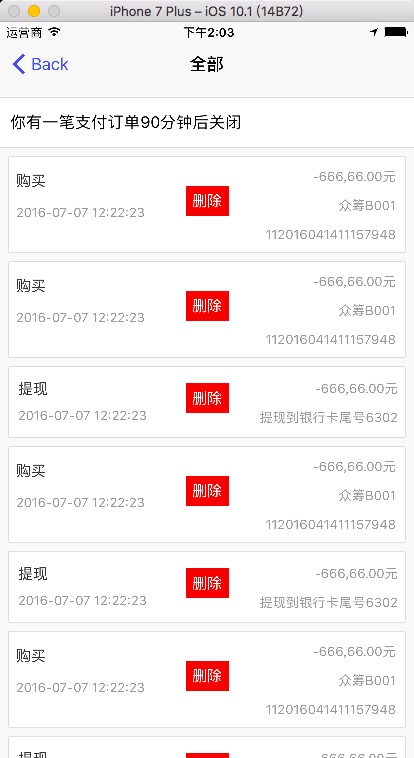
下面是主要的代码:
#define KSUPER_TAG 20000

#define KDEFAU_TAG 10000

#import "WholeViewController.h"

#import "HJ_CELL_3.h"

#import "HJ_CELL_4.h"

#import "NULL_CELL.h"

#import "HRAdView.h"

#import "FrameMacro.h"

#import "ColorMacro.h"

#import "FontMacro.h"

@interface WholeViewController ()

{

    NSMutableArray *_dataSource;

    UIView         * _tabHead_View ;

}

@end

@implementation WholeViewController

- (void)viewDidLoad {

    [super viewDidLoad];

    [self setTitle:@"全部"];

    self.tableView.backgroundColor = K_SET_COLOR_VALUE(K_ROOT_BGC);

    // 假设有表头数据

    [self createTableHeader];

    // 设置无选择线

    [self.tableView setSeparatorStyle:UITableViewCellSeparatorStyleNone];

    self.tableView.showsHorizontalScrollIndicator = NO;

    self.tableView.showsVerticalScrollIndicator = NO;

    // 初始化数据源

    _dataSource = [NSMutableArray arrayWithObjects:@"",@"",@"",@"",@"",@"",@"",@"",@"",@"",@"",@"",@"",@"",@"",@"",@"",@"", nil];

}

// 创建表头

- (void)createTableHeader{

    if (!_tabHead_View) {

        // 表头部分的View

        _tabHead_View = [[UIView alloc] initWithFrame:CGRectMake(,, K_WIDTH, )];

        _tabHead_View.backgroundColor = K_SET_COLOR_VALUE(K_ROOT_BGC);

        // 初始化广告控件

        HRAdView *hdview = [[HRAdView alloc] initWithTitles:@[@"你有一笔支付订单30分钟后关闭",@"你有一笔支付订单60分钟后关闭",@"你有一笔支付订单90分钟后关闭"]];

        hdview.time = ;

        [hdview beginScroll];

        hdview.backgroundColor = [UIColor whiteColor];

        hdview.isHaveTouchEvent = YES;

        hdview.clickAdBlock = ^(NSUInteger index){

            NSLog(@"下标是 %ld",(unsigned long)index);

        };

        hdview.frame = CGRectMake(, , K_WIDTH, );

        [_tabHead_View addSubview:hdview];

        // 分割线 1

        UIView *line_1 = [[UIView alloc] initWithFrame:CGRectMake(, , K_WIDTH, )];

        [line_1 setBackgroundColor:K_SET_COLOR_VALUE(@"#dbdbdb")];

        [_tabHead_View addSubview:line_1];

        // 分割线 2

        UIView *line_2 = [[UIView alloc] initWithFrame:CGRectMake(, , K_WIDTH, )];

        [line_2 setBackgroundColor:K_SET_COLOR_VALUE(@"#dbdbdb")];

        [_tabHead_View addSubview:line_2];

    }

    self.tableView.tableHeaderView = _tabHead_View;

}

- (void)didReceiveMemoryWarning {

    [super didReceiveMemoryWarning];

    if (self.isViewLoaded&&self.view.window) {

        self.view = nil;

    }

}

#pragma mark - Table view data source

- (NSInteger)numberOfSectionsInTableView:(UITableView *)tableView {

    return ;

}

- (NSInteger)tableView:(UITableView *)tableView numberOfRowsInSection:(NSInteger)section {

    return [_dataSource count];

}

- (UITableViewCell *)tableView:(UITableView *)tableView cellForRowAtIndexPath:(NSIndexPath *)indexPath {

    UITableViewCell *cell = nil;

    NSString *mask = _dataSource[indexPath.row];

    if ([mask isEqualToString:@""]) {

        cell = (HJ_CELL_3*)[tableView dequeueReusableCellWithIdentifier:@"HJ_CELL_3" forIndexPath:indexPath];

        if (nil == cell) {

            cell = (HJ_CELL_3*)[[[NSBundle mainBundle] loadNibNamed:@"HJ_CELL_3" owner:self options:nil] lastObject];

        }

        ((HJ_CELL_3*)cell).block = ^(NSInteger statusNum){

            if (  == statusNum) {

                // 执行删除任务

                [self tableView:tableView commitEditingStyle:UITableViewCellEditingStyleDelete forRowAtIndexPath:indexPath];

            }

        };

    }else

    if ([mask isEqualToString:@""]) {

        cell = (HJ_CELL_4*)[tableView dequeueReusableCellWithIdentifier:@"HJ_CELL_4" forIndexPath:indexPath];

        if (nil == cell) {

            cell = (HJ_CELL_4*)[[[NSBundle mainBundle] loadNibNamed:@"HJ_CELL_4" owner:self options:nil] lastObject];

        }

        ((HJ_CELL_4*)cell).block = ^(NSInteger statusNum){

            if (  == statusNum) {

                // 执行删除任务

                [self tableView:tableView commitEditingStyle:UITableViewCellEditingStyleDelete forRowAtIndexPath:indexPath];

            }

        };

    }else {

        cell = (NULL_CELL*)[tableView dequeueReusableCellWithIdentifier:@"NULL_CELL" forIndexPath:indexPath];

        if (nil == cell) {

            cell = (NULL_CELL*)[[[NSBundle mainBundle] loadNibNamed:@"NULL_CELL" owner:self options:nil] lastObject];

        }

    }

    return cell;

}

-(CGFloat)tableView:(UITableView *)tableView heightForRowAtIndexPath:(NSIndexPath *)indexPath{

    NSString *mask = _dataSource[indexPath.row];

    if ([mask isEqualToString:@""]) {

        return ;

    }else

    if ([mask isEqualToString:@""]) {

        return ;

    }else {

        return ;

    }

    return ;

}

// 删除某些行的方法

- (void)tableView:(UITableView *)tableView commitEditingStyle:(UITableViewCellEditingStyle)editingStyle forRowAtIndexPath:(NSIndexPath *)indexPath {

    if (editingStyle == UITableViewCellEditingStyleDelete) {

        // Delete the row from the data source

        [_dataSource removeObjectAtIndex:indexPath.row];

        [tableView deleteRowsAtIndexPaths:@[indexPath] withRowAnimation:UITableViewRowAnimationFade];

        [self.tableView reloadData];

    } else if (editingStyle == UITableViewCellEditingStyleInsert) {

        // Create a new instance of the appropriate class, insert it into the array, and add a new row to the table view

    }

}

/*

// Override to support rearranging the table view.

- (void)tableView:(UITableView *)tableView moveRowAtIndexPath:(NSIndexPath *)fromIndexPath toIndexPath:(NSIndexPath *)toIndexPath {

}

*/

/*

// Override to support conditional rearranging of the table view.

- (BOOL)tableView:(UITableView *)tableView canMoveRowAtIndexPath:(NSIndexPath *)indexPath {

    // Return NO if you do not want the item to be re-orderable.

    return YES;

}

*/

/*

#pragma mark - Navigation

// In a storyboard-based application, you will often want to do a little preparation before navigation

- (void)prepareForSegue:(UIStoryboardSegue *)segue sender:(id)sender {

    // Get the new view controller using [segue destinationViewController].

    // Pass the selected object to the new view controller.

}

*/

@end
使用 StoryBoard 制作一个能够删除cell的TableView的更多相关文章
- 制作一个可以滑动操作的 Table View Cell
本文转载至 https://github.com/nixzhu/dev-blog Apple 通过 iOS 7 的邮件(Mail)应用介绍了一种新的用户界面方案——向左滑动以显示一个有着多个操作的菜单 ...
- 使用 Swift 制作一个新闻通知中心插件(1)
input[type="date"].form-control,.input-group-sm>input[type="date"].input-grou ...
- iOS自定义控件教程:制作一个可重用的旋钮
当你的APP需要一些新功能时,自定义UI控件会十分有用,尤其是这些自定义控件可以在其他APP里面很好的重用.Colin Eberhart写过一篇很棒的介绍自定义UI控件的教程.这个教程涉及的是一个继承 ...
- Swift 制作一个新闻通知中心插件1
使用 Swift 制作一个新闻通知中心插件(1) 随着 iOS 8 的发布,苹果为开发者们开放了很多新的 API,而在这些开放的接口中 通知中心插件 无疑是最显眼的一个.通知中心就不用过多介绍了,相信 ...
- ios学习-制作一个浏览图片的Demo
一.项目要求:制作一个浏览图片的Demo,要求包含夜间模式,以及改变图片大小,能够显示不同的图片描述 二.开发步骤: 1.在storyboard上添加一个空白的View,然后添加”设置“按钮,添加im ...
- iOS学习——制作一个小型加法计算器
一.项目要求:制作一个加法计算器.在第1个和第2个文本框中输入两个整数,然后点击“计算”按钮,可将计算结果显示在第3个文本框中. 二.开发步骤: 1.搭建UI界面 2.监听按钮的点击事件 3.获取文本 ...
- 使用sqlite3 有关tableview删除cell的问题
在root页面,想要删除tableviewcell,是有一定顺序的 首先要删除 数据库sqlite3 中的数据,然后删除数组中的数据,最后删除cell 一般我们知道,删除cell要在删除数组数据之后, ...
- ASP.NET MVC + 百度富文本编辑器 + EasyUi + EntityFrameWork 制作一个添加新闻功能
本文将交大伙怎么集成ASP.NET MVC + 百度富文本编辑器 + EasyUi + EntityFrameWork来制作一个新闻系统 先上截图: 添加页面如下: 下面来看代码部分 列表页如下: @ ...
- 用JS制作一个信息管理平台完整版
前 言 JRedu 在之前的文章中,介绍了如何用JS制作一个实用的信息管理平台. 但是那样的平台功能过于简陋了,我们今天来继续完善一下. 首先我们回顾一下之前的内容. 1.JSON的基础知识 ...
随机推荐
- c#高级编程笔记----委托
因为定义委托基本上是定义一个新类,所以可以在定义类的任何相同地方定义委托,也就是说,可以在另一个类的内部定义,也可以在任何类的外部定义,还可以在名称空间中把委托定义为顶层对象.根据定义的可见性,和委托 ...
- Java基础:抽象类和接口
转载请注明出处:jiq•钦's technical Blog 一.引言 基于面向对象五大原则中的以下两个原则,我们应该多考虑使用接口和抽象类: 里氏替换原则:子类能够通过实现父类接口来替换父类,所以父 ...
- JavaScript的string方法(demo)
<!DOCTYPE html> <html> <head> <meta charset="UTF-8"> <title> ...
- C# 知识点随手学习网站推荐
http://www.studyofnet.com/news/list-8881.2-1-1.html
- 数据库如何让自增id重置
sql语句:truncate tablename; 会清空表的所有记录,并且使自增的id重置. 另外,navicat的截断表,就是这个功能. 它的清空表只会清空数据,不能使自增的id重置.
- UVA 10042 Smith Numbers(数论)
Smith Numbers Background While skimming his phone directory in 1982, Albert Wilansky, a mathematicia ...
- CCNET自动构建之路
人永远追求效率(想偷懒),不想手动编译项目.发布站点于是产生了自动构建技术,.NET领域中CCNET是个不错的选择. 一路问题不少,记录一下. 准备环境 服务器上需要有iis.vs(与开发环境的版本一 ...
- 04 json,xml混合封装通信
<?php class Response_json_xml{ public static function show($code,$message="",$data=arra ...
- 虚拟化(四):vsphere高可用功能前提-共享存储搭建(使用微软提供的iscsi software target,也可以使用免费开源的openfiler)
虚拟化(一):虚拟化及vmware产品介绍 虚拟化(二):虚拟化及vmware workstation产品使用 虚拟化(三):vsphere套件的安装注意及使用 虚拟化(四):vsphere高可用功能 ...
- Delphi 7以来的Delphi 2009测试版新语法特性
我晕,Delphi 7 以后增加了这么多有用的语法,我都不知道.真是越学越觉得自己浅薄,自己所作的Delphi项目所用的知识还不够Delphi知识储备体系的十分之一,更别说Delphi还在继续发展. ...