
Gulp-webpack简单应用
1.配置环境: 在 webstorm 的控制台中 (1) cnpm install --save-dev gulp (2) cnpm install --save-dev gulp-webpack
(3)cnpm install babel-loader babel-core babel-preset-es2017 --save-dev
2.目录结构:( build文件夹 是在配置好所有文件后,在webstorm的控制台输入 gulp 后自动生成的)
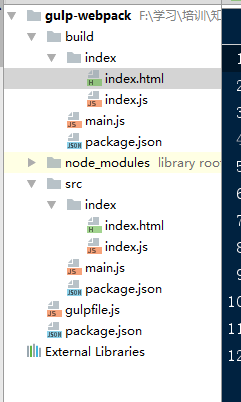
3.gulpfile文件配置:
 /**

  * Created by Administrator on 2016/11/16.

  */

 const gulp = require("gulp");

 const webpack = require("gulp-webpack");

 gulp.task("copy_html_files", function () {

     gulp.src("src/**/*.html").pipe(gulp.dest("build"));

 });

 gulp.task("copy_package_json", function () {

     gulp.src("src/package.json").pipe(gulp.dest("build"));

 });

 gulp.task("compile_index", function () {

     gulp.src("src/index/index.js").pipe(webpack({

         output: {

             filename: "index/index.js"

         },

         module: {

             loaders: [

                 {

                     test: /\.js$/,

                     loader: 'babel', // 'babel-loader' is also a valid name to reference

                     query: {

                         presets: ['es2017']

                     }

                 }

             ],

         },

         externals: {

             electron: "require('electron')",

             path: "require('path')",

             fs: "require('fs')",

             url: "require('url')"

         }

     })).pipe(gulp.dest("build"));

 });

 gulp.task("copy_main_js", function () {

     gulp.src("src/main.js").pipe(gulp.dest("build"));

 });

 gulp.task("default", ["copy_package_json", "copy_html_files", "copy_main_js", "compile_index"]);
4.根目录下的package.json配置好后:
 {

   "name": "application-name",

   "version": "0.0.1",

   "devDependencies": {

     "babel-core": "^6.18.2",

     "babel-loader": "^6.2.7",

     "babel-preset-es2017": "^6.16.0",

     "gulp": "^3.9.1",

     "gulp-webpack": "^1.5.0"

   }

 }
5.src 目录下的package.json是为了适应 electeon 的配置:
 {

   "scripts": {

     "start":"electron ."

   },

   "name": "application-name",

   "version": "0.0.1",

   "main": "main.js"

 }
6.src目录下的 main.js 文件也是为了适应 electron 的配置:
 /**

  * Created by Administrator on 2016/11/16.

  */

 const {app, BrowserWindow} = require('electron')

 const path = require('path');

 const url = require('url');

 // Keep a global reference of the window object, if you don't, the window will

 // be closed automatically when the JavaScript object is garbage collected.

 let win;

 function createWindow() {

     // Create the browser window.

     win = new BrowserWindow({width: 800, height: 600})

     var filepath = path.join(__dirname, 'index.html');

     console.log(filepath);

     // and load the index.html of the app.

     //此处需要手动配置   index.html 的路径

     win.loadURL(url.format({

         pathname: path.join(__dirname, "index", 'index.html'),

         protocol: 'file:',

         slashes: true

     }));

     // Open the DevTools.

     win.webContents.openDevTools();

     // Emitted when the window is closed.

     win.on('closed', () => {

         // Dereference the window object, usually you would store windows

         // in an array if your app supports multi windows, this is the time

         // when you should delete the corresponding element.

         win = null

     })

 }

 // This method will be called when Electron has finished

 // initialization and is ready to create browser windows.

 // Some APIs can only be used after this event occurs.

 app.on('ready', createWindow);

 // Quit when all windows are closed.

 app.on('window-all-closed', () => {

     // On macOS it is common for applications and their menu bar

     // to stay active until the user quits explicitly with Cmd + Q

     if (process.platform !== 'darwin') {

     app.quit()

 }

 });

 app.on('activate', () => {

     // On macOS it's common to re-create a window in the app when the

     // dock icon is clicked and there are no other windows open.

     if (win === null) {

     createWindow()

 }

 });
7.src目录中的index中的 index.html 引入的是 index.js文件
8.配置时,将工程配置为 npm :

Gulp-webpack简单应用的更多相关文章
- webpack gulp grunt 简单介绍
本文主要是讲下webpack的相关知识点,理论比较多,因为webpack的功能非常强大,说到的也基本都是经常用到的. 这三个工具都属于前端自动化的工具,都是第三方的,并且国内很多大型团队也都有自己成熟 ...
- 做一个gulp+webpack+vue的单页应用开发架子
1.目标 最近项目上的事情不多,根据我自己的开发习惯,决定开发一些简单的开发架子,方便以后事情多的时候直接套用.本文讲的一个gulp+webpack+vue的单页应用架子,想要达到的目的: 可以通过命 ...
- gulp+webpack+vue
gulp+webpack+vue 章节目录 1.目标 2.实现 2.1合并库文件 2.2组织业务代码 2.3打包开发代码 2.4使用webpack-dev-server和热替换插件HotModuleR ...
- gulp & webpack整合
为什么需要前端工程化? 前端工程化的意义在于让前端这个行业由野蛮时代进化为正规军时代,近年来很多相关的工具和概念诞生.好奇心日报在进行前端工程化的过程中,主要的挑战在于解决如下问题:✦ 如何管理多个项 ...
- 用gulp+webpack构建多页应用——记一次Node多页应用的构建过程
通过参考网上的一些构建方法,当然也在开发过程中进行了一番实践,最终搭建了一套适用于当前多页应用的构建方案,当然该方案还处于draft版本,会在后续的演进过程中不断的优化. 个人觉得该方案的演进过程相对 ...
- gulp + webpack + sass 学习
笔记: new webpack.optimize.CommonsChunkPlugin 核心作用是抽离公共代码,chunks:['index.js','main.js'] 另一个作用就是单独生成一个j ...
- Gulp.js - 简单、直观的自动化项目构建工具
Gulp.js 是一个简单.直观的构建系统.崇尚代码优于配置,使复杂的任务更好管理.通过结合 NodeJS 的数据流的能力,你能够快速构建.通过简单的 API 接口,只需几步就能搭建起自己的自动化项目 ...
- grunt,gulp,webpack前端打包工具的特性
1.http://www.cnblogs.com/lovesong/p/6413546.html (gulp与webpack的区别) 2.http://blog.csdn.net/qq_3231263 ...
- nodejs+gulp+webpack基础知识
nodejs+gulp+webpack基础知识 2019年08月22日 11:49:40 天府云创 阅读数 22 版权声明:本文为博主原创文章,遵循CC 4.0 BY-SA版权协议,转载请附上原文 ...
- gulp + webpack 构建多页面前端项目
修改增加了demo地址 gulp-webpack-demo 之前在使用gulp和webpack对项目进行构建的时候遇到了一些问题,最终算是搭建了一套比较完整的解决方案,接下来这篇文章以一个实际项目为例 ...
随机推荐
- react 监听 移动端 手机键盘 enter 事件
处理方法: (1)html书写 form标签中去掉action参数,定义onSubmit方法,如下所示: /** * 搜索框 组件 */ import React,{PureComponent} fr ...
- match excel test search replace 用法
1 test:测试string是否包含有匹配结果,包含返回true,不包含返回false. 2 reg.test(str) 3 <script type="text/javascrip ...
- 使用 Navicat 8.0 管理mysql数据库(导出导入数据)
http://dxcns.blog.51cto.com/1426423/367105 使用Navicat For MySql 将mysql中的数据导出,包括数据库表创建脚本和数据 (1)数据的导出:右 ...
- kubernetes故障现场一之Orphaned pod
系列目录 问题描述:周五写字楼整体停电,周一再来的时候发现很多pod的状态都是Terminating,经排查是因为测试环境kubernetes集群中的有些节点是PC机,停电后需要手动开机才能起来.起来 ...
- nanoporetech/nanonet
nanoporetech/nanonet CodeIssues 7Pull requests 0Projects 0Wiki Insights First generation RNN baseca ...
- LeetCode215:Kth Largest Element in an Array
Find the kth largest element in an unsorted array. Note that it is the kth largest element in the so ...
- commons.cli.jar 作用
对命令行进行处理的jar包.处理的步骤主要包括定义.分析和询问.(There are three stages to command line processing. They are the def ...
- Asp.net mvc4 快速入门之构建表单
1.asp.net mvc4 Index.cshtml页面上构建表单form的方式 @{ ViewBag.Title = "Index"; Layout = "~/Vi ...
- BZOJ3627: [JLOI2014]路径规划
BZOJ3627: [JLOI2014]路径规划 Description 相信大家都用过地图上的路径规划功能,只要输入起点终点就能找出一条最优路线.现在告诉你一张地图的信息,请你找出最优路径(即最短路 ...
- cgic 中文文档
CGIC英文文档地址:https://boutell.com/cgic/ cgic是用c写cgi程序的一个很小的库,所以英文文档也很少,为了便于日后复习翻看,心血来潮,翻译了一遍. 1. 什么是cgi ...